1. ആമുഖം
The RENAISSER Raphael 520C is a high-precision stylus pen designed for Microsoft Surface devices and other compatible touchscreens. It offers an exceptional writing and drawing experience with advanced features like 4096 levels of pressure sensitivity, tilt support, and palm rejection. Its durable aluminum body and efficient USB-C charging make it an ideal tool for professionals and creatives alike.

This manual provides detailed instructions to help you get the most out of your Raphael 520C stylus, from initial setup to advanced usage and troubleshooting.
2. പാക്കേജ് ഉള്ളടക്കം
Upon opening your RENAISSER Raphael 520C package, please ensure all components are present:
- RENAISSER Raphael 520C Stylus Pen (1)
- Replacement Stylus Tips (2) - Includes HB-type and 2H-type for varied writing feel.
- ഉപയോക്തൃ മാനുവൽ (ഈ പ്രമാണം)

3. ഉൽപ്പന്ന സവിശേഷതകളും ഘടകങ്ങളും
The Raphael 520C stylus is engineered for optimal performance and user comfort. Key features include:
- USB-C ചാർജിംഗ്: വേഗതയേറിയതും സൗകര്യപ്രദവുമായ ചാർജിംഗ്.
- 4096 Pressure Sensitivity: Provides precise control for drawing and writing.
- ടിൽറ്റ് സെൻസിറ്റിവിറ്റി: Allows for shading effects, similar to a traditional pencil.
- ഈന്തപ്പന നിരസിക്കൽ: Prevents unintended marks when resting your hand on the screen.
- കാന്തിക അറ്റാച്ച്മെൻ്റ്: Securely attaches to compatible Surface devices.
- എർഗണോമിക് ഡിസൈൻ: Lightweight (14 grams) and streamlined for comfortable extended use.
- മോടിയുള്ള മെറ്റീരിയൽ: Constructed from premium aluminum alloy.
The stylus incorporates MPP 2.0 Technology, offering significant improvements over older stylus designs:

4. സജ്ജീകരണവും ചാർജിംഗും
4.1 പ്രാരംഭ ചാർജിംഗ്
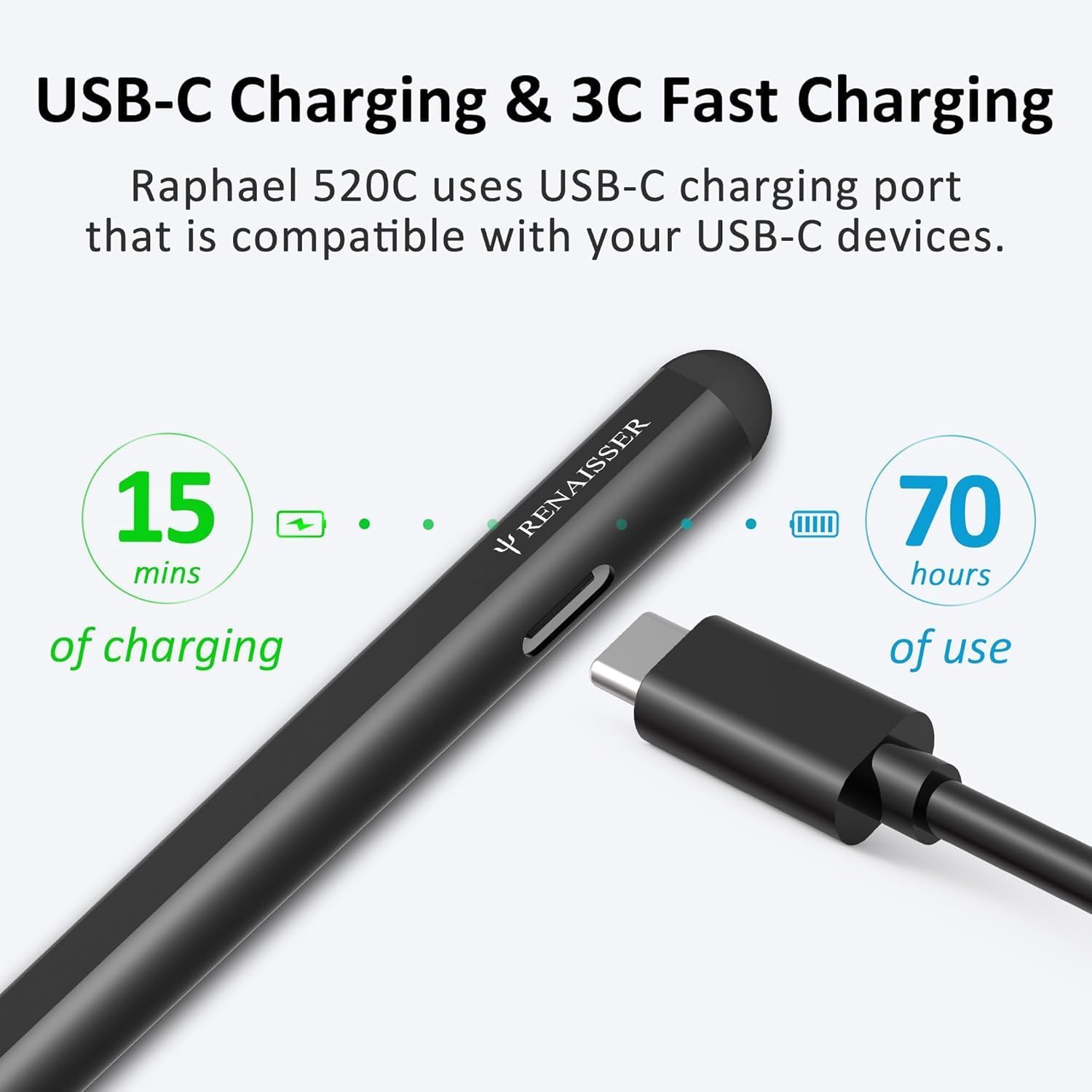
Before first use, it is recommended to fully charge your Raphael 520C stylus. The stylus features a USB-C charging port for quick and efficient power delivery.
- Connect the USB-C cable to the charging port on the side of the stylus.
- Connect the other end of the cable to a compatible USB-C power adapter or port.
- A 20-minute charge provides approximately 50 hours of use. A full 1-hour charge can last for over 100 hours.

The design ensures the charging port remains accessible even when magnetically attached to your Surface device.

4.2 ജോടിയാക്കലും കണക്ഷനും
The Raphael 520C stylus does not require Bluetooth pairing. Simply turn on the pen, and it will automatically connect to compatible devices within range.
- Press the power button on the stylus to turn it on.
- The stylus is ready for use when the indicator light is active.
5. പ്രവർത്തന നിർദ്ദേശങ്ങൾ
5.1 അടിസ്ഥാന ഉപയോഗം
Use the Raphael 520C stylus just like a traditional pen on your compatible touchscreen device. The pen's tip interacts directly with the screen for precise input.
5.2 Pressure and Tilt Sensitivity
The stylus supports 4096 levels of pressure sensitivity, allowing for varying line thickness and opacity based on how hard you press. Tilt sensitivity enables shading effects by tilting the stylus, similar to using a pencil. Compatibility with tilt sensitivity may vary depending on the application and specific pen brushes used.
5.3 കൈപ്പത്തി നിരസിക്കൽ
With palm rejection, you can comfortably rest your hand on the screen while writing or drawing without causing unintended marks or interference.
5.4 ബട്ടൺ പ്രവർത്തനങ്ങൾ
The Raphael 520C features two functional buttons:
- Right-click Button: Typically located near the tip, this button functions as a right-click, opening context menus or performing specific actions within applications.
- മായ്ക്കുക ബട്ടൺ: Located above the right-click button, this button activates the erase function in drawing or note-taking applications.
5.5 കാന്തിക അറ്റാച്ച്മെന്റ്
The Raphael 520C is equipped with built-in magnets, allowing it to securely attach to the left side of compatible Surface Pro, Go, and Book devices. This provides convenient storage and prevents loss.

6 അനുയോജ്യത
The RENAISSER Raphael 520C Stylus Pen is compatible with a wide range of Microsoft Surface devices and other select touchscreen computers. Please refer to the list below for confirmed compatibility:
- Surface Pro 11/10/9/8/7+/7/6/5/4
- Surface Duo/Duo 2
- ഉപരിതല പ്രോ എക്സ്
- Surface Go/Go 2/Go 3
- Surface Book/Book 2/Book 3
- Surface Studio 1st Gen, Surface Studio 2, Surface Studio 2+
- Surface Laptop 1/Laptop 2/Laptop 3/Laptop 4/Laptop 5/Laptop 6
- Surface Laptop Studio
- Kobo Libra Colour, Kobo Sage, Kobo Elipsa, Kobo Elipsa 2E
കുറിപ്പ്: The Raphael 520C is അല്ല compatible with Surface Laptop Go, Surface Laptop Go 2, or other touchscreen computers not explicitly listed above.
7. പരിപാലനം
7.1 ചാർജിംഗ് മികച്ച രീതികൾ
- Charge the stylus using a standard USB-C cable and a compatible power source.
- Avoid overcharging by disconnecting the stylus once fully charged.
- If the stylus will not be used for an extended period, charge it periodically to maintain battery health. The smart power management feature will automatically turn off the pen after 10 minutes of non-use to conserve battery.
7.2 പേന മാറ്റിസ്ഥാപിക്കുന്നതിനുള്ള നുറുങ്ങുകൾ
The Raphael 520C comes with original quality HB-type and 2H-type pen tips, providing different writing sensations. Over time, pen tips may wear down and require replacement. To replace a tip:
- Gently pull the old tip straight out from the stylus.
- Insert a new tip firmly into the stylus until it clicks into place.
7.3 വൃത്തിയാക്കൽ
To clean your stylus, wipe it gently with a soft, dry, lint-free cloth. Do not use abrasive cleaners or immerse the stylus in liquid.
8. പ്രശ്നപരിഹാരം
| ഇഷ്യൂ | സാധ്യമായ കാരണം | പരിഹാരം |
|---|---|---|
| Stylus not responding or inconsistent writing. | Low battery; Incompatibility with device/application; Software glitch. | Charge the stylus fully. Verify your device is listed in the compatibility section. Restart your device and the application. Ensure the pen tip is securely inserted. |
| Buttons not functioning. | Application specific settings; Software glitch. | Check application settings for stylus button customization. Restart the application or device. |
| Magnetic attachment not working. | Incorrect attachment side; Non-compatible device. | Ensure you are attaching to the left side of compatible Surface devices. Confirm your device model is compatible with magnetic attachment. |
| Pen turns off automatically too quickly. | Smart power management feature. | This is normal behavior; the pen turns off after 10 minutes of non-use to save battery. Press the power button to reactivate. |
9 സ്പെസിഫിക്കേഷനുകൾ
| ഫീച്ചർ | വിശദാംശങ്ങൾ |
|---|---|
| മോഡൽ നമ്പർ | റാഫേൽ 520 സി |
| അളവുകൾ (L x W x H) | 5.88 x 0.36 x 0.34 ഇഞ്ച് (149.35 x 9.14 x 8.64 മിമി) |
| ഇനത്തിൻ്റെ ഭാരം | 0.494 ഔൺസ് (14 ഗ്രാം) |
| മെറ്റീരിയൽ | അലുമിനിയം |
| പ്രഷർ സെൻസിറ്റിവിറ്റി | 4096 ലെവലുകൾ |
| ടിൽറ്റ് സെൻസിറ്റിവിറ്റി | പിന്തുണച്ചു |
| ചാർജിംഗ് പോർട്ട് | USB-C |
| ചാർജിംഗ് സമയം | പൂർണ്ണമായി ചാർജ് ചെയ്യാൻ ഏകദേശം 1 മണിക്കൂർ |
| ബാറ്ററി ലൈഫ് | Up to 100+ hours on a full charge (50 hours for 20 min charge) |
| ബാറ്ററി തരം | ലിഥിയം-അയൺ പോളിമർ |
| ഓട്ടോ ഓഫ് ഫീച്ചർ | 10 മിനിറ്റ് ഉപയോഗിക്കാത്തതിന് ശേഷം |
10. വാറൻ്റിയും പിന്തുണയും
RENAISSER products are manufactured to high quality standards. For information regarding warranty coverage, technical support, or service inquiries, please refer to the warranty card included with your product or visit the official RENAISSER webസൈറ്റ്. വാറൻ്റി ക്ലെയിമുകൾക്കായി നിങ്ങളുടെ വാങ്ങൽ രസീത് സൂക്ഷിക്കുക.
For further assistance, you may contact RENAISSER customer support through their official channels.


