1. ആമുഖം
This manual provides detailed instructions for the setup, operation, and maintenance of your Onikuma G26 TKL Mechanical Gaming Keyboard and CW905 RGB Gaming Mouse Combo. Please read this manual thoroughly before using the products to ensure optimal performance and longevity.

Image 1.1: The Onikuma G26 TKL Mechanical Gaming Keyboard and CW905 RGB Gaming Mouse Combo. This image displays both the compact mechanical keyboard with RGB backlighting and the ergonomic gaming mouse, also featuring RGB lighting.
2. പാക്കേജ് ഉള്ളടക്കം
നിങ്ങളുടെ പാക്കേജിൽ എല്ലാ ഇനങ്ങളും ഉണ്ടെന്ന് ദയവായി പരിശോധിക്കുക:
- Onikuma G26 TKL Mechanical Gaming Keyboard
- Onikuma CW905 RGB Gaming Mouse
- ഉപയോക്തൃ മാനുവൽ (ഈ പ്രമാണം)
3. സജ്ജീകരണ നിർദ്ദേശങ്ങൾ
The Onikuma G26 keyboard and CW905 mouse are designed for plug-and-play functionality with PC and laptop systems.
- കീബോർഡ് ബന്ധിപ്പിക്കുക: Locate an available USB port on your computer. Insert the USB connector of the Onikuma G26 keyboard into the USB port. The keyboard will be automatically detected and installed by your operating system.
- മൗസ് ബന്ധിപ്പിക്കുക: Locate another available USB port on your computer. Insert the USB connector of the Onikuma CW905 mouse into the USB port. The mouse will be automatically detected and installed by your operating system.
- ഡ്രൈവർ ഇൻസ്റ്റാളേഷൻ: No additional drivers are typically required for basic functionality. For advanced customization (e.g., macro programming for the mouse), please refer to the Onikuma official website for any specific software downloads.
4. Keyboard Operation (Onikuma G26)
4.1. RGB Backlighting Modes
The G26 keyboard features 20 distinct lighting modes and 3 customizable backlight modes. Use the Function (FN) key in combination with other keys to control the lighting.
- FN + [കീ]: Cycle through 20 lighting modes.
- FN + [കീ]: Switch between 3 customizable backlight modes.
- FN + [കീ]: Turn on/off the backlight mode.
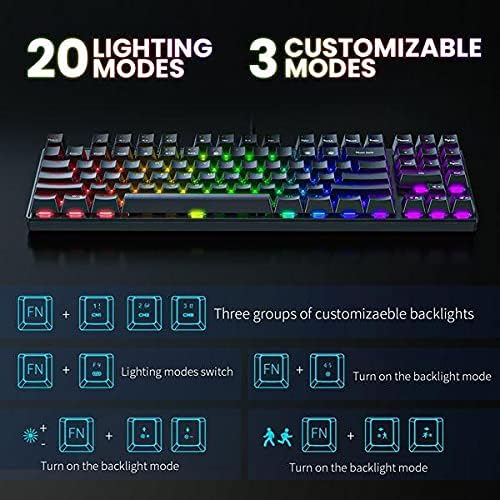
Image 4.1: Illustration of the Onikuma G26 keyboard's 20 lighting modes and 3 customizable modes. This image shows various FN key combinations for controlling the keyboard's RGB backlighting, including switching modes and turning the backlight on/off.
4.2. Preset Game and Office Modes
The keyboard offers preset lighting configurations optimized for office work and different gaming scenarios.
- Office Mode (FN + 7): Lights up keys relevant for general typing, such as "QWERTYUIOPASDFGHJKLZXCVBNM".
- Game Mode 1 (FN + 6): Highlights common gaming keys like "ASDW" and arrow keys.
- Game Mode 2 (FN + 5): Illuminates keys frequently used in gaming, including "QWERASDF", "123456", and "Ctrl".

Image 4.2: Visual representation of the Onikuma G26 keyboard's Office Mode and two Game Modes. This image demonstrates which keys are illuminated for each mode, activated by specific FN key combinations.
5. Mouse Operation (Onikuma CW905)
5.1. ഓവർview
The CW905 gaming mouse features an ergonomic design, 7 programmable buttons, and adjustable DPI settings for precise control.
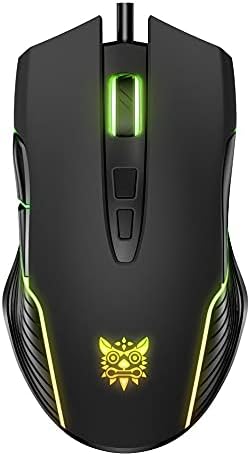
ചിത്രം 5.1: മുകളിൽ നിന്ന് താഴേക്ക് view of the Onikuma CW905 RGB Gaming Mouse. This image highlights the mouse's ergonomic shape and button layout, including the scroll wheel and DPI adjustment buttons.
5.2. Adjustable DPI Settings
The CW905 mouse offers 6 default adjustable DPI (Dots Per Inch) settings, allowing you to customize cursor sensitivity. Each DPI setting is indicated by a specific RGB backlight color:
- 800 DPI: പച്ച ബാക്ക്ലൈറ്റ്
- 1600 DPI: Pink backlight
- 2400 DPI: നീല ബാക്ക്ലൈറ്റ്
- 3200 DPI: ചുവന്ന ബാക്ക്ലൈറ്റ്
- 4800 DPI: Cyan backlight
- 6400 DPI: മഞ്ഞ ബാക്ക്ലൈറ്റ്
Press the DPI button (usually located behind the scroll wheel) to cycle through these settings.
5.3. RGB ബാക്ക്ലൈറ്റ് മോഡുകൾ
The mouse features 7 distinct RGB backlight modes, enhancing its aesthetic appeal. These modes can typically be cycled through using a dedicated button or software, if available.
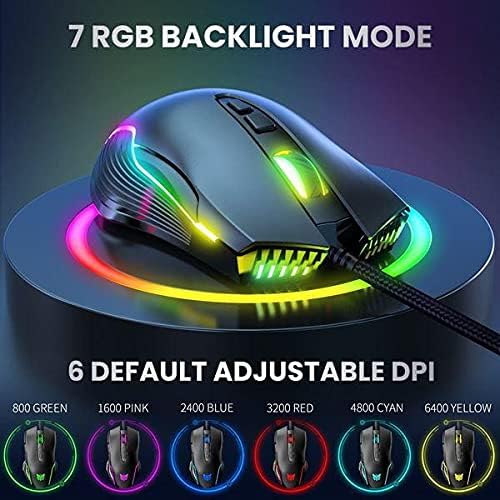
Image 5.2: The Onikuma CW905 mouse showcasing its 7 RGB backlight modes and the corresponding colors for each of the 6 adjustable DPI settings. This image visually links DPI levels to specific LED colors.
5.4. പ്രോഗ്രാം ചെയ്യാവുന്ന ബട്ടണുകൾ
The CW905 mouse is equipped with 7 programmable buttons. Customization of these buttons typically requires dedicated software, which can be downloaded from the Onikuma official website. This software allows users to assign macros, key functions, or other commands to enhance gaming or productivity.
6. പരിപാലനവും പരിചരണവും
Proper maintenance ensures the longevity and optimal performance of your gaming combo.
- കീബോർഡ് വൃത്തിയാക്കൽ: കീബോർഡിന്റെ ഉപരിതലം തുടയ്ക്കാൻ മൃദുവായതും ഉണങ്ങിയതുമായ തുണി ഉപയോഗിക്കുക. കീകൾക്കിടയിലുള്ള പൊടിക്ക്, കംപ്രസ് ചെയ്ത വായു ഉപയോഗിക്കുക. കഠിനമായ രാസവസ്തുക്കളോ ഉരച്ചിലുകളോ ഉള്ള വസ്തുക്കൾ ഉപയോഗിക്കുന്നത് ഒഴിവാക്കുക.
- മൗസ് വൃത്തിയാക്കൽ: മൗസിന്റെ പ്രതലം മൃദുവായ, ചെറുതായി d തുണി ഉപയോഗിച്ച് തുടയ്ക്കുക.amp തുണി. ആന്തരിക ഘടകങ്ങളിലേക്ക് ദ്രാവകം പ്രവേശിക്കുന്നില്ലെന്ന് ഉറപ്പാക്കുക. ട്രാക്കിംഗ് പ്രശ്നങ്ങൾ ഉണ്ടായാൽ ഒപ്റ്റിക്കൽ സെൻസർ ഏരിയ ഒരു കോട്ടൺ സ്വാബ് ഉപയോഗിച്ച് സൌമ്യമായി വൃത്തിയാക്കുക.
- സംഭരണം: ഉപയോഗത്തിലില്ലാത്തപ്പോൾ നേരിട്ടുള്ള സൂര്യപ്രകാശത്തിൽ നിന്നും കടുത്ത താപനിലയിൽ നിന്നും അകന്ന് തണുത്തതും വരണ്ടതുമായ സ്ഥലത്ത് ഉപകരണങ്ങൾ സൂക്ഷിക്കുക.
- ലിക്വിഡ് എക്സ്പോഷർ ഒഴിവാക്കുക: Do not expose the keyboard or mouse to liquids, as this can cause damage.
7. പ്രശ്നപരിഹാരം
If you encounter issues with your Onikuma G26 + CW905 combo, please refer to the following common solutions:
- ഉപകരണം കണ്ടെത്തിയില്ല:
- Ensure the USB cable is securely plugged into a functional USB port on your computer.
- ഉപകരണം മറ്റൊരു USB പോർട്ടിലേക്ക് ബന്ധിപ്പിക്കാൻ ശ്രമിക്കുക.
- നിങ്ങളുടെ കമ്പ്യൂട്ടർ പുനരാരംഭിക്കുക.
- പ്രതികരിക്കാത്ത കീബോർഡ് കീകൾ:
- Check for any physical obstructions under the keycaps.
- Ensure the keyboard is not in a locked mode (e.g., Windows key lock).
- ഒരു സിസ്റ്റം-നിർദ്ദിഷ്ട പ്രശ്നം ഒഴിവാക്കാൻ മറ്റൊരു കമ്പ്യൂട്ടറിൽ കീബോർഡ് പരിശോധിക്കുക.
- Mouse Cursor Not Moving or Erratic:
- മൗസിന്റെ അടിവശത്തുള്ള ഒപ്റ്റിക്കൽ സെൻസർ വൃത്തിയാക്കുക.
- മൗസ് അനുയോജ്യമായ ഒരു പ്രതലത്തിലാണ് ഉപയോഗിക്കുന്നതെന്ന് ഉറപ്പാക്കുക (ഉദാ. ഒരു മൗസ് പാഡ്).
- Try adjusting the DPI setting.
- RGB ലൈറ്റിംഗ് പ്രവർത്തിക്കുന്നില്ല:
- For the keyboard, ensure you have not accidentally turned off the backlight using the FN key combination.
- For the mouse, check if the DPI setting is active, as some DPI settings correspond to specific colors.
- Ensure the devices are receiving sufficient power from the USB port.
8 സാങ്കേതിക സവിശേഷതകൾ
| ബ്രാൻഡ് | ഒനികുമ |
| മോഡൽ നമ്പർ | G26 + CW905 |
| കണക്റ്റിവിറ്റി ടെക്നോളജി | USB (വയർഡ്) |
| അനുയോജ്യമായ ഉപകരണങ്ങൾ | പേഴ്സണൽ കമ്പ്യൂട്ടർ, ലാപ്ടോപ്പ് |
| കീബോർഡ് തരം | TKL Mechanical Gaming Keyboard (Blue Switch) |
| കീബോർഡ് ലേഔട്ട് | QWERTY (ഇംഗ്ലീഷ്) |
| മൗസ് ഡിപിഐ | 6400 DPI വരെ (ക്രമീകരിക്കാവുന്നത്) |
| മൗസ് ബട്ടണുകൾ | 7 പ്രോഗ്രാം ചെയ്യാവുന്ന ബട്ടണുകൾ |
| ചലനം കണ്ടെത്തൽ | ഒപ്റ്റിക്കൽ |
| നിറം | കറുപ്പ് |
| പവർ ഉറവിടം | കോർഡഡ് ഇലക്ട്രിക് (USB) |
| ബാറ്ററികൾ ആവശ്യമാണ് | ഇല്ല |
| ഇനത്തിൻ്റെ ഭാരം | 900 g (approx. for combo) |
| പാക്കേജ് അളവുകൾ | 37 x 19.6 x 4.6 സെ.മീ |
| നിർമ്മാതാവ് | ഒനികുമ |
| ആദ്യ തീയതി ലഭ്യമാണ് | 7 ജൂലൈ 2021 |
9. വാറൻ്റിയും പിന്തുണയും
Onikuma products typically come with a standard manufacturer's warranty. Please refer to the warranty card included with your purchase or visit the official Onikuma webനിർദ്ദിഷ്ട വാറന്റി നിബന്ധനകൾക്കും വ്യവസ്ഥകൾക്കും സൈറ്റ്.
For technical support, troubleshooting assistance beyond this manual, or warranty claims, please contact Onikuma customer service through their official webസൈറ്റ് അല്ലെങ്കിൽ നിങ്ങളുടെ ഉൽപ്പന്നത്തിനൊപ്പം നൽകിയിരിക്കുന്ന ബന്ധപ്പെടാനുള്ള വിവരങ്ങൾ.


