1. ആമുഖം
The D-Link DGS-105GL is a 5-Port Gigabit Unmanaged Desktop Switch designed to provide a simple and efficient solution for expanding network connectivity in small office/home office (SOHO) and small to medium-sized business (SMB) environments. This device offers plug-and-play functionality, requiring no complex configuration. Its fanless design ensures silent operation, and the metal housing provides durability. The DGS-105GL incorporates energy-efficient features, including IEEE 802.3az Energy-Efficient Ethernet, to reduce power consumption without compromising performance.
2. പാക്കേജ് ഉള്ളടക്കം
നിങ്ങളുടെ പാക്കേജിൽ ഇനിപ്പറയുന്ന ഇനങ്ങൾ അടങ്ങിയിട്ടുണ്ടെന്ന് പരിശോധിക്കുക:
- D-Link DGS-105GL 5-Port Gigabit Unmanaged Desktop Switch
- പവർ അഡാപ്റ്റർ
If any items are missing or damaged, please contact your local D-Link reseller.
3. ഉൽപ്പന്നം കഴിഞ്ഞുview
The DGS-105GL switch features a compact, low-profile design with a durable metal housing. It is equipped with five Gigabit Ethernet ports for high-speed network connections.
3.1 ഫ്രണ്ട് പാനൽ

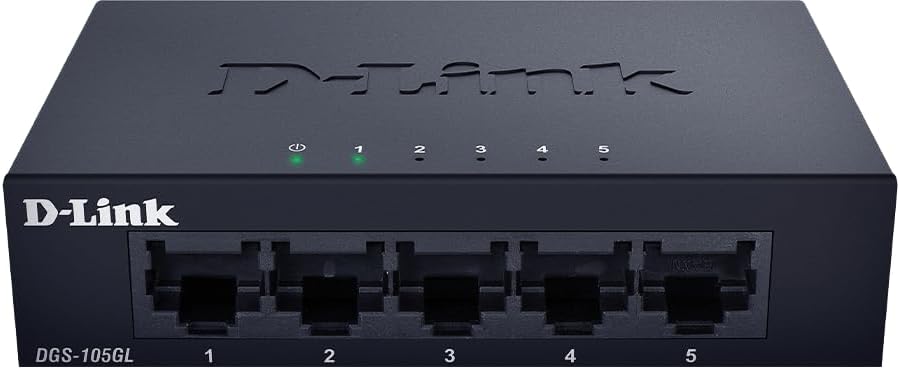
ചിത്രം: മുൻഭാഗം view of the D-Link DGS-105GL switch, showing the D-Link logo, model number DGS-105GL, a power LED, five port status LEDs (1-5), and five RJ45 Gigabit Ethernet ports (1-5).
The front panel includes the following indicators and ports:
- പവർ എൽഇഡി: സ്വിച്ചിന്റെ പവർ സ്റ്റാറ്റസ് സൂചിപ്പിക്കുന്നു.
- പോർട്ട് LED-കൾ (1-5): Each port has an LED that indicates link status and activity. A solid light indicates a successful connection, and a blinking light indicates data transmission.
- RJ45 Gigabit Ethernet Ports (1-5): These ports are used to connect network devices such as computers, servers, and other switches.
3.2 പിൻ പാനൽ

ചിത്രം: പിൻഭാഗം view of the D-Link DGS-105GL switch, showing the power input port labeled '5V --- 1A'.
The rear panel contains the power input port, where the included power adapter is connected.
4. സജ്ജീകരണം
The DGS-105GL is a plug-and-play device, making installation straightforward. Follow these steps to set up your switch:
- പവർ അഡാപ്റ്റർ ബന്ധിപ്പിക്കുക: Plug the included power adapter into the power input port on the rear panel of the DGS-105GL switch. Then, plug the other end of the adapter into a standard electrical outlet. The Power LED on the front panel should illuminate.
- നെറ്റ്വർക്ക് ഉപകരണങ്ങൾ ബന്ധിപ്പിക്കുക: Connect your network devices (e.g., computers, network-attached storage, routers) to any of the five RJ45 Gigabit Ethernet ports on the front panel using standard Ethernet cables.
- കണക്ഷനുകൾ പരിശോധിക്കുക: Once a device is connected and powered on, the corresponding Port LED on the switch's front panel should light up, indicating a successful link. If there is network activity, the LED will blink.

Image: The D-Link DGS-105GL switch placed on a desk in an office setting, connected to a laptop and other peripherals, demonstrating a typical setup.
5. സ്വിച്ച് പ്രവർത്തിപ്പിക്കൽ
The DGS-105GL operates automatically once connected. It supports auto-negotiation for speed and duplex mode, and auto-MDI/MDIX, eliminating the need for crossover cables. The switch automatically detects the speed of the connected device (10/100/1000 Mbps) and adjusts accordingly.
5.1 LED സൂചകങ്ങൾ
The LEDs provide visual feedback on the switch's status:
ചിത്രം: മുൻഭാഗം view of the D-Link DGS-105GL switch with the green power LED and green port LEDs 1-5 illuminated, indicating active connections.
| എൽഇഡി | നില | വിവരണം |
|---|---|---|
| ശക്തി | സോളിഡ് ഗ്രീൻ | സ്വിച്ച് ഓണാണ്. |
| ശക്തി | ഓഫ് | സ്വിച്ച് പവർ സ്വീകരിക്കുന്നില്ല. |
| പോർട്ട് (1-5) | സോളിഡ് ഗ്രീൻ | A device is successfully connected to the port. |
| പോർട്ട് (1-5) | മിന്നുന്ന പച്ച | പോർട്ട് വഴിയാണ് ഡാറ്റ കൈമാറുകയോ സ്വീകരിക്കുകയോ ചെയ്യുന്നത്. |
| പോർട്ട് (1-5) | ഓഫ് | പോർട്ടിലേക്ക് ഒരു ഉപകരണവും ബന്ധിപ്പിച്ചിട്ടില്ല, അല്ലെങ്കിൽ ബന്ധിപ്പിച്ച ഉപകരണം ഓഫാക്കിയിരിക്കുന്നു. |
6. പരിപാലനം
To ensure optimal performance and longevity of your DGS-105GL switch, consider the following maintenance guidelines:
- വൃത്തിയാക്കൽ: Periodically clean the exterior of the switch with a soft, dry cloth. Avoid using liquid or aerosol cleaners directly on the device.
- പരിസ്ഥിതി വ്യവസ്ഥകൾ: Ensure the switch is placed in a well-ventilated area, away from direct sunlight, heat sources, and excessive moisture. Maintain operating temperatures within the specified range (refer to specifications).
- കേബിൾ മാനേജുമെന്റ്: Keep network cables neatly organized to prevent strain on ports and improve airflow around the device.
- പവർ സൈക്ലിംഗ്: If you experience network issues, a simple power cycle (unplugging the power adapter, waiting 10 seconds, and plugging it back in) can often resolve minor problems.
7. പ്രശ്നപരിഹാരം
If you encounter issues with your DGS-105GL switch, refer to the following common troubleshooting steps:
- പവർ എൽഇഡി ഇല്ല:
- പവർ അഡാപ്റ്റർ സ്വിച്ചിലേക്കും പ്രവർത്തിക്കുന്ന ഒരു ഇലക്ട്രിക്കൽ ഔട്ട്ലെറ്റിലേക്കും സുരക്ഷിതമായി ബന്ധിപ്പിച്ചിട്ടുണ്ടെന്ന് ഉറപ്പാക്കുക.
- മറ്റൊരു ഉപകരണം പ്ലഗ് ഇൻ ചെയ്ത് ഇലക്ട്രിക്കൽ ഔട്ട്ലെറ്റ് പ്രവർത്തനക്ഷമമാണെന്ന് ഉറപ്പാക്കുക.
- No Link LED for a Connected Device:
- സ്വിച്ച് പോർട്ടിലേക്കും നെറ്റ്വർക്ക് ഉപകരണത്തിലേക്കും ഇതർനെറ്റ് കേബിൾ സുരക്ഷിതമായി പ്ലഗ് ചെയ്തിട്ടുണ്ടോയെന്ന് പരിശോധിക്കുക.
- ബന്ധിപ്പിച്ചിരിക്കുന്ന നെറ്റ്വർക്ക് ഉപകരണം ഓണാണെന്നും ശരിയായി പ്രവർത്തിക്കുന്നുണ്ടെന്നും ഉറപ്പാക്കുക.
- കേബിളിലെ തകരാറുകൾ ഒഴിവാക്കാൻ മറ്റൊരു ഇതർനെറ്റ് കേബിൾ പരീക്ഷിക്കുക.
- സ്വിച്ചിലെ മറ്റൊരു പോർട്ടിലേക്ക് ഉപകരണം കണക്റ്റുചെയ്യാൻ ശ്രമിക്കുക.
- കുറഞ്ഞ നെറ്റ്വർക്ക് വേഗത:
- Ensure all connected devices and cables support Gigabit Ethernet (Cat5e or higher).
- Check for excessive network traffic or bandwidth-intensive applications running on connected devices.
- Perform a power cycle on the switch and connected devices.
8 സ്പെസിഫിക്കേഷനുകൾ
Key technical specifications for the D-Link DGS-105GL switch:
| ഫീച്ചർ | സ്പെസിഫിക്കേഷൻ |
|---|---|
| മോഡൽ നമ്പർ | DGS-105GL |
| തുറമുഖങ്ങളുടെ എണ്ണം | 5 x ഗിഗാബിറ്റ് ഇതർനെറ്റ് (RJ45) |
| ഡാറ്റ കൈമാറ്റ നിരക്ക് | 1 Gbps per port |
| ഇൻ്റർഫേസ് തരം | RJ45 |
| കേസ് മെറ്റീരിയൽ | ലോഹം |
| ഫാൻലെസ് ഡിസൈൻ | അതെ |
| ഊർജ്ജ കാര്യക്ഷമത | IEEE 802.3az എനർജി-എഫിഷ്യൻ്റ് ഇഥർനെറ്റ് (EEE) |
| പവർ ഇൻപുട്ട് | 5 Volts (DC), 1 Amps |
| ഇനത്തിൻ്റെ ഭാരം | 160 ഗ്രാം (5.6 ഔൺസ്) |
| ഉൽപ്പന്ന അളവുകൾ | 39.37"L x 25.2"W x 0.94"H (Approximate) |
| യു.പി.സി | 790069458606 |
9. വാറൻ്റിയും സാങ്കേതിക പിന്തുണയും
D-Link products are backed by a limited warranty. For specific warranty terms and conditions, please refer to the warranty information included with your product or visit the official D-Link webസൈറ്റ്.
For technical assistance, product documentation, or to download the latest software and firmware updates, please visit the D-Link support portal or contact D-Link technical support directly. Contact information can typically be found on the D-Link webനിങ്ങളുടെ പ്രദേശത്തിനായുള്ള സൈറ്റ്.