
1. ആമുഖം
This manual provides detailed instructions for the installation, operation, and maintenance of your Symphony SY-V3080BT 7.2 Inch Touch Screen Car Multimedia Player. Please read this manual thoroughly before using the product to ensure proper operation and to prevent damage.
2 സുരക്ഷാ വിവരങ്ങൾ
- Always operate the device in a safe manner, ensuring it does not distract you from driving.
- യൂണിറ്റ് വേർപെടുത്താനോ പരിഷ്ക്കരിക്കാനോ ശ്രമിക്കരുത്. ഇത് കേടുപാടുകൾക്ക് കാരണമായേക്കാം, വാറന്റി അസാധുവാക്കിയേക്കാം.
- ഷോർട്ട് സർക്യൂട്ടുകൾ തടയുന്നതിന് എല്ലാ വയറിംഗ് കണക്ഷനുകളും സുരക്ഷിതമാണെന്നും ശരിയായി ഇൻസുലേറ്റ് ചെയ്തിട്ടുണ്ടെന്നും ഉറപ്പാക്കുക.
- ഏതെങ്കിലും ഘട്ടങ്ങളെക്കുറിച്ച് നിങ്ങൾക്ക് ഉറപ്പില്ലെങ്കിൽ, ഇൻസ്റ്റാളേഷനായി ഒരു പ്രൊഫഷണലിനെ സമീപിക്കുക.
- യൂണിറ്റ് വെള്ളത്തിൽ നിന്നും അമിതമായ ഈർപ്പത്തിൽ നിന്നും അകറ്റി നിർത്തുക.
3. പാക്കേജ് ഉള്ളടക്കം
പാക്കേജിൽ എല്ലാ ഇനങ്ങളും ഉണ്ടെന്ന് ഉറപ്പാക്കുക:
- Symphony SY-V3080BT Car Multimedia Player Unit
- റിമോട്ട് കൺട്രോൾ
- പവർ, സ്പീക്കർ വയറിംഗ് ഹാർനെസ്
- മൗണ്ടിംഗ് ഹാർഡ്വെയർ (ബ്രാക്കറ്റുകൾ, സ്ക്രൂകൾ)
- ഉപയോക്തൃ മാനുവൽ (ഈ പ്രമാണം)
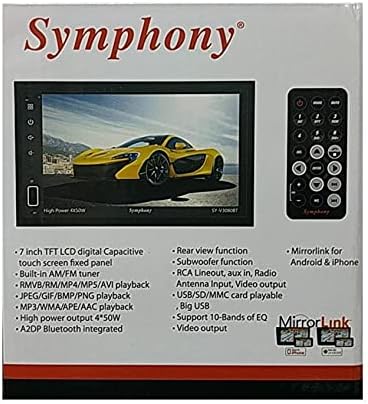
Image: The product packaging for the Symphony SY-V3080BT, highlighting key features such as 7-inch TFT LCD, AM/FM tuner, various playback formats, Bluetooth, and MirrorLink. A remote control is also visible.
4. സജ്ജീകരണവും ഇൻസ്റ്റാളേഷനും
4.1 വയറിംഗ് കണക്ഷനുകൾ
Before installation, ensure the vehicle's battery is disconnected. Connect the wiring harness to the corresponding ports on the back of the unit and to your vehicle's wiring system. Pay close attention to power, ground, speaker, and accessory wire connections.
- പവർ (മഞ്ഞ): സ്ഥിരമായ 12V പവറിലേക്ക് കണക്റ്റ് ചെയ്യുക.
- ആക്സസറി (ചുവപ്പ്): Connect to switched 12V power (ignition).
- ഗ്രൗണ്ട് (കറുപ്പ്): ഒരു സോളിഡ് ഷാസി ഗ്രൗണ്ട് പോയിന്റിലേക്ക് കണക്റ്റ് ചെയ്യുക.
- സ്പീക്കർ വയറുകൾ: Connect to your vehicle's speakers, ensuring correct polarity.
- ആന്റിന ഇൻപുട്ട്: നിങ്ങളുടെ കാറിന്റെ റേഡിയോ ആന്റിന ബന്ധിപ്പിക്കുക.
- RCA Lineout: ബാഹ്യ കണക്ഷൻ ഉറപ്പാക്കാൻ ampജീവപര്യന്തം.
- വീഡിയോ ഔട്ട്പുട്ട്: ബാഹ്യ ഡിസ്പ്ലേകൾ ബന്ധിപ്പിക്കുന്നതിന്.
- പിൻഭാഗം View ക്യാമറ ഇൻപുട്ട്: അനുയോജ്യമായ ഒരു പിൻഭാഗം ബന്ധിപ്പിക്കുക view ക്യാമറ (ബാധകമെങ്കിൽ).

ചിത്രം: പിൻഭാഗം view of the Symphony SY-V3080BT car multimedia player, showing various input and output ports for power, speakers, antenna, and auxiliary connections.
4.2 യൂണിറ്റ് മൌണ്ട് ചെയ്യുന്നു
Secure the unit into the vehicle's dashboard using the provided mounting brackets and screws. Ensure the unit is firmly in place and does not obstruct any vehicle controls.
4.3 പ്രാരംഭ പവർ-ഓൺ
After all connections are made and the unit is mounted, reconnect the vehicle's battery. Turn on the vehicle's ignition. The unit should power on. Follow any on-screen prompts for initial setup.
5. പ്രവർത്തന നിർദ്ദേശങ്ങൾ
5.1 അടിസ്ഥാന നിയന്ത്രണങ്ങൾ
- പവർ ബട്ടൺ: യൂണിറ്റ് ഓൺ/ഓഫ് ചെയ്യാൻ അമർത്തുക.
- വോളിയം നിയന്ത്രണം: Use the on-screen controls or remote to adjust volume.
- മെനു/ഹോം ബട്ടൺ: പ്രധാന മെനുവിലേക്കോ ഹോം സ്ക്രീനിലേക്കോ മടങ്ങുന്നു.
- ടച്ച് സ്ക്രീൻ: Navigate menus and select functions by touching the screen.
5.2 Media Playback (DVD/USB/SD)
- ഡിവിഡി പ്ലേബാക്ക്: Insert a DVD disc into the slot. The unit will automatically detect and begin playback.
- യുഎസ്ബി പ്ലേബാക്ക്: Insert a USB drive into the USB port. Select the USB source from the main menu to browse and play media files (MP3, MPEG4, RMVB, etc.).
- SD കാർഡ് പ്ലേബാക്ക്: Insert an SD card into the SD card slot. Select the SD source from the main menu to browse and play media files.
5.3 Radio (AM/FM Tuner)
Select the Radio function from the main menu. Use the on-screen controls to scan for stations, save presets, and switch between AM and FM bands.
5.4 ബ്ലൂടൂത്ത് കണക്റ്റിവിറ്റി
To pair your mobile device:
- നിങ്ങളുടെ മൊബൈൽ ഉപകരണത്തിൽ ബ്ലൂടൂത്ത് പ്രവർത്തനക്ഷമമാക്കുക.
- On the SY-V3080BT, select the Bluetooth function.
- ഇതിനായി തിരയുക available devices on your mobile phone and select 'SY-V3080BT'.
- ആവശ്യപ്പെടുകയാണെങ്കിൽ ജോടിയാക്കൽ കോഡ് സ്ഥിരീകരിക്കുക.
Once paired, you can make/receive calls and stream audio (A2DP) wirelessly.
5.5 MirrorLink (Android & iPhone)
The MirrorLink feature allows you to mirror your smartphone's screen onto the unit's display. Connect your Android or iPhone device via USB. Follow the on-screen instructions on both the unit and your phone to establish the connection. This enables on-screen control of compatible smartphone applications.
5.6 പിൻഭാഗം View ഫംഗ്ഷൻ
ഒരു പിൻഭാഗമാണെങ്കിൽ view camera is connected, the display will automatically switch to the camera feed when the vehicle is put into reverse gear.
5.7 ഓഡിയോ ക്രമീകരണങ്ങൾ
Access the audio settings menu to adjust equalizer (EQ) presets or custom settings (supports 10-bands of EQ), balance, fader, and subwoofer output.
6. പരിപാലനം
6.1 യൂണിറ്റ് വൃത്തിയാക്കൽ
Use a soft, dry cloth to clean the unit's screen and exterior. For stubborn marks, slightly dampവെള്ളം കൊണ്ട് തുണി. ഉരച്ചിലുകളുള്ള ക്ലീനറുകളോ ലായകങ്ങളോ ഉപയോഗിക്കരുത്.
6.2 പൊതു പരിചരണം
Avoid exposing the unit to extreme temperatures, direct sunlight for prolonged periods, or excessive dust. Ensure proper ventilation around the unit.
7. പ്രശ്നപരിഹാരം
If you encounter issues with your SY-V3080BT, refer to the following common problems and solutions:
| പ്രശ്നം | സാധ്യമായ കാരണം | പരിഹാരം |
|---|---|---|
| ശക്തിയില്ല | തെറ്റായ വയറിംഗ്, പൊട്ടിത്തെറിച്ച ഫ്യൂസ്, വാഹന ബാറ്ററി പ്രശ്നം. | പവർ, ഗ്രൗണ്ട് കണക്ഷനുകൾ പരിശോധിക്കുക. വാഹന ഫ്യൂസുകൾ പരിശോധിക്കുക. വാഹന ബാറ്ററി ചാർജ്ജ് ചെയ്തിട്ടുണ്ടെന്ന് ഉറപ്പാക്കുക. |
| ശബ്ദമില്ല | സ്പീക്കർ വയറുകൾ വിച്ഛേദിക്കപ്പെട്ടു, ശബ്ദം വളരെ കുറവാണ്, ഓഡിയോ ഉറവിടം തെറ്റാണ്. | Verify speaker connections. Increase volume. Select correct audio source. Check audio settings. |
| ടച്ച് സ്ക്രീൻ പ്രതികരിക്കുന്നില്ല | System error, temporary glitch. | Restart the unit (turn off and on vehicle ignition). If issue persists, consult support. |
| ബ്ലൂടൂത്ത് കണക്ഷൻ പരാജയപ്പെടുന്നു | ഉപകരണം ജോടിയാക്കൽ മോഡിലല്ല, തടസ്സം, തെറ്റായ ജോടിയാക്കൽ പ്രക്രിയ. | രണ്ട് ഉപകരണങ്ങളും ജോടിയാക്കൽ മോഡിലാണെന്ന് ഉറപ്പാക്കുക. മുമ്പത്തെ ജോടിയാക്കലുകൾ ഇല്ലാതാക്കി വീണ്ടും ശ്രമിക്കുക. യൂണിറ്റിന് അടുത്തേക്ക് നീക്കുക. |
| DVD/USB/SD not playing | പൊരുത്തമില്ലാത്തത് file format, damaged media, incorrect source selected. | Check media for damage. Ensure files are in supported formats (MP3, MPEG4, RMVB, etc.). Select correct source. |
If the problem persists after trying these solutions, please contact Symphony customer support.
8 സ്പെസിഫിക്കേഷനുകൾ
- മോഡൽ: SY-V3080BT
- സ്ക്രീൻ വലിപ്പം: 7.2 ഇഞ്ച് ടച്ച് സ്ക്രീൻ
- റെസലൂഷൻ: 1920x1080
- മീഡിയ തരം: DVD, MP3, MPEG4, RMVB, USB, SD
- ട്യൂണർ: AM/FM ട്യൂണർ
- കണക്റ്റിവിറ്റി: AUX, Bluetooth (A2DP), USB, SD Card
- സ്മാർട്ട്ഫോൺ സംയോജനം: MirrorLink for Android & iPhone, On-Screen Control
- ഓഡിയോ putട്ട്പുട്ട് മോഡ്: ഡിജിറ്റൽ
- പിന്തുണയ്ക്കുന്ന ഓഡിയോ ഫോർമാറ്റ്: ഡോൾബി ഡിജിറ്റൽ, ഡി.ടി.എസ്
- പവർ ഔട്ട്പുട്ട്: High Power 4 x 50W
- സമനില: Support 10-Bands of EQ
- അധിക സവിശേഷതകൾ: പിൻഭാഗം view function, RCA Lineout, Video output
- ഇനത്തിൻ്റെ ഭാരം: Approximately 904 g (0.9 Kilograms)
9. വാറൻ്റിയും പിന്തുണയും
For warranty information, please refer to the warranty card included with your product or contact your retailer. For technical support or service inquiries, please contact Symphony customer service through their official channels.


