ആമുഖം
The SKYRC B6 Nex AC/DC Smart Charger is a versatile and powerful charging solution designed for various battery types, including Lithium (LiPo, LiFe, LiIon, LiHV), Nickel (NiMH, NiCd), and Lead-Acid (Pb) batteries. With both AC and DC input capabilities, it offers flexibility for use at home or in the field. This charger features a high-quality 2.4-inch VA display for clear information, a maximum charge power of 200W, and a maximum charge current of 10A. Its compact design, efficient heat dissipation, and user-friendly interface make it an ideal choice for hobbyists and professionals alike.
Key features include the "Scan to Go" function for quick charging via QR codes, Bluetooth connectivity for control via the SkyCharger app, and a memory cache that retains the last used settings for convenience.
സജ്ജീകരണ ഗൈഡ്
Follow these steps to set up your SKYRC B6 Nex charger for the first time:
- പവർ കണക്ഷൻ: ഒരു പവർ സ്രോതസ്സിലേക്ക് ചാർജർ ബന്ധിപ്പിക്കുക.
- For AC power, use the provided AC power cable and plug it into the AC 100-240V input port on the side of the charger and then into a wall outlet.
- For DC power, connect a DC power source (10-30V) to the DC IN port using an appropriate cable.
- ബാറ്ററി കണക്ഷൻ: Connect your battery to the charger.
- Connect the main discharge lead of your battery to the XT60 output connector on the charger.
- For balance charging, connect the battery's balance lead to the XH Balance connection port on the charger. Ensure the balance lead is correctly oriented.
- പ്രാരംഭ പവർ ഓൺ: Once connected, the charger's 2.4-inch VA display will illuminate, indicating it is ready for operation.
- App Connection (Optional): For advanced control and monitoring, download the SkyCharger app on your smartphone. Enable Bluetooth on your device and pair it with the B6 Nex charger.
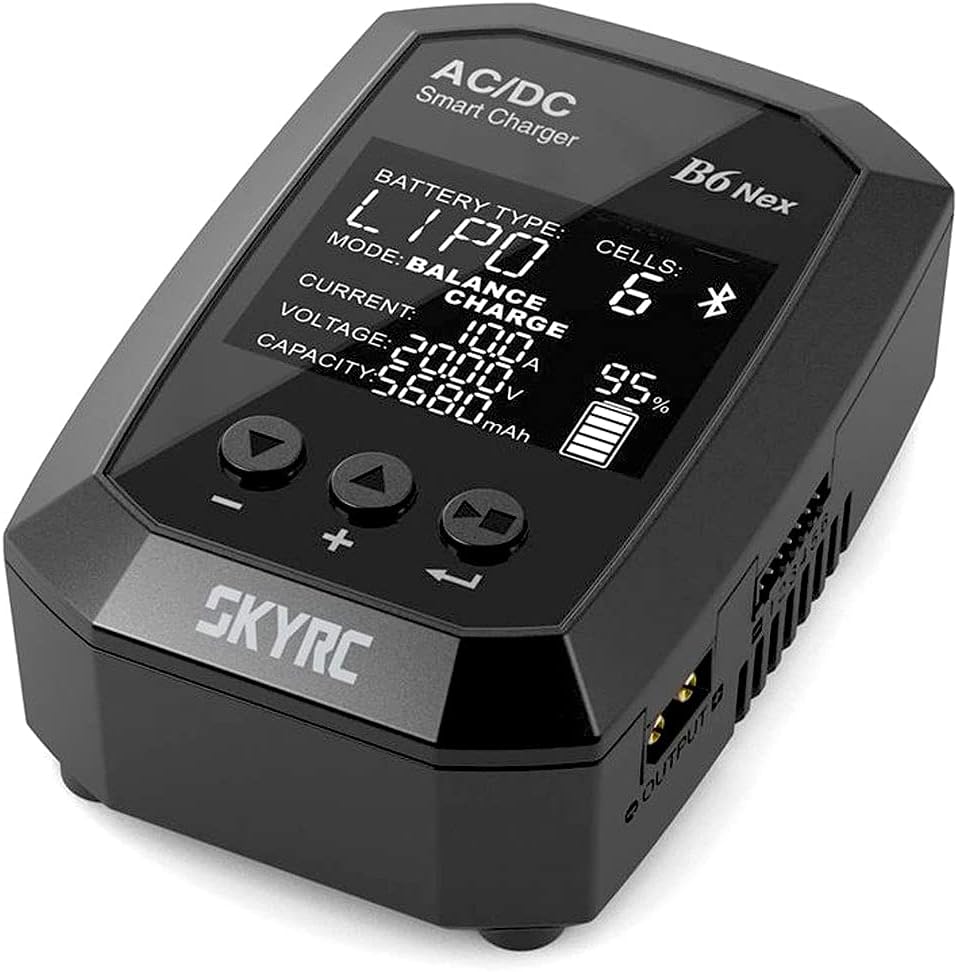
ചിത്രം 1: This image shows the front of the SKYRC B6 Nex charger, highlighting its 2.4-inch VA display. The display indicates battery type (LiPo), mode (Balance Charge), current (10.0A), voltage (20.00V), capacity (5680mAh), and charge percentage (95%). Below the screen are three control buttons for navigation and adjustment.

ചിത്രം 2: ഈ ചിത്രം ഒരു വശം നൽകുന്നു view of the SKYRC B6 Nex charger, illustrating the AC 100-240V input port on one side and the DC IN 10-30V port on the other. The XT60 output connector and XH Balance connection are also visible, emphasizing the charger's versatile power input and output options.
പ്രവർത്തന നിർദ്ദേശങ്ങൾ
The B6 Nex charger is operated using three intuitive buttons below the display. The VA display provides clear, high-contrast information.
അടിസ്ഥാന പ്രവർത്തനം:
- നാവിഗേഷൻ: Use the left and right buttons to navigate through menus and adjust values.
- Selection/Confirmation: Use the center button to select an option or confirm a setting.
- ബാറ്ററി തരം തിരഞ്ഞെടുക്കൽ: From the main menu, select the appropriate battery type (LiPo, LiFe, LiIon, LiHV, NiMH, NiCd, Pb) for the battery you are charging.
- ചാർജിംഗ് മോഡ്: Choose your desired charging mode (e.g., Balance Charge, Fast Charge, Storage, Discharge).
- പാരാമീറ്റർ അഡ്ജസ്റ്റ്മെന്റ്: Set the charge current (up to 10A) and voltage according to your battery's specifications. The charger remembers the last set value for convenience.
- ചാർജിംഗ് ആരംഭിക്കുക: Once all parameters are set, confirm to start the charging process. The display will show real-time charging status.
വിപുലമായ സവിശേഷതകൾ:
- Scan to Go Function: This feature allows for quick and automatic charging. If your battery has a QR code with basic data stored, simply scan it using the SkyCharger app. The B6 Nex will automatically initiate the charging or discharging process based on the QR code data.
- Adjustable Cut-off Voltage: For experienced users, the charger allows manual adjustment of the battery cut-off voltage, providing more control over the charging process.
- ബ്ലൂടൂത്ത് കണക്റ്റിവിറ്റി: Control and monitor your charging tasks remotely via the SkyCharger app on your smartphone. This provides a more detailed view of charging parameters and allows for easy setting adjustments.
മെയിൻ്റനൻസ്
Proper maintenance ensures the longevity and optimal performance of your SKYRC B6 Nex charger:
- വൃത്തിയാക്കൽ: Regularly wipe the charger's exterior with a soft, dry cloth. Do not use abrasive cleaners or solvents. Ensure no dust or debris accumulates in the ventilation openings.
- സംഭരണം: Store the charger in a cool, dry place away from direct sunlight, moisture, and extreme temperatures.
- കൈകാര്യം ചെയ്യൽ: Avoid dropping the charger or subjecting it to strong impacts. Handle all cables and connectors with care to prevent damage.
- വെൻ്റിലേഷൻ: Ensure the charger has adequate ventilation during operation to prevent overheating. Do not block the cooling fan or vents.
ട്രബിൾഷൂട്ടിംഗ്
If you encounter issues with your SKYRC B6 Nex charger, refer to the following common problems and solutions:
- Charger Does Not Power On:
- Check if the AC or DC power cable is securely connected to both the charger and the power source.
- Verify that the power outlet or DC power source is functional.
- Charging Error Message:
- Ensure the correct battery type and cell count are selected on the charger.
- Check all battery connections (main lead and balance lead) for proper contact and polarity.
- Inspect the battery for any visible damage or swelling. Do not charge damaged batteries.
- ചാർജർ അമിതമായി ചൂടാക്കൽ:
- Ensure the charger is placed in a well-ventilated area and its cooling vents are not obstructed.
- Reduce the charge current if the charger consistently overheats.
- ആപ്പ് കണക്റ്റിവിറ്റി പ്രശ്നങ്ങൾ:
- Ensure Bluetooth is enabled on your smartphone and the SkyCharger app is up to date.
- Restart both the charger and your smartphone, then attempt to pair again.
For persistent issues, please contact SKYRC customer support or refer to the official SKYRC website for detailed FAQs and support resources.
സാങ്കേതിക സവിശേഷതകൾ
| ഫീച്ചർ | സ്പെസിഫിക്കേഷൻ |
|---|---|
| മോഡൽ നമ്പർ | SK100174-02 |
| ഇൻപുട്ട് വോളിയംtagഇ (എസി) | 100വി - 240വി |
| ഇൻപുട്ട് വോളിയംtagഇ (ഡിസി) | 10വി - 30വി |
| പരമാവധി ചാർജ് പവർ | 200W |
| പരമാവധി ചാർജ് കറൻ്റ് | 10എ |
| ഡിസ്പ്ലേ തരം | 2.4" VA LCD |
| പിന്തുണയ്ക്കുന്ന ബാറ്ററി തരങ്ങൾ | LiPo, LiFe, LiIon, LiHV, NiMH, NiCd, Pb |
| ഭാരം | 160 ഗ്രാം |
| Put ട്ട്പുട്ട് കണക്റ്റർ | XT60 |
| ബാലൻസ് പോർട്ട് | XH |
വാറൻ്റി വിവരങ്ങൾ
Warranty details for the SKYRC B6 Nex AC/DC Smart Charger are typically provided with your purchase documentation or can be found on the official SKYRC website. Please retain your proof of purchase for any warranty claims. The warranty generally covers manufacturing defects under normal use conditions.
For specific terms and conditions, including warranty period and coverage, please refer to the warranty card included in the product packaging or visit the manufacturer's official support page.
ഉപഭോക്തൃ പിന്തുണ
For technical assistance, troubleshooting beyond this manual, or inquiries regarding your SKYRC B6 Nex charger, please contact SKYRC customer support. You can usually find contact information on the official SKYRC webസൈറ്റ് അല്ലെങ്കിൽ നിങ്ങളുടെ ഉൽപ്പന്ന റീട്ടെയിലർ വഴി.
When contacting support, please have your product model number (SK100174-02) and a detailed description of the issue ready to facilitate a quicker resolution.


