സ്വാഗതം
Thank you for choosing the HTC HS01 Bluetooth Headphones. This manual provides essential information for setting up, operating, maintaining, and troubleshooting your new headphones. Please read it carefully to ensure optimal performance and longevity of your device.
പാക്കേജ് ഉള്ളടക്കം
താഴെ ലിസ്റ്റ് ചെയ്തിരിക്കുന്ന എല്ലാ ഇനങ്ങളും നിങ്ങളുടെ പാക്കേജിൽ ഉൾപ്പെടുത്തിയിട്ടുണ്ടെന്ന് ഉറപ്പാക്കുക:
- 1 x HTC HS01 Bluetooth Headphones
- 1 x USB ചാർജിംഗ് കേബിൾ
- ഒന്നിലധികം വലുപ്പത്തിലുള്ള ചെവിക്കുപ്പികൾ (ചെറുത്, ഇടത്തരം, വലുത്)
- 1 x ഉപയോക്തൃ മാനുവൽ
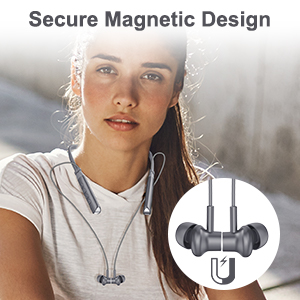
Image: The package contents, including the headphones, charging cable, various ear tips, and the user manual.
ഉൽപ്പന്നം കഴിഞ്ഞുview
The HTC HS01 features a lightweight neckband design with in-ear earbuds, equipped with intuitive controls for easy operation.
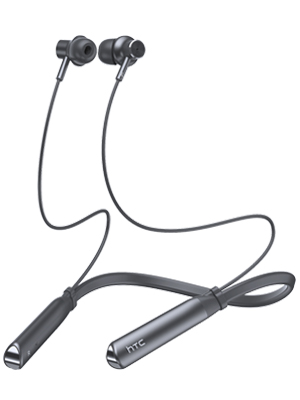
ചിത്രം: ഒരു പൂർണ്ണ view of the HTC HS01 Bluetooth Headphones, showcasinകഴുത്തിലെ ബാൻഡും ഇയർബഡുകളും.
നിയന്ത്രണങ്ങൾ
The control panel is located on the neckband for easy access:
- ANC ബട്ടൺ: ആക്ടീവ് നോയ്സ് റദ്ദാക്കൽ സജീവമാക്കുന്നു അല്ലെങ്കിൽ നിർജ്ജീവമാക്കുന്നു.
- വോളിയം + / അടുത്ത ട്രാക്ക്: ശബ്ദം കൂട്ടുന്നു അല്ലെങ്കിൽ അടുത്ത ട്രാക്കിലേക്ക് പോകുന്നു.
- Power / Multi-function Button: Powers the device on/off, plays/pauses music, answers/ends calls.
- വോളിയം - / മുമ്പത്തെ ട്രാക്ക്: ശബ്ദം കുറയ്ക്കുന്നു അല്ലെങ്കിൽ മുമ്പത്തെ ട്രാക്കിലേക്ക് പോകുന്നു.
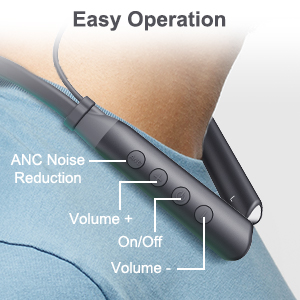
ചിത്രം: ഒരു ക്ലോസ്-അപ്പ് view of the control buttons on the HTC HS01 neckband, detailing their functions.
സജ്ജമാക്കുക
1. ഹെഡ്ഫോണുകൾ ചാർജ് ചെയ്യുന്നു
- ഹെഡ്ഫോണുകളിലെ ചാർജിംഗ് പോർട്ടിലേക്ക് USB ചാർജിംഗ് കേബിൾ ബന്ധിപ്പിക്കുക.
- കേബിളിന്റെ മറ്റേ അറ്റം ഒരു USB പവർ സ്രോതസ്സിലേക്ക് പ്ലഗ് ചെയ്യുക (ഉദാ: കമ്പ്യൂട്ടർ, വാൾ അഡാപ്റ്റർ).
- The indicator light will show charging status. A full charge typically takes approximately 2 hours.
A fully charged battery provides up to 12 hours of music playback, 10 hours of talk time, and 180 days of standby time.
2. ബ്ലൂടൂത്ത് ഉപകരണവുമായി ജോടിയാക്കുന്നു
- ഹെഡ്ഫോണുകൾ ഓഫാണെന്ന് ഉറപ്പാക്കുക.
- Press and hold the Power/Multi-function button until the indicator light flashes red and blue, indicating pairing mode.
- നിങ്ങളുടെ ഉപകരണത്തിൽ (സ്മാർട്ട്ഫോൺ, ടാബ്ലെറ്റ്, കമ്പ്യൂട്ടർ), ബ്ലൂടൂത്ത് പ്രവർത്തനക്ഷമമാക്കി ലഭ്യമായ ഉപകരണങ്ങൾക്കായി തിരയുക.
- Select "HTC HS01" from the list of found devices.
- കണക്ട് ചെയ്തുകഴിഞ്ഞാൽ, ഇൻഡിക്കേറ്റർ ലൈറ്റ് സാവധാനം കടും നീലയോ ഫ്ലാഷ് നീലയോ ആയി മാറും.
The headphones utilize Bluetooth 5.0 technology for stable and efficient wireless transmission.
പ്രവർത്തന നിർദ്ദേശങ്ങൾ
പവർ ഓൺ/ഓഫ്
- പവർ ഓണാക്കാൻ: പവർ/മൾട്ടി-ഫംഗ്ഷൻ ബട്ടൺ 3 സെക്കൻഡ് അമർത്തിപ്പിടിക്കുക.
- പവർ ഓഫ് ചെയ്യാൻ: പവർ/മൾട്ടി-ഫംഗ്ഷൻ ബട്ടൺ 5 സെക്കൻഡ് അമർത്തിപ്പിടിക്കുക.
സംഗീത പ്ലേബാക്ക്
- പ്ലേ/താൽക്കാലികമായി നിർത്തുക: Press the Power/Multi-function button once.
- അടുത്ത ട്രാക്ക്: വോളിയം + ബട്ടൺ അമർത്തിപ്പിടിക്കുക.
- മുമ്പത്തെ ട്രാക്ക്: വോളിയം ബട്ടൺ അമർത്തിപ്പിടിക്കുക.
- വോളിയം കൂട്ടുക: Press the Volume + button briefly.
- വോളിയം താഴേക്ക്: Press the Volume - button briefly.

Image: A woman enjoying music with the HTC HS01 headphones, illustrating the 9D stereo sound experience.
കോൾ മാനേജുമെന്റ്
- ഉത്തരം/അവസാന കോൾ: Press the Power/Multi-function button once.
- കോൾ നിരസിക്കുക: പവർ/മൾട്ടി-ഫംഗ്ഷൻ ബട്ടൺ 2 സെക്കൻഡ് അമർത്തിപ്പിടിക്കുക.
സജീവ ശബ്ദ റദ്ദാക്കൽ (ANC)
- Press the dedicated ANC button to activate or deactivate the noise cancellation feature.
The ANC+ENC technology uses both outward-facing and inward-facing microphones to detect and counteract environmental noise, providing a clearer audio experience.

Image: A man wearing the HTC HS01 headphones in an outdoor setting, highlighting the ANC feature.
മെയിൻ്റനൻസ്
വൃത്തിയാക്കൽ
Regularly clean your headphones to maintain optimal performance:
- Wipe the earbuds and neckband with a soft, dry cloth.
- ചെവിയുടെ അറ്റങ്ങൾ നീക്കം ചെയ്ത് ആവശ്യമെങ്കിൽ നേരിയ സോപ്പും വെള്ളവും ഉപയോഗിച്ച് വൃത്തിയാക്കുക, വീണ്ടും ഘടിപ്പിക്കുന്നതിന് മുമ്പ് അവ പൂർണ്ണമായും ഉണങ്ങിയെന്ന് ഉറപ്പാക്കുക.
- ഉരച്ചിലുകളുള്ള ക്ലീനറുകളോ ലായകങ്ങളോ ഉപയോഗിക്കരുത്.
സംഭരണം
When not in use, store your headphones in a cool, dry place away from direct sunlight and extreme temperatures. The earbuds feature a secure magnetic design for tangle-free storage.
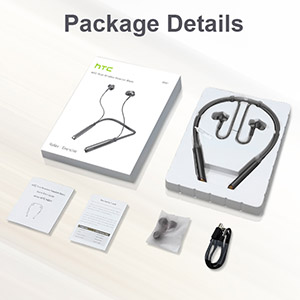
Image: A woman wearing the headphones, demonstrating the magnetic earbuds that secure them around the neck.
ജല പ്രതിരോധം (IPX5)
The HTC HS01 headphones are IPX5 water-resistant, meaning they can withstand light rain and sweat. They are suitable for sports and outdoor activities. However, they are not designed for submersion in water.

Image: A man exercising, highlighting the IPX5 waterproof design of the headphones, suitable for workouts.
ട്രബിൾഷൂട്ടിംഗ്
If you encounter any issues with your HTC HS01 headphones, refer to the following common problems and solutions:
- ഹെഡ്ഫോണുകൾ ഓൺ ചെയ്യില്ല:
Ensure the battery is charged. Connect the headphones to a power source using the USB charging cable. - ഒരു ഉപകരണവുമായി ജോടിയാക്കാൻ കഴിയില്ല:
Make sure the headphones are in pairing mode (indicator light flashing red and blue). Ensure Bluetooth is enabled on your device and it is within range. Try restarting both the headphones and your device. - ശബ്ദമില്ല അല്ലെങ്കിൽ കുറഞ്ഞ ശബ്ദം:
Check the volume levels on both the headphones and your connected device. Ensure the headphones are properly paired and connected. Try re-pairing the headphones. - മോശം ശബ്ദ നിലവാരം:
Ensure the ear tips provide a secure and comfortable seal in your ear canal. Clean the earbuds to remove any debris that might be obstructing the sound. Move closer to your paired device to avoid interference. - Short Bluetooth range or frequent disconnections:
Bluetooth range can be affected by obstacles and interference. Try to keep your paired device closer to the headphones, ideally within 10 meters (33 feet) in an open environment.
സ്പെസിഫിക്കേഷനുകൾ
| മോഡൽ നമ്പർ | HS01 |
| കണക്റ്റിവിറ്റി ടെക്നോളജി | ബ്ലൂടൂത്ത് 5.0 |
| ശബ്ദ നിയന്ത്രണം | Active Noise Cancellation (ANC+ENC) |
| സ്പീക്കർ യൂണിറ്റ് | 10 മി.മീ |
| ബാറ്ററി ശേഷി | 130 mAh ലിഥിയം അയോൺ |
| മ്യൂസിക് പ്ലേടൈം | 12 മണിക്കൂർ വരെ |
| സംസാര സമയം | 10 മണിക്കൂർ വരെ |
| സ്റ്റാൻഡ്ബൈ സമയം | 180 ദിവസം വരെ |
| ചാർജിംഗ് സമയം | ഏകദേശം 2 മണിക്കൂർ |
| വാട്ടർ റെസിസ്റ്റൻസ് റേറ്റിംഗ് | IPX5 |
| ഇനത്തിൻ്റെ ഭാരം | 35 ഗ്രാം (1.23 ഔൺസ്) |
| മെറ്റീരിയൽ | പ്ലാസ്റ്റിക് |
| ചെവി പ്ലേസ്മെൻ്റ് | ചെവിയിൽ |
| നിയന്ത്രണ രീതി | ടച്ച്, ബട്ടൺ |
വാറൻ്റിയും പിന്തുണയും
HTC products are designed for reliability and performance. For warranty information or technical support, please refer to the warranty card included in your package or visit the official HTC support webസൈറ്റ്. ഏതെങ്കിലും വാറന്റി ക്ലെയിമുകൾക്ക് വാങ്ങിയതിന്റെ തെളിവായി നിങ്ങളുടെ വാങ്ങൽ രസീത് സൂക്ഷിക്കുക.


