ആമുഖം
The Razer Strider Hybrid Mouse Mat combines the smooth glide of a hard surface with the rollable, portable nature of a soft base. This design offers a balance of speed and control, suitable for various applications from gaming to professional use. This manual provides essential information for the setup, operation, maintenance, and troubleshooting of your Razer Strider Hybrid Mouse Mat.
പ്രധാന സവിശേഷതകൾ
- Firm Gliding Surface: Offers a smooth, even glide for agile and precise mouse movements, unlike traditional fabric mats.
- ആൻ്റി-സ്ലിപ്പ് ബേസ്: A 3mm thick base cushions wrists and features a grooved pattern to securely anchor the mat to your desk, preventing unwanted movement.
- Rollable and Portable: Designed to be rolled up for easy storage and transport, yet it remains perfectly flat when unrolled due to its thickness.
- Anti-Fraying Stitched Edges: Protective stitching along the edges prevents fraying from intense use or travel, ensuring durability.
- വെള്ളത്തെ പ്രതിരോധിക്കുന്ന: The mat's surface repels spills, allowing for easy cleaning with a quick wipe.

Figure 1: Razer Strider Hybrid Mouse Mat in Classic Black.
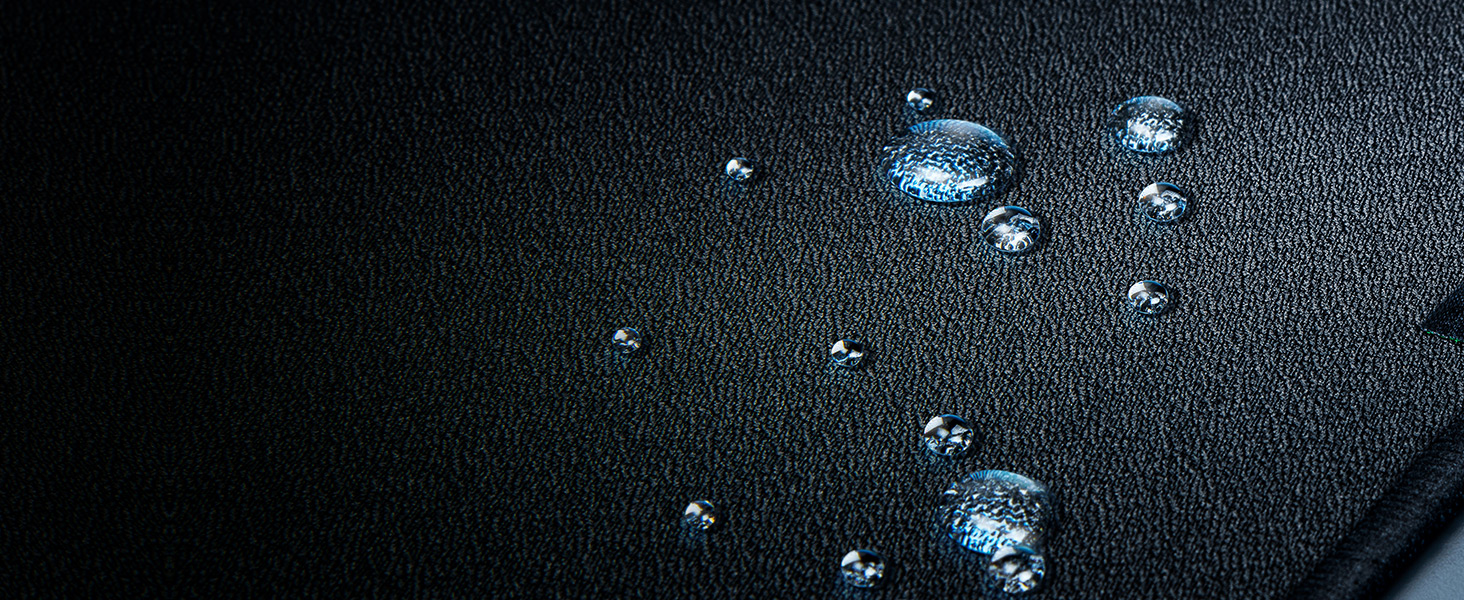
Figure 2: Detail of the anti-slip base, designed to keep the mat securely in place.

Figure 3: Reinforced stitched edges for enhanced durability and to prevent fraying.
സജ്ജമാക്കുക
- പായ അൺപാക്ക് ചെയ്യുക: Carefully remove the Razer Strider Hybrid Mouse Mat from its packaging.
- Unroll and Flatten: Gently unroll the mat onto your desired surface. The mat's design ensures it will lie flat quickly without curling.
- സ്ഥാനനിർണ്ണയം: Place the mat on a clean, dry desk surface. The anti-slip rubber base will help secure it in position.
- Placement of Peripherals: Position your mouse and other peripherals on the mat as desired.

Figure 4: The Razer Strider Hybrid Mouse Mat laid out on a desk, ready for use.
ഓപ്പറേഷൻ
The Razer Strider Hybrid Mouse Mat is designed for optimal mouse performance. Its firm, smooth surface allows for rapid, fluid mouse movements while maintaining precise control. Simply place your mouse on the mat and begin use. The consistent surface texture ensures accurate tracking for both optical and laser sensors.
വീഡിയോ 1: വീണ്ടുംview മോൺtage showcasing the Razer Strider Hybrid Mouse Mat in use, highlighting its performance characteristics.
പരിപാലനവും പരിചരണവും
To ensure the longevity and optimal performance of your Razer Strider Hybrid Mouse Mat, follow these care instructions:
- പതിവ് വൃത്തിയാക്കൽ: For light dust or debris, gently wipe the surface with a soft, dry cloth.
- Spill Cleaning: Due to its water-resistant surface, spills can be easily cleaned. Immediately wipe any liquid spills with a clean, damp തുണി. ഉരച്ചിലുകൾ ഉള്ള വസ്തുക്കൾ ഒഴിവാക്കുക.
- ആഴത്തിലുള്ള വൃത്തിയാക്കൽ: For more stubborn dirt, use a small amount of mild soap and water on a soft cloth. Gently scrub the affected area, then wipe clean with a damp cloth and allow to air dry completely before reuse.
- കഠിനമായ രാസവസ്തുക്കൾ ഒഴിവാക്കുക: Do not use harsh detergents, bleach, or alcohol-based cleaners, as these can damage the mat's surface.
- സംഭരണം: When not in use or for travel, roll the mat loosely to prevent creases.

Figure 5: The water-resistant surface allows for easy cleaning of spills.
ട്രബിൾഷൂട്ടിംഗ്
- Mat Not Lying Flat: If the mat does not lie perfectly flat after unrolling, allow it some time to settle. Applying gentle pressure or placing heavy, flat objects on the edges overnight can help.
- മൗസ് ട്രാക്കിംഗ് പ്രശ്നങ്ങൾ: Ensure the mat surface is clean and free of debris. Check your mouse's sensor for any obstructions. If issues persist, try adjusting your mouse's DPI settings.
- Unwanted Movement: Verify that the desk surface beneath the mat is clean and dry. The anti-slip base requires a clean surface to adhere effectively.
സ്പെസിഫിക്കേഷനുകൾ
| ആട്രിബ്യൂട്ട് | മൂല്യം |
|---|---|
| ഉൽപ്പന്ന അളവുകൾ | 15.76 x 17.73 x 0.12 ഇഞ്ച് |
| ഇനത്തിൻ്റെ ഭാരം | 6.4 ഔൺസ് |
| ASIN | B099MFQBYS |
| ഇനം മോഡൽ നമ്പർ | RZ02-03810200-R3U1 |
| നിർമ്മാതാവ് | റേസർ |
| ബ്രാൻഡ് | റേസർ |
| നിറം | ക്ലാസിക് ബ്ലാക്ക് |
| പ്രത്യേക ഫീച്ചർ | Non-slip, Wrist Support |
| ശുപാർശ ചെയ്യുന്ന ഉപയോഗങ്ങൾ | ഗെയിമിംഗ് |
| മെറ്റീരിയൽ | തുണിത്തരങ്ങൾ |

Figure 6: Dimensions of the Razer Strider Hybrid Mouse Mat.
വാറൻ്റിയും പിന്തുണയും
The Razer Strider Hybrid Mouse Mat is covered by a limited manufacturer's warranty. For detailed warranty information, product support, or technical assistance, please visit the official Razer support webസൈറ്റിൽ ബന്ധപ്പെടുക അല്ലെങ്കിൽ അവരുടെ ഉപഭോക്തൃ സേവനവുമായി ബന്ധപ്പെടുക. വാറന്റി ക്ലെയിമുകൾക്കായി നിങ്ങളുടെ വാങ്ങിയതിന്റെ തെളിവ് സൂക്ഷിക്കുക.
ഓൺലൈൻ പിന്തുണ: www.razer.com/support (ജനറൽ)
ബന്ധപ്പെടാനുള്ള വിവരങ്ങൾ: Refer to the Razer support webപ്രാദേശിക കോൺടാക്റ്റ് വിശദാംശങ്ങൾക്കായി സൈറ്റ്.


