1. ആമുഖം
This manual provides instructions for the proper setup, operation, and maintenance of your YAOHUIMI replacement remote control. This remote is designed to be compatible with various window air conditioner models, including AKPH10CR61, WPPH10CR5, AKPH08CR61, AKPH12CR61, AKPH08CR81, AKPH10CR81, WPPH08CR8N, and KPPH10CR71N. Please read this manual thoroughly before use to ensure optimal performance and longevity of your device.
2. ഉൽപ്പന്നം കഴിഞ്ഞുview
The remote control features an ergonomic design for comfortable handling and a clear LCD display for easy viewing of settings. It operates on two AAA batteries (not included).
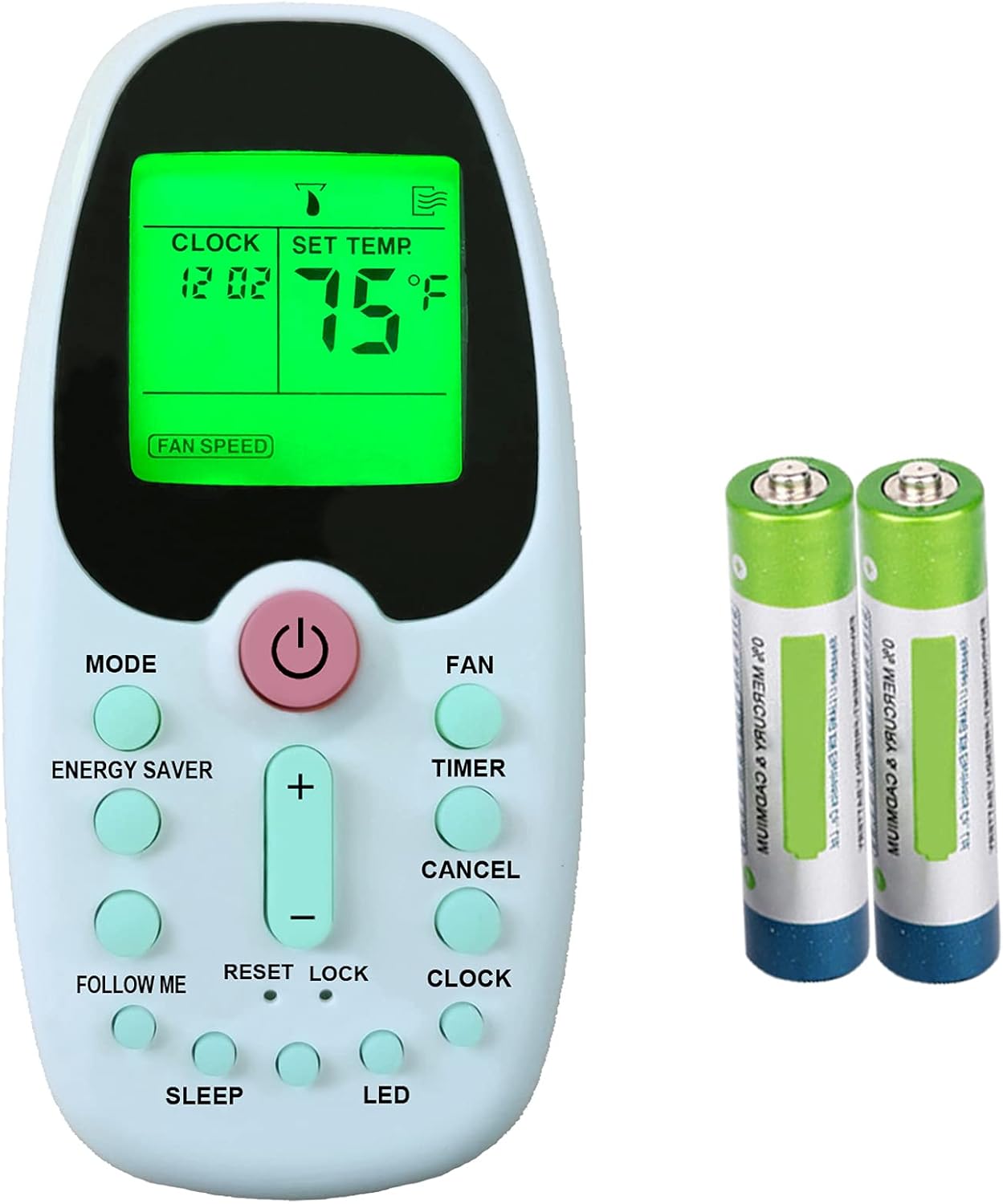
Image 1: YAOHUIMI Replacement Remote Control and two AAA batteries. The remote features a green LCD screen displaying "CLOCK 12:02" and "SET TEMP. 75°F", along with a "FAN SPEED" indicator. Below the screen are various control buttons.
ബട്ടൺ പ്രവർത്തനങ്ങൾ:
- പവർ ബട്ടൺ (⏻): എയർ കണ്ടീഷണർ ഓൺ അല്ലെങ്കിൽ ഓഫ് ചെയ്യുന്നു.
- മോഡ്: Cycles through operating modes (e.g., Cool, Dry, Fan, Auto).
- ഫാൻ: Adjusts fan speed (e.g., Low, Medium, High, Auto).
- എനർജി സേവർ: Activates or deactivates energy-saving mode.
- ടൈമർ: Sets the ON/OFF timer for the air conditioner.
- താപനില ക്രമീകരണം (+ / -): Increases or decreases the set temperature.
- റദ്ദാക്കുക: Cancels timer settings or other active functions.
- എന്നെ പിന്തുടരുക: Activates the Follow Me function, which senses the temperature at the remote's location.
- പുനഃസജ്ജമാക്കുക: Resets certain settings or functions.
- ലോക്ക് ചെയ്യുക: Locks the remote control buttons to prevent accidental changes.
- ക്ലോക്ക്: Sets the current time on the remote's display.
- ഉറങ്ങുക: Activates or deactivates sleep mode for comfortable night operation.
- എൽഇഡി: എയർ കണ്ടീഷണർ യൂണിറ്റിലെ ഡിസ്പ്ലേ ലൈറ്റ് നിയന്ത്രിക്കുന്നു.
3. സജ്ജീകരണം
ബാറ്ററി ഇൻസ്റ്റാളേഷൻ:
- റിമോട്ട് കൺട്രോളിൻ്റെ പിൻഭാഗത്ത് ബാറ്ററി കമ്പാർട്ട്മെൻ്റ് കവർ കണ്ടെത്തുക.
- കവർ താഴേക്ക് സ്ലൈഡ് ചെയ്യുക അല്ലെങ്കിൽ ലാച്ച് അമർത്തി ലിഫ്റ്റ് ഉപയോഗിച്ച് തുറക്കുക.
- Insert two new AAA batteries, ensuring the positive (+) and negative (-) terminals match the markings inside the compartment.
- ബാറ്ററി കമ്പാർട്ട്മെന്റ് കവർ മാറ്റി, സുരക്ഷിതമായി ക്ലിക്ക് ചെയ്യുന്നതുവരെ അത് തിരികെ സ്ഥലത്തേക്ക് സ്ലൈഡ് ചെയ്യുക.
- Note: If the remote does not respond, check battery orientation or replace with fresh batteries.
4. പ്രവർത്തന നിർദ്ദേശങ്ങൾ
അടിസ്ഥാന പ്രവർത്തനം:
- ഓൺ/ഓഫ് ചെയ്യുന്നു: അമർത്തുക ശക്തി button once to turn the unit on, and again to turn it off.
- താപനില ക്രമീകരണം: ഉപയോഗിക്കുക + ഒപ്പം - buttons to adjust the desired room temperature. The temperature range is typically between 62°F (17°C) and 86°F (30°C).
- മോഡ് മാറ്റുന്നു: അമർത്തുക മോഡ് button repeatedly to cycle through available operating modes: Auto, Cool, Dry, Fan.
- ഫാൻ സ്പീഡ് ക്രമീകരിക്കുന്നു: അമർത്തുക ഫാൻ button repeatedly to select desired fan speed: Auto, Low, Medium, High.
വിപുലമായ പ്രവർത്തനങ്ങൾ:
- TIMER പ്രവർത്തനം: അമർത്തുക ടൈമർ to set the auto-on or auto-off time. Use + / - to adjust the time, then press ടൈമർ സ്ഥിരീകരിക്കാൻ വീണ്ടും. അമർത്തുക റദ്ദാക്കുക ടൈമർ മായ്ക്കാൻ.
- സ്ലീപ്പ് മോഡ്: അമർത്തുക ഉറങ്ങുക to activate a quiet, energy-efficient mode that gradually adjusts temperature for comfortable sleep. Press again to deactivate.
- ENERGY SAVER Mode: അമർത്തുക എനർജി സേവർ to enable a function that cycles the compressor on and off to save energy once the desired temperature is reached.
- എന്റെ പ്രവർത്തനം പിന്തുടരുക: അമർത്തുക എന്നെ പിന്തുടരുക to activate. The remote will then act as a thermostat, sensing the temperature at its location and adjusting the air conditioner accordingly. Press again to deactivate.
- ക്ലോക്ക് ക്രമീകരണം: അമർത്തുക ക്ലോക്ക്, പിന്നെ ഉപയോഗിക്കുക + / - നിലവിലെ സമയം സജ്ജമാക്കാൻ. അമർത്തുക ക്ലോക്ക് സ്ഥിരീകരിക്കാൻ വീണ്ടും.
- ലോക്ക് പ്രവർത്തനം: അമർത്തുക ലോക്ക് ചെയ്യുക to disable all buttons on the remote, preventing accidental changes. Press again to unlock.
- LED നിയന്ത്രണം: അമർത്തുക എൽഇഡി to turn the air conditioner's display light ON or OFF.
- RESET Function: In case of unusual operation or to clear all settings, press the പുനഃസജ്ജമാക്കുക button (often a small recessed button requiring a pointed object like a paperclip).
5. പരിപാലനം
റിമോട്ട് കൺട്രോൾ വൃത്തിയാക്കൽ:
- മൃദുവായതും ഉണങ്ങിയതുമായ തുണി ഉപയോഗിച്ച് റിമോട്ട് കൺട്രോൾ തുടയ്ക്കുക.
- ലിക്വിഡ് ക്ലീനറുകൾ, അബ്രാസീവ് ക്ലീനറുകൾ, കെമിക്കൽ സ്പ്രേകൾ എന്നിവ ഉപയോഗിക്കരുത്, കാരണം ഇവ റിമോട്ടിന്റെ ഉപരിതലത്തിനോ ആന്തരിക ഘടകങ്ങളോ കേടുവരുത്തും.
- റിമോട്ട് ദീർഘനേരം ഉപയോഗിക്കുന്നില്ലെങ്കിൽ, ചോർച്ചയും നാശവും തടയാൻ ബാറ്ററികൾ നീക്കം ചെയ്യുക.
6. പ്രശ്നപരിഹാരം
| പ്രശ്നം | സാധ്യമായ കാരണം | പരിഹാരം |
|---|---|---|
| റിമോട്ട് പ്രതികരിക്കുന്നില്ല | ഡെഡ് അല്ലെങ്കിൽ തെറ്റായി ഇൻസ്റ്റാൾ ചെയ്ത ബാറ്ററികൾ. റിമോട്ടിനും എസി യൂണിറ്റിനും ഇടയിലുള്ള തടസ്സം. റിമോട്ട് പരിധിക്ക് പുറത്താണ്. | ബാറ്ററികൾ മാറ്റി, ശരിയായ പോളാരിറ്റി ഉറപ്പാക്കുക. തടസ്സങ്ങൾ നീക്കം ചെയ്യുക. എസി യൂണിറ്റിന് അടുത്തേക്ക് നീങ്ങുക. |
| ഡിസ്പ്ലേ മങ്ങിയതോ ശൂന്യമോ ആണ് | കുറഞ്ഞ ബാറ്ററി പവർ. | ബാറ്ററികൾ മാറ്റിസ്ഥാപിക്കുക. |
| എസി യൂണിറ്റ് നിർദ്ദിഷ്ട കമാൻഡുകളോട് പ്രതികരിക്കുന്നില്ല. | Remote in LOCK mode. AC unit not compatible with all functions. | അമർത്തുക ലോക്ക് ചെയ്യുക button to unlock the remote. Refer to your AC unit's manual for supported functions. |
7 സ്പെസിഫിക്കേഷനുകൾ
- മോഡൽ നമ്പർ: A420210720-49
- ബ്രാൻഡ്: YAOHUIMI
- അനുയോജ്യമായ ഉപകരണങ്ങൾ: AKPH08CR61, AKPH08CR81, AKPH10CR61, AKPH10CR81, AKPH12CR61, KPPH10CR71N, WPPH08CR8N, WPPH10CR5 Window Air Conditioners
- പവർ ഉറവിടം: 2 x AAA ബാറ്ററികൾ (ഉൾപ്പെടുത്തിയിട്ടില്ല)
- പ്രത്യേക ഫീച്ചർ: എർഗണോമിക് ഡിസൈൻ
8. വാറൻ്റിയും പിന്തുണയും
വാറന്റി വിവരങ്ങൾക്കോ സാങ്കേതിക പിന്തുണയ്ക്കോ, ദയവായി വിൽപ്പനക്കാരന്റെ നയം പരിശോധിക്കുകയോ നിർമ്മാതാവിനെ നേരിട്ട് ബന്ധപ്പെടുകയോ ചെയ്യുക. വാങ്ങിയതിന്റെ തെളിവായി നിങ്ങളുടെ വാങ്ങൽ രസീത് സൂക്ഷിക്കുക.


