1. ആമുഖം
The TOPXCDZ Mini RGB Bluetooth Controller is a wireless smart LED controller utilizing Bluetooth 4.0 technology. It is designed to provide convenient control over RGB LED light strips, supporting DC 5V, 12V, and 24V systems. This device allows users to manage various lighting functions, including power on/off, color selection, brightness adjustment, and a range of dynamic lighting effects, all through a dedicated mobile application.
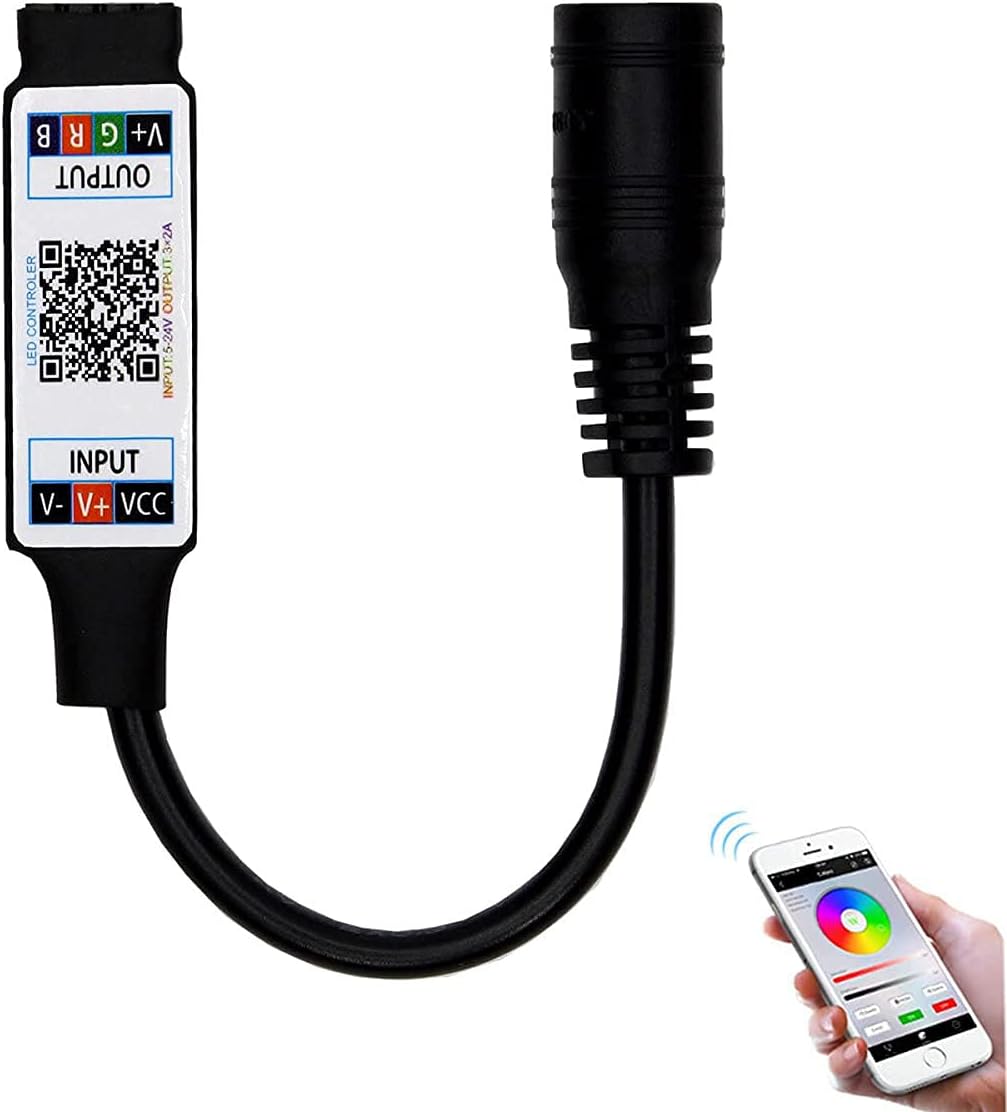
Figure 1: The TOPXCDZ Mini RGB Bluetooth Controller connected to an LED strip, demonstrating app control.
2. ഉൽപ്പന്ന സവിശേഷതകൾ
- വയർലെസ് നിയന്ത്രണം: Utilizes Bluetooth 4.0 technology for seamless wireless operation.
- മൊബൈൽ ആപ്പ് അനുയോജ്യത: Controlled via a dedicated mobile application, suitable for Android systems (version 4.3 and above) and Apple iOS systems (version 6.0 and above).
- ബഹുമുഖ ആപ്ലിക്കേഷൻ: Ideal for various settings including homes, hotels, bars, and entertainment venues.
- Comprehensive Light Control: Directly manages light strip power (on/off), color selection, and brightness levels.
- ഡൈനാമിക് ലൈറ്റിംഗ് ഇഫക്റ്റുകൾ: Offers a wide array of pre-programmed effects, including colorful gradients, various monochrome and bi-color gradients, strobe effects, colorful flashes, and music synchronization modes.
3 സ്പെസിഫിക്കേഷനുകൾ

ചിത്രം 2: കൺട്രോളറിന്റെ ഭൗതിക അളവുകൾ.
| പരാമീറ്റർ | മൂല്യം |
|---|---|
| പവർ സപ്ലൈ വോളിയംtage | 4.5V-24V DC (Wide Voltage) |
| ഔട്ട്പുട്ട് ചാനലുകൾ | 3 Channels (RGB) |
| ഉൽപ്പന്ന അളവുകൾ (L*W*H) | ഏകദേശം 43 മിമി * 22 മിമി * 11 മിമി |
| Total Length (with cable) | Approx. 120mm to 500mm (varies by type) |
| സ്റ്റാറ്റിക് പവർ ഉപഭോഗം | <1W |
| പരമാവധി ലോഡ് കറന്റ് | <6A (2A per channel) |
| Put ട്ട്പുട്ട് കണക്റ്റർ | 4-പിൻ കണക്റ്റർ |
| ഔട്ട്പുട്ട് പവർ | 5V <30W, 12V <72W, 24V <144W |
| ബ്ലൂടൂത്ത് പതിപ്പ് | BLE V4.2 |
| പ്രവർത്തന താപനില | -25°C മുതൽ 75°C വരെ |
| ഭാരം | ഏകദേശം 30 ഗ്രാം |
| മെറ്റീരിയൽ | ലോഹം |
| ഇൻഡോർ/ഔട്ട്ഡോർ ഉപയോഗം | ഇൻഡോർ |
4. പാക്കേജ് ഉള്ളടക്കം
പാക്കേജിൽ ഇനിപ്പറയുന്ന ഇനം ഉൾപ്പെടുന്നു:
- 1x TOPXCDZ Mini RGB Bluetooth Controller
5. സജ്ജീകരണ നിർദ്ദേശങ്ങൾ
Follow these steps to set up your Mini RGB Bluetooth Controller:
- LED സ്ട്രിപ്പ് ബന്ധിപ്പിക്കുക:
Ensure your LED strip is compatible with a 4-pin RGB connector. Connect the output end of the controller (labeled 'OUTPUT V+ G R B') to your RGB LED strip. Match the V+, G, R, B pins correctly. - പവർ സപ്ലൈ ബന്ധിപ്പിക്കുക:
Connect a compatible DC power supply (4.5V-24V) to the input end of the controller (labeled 'INPUT V- V+ VCC'). Ensure the voltage matches your LED strip requirements. - ആപ്പ് ഡൗൺലോഡ് ചെയ്യുക:
Scan the QR code printed on the controller or visit the official download link to install the control application on your smartphone. The app is available for Android (4.3+) and iOS (6.0+).
ആപ്പ് ഇവിടെ ഡൗൺലോഡ് ചെയ്യുക - ബ്ലൂടൂത്ത് ജോടിയാക്കുക:
Open the installed application on your smartphone. Ensure Bluetooth is enabled on your phone. The app should automatically detect and connect to the controller within 5 seconds. If not, check your phone's Bluetooth settings and restart the app.

Figure 3: Correct connection of the controller to an LED strip.
6. പ്രവർത്തന നിർദ്ദേശങ്ങൾ
Once connected, use the mobile application to control your LED strip. The app provides a user-friendly interface for various functions.
6.1 ആപ്പ് ഇന്റർഫേസ് ഓവർview
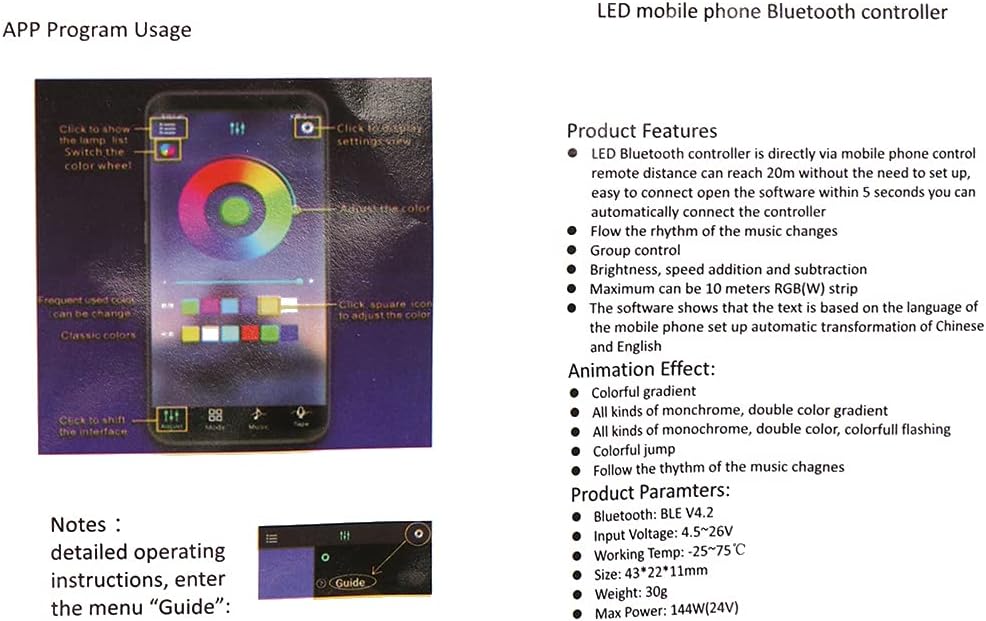
ചിത്രം 4: ഓവർview of the mobile application interface.
The app typically features a color wheel for precise color selection, sliders for brightness and speed adjustment, and various mode buttons for dynamic effects. Detailed operating instructions can often be found within the app's 'Guide' menu.
6.2 അടിസ്ഥാന നിയന്ത്രണങ്ങൾ
- പവർ ഓൺ/ഓഫ്: Use the designated power button within the app to turn the LED strip on or off.
- വർണ്ണ തിരഞ്ഞെടുപ്പ്: Tap or drag on the color wheel to choose your desired static color.
- തെളിച്ച ക്രമീകരണം: Use the brightness slider to increase or decrease the light intensity.
6.3 Dynamic Modes and Music Sync
- Pre-set Effects: Select from various animation effects such as colorful gradient, flashing, jumping, and more.
- സംഗീത സമന്വയം: Activate the music mode to make the LED lights change in rhythm with music played through your phone's microphone or internal audio.
Video 1: Demonstration of the TOPXCDZ Mini RGB Bluetooth Controller's functionality, showcasing various color changes and music synchronization via the mobile app.
7. പരിപാലനം
നിങ്ങളുടെ കൺട്രോളറിന്റെ ദീർഘായുസ്സും ഒപ്റ്റിമൽ പ്രകടനവും ഉറപ്പാക്കാൻ, ഈ പരിപാലന മാർഗ്ഗനിർദ്ദേശങ്ങൾ പാലിക്കുക:
- ഉണക്കി സൂക്ഷിക്കുക: Avoid exposing the controller to moisture or liquids, as this can cause damage.
- സൌമ്യമായി വൃത്തിയാക്കുക: കൺട്രോളർ വൃത്തിയാക്കാൻ മൃദുവായതും ഉണങ്ങിയതുമായ തുണി ഉപയോഗിക്കുക. കഠിനമായ രാസവസ്തുക്കളോ ഉരച്ചിലുകളോ ഉള്ള വസ്തുക്കളോ ഉപയോഗിക്കരുത്.
- തീവ്രമായ താപനില ഒഴിവാക്കുക: Operate and store the controller within the recommended temperature range (-25°C to 75°C) to prevent malfunction.
- ശരിയായ സംഭരണം: When not in use for extended periods, store the controller in a cool, dry place away from direct sunlight.
8. പ്രശ്നപരിഹാരം
If you encounter issues with your TOPXCDZ Mini RGB Bluetooth Controller, refer to the following troubleshooting steps:
| പ്രശ്നം | സാധ്യമായ കാരണം | പരിഹാരം |
|---|---|---|
| Controller not connecting to app | Bluetooth is off on phone; App not running; Controller not powered; Out of range. | Ensure phone's Bluetooth is on. Restart the app. Check power connection to controller. Move closer to the controller (within 20m). |
| LED സ്ട്രിപ്പ് പ്രകാശിക്കുന്നില്ല | No power to controller; Incorrect wiring; Faulty LED strip. | Verify power supply is connected and functional. Check all wiring connections, especially the 4-pin output. Test the LED strip with another controller if possible. |
| Incorrect colors displayed | RGB pins connected incorrectly. | Ensure the R, G, B, and V+ pins on the controller output are correctly matched to the LED strip's input. Some strips may have a different order. |
| ലൈറ്റുകൾ മിന്നിമറയുന്നു അല്ലെങ്കിൽ ക്രമരഹിതമായി പ്രവർത്തിക്കുന്നു | Unstable power supply; Loose connection; Overloaded controller. | Check power supply stability. Secure all connections. Ensure total wattage of LED strip does not exceed controller's maximum output (e.g., 144W for 24V). |
9. വാറൻ്റിയും പിന്തുണയും
For warranty information and technical support, please refer to the documentation provided with your purchase or contact the retailer. Keep your proof of purchase for any warranty claims.
