1. ആമുഖം
The KOMSHINE KPN-35 is a compact and precise Live PON Optical Power Meter designed for testing Passive Optical Networks (PON). It is capable of simultaneously measuring and displaying optical power levels at three key wavelengths: 1310nm (for ONT upstream), 1490nm (for OLT downstream), and 1550nm (for video signals). This device is essential for installation, maintenance, and troubleshooting of EPON, GPON, and APON networks, providing clear pass/warning/fail indications based on user-defined thresholds.
2 സുരക്ഷാ വിവരങ്ങൾ
Please read and understand all safety instructions before operating the KOMSHINE KPN-35. Failure to follow these instructions may result in injury or damage to the device.
- നേത്ര സുരക്ഷ: Never look directly into the optical output port of the device or any fiber optic cable connected to it. Invisible laser radiation can cause severe eye damage. Always use appropriate eye protection when working with fiber optics.
- ബാറ്ററി സുരക്ഷ: Use only the specified battery type. Do not attempt to open, crush, or expose batteries to extreme temperatures. Dispose of batteries according to local regulations.
- പരിസ്ഥിതി വ്യവസ്ഥകൾ: Operate the device within the specified temperature and humidity ranges. Avoid exposure to water, dust, and corrosive substances.
- വൃത്തിയാക്കൽ: Ensure the device is powered off before cleaning. Use a soft, dry cloth. Do not use abrasive cleaners or solvents.
3. ഉൽപ്പന്ന സവിശേഷതകൾ
- Simultaneous measurement of 1310nm, 1490nm, and 1550nm wavelengths in PON networks.
- Displays data and video signals for different PON architectures.
- Five selectable threshold sets with Pass, Warning, and Fail modes for easy interpretation.
- Thresholds can be customized via management software.
- Equipped with SC APC connector.
- Large-capacity data storage for measurement results.
- Automatic shutdown feature (can be disabled).
- Durable design with rubber armor protection and anti-slip silicone jacket.
- LED backlit display for improved visibility in various lighting conditions.
- ഒതുക്കമുള്ളതും പോർട്ടബിൾ ഡിസൈൻ.
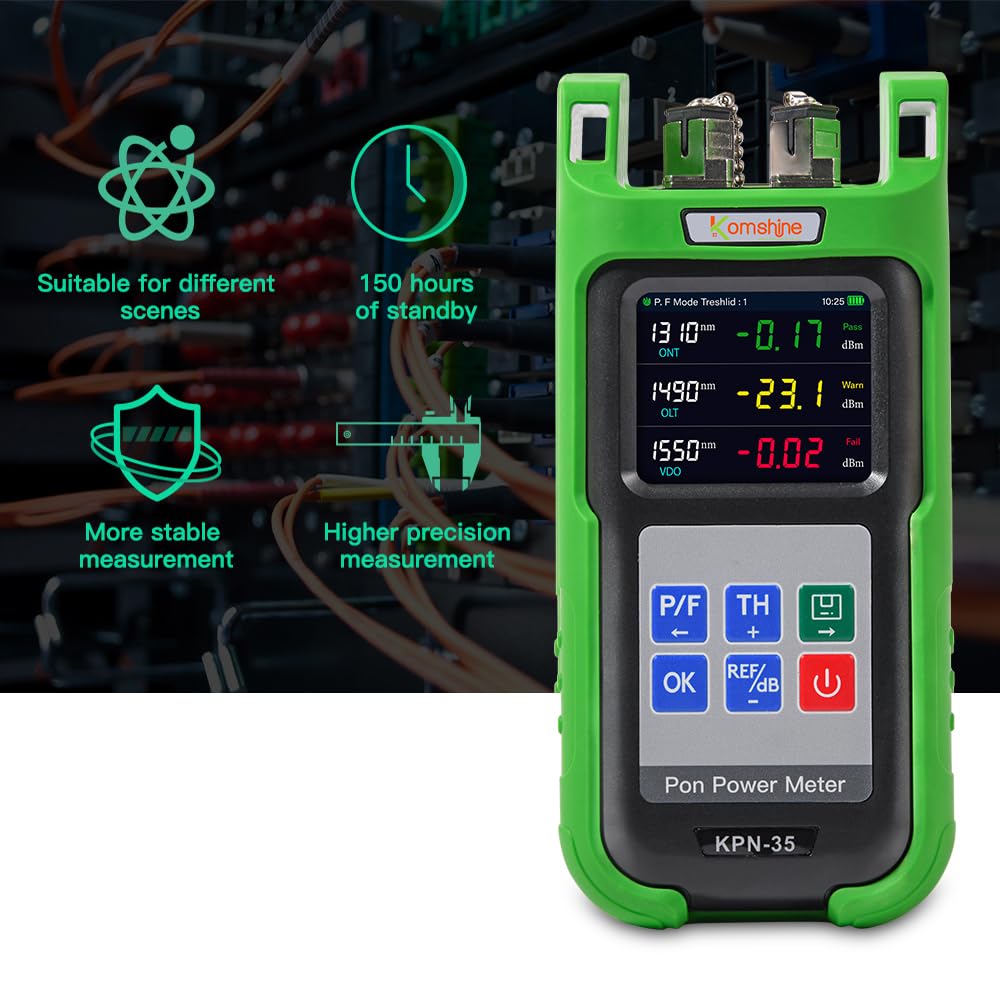
ചിത്രം 3.1: Key features of the KPN-35, highlighting its versatility, long standby time, and measurement stability.
4. സജ്ജീകരണം
4.1 അൺപാക്കിംഗും പരിശോധനയും
Carefully unpack the KOMSHINE KPN-35 and inspect it for any signs of damage. Ensure all components are present. The standard package includes the KPN-35 unit and a user manual. Please note that batteries are not included and must be purchased separately.
4.2 ബാറ്ററി ഇൻസ്റ്റാളേഷൻ
The KPN-35 operates on batteries. Locate the battery compartment on the device, typically on the rear. Open the compartment cover, insert the required batteries (refer to the device label for battery type and polarity), and securely close the cover.
4.3 Attaching the Protective Jacket
The KPN-35 comes with a rubber armor protection and an anti-slip silicone jacket. Carefully fit the silicone jacket around the device to provide enhanced durability and protection against drops and impacts.
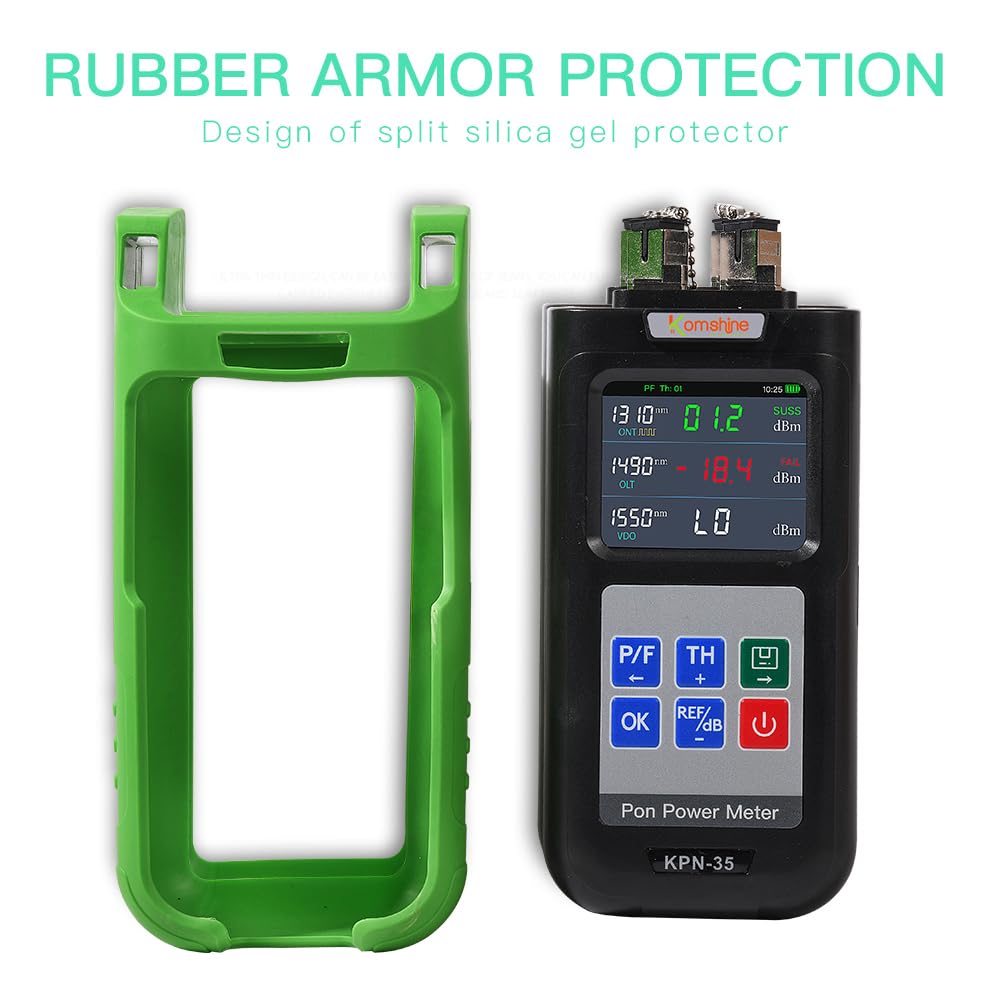
ചിത്രം 4.1: The KPN-35 unit alongside its protective rubber armor.

ചിത്രം 4.2: The KPN-35 with its anti-wrestling silicone jacket, demonstrating impact resistance.
5. പ്രവർത്തന നിർദ്ദേശങ്ങൾ
5.1 പവർ ഓൺ/ഓഫ്
അമർത്തിപ്പിടിക്കുക ശക്തി button (usually marked with a power symbol) to turn the device on or off.
5.2 Connecting to Fiber
The KPN-35 features an SC APC connector. Before connecting, ensure the fiber end-face and the meter's input port are clean. Remove the dust plug from the meter's input port and carefully insert the SC APC connector of the fiber optic cable.

ചിത്രം 5.1: The KPN-35 showing simultaneous measurements for 1310nm, 1490nm, and 1550nm, highlighting its SC dedicated interface.

ചിത്രം 5.2: Detail of the KPN-35's connectors, featuring dust plugs, ceramic core, metal chain, and an antiskid clip for secure and clean connections.
5.3 അളവുകൾ എടുക്കൽ
Once powered on and connected, the KPN-35 will automatically detect and display the optical power levels for 1310nm, 1490nm, and 1550nm wavelengths. The display will show the measured power in dBm for each wavelength, along with a corresponding status (Pass, Warning, or Fail) based on the currently selected threshold settings.

ചിത്രം 5.3: The KPN-35's LED backlit display, clearly indicating Pass, Warn, and Fail statuses for different wavelengths.
5.4 Setting Thresholds
The KPN-35 provides five sets of pre-defined thresholds. Use the TH button to cycle through these threshold sets. The active threshold set number will be indicated on the display. For custom threshold settings, connect the device to a computer and use the provided management software.
5.5 ഫലങ്ങൾ വ്യാഖ്യാനിക്കൽ
- പാസ്: Indicates the measured power level is within the acceptable range defined by the current threshold.
- മുന്നറിയിപ്പ്: Indicates the measured power level is close to the acceptable limit, suggesting potential issues or degradation.
- പരാജയം: Indicates the measured power level is outside the acceptable range, requiring immediate attention or troubleshooting.
5.6 ഡാറ്റ സംഭരണം
The device has large-capacity data storage. Press the OK button to save the current measurement data. Refer to the full manual or management software for instructions on retrieving and analyzing stored data.
6. പരിപാലനം
6.1 Cleaning the Optical Port
Regularly clean the optical input port of the KPN-35 to ensure accurate measurements. Use a specialized fiber optic cleaning tool or lint-free wipes with isopropyl alcohol. Always power off the device before cleaning.
6.2 ബാറ്ററി മാറ്റിസ്ഥാപിക്കൽ
When the battery indicator shows low power, replace the batteries promptly to avoid interruption of operation. Ensure correct battery type and polarity during replacement.
6.3 സംഭരണം
When not in use, store the KPN-35 in a clean, dry environment, away from direct sunlight and extreme temperatures. Always replace the dust caps on the optical ports to prevent contamination.
7. പ്രശ്നപരിഹാരം
- ഉപകരണം പവർ ഓൺ ചെയ്യുന്നില്ല: Check battery installation and ensure batteries have sufficient charge. Replace batteries if necessary.
- കൃത്യമല്ലാത്ത വായനകൾ: Ensure the optical port and fiber connector are clean. Dirty connectors are a common cause of inaccurate measurements. Verify the fiber type and wavelength settings are appropriate for the test.
- Screen difficult to read in daylight: While the device has an LED backlight, direct sunlight can still affect visibility. Try to operate in shaded areas or adjust your viewing ആംഗിൾ.
- Only one wavelength shows readings: Ensure the fiber connection is stable and clean. If the issue persists, it may indicate a fault with the device or the fiber being tested. Contact support if the problem continues across multiple tests and fibers.
- Device freezes or behaves erratically: Try powering off the device and restarting it. If the issue persists, remove and reinsert batteries.
8 സ്പെസിഫിക്കേഷനുകൾ
| സ്പെസിഫിക്കേഷൻ | മൂല്യം |
|---|---|
| ബ്രാൻഡ് | കോംഷൈൻ |
| മോഡൽ നമ്പർ | KPN-35 |
| അളക്കൽ തരം | ഒപ്റ്റിക്കൽ പവർ മീറ്റർ |
| തരംഗദൈർഘ്യം | 1310nm, 1490nm, 1550nm |
| റെസലൂഷൻ | 0.1dB |
| കണക്റ്റർ തരം | എസ്സി എപിസി |
| പവർ ഉറവിടം | ബാറ്ററി പവർ (ബാറ്ററികൾ ഉൾപ്പെടുത്തിയിട്ടില്ല) |
| ഡാറ്റ സംഭരണം | 100 റെക്കോർഡുകൾ |
| ഇനത്തിൻ്റെ ഭാരം | 381 ഗ്രാം |
| പാക്കേജ് അളവുകൾ | 22.1 x 11.71 x 6.2 സെ.മീ |
| നിറം | പച്ച |
| സ്പെസിഫിക്കേഷൻ മെറ്റ് | CE, FCC |
9. വാറൻ്റിയും പിന്തുണയും
The KOMSHINE KPN-35 comes with a 10-day replacement policy. For any issues encountered within this period, please contact your retailer or point of purchase for assistance. Additionally, extended warranty options may be available from third-party providers like Onsitego. For technical support, product inquiries, or further assistance, please refer to the contact information provided by your seller or visit the official KOMSHINE webസൈറ്റ്.


