ആമുഖം
Thank you for choosing the VÂNTOP Nimbal M3 3-Axis Smartphone Gimbal Stabilizer. This manual provides essential information for setting up, operating, and maintaining your device. Please read this manual thoroughly before use to ensure proper operation and to maximize the performance of your gimbal.
സുരക്ഷാ വിവരങ്ങൾ
- Do not expose the gimbal to water or moisture.
- ഗിംബൽ താഴെയിടുകയോ ശക്തമായ ആഘാതങ്ങൾക്ക് വിധേയമാക്കുകയോ ചെയ്യുന്നത് ഒഴിവാക്കുക.
- Do not disassemble, repair, or modify the gimbal yourself. Contact authorized service personnel for assistance.
- Keep the gimbal away from heat sources, direct sunlight, and flammable materials.
- Ensure the smartphone is securely mounted before powering on the gimbal to prevent damage.
- Store the gimbal in a cool, dry place when not in use.
പാക്കേജ് ഉള്ളടക്കം
അൺബോക്സിംഗ് ചെയ്യുമ്പോൾ എല്ലാ ഇനങ്ങളും ഉണ്ടെന്ന് ഉറപ്പാക്കാൻ പാക്കേജ് ഉള്ളടക്കങ്ങൾ പരിശോധിക്കുക:
- VÂNTOP Nimbal M3 Gimbal Stabilizer
- മിനി ട്രൈപോഡ്
- ചുമക്കുന്ന കേസ്
- യുഎസ്ബി ചാർജിംഗ് കേബിൾ
- ഉപയോക്തൃ മാനുവൽ

Image: Contents of the VÂNTOP Nimbal M3 package, including the gimbal, mini tripod, carrying case, USB charging cable, and user manual.
ഉൽപ്പന്നം കഴിഞ്ഞുview
Familiarize yourself with the main components and controls of your Nimbal M3 gimbal:

ചിത്രം: വിശദമായ ഒരു ചിത്രം view of the Nimbal M3 gimbal, highlighting its 3-axis stabilization mechanism and ergonomic design.
- സ്മാർട്ട്ഫോൺ Clamp: നിങ്ങളുടെ സ്മാർട്ട്ഫോൺ സുരക്ഷിതമായി സൂക്ഷിക്കുന്നു.
- Roll Axis Motor: Controls the roll movement of the smartphone.
- Tilt Axis Motor: Controls the tilt (up/down) movement.
- Pan Axis Motor: Controls the pan (left/right) movement.
- നിയന്ത്രണ പാനൽ: Includes joystick, mode button, power button, and zoom wheel.
- കൈകാര്യം ചെയ്യുക: സുഖകരമായ പിടിയ്ക്കായി എർഗണോമിക് ആയി രൂപകൽപ്പന ചെയ്തിരിക്കുന്നു.
- 1/4" സ്ക്രൂ ദ്വാരം: For attaching the mini tripod or other accessories.
സജ്ജമാക്കുക
1. Gimbal ചാർജ് ചെയ്യുന്നു
Before first use, fully charge the gimbal using the provided USB charging cable. Connect the USB-C end to the gimbal's charging port and the USB-A end to a power adapter (not included). The indicator light will show charging status and turn off when fully charged.
2. നിങ്ങളുടെ സ്മാർട്ട്ഫോൺ മൌണ്ട് ചെയ്യുന്നു
- സ്മാർട്ട്ഫോൺ cl നീട്ടുകamp.
- Carefully place your smartphone into the clamp, ensuring it is centered and secure.
- Ensure the phone's camera is not obstructed by the clamp.
3. ഗിംബലിനെ സന്തുലിതമാക്കൽ
Proper balancing is crucial for optimal performance and battery life. After mounting your smartphone, adjust its position within the clamp until the phone remains level when the gimbal is powered off. This reduces strain on the motors.
4. ആപ്പ് ഇൻസ്റ്റാളേഷനും കണക്ഷനും
For full functionality and advanced features, download the 'Gimo' app from your smartphone's app store (iOS App Store or Google Play Store).
- നിങ്ങളുടെ മൊബൈൽ ഫോണിൽ ബ്ലൂടൂത്ത് പ്രവർത്തനക്ഷമമാക്കുക.
- Power on your Nimbal M3 gimbal by pressing and holding the power button.
- Launch the 'Gimo' App.
- Follow the in-app instructions to connect to your Nimbal M3 via Bluetooth.

Image: Simple setup guide for the Nimbal M3, illustrating the steps to connect the gimbal to a smartphone via the Gimo app.
Gimbal പ്രവർത്തിപ്പിക്കുന്നു
പവർ ഓൺ/ഓഫ്
- പവർ ഓൺ: പവർ ബട്ടൺ 3 സെക്കൻഡ് അമർത്തിപ്പിടിക്കുക.
- പവർ ഓഫ്: പവർ ബട്ടൺ 3 സെക്കൻഡ് അമർത്തിപ്പിടിക്കുക.
നിയന്ത്രണ പാനൽ പ്രവർത്തനങ്ങൾ
- ജോയ്സ്റ്റിക്ക്: Controls the pan and tilt movement of the gimbal.
- മോഡ് ബട്ടൺ: Cycles through different operating modes (e.g., Pan Follow, Lock Mode, POV). Refer to the Gimo app for detailed mode descriptions.
- Zoom Wheel: Adjusts the focal length (zoom in/out) of your smartphone camera within the Gimo app.
പ്രവർത്തന രീതികളും സവിശേഷതകളും
- ഫോൺ ഗോ മോഡ്: Allows the smartphone to quickly rotate with the handle for extremely fast transition effects. This mode is optimized for rapid response.
- സ്മാർട്ട് ട്രാക്കിംഗ്: The gimbal can automatically track a selected subject, keeping it in the frame. This is ideal for capturing dynamic scenes with moving objects.
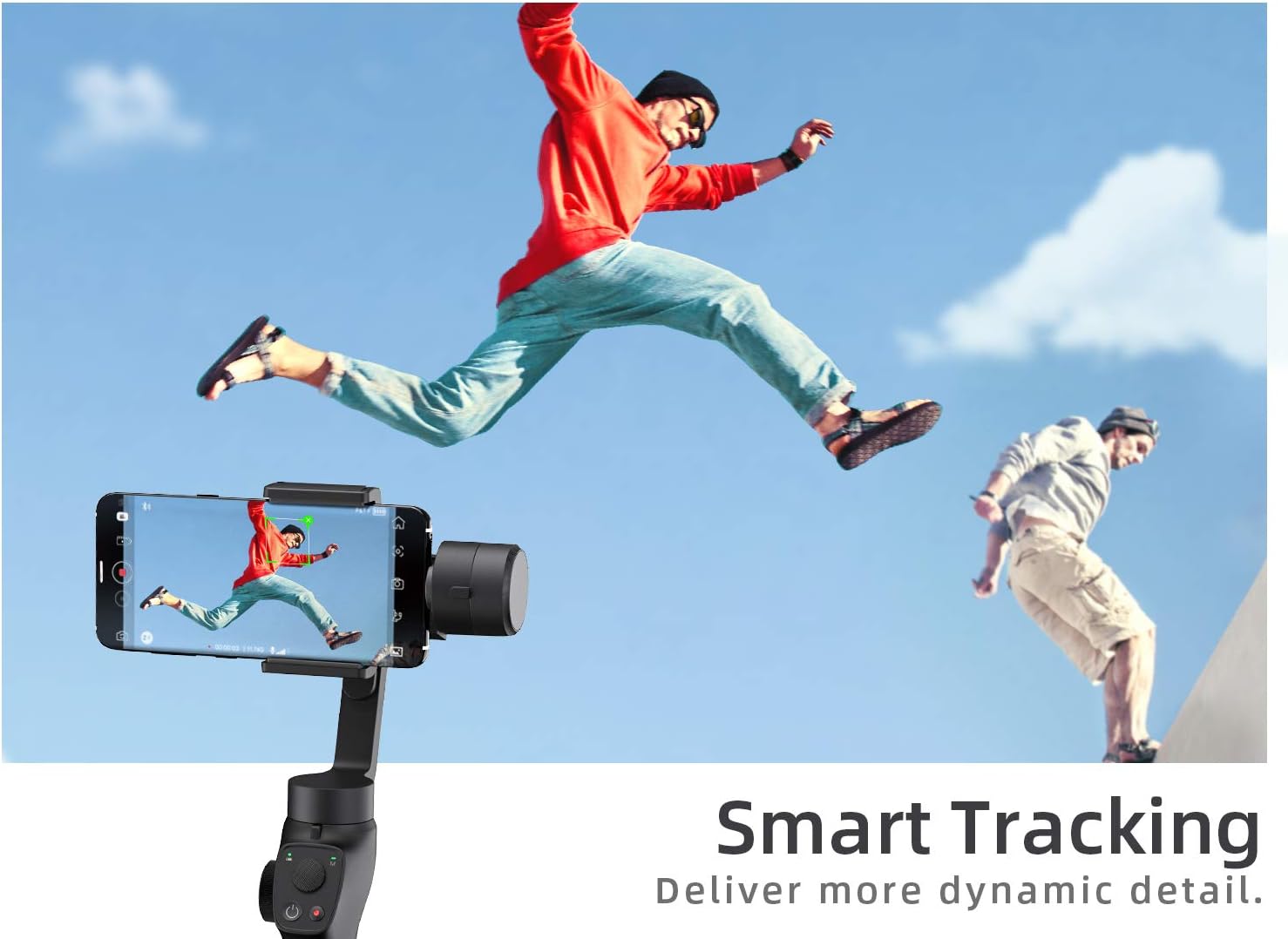
Image: The Smart Tracking feature in action, demonstrating the gimbal's ability to follow subjects for dynamic video capture.
- പ്രവർത്തന മോഡ്: Optimized algorithm for faster response, allowing the gimbal to easily follow fast-moving objects and capture action scenes instantly.

Image: A visual comparison highlighting the effectiveness of Action Mode, showing how the Nimbal M3 captures clear footage of fast-moving subjects compared to unstabilized shots.
- ആരംഭ മോഡ്: Creates a spinning camera effect, adding a dynamic and cinematic feel to your videos.
- Hitchcock Effect (Dolly Zoom): Achieves a dramatic visual effect where the background appears to zoom in or out while the foreground remains the same size.
മെയിൻ്റനൻസ്
- വൃത്തിയാക്കൽ: ജിംബൽ വൃത്തിയാക്കാൻ മൃദുവായതും ഉണങ്ങിയതുമായ തുണി ഉപയോഗിക്കുക. ലിക്വിഡ് ക്ലീനറുകളോ ലായകങ്ങളോ ഉപയോഗിക്കരുത്.
- സംഭരണം: When not in use for extended periods, store the gimbal in its carrying case in a cool, dry place. Ensure the gimbal is powered off.
- ബാറ്ററി കെയർ: To prolong battery life, avoid fully discharging the battery frequently. Charge the gimbal at least once every three months if not in regular use.
ട്രബിൾഷൂട്ടിംഗ്
| പ്രശ്നം | സാധ്യമായ കാരണം | പരിഹാരം |
|---|---|---|
| ഗിംബാൽ പവർ ഓൺ ചെയ്യുന്നില്ല. | ബാറ്ററി ചാർജ് കുറവാണ്; പവർ ബട്ടൺ അധികം നേരം അമർത്തിപ്പിടിച്ചിട്ടില്ല. | Charge the gimbal fully; Press and hold the power button for 3 seconds. |
| അസ്ഥിരമായ ഫൂtage/vibration. | Smartphone not balanced; Overloaded motor. | Ensure smartphone is properly balanced; Check phone weight is within limits. |
| Cannot connect to Gimo App. | Bluetooth off; App not launched; Gimbal not powered on. | Enable Bluetooth; Relaunch app; Power on gimbal; Restart phone and gimbal. |
| Motors feel hot. | Prolonged use; Improper balancing. | Allow gimbal to cool down; Re-balance the smartphone. |
സ്പെസിഫിക്കേഷനുകൾ
| മോഡലിൻ്റെ പേര് | Nimbal M3 |
| മോഡൽ നമ്പർ | NBM3XX-ITGY0A |
| ബ്രാൻഡ് | VÂNTOP |
| നിറം | കറുപ്പ് |
| അനുയോജ്യമായ ഉപകരണങ്ങൾ | Mobile Phones (iPhone, Samsung, Huawei, Xiaomi, etc.) |
| സ്ഥിരത | 3-ആക്സിസ് |
| ബാറ്ററി ലൈഫ് | 15 മണിക്കൂർ വരെ |
| യു.പി.സി | 760932572142 |
| ASIN | B09B7K49PX |
വാറൻ്റിയും പിന്തുണയും
The VÂNTOP Nimbal M3 Gimbal Stabilizer comes with a standard manufacturer's warranty. For detailed warranty terms, technical support, or service inquiries, please refer to the warranty card included in your package or visit the official VÂNTOP webസൈറ്റ്. വാറന്റി ക്ലെയിമുകൾക്കായി നിങ്ങളുടെ വാങ്ങലിന്റെ തെളിവ് സൂക്ഷിക്കുക.


