1. ആമുഖം
The Sonoro Easy is a compact and portable digital radio designed to provide powerful sound for various occasions. It features FM, DAB+, and Bluetooth connectivity, along with an AUX input for external devices. Its small footprint allows for easy placement in any room, and the intuitive controls ensure straightforward operation. The integrated LED night light and USB charging port add to its versatility, making it an ideal companion for your bedroom, kitchen, or on the go.
2. സജ്ജീകരണം
2.1 അൺപാക്കിംഗ്
Carefully remove the Sonoro Easy radio from its packaging. Ensure all components are present:
- Sonoro Easy Digital Radio
- പവർ അഡാപ്റ്റർ
- ഉപയോക്തൃ മാനുവൽ (ഈ പ്രമാണം)
2.2 പവർ ചെയ്യുന്നു
The Sonoro Easy can be powered via the included mains adapter or by batteries for portable use.
പ്രധാന ശക്തി:
- Connect the power adapter to the "12V - 2.5A" DC input port on the rear of the radio.
- പവർ അഡാപ്റ്റർ അനുയോജ്യമായ ഒരു മതിൽ ഔട്ട്ലെറ്റിലേക്ക് പ്ലഗ് ചെയ്യുക.
- അമർത്തുക ശക്തി button on the front panel to turn on the device.
ബാറ്ററി പവർ:
The radio supports alkaline or NiMH rechargeable batteries (not included). The battery compartment is located on the bottom of the unit.
- ബാറ്ററി കമ്പാർട്ട്മെൻ്റ് കവർ തുറക്കുക.
- ആവശ്യമായ ബാറ്ററികൾ തിരുകുക, ശരിയായ ധ്രുവത്വം ഉറപ്പാക്കുക.
- ബാറ്ററി കമ്പാർട്ട്മെൻ്റ് കവർ സുരക്ഷിതമായി അടയ്ക്കുക.
- അമർത്തുക ശക്തി ഉപകരണം ഓണാക്കാനുള്ള ബട്ടൺ.

Figure 1: Rear panel connections including power input and antenna.
2.3 Initial Setup and Antenna
Upon first power-on, the radio may perform an initial scan for DAB+ stations. Extend the telescopic antenna for optimal reception for both FM and DAB+ radio.

Figure 2: Front display and controls of the Sonoro Easy radio.
3. പ്രവർത്തന നിർദ്ദേശങ്ങൾ
3.1 അടിസ്ഥാന നിയന്ത്രണങ്ങൾ
The Sonoro Easy features intuitive controls located on the top and front panels.
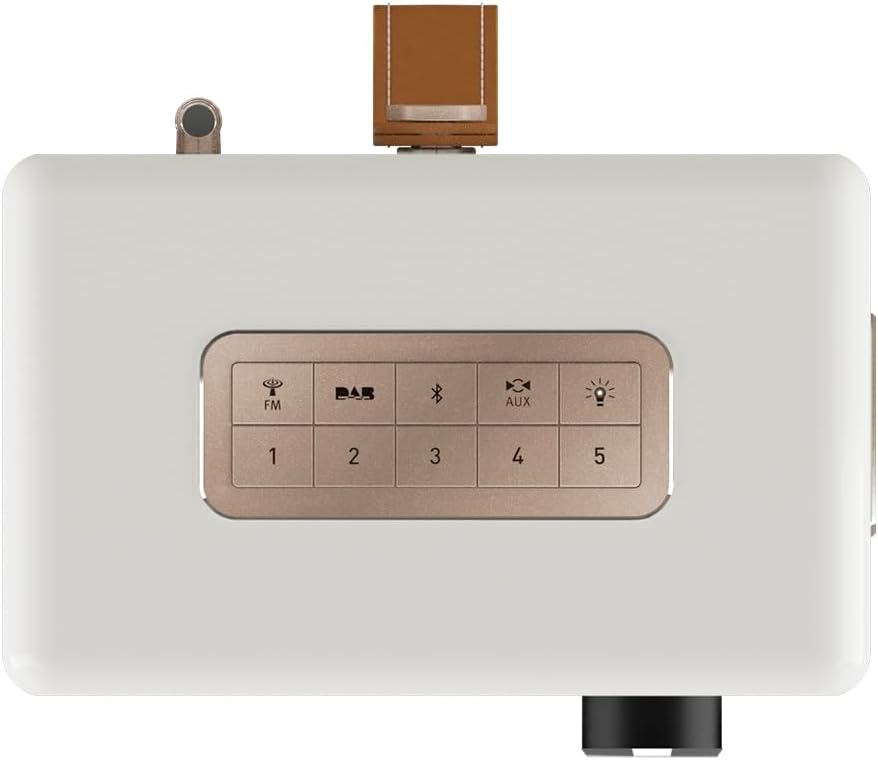
Figure 3: Top panel controls including preset and function buttons.
- പവർ ബട്ടൺ: റേഡിയോ ഓണാക്കുകയോ ഓഫാക്കുകയോ ചെയ്യുന്നു.
- റോട്ടറി നോബ്: Used for volume control, menu navigation, and selection.
- പ്രീസെറ്റ് ബട്ടണുകൾ (1-5): നിങ്ങളുടെ പ്രിയപ്പെട്ട റേഡിയോ സ്റ്റേഷനുകൾ സംഭരിക്കുകയും ഓർമ്മിക്കുകയും ചെയ്യുക.
- Function Buttons (FM, DAB, Bluetooth, AUX, Night Light): ആവശ്യമുള്ള ഓപ്പറേറ്റിംഗ് മോഡ് തിരഞ്ഞെടുക്കുക.
3.2 Radio Modes (DAB+ / FM)
DAB+ റേഡിയോ:
- അമർത്തുക DAB button to enter DAB+ mode.
- ലഭ്യമായ സ്റ്റേഷനുകൾക്കായി റേഡിയോ യാന്ത്രികമായി സ്കാൻ ചെയ്യും.
- Use the rotary knob to scroll through the station list and press to select.
- To save a station as a preset, press and hold one of the പ്രീസെറ്റ് ബട്ടണുകൾ (1-5) until the display confirms.
എഫ്എം റേഡിയോ:
- അമർത്തുക FM FM മോഡിൽ പ്രവേശിക്കാനുള്ള ബട്ടൺ.
- Use the rotary knob to manually tune to a frequency or press and hold to auto-scan for the next available station.
- To save a station as a preset, press and hold one of the പ്രീസെറ്റ് ബട്ടണുകൾ (1-5) until the display confirms.
3.3 ബ്ലൂടൂത്ത് കണക്റ്റിവിറ്റി
- അമർത്തുക ബ്ലൂടൂത്ത് button to activate Bluetooth pairing mode. The display will show "Pairing".
- On your mobile device, enable Bluetooth and search for "Sonoro Easy".
- Select "Sonoro Easy" from the list of available devices to connect.
- കണക്റ്റ് ചെയ്തുകഴിഞ്ഞാൽ, നിങ്ങളുടെ ഉപകരണത്തിൽ നിന്ന് റേഡിയോയിലേക്ക് ഓഡിയോ സ്ട്രീം ചെയ്യാൻ കഴിയും.
3.4 AUX ഇൻപുട്ട്
- Connect an external audio device (e.g., MP3 player) to the "AUX IN" port on the rear of the radio using a 3.5mm audio cable (not included).
- അമർത്തുക ഓക്സ് button to select AUX input mode.
- നിങ്ങളുടെ ബാഹ്യ ഉപകരണത്തിൽ നിന്ന് പ്ലേബാക്ക് നിയന്ത്രിക്കുക.
3.5 അലാറം ക്ലോക്കും സ്ലീപ്പ് ടൈമറും
The Sonoro Easy features a dual alarm function and a sleep timer.
- അലാറങ്ങൾ സജ്ജീകരിക്കുക: Access the alarm settings through the menu (usually by pressing the rotary knob and navigating). Follow on-screen prompts to set alarm time, source (buzzer, FM, DAB+), and volume.
- സ്ലീപ്പ് ടൈമർ: The sleep timer allows the radio to turn off automatically after a set period. This function is typically accessed via the menu.
- സ്നൂസ് പ്രവർത്തനം: When an alarm sounds, pressing the rotary knob or a designated snooze button will temporarily pause the alarm.
3.6 Night Light and USB Charging
- രാത്രി വെളിച്ചം: അമർത്തുക രാത്രി വെളിച്ചം button (often represented by a light bulb icon) to activate the integrated LED night light on the rear of the unit. This provides subtle background illumination.
- USB ചാർജിംഗ്: The USB port (5V - 2.1A) on the side of the radio can be used to charge compatible smartphones or other small devices. Connect your device using its charging cable.
4. പരിപാലനം
4.1 വൃത്തിയാക്കൽ
To maintain the appearance of your Sonoro Easy radio:
- വൃത്തിയാക്കുന്നതിന് മുമ്പ് ഉപകരണം ഓഫാണെന്നും അൺപ്ലഗ് ചെയ്തിട്ടുണ്ടെന്നും ഉറപ്പാക്കുക.
- പ്രതലങ്ങൾ തുടയ്ക്കാൻ മൃദുവായതും ഉണങ്ങിയതും ലിന്റ് രഹിതവുമായ തുണി ഉപയോഗിക്കുക.
- കഠിനമായ അടയാളങ്ങൾക്ക്, ചെറുതായി dampen the cloth with water. Avoid abrasive cleaners, solvents, or chemical sprays.
4.2 സംഭരണം
When not in use for extended periods, store the radio in a cool, dry place away from direct sunlight and extreme temperatures. If using batteries, remove them to prevent leakage.
5. പ്രശ്നപരിഹാരം
| പ്രശ്നം | സാധ്യമായ കാരണം | പരിഹാരം |
|---|---|---|
| വൈദ്യുതിയില്ല / റേഡിയോ ഓണാകുന്നില്ല. | Power adapter not connected or faulty. Batteries depleted or incorrectly inserted. | Check power adapter connection and wall outlet. Replace or recharge batteries, ensuring correct polarity. |
| Poor radio reception (DAB+ / FM). | Antenna not extended. Weak signal in the area. Interference from other electronics. | Fully extend the telescopic antenna. Try repositioning the radio. Move away from other electronic devices. |
| ബ്ലൂടൂത്ത് ഉപകരണം ബന്ധിപ്പിക്കാൻ കഴിയുന്നില്ല. | Radio not in pairing mode. Device too far away. Bluetooth disabled on source device. | Ensure radio is in Bluetooth pairing mode. Move device closer to the radio. Enable Bluetooth on your source device. |
| AUX ഇൻപുട്ടിൽ നിന്ന് ശബ്ദമൊന്നുമില്ല. | AUX cable not connected properly. Radio not in AUX mode. Volume too low on radio or source device. | Check AUX cable connection. Select AUX mode on the radio. Increase volume on both the radio and the external device. |
| ഡിസ്പ്ലേ വളരെ തെളിച്ചമുള്ളതോ വളരെ മങ്ങിയതോ ആണ്. | ഡിസ്പ്ലേ തെളിച്ച ക്രമീകരണം ക്രമീകരിക്കേണ്ടതുണ്ട്. | Adjust display brightness through the radio's menu settings. |
6 സ്പെസിഫിക്കേഷനുകൾ
| ഫീച്ചർ | വിശദാംശങ്ങൾ |
|---|---|
| ബ്രാൻഡ് | സോനോറോ |
| മോഡൽ നമ്പർ | 88f59bc4-6f28-4e95-95de-ba49a597f237 |
| നിറം | വെളുത്ത മാറ്റ് |
| ട്യൂണിംഗ് സാങ്കേതികവിദ്യ | DAB+, FM |
| കണക്റ്റിവിറ്റി | Bluetooth, AUX In, USB (charging) |
| പ്രത്യേക സവിശേഷതകൾ | Portable, Dual Alarm, Sleep Timer, Snooze, Dimmable Display, LED Night Light, USB Charging Port |
| പവർ ഉറവിടം | Mains (12V - 2.5A), Battery (Alkaline or NiMH, not included) |
| USB ഔട്ട്പുട്ട് | 5V - 2.1A (for charging external devices) |
| അളവുകൾ (L x W x H) | 18.6 സെ.മീ x 15.6 സെ.മീ x 11.8 സെ.മീ |
| സ്പീക്കർ | 3" Full-range speaker with Bass Reflex tube |
| മെറ്റീരിയൽ | Hand-polished wooden cabinet |
7. വാറണ്ടിയും പിന്തുണയും
7.1 ഉൽപ്പന്ന വാറന്റി
The Sonoro Easy Digital Radio comes with a 2 വർഷത്തെ നിർമ്മാതാവിന്റെ വാറന്റി വാങ്ങിയ തീയതി മുതൽ. സാധാരണ ഉപയോഗത്തിലുള്ള മെറ്റീരിയലുകളിലെയും ജോലികളിലെയും വൈകല്യങ്ങൾ ഈ വാറന്റി ഉൾക്കൊള്ളുന്നു. വാറന്റി ക്ലെയിമുകൾക്കായി നിങ്ങളുടെ വാങ്ങിയതിന്റെ തെളിവ് സൂക്ഷിക്കുക.
വാറൻ്റി ഉൾപ്പെടുന്നില്ല:
- അപകടം, ദുരുപയോഗം, ദുരുപയോഗം, വെള്ളപ്പൊക്കം, തീ, ഭൂകമ്പം അല്ലെങ്കിൽ മറ്റ് ബാഹ്യ കാരണങ്ങളാൽ ഉണ്ടാകുന്ന നാശനഷ്ടങ്ങൾ.
- Damage caused by operating the product outside the permitted or intended uses described in this manual.
- Damage caused by service performed by anyone who is not an authorized representative of Sonoro.
- Products or parts that have been modified to alter functionality or capability without the written permission of Sonoro.
7.2 ഉപഭോക്തൃ പിന്തുണ
For technical assistance, warranty claims, or further information, please contact Sonoro customer support. Contact details can typically be found on the official Sonoro webസൈറ്റ് അല്ലെങ്കിൽ ഉൽപ്പന്ന പാക്കേജിംഗിൽ.
Please visit the official Sonoro website for the most up-to-date support information and contact options.


