1. ആമുഖം
This manual provides essential information for the proper installation, operation, and maintenance of your ViewSonic VP2768a-4K professional monitor. Please read this manual thoroughly before using the product to ensure optimal performance and longevity.
ദി ViewSonic VP2768a-4K is a 27-inch 4K UHD (3840x2160p) IPS monitor designed for professionals requiring exceptional color accuracy and versatile connectivity. It features 100% sRGB, EBU, SMPTE-C, Rec. 709, and DICOM-SIM color spaces, Delta E<2 accuracy, and hardware calibration capabilities.
2. പാക്കേജ് ഉള്ളടക്കം
Verify that all items listed below are present in your product packaging. If any items are missing or damaged, please contact your retailer or Viewസോണിക് ഉപഭോക്തൃ പിന്തുണ.

Image: Contents of the ViewSonic VP2768a-4K monitor box, showing the monitor, power cable, HDMI cable, USB Type-A/Type-B cable, USB Type-C cable, and QuickStart Guide.
- ViewSonic VP2768a-4K Monitor
- Power Cable (varies by region)
- HDMI കേബിൾ
- USB Type-A / Type-B Cable
- യുഎസ്ബി ടൈപ്പ്-സി കേബിൾ
- ക്വിക്ക്സ്റ്റാർട്ട് ഗൈഡ്
3. സജ്ജീകരണം
3.1 ഭൗതിക സജ്ജീകരണം
Follow these steps to assemble and position your monitor:

ചിത്രം: മുൻഭാഗം view യുടെ ViewSonic VP2768a-4K monitor on its stand, displaying a vibrant image.
- മോണിറ്ററിന്റെയും സ്റ്റാൻഡിന്റെയും ഘടകങ്ങൾ പാക്കേജിംഗിൽ നിന്ന് ശ്രദ്ധാപൂർവ്വം നീക്കം ചെയ്യുക.
- Attach the stand base to the stand column, securing it with the provided screw.
- Mount the monitor panel onto the assembled stand column. Ensure it clicks securely into place.
- മോണിറ്റർ സുസ്ഥിരവും പരന്നതുമായ പ്രതലത്തിൽ സ്ഥാപിക്കുക.
3.2 കണക്റ്റിവിറ്റി
The VP2768a-4K offers a variety of input and output ports for flexible connectivity with your devices.

ചിത്രം: പിൻഭാഗം view യുടെ ViewSonic VP2768a-4K monitor, highlighting various connectivity ports including VESA mount, HDMI, DisplayPort, USB Type-A, USB Type-B, and USB Type-C.
- എച്ച്ഡിഎംഐ 2.0: HDMI ഔട്ട്പുട്ട് പിന്തുണയ്ക്കുന്ന ഉപകരണങ്ങളിലേക്ക് കണക്റ്റുചെയ്യുക.
- DisplayPort (In): Connect to devices supporting DisplayPort output.
- യുഎസ്ബി ടൈപ്പ്-സി: Provides video, audio, data transfer, and up to 90W power delivery over a single cable. This reduces cable clutter for compatible laptops and devices.
- USB ടൈപ്പ്-എ (x2): For connecting peripherals such as keyboards, mice, or external storage.
- USB ടൈപ്പ്-ബി: Upstream port for enabling the monitor's USB hub functionality.
- ഇഥർനെറ്റ് (RJ45): For network connectivity directly through the monitor.
- VESA Compatible Wall Mount (100x100mm): For alternative mounting solutions.

Image: Diagram illustrating the 'Less Clutter. More Efficiency.' concept with a laptop connected to the monitor via a single USB Type-C cable, providing audio, data, video, and 90W charging.
Connect the appropriate cables from your computer or video source to the corresponding input ports on the monitor. Connect the power cable to the monitor and a power outlet.
4. മോണിറ്റർ പ്രവർത്തിപ്പിക്കുക
4.1 പവർ ഓൺ/ഓഫ്
മോണിറ്റർ ഓണാക്കാനോ ഓഫാക്കാനോ അതിൽ സ്ഥിതിചെയ്യുന്ന പവർ ബട്ടൺ അമർത്തുക. മോണിറ്റർ സജീവമാകുമ്പോൾ പവർ ഇൻഡിക്കേറ്റർ ലൈറ്റ് പ്രകാശിക്കും.
4.2 എർഗണോമിക് ക്രമീകരണങ്ങൾ
The VP2768a-4K features an advanced ergonomic stand designed for user comfort and productivity. Adjust the monitor to your preferred viewസ്ഥാനം.
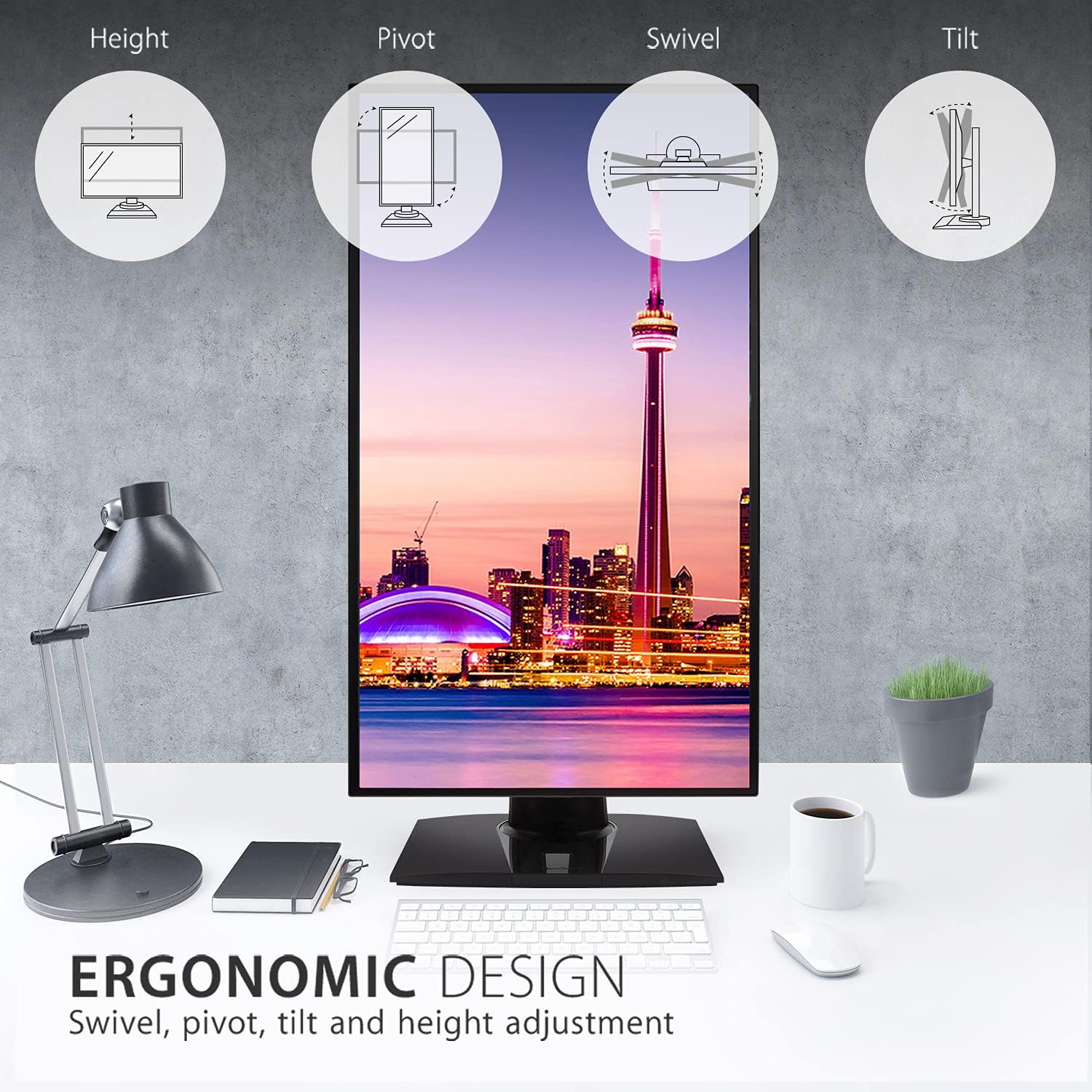
Image: Diagram showing the ergonomic adjustments of the monitor: Height, Pivot (portrait mode), Swivel, and Tilt.
- ഉയരം ക്രമീകരിക്കൽ: മോണിറ്റർ കണ്ണിന്റെ നിരപ്പിലേക്ക് ഉയർത്തുകയോ താഴ്ത്തുകയോ ചെയ്യുക.
- പിവറ്റ്: പോർട്രെയ്റ്റിനായി സ്ക്രീൻ 90 ഡിഗ്രി തിരിക്കുക. viewing.
- സ്വിവൽ: മോണിറ്റർ തിരശ്ചീനമായി ഇടത്തോട്ടോ വലത്തോട്ടോ തിരിക്കുക.
- ടിൽറ്റ്: ലംബമായി ക്രമീകരിക്കുക viewസ്ക്രീനിന്റെ ആംഗിൾ.
4.3 വർണ്ണ കൃത്യതയും കാലിബ്രേഷനും
This monitor is factory calibrated to deliver exceptional color accuracy (Delta E<2) and supports various professional color spaces. It is Pantone Validated, ensuring accurate reproduction of Pantone Matching System colors.

Image: A person holding a DSLR camera in front of the ViewSonic VP2768a-4K monitor, which displays vibrant, color-accurate images, illustrating 'Color at Your Command'.
Hardware calibration is available to maintain precise color performance over time. Refer to the QuickStart Guide or ViewSonic's official website for detailed instructions on hardware calibration procedures.
4.4 മെച്ചപ്പെടുത്തി Viewing കംഫർട്ട്
The monitor incorporates Flicker-Free technology and a Blue Light Filter to reduce eye fatigue during extended use.
5. പരിപാലനം
നിങ്ങളുടെ മോണിറ്ററിന്റെ ദീർഘായുസ്സും ഒപ്റ്റിമൽ പ്രകടനവും ഉറപ്പാക്കാൻ, ഈ പരിപാലന മാർഗ്ഗനിർദ്ദേശങ്ങൾ പാലിക്കുക:
- സ്ക്രീൻ വൃത്തിയാക്കൽ: മൃദുവായ, ലിന്റ് രഹിത തുണി ഉപയോഗിച്ച് സ്ക്രീൻ സൌമ്യമായി തുടയ്ക്കുക. കഠിനമായ പാടുകൾക്ക്, നേരിയ തോതിൽ dampതുണിയിൽ വെള്ളം അല്ലെങ്കിൽ നേരിയതും ഉരച്ചിലുകൾ ഇല്ലാത്തതുമായ സ്ക്രീൻ ക്ലീനർ ഉപയോഗിക്കുക. സ്ക്രീനിൽ നേരിട്ട് ദ്രാവകം സ്പ്രേ ചെയ്യരുത്.
- സി വൃത്തിയാക്കൽasing: മോണിറ്റർ തുടയ്ക്കാൻ മൃദുവായതും ഉണങ്ങിയതുമായ തുണി ഉപയോഗിക്കുക casing. വീര്യം കൂടിയ ഡിറ്റർജന്റുകൾ അല്ലെങ്കിൽ ഉരച്ചിലുകൾ ഉള്ള ക്ലീനറുകൾ ഉപയോഗിക്കുന്നത് ഒഴിവാക്കുക.
- വെൻ്റിലേഷൻ: അമിതമായി ചൂടാകുന്നത് തടയാൻ മോണിറ്ററിലെ വെന്റിലേഷൻ ദ്വാരങ്ങൾ അടഞ്ഞിട്ടില്ലെന്ന് ഉറപ്പാക്കുക.
- പവർ ഓഫ്: മോണിറ്റർ വൃത്തിയാക്കുന്നതിന് മുമ്പ് അല്ലെങ്കിൽ കൂടുതൽ നേരം ഉപയോഗിക്കാതിരുന്നാൽ, എല്ലായ്പ്പോഴും അത് ഓഫ് ചെയ്ത് പവർ ഔട്ട്ലെറ്റിൽ നിന്ന് അൺപ്ലഗ് ചെയ്യുക.
6. പ്രശ്നപരിഹാരം
നിങ്ങളുടെ മോണിറ്ററിൽ പ്രശ്നങ്ങൾ നേരിടുകയാണെങ്കിൽ, ഇനിപ്പറയുന്ന പൊതുവായ ട്രബിൾഷൂട്ടിംഗ് ഘട്ടങ്ങൾ പരിശോധിക്കുക:
- ശക്തിയില്ല: മോണിറ്ററിലേക്കും പ്രവർത്തിക്കുന്ന ഒരു പവർ ഔട്ട്ലെറ്റിലേക്കും പവർ കേബിൾ സുരക്ഷിതമായി ബന്ധിപ്പിച്ചിട്ടുണ്ടെന്ന് ഉറപ്പാക്കുക. പവർ ഇൻഡിക്കേറ്റർ ലൈറ്റ് ഓണാണോ എന്ന് പരിശോധിക്കുക.
- സിഗ്നലില്ല: Verify that the video cable (HDMI, DisplayPort, or USB-C) is correctly connected to both the monitor and your computer. Ensure the correct input source is selected on the monitor (usually via the OSD menu).
- മിന്നിമറയുന്ന അല്ലെങ്കിൽ വികലമായ ചിത്രം: Check the video cable for damage. Ensure your graphics card drivers are up to date. Try a different resolution or refresh rate.
- തെറ്റായ നിറങ്ങൾ: Perform a factory reset of the monitor settings. If available, run the hardware calibration utility.
- USB പോർട്ടുകൾ പ്രവർത്തിക്കുന്നില്ല: മോണിറ്ററിൽ നിന്ന് നിങ്ങളുടെ കമ്പ്യൂട്ടറിലേക്ക് യുഎസ്ബി ടൈപ്പ്-ബി അപ്സ്ട്രീം കേബിൾ ബന്ധിപ്പിച്ചിട്ടുണ്ടെന്ന് ഉറപ്പാക്കുക.
For more detailed troubleshooting or persistent issues, please consult the full user manual available on the Viewസോണിക് webസൈറ്റ് അല്ലെങ്കിൽ കോൺടാക്റ്റ് Viewസോണിക് ഉപഭോക്തൃ പിന്തുണ.
7 സ്പെസിഫിക്കേഷനുകൾ
പ്രധാന സാങ്കേതിക സവിശേഷതകൾ ViewSonic VP2768a-4K monitor:

Image: Diagram showing the ViewSonic VP2768a-4K monitor with its physical dimensions: 27 inches diagonal, 61.3 cm (24.1 in) width, 21.5 cm (8.5 in) depth, and 54.3 cm (21.4 in) adjustable height.
| ഫീച്ചർ | സ്പെസിഫിക്കേഷൻ |
|---|---|
| സ്ക്രീൻ വലിപ്പം | 27 ഇഞ്ച് |
| റെസലൂഷൻ | 4K UHD (3840 x 2160 പിക്സലുകൾ) |
| പാനൽ തരം | ഐ.പി.എസ് |
| പുതുക്കിയ നിരക്ക് | 60Hz |
| വീക്ഷണാനുപാതം | 16:9 |
| തെളിച്ചം | 350 cd/m² |
| വർണ്ണ കൃത്യത | 100% sRGB, Delta E<2, Pantone Validated |
| കണക്റ്റിവിറ്റി | 1x HDMI 2.0, 1x DisplayPort (In), 1x USB Type-C (90W PD), 2x USB Type-A, 1x USB Type-B, 1x Ethernet (RJ45) |
| എർഗണോമിക്സ് | Height, Pivot, Swivel, Tilt |
| വെസെ മൌണ്ട് | 100x100 മി.മീ |
| ഉൽപ്പന്ന അളവുകൾ (സ്റ്റാൻഡിനൊപ്പം) | 8.5 x 24.1 x 21.38 ഇഞ്ച് (21.5 x 61.3 x 54.3 സെ.മീ) |
| ഇനത്തിൻ്റെ ഭാരം | 15.2 പൗണ്ട് |
| വാല്യംtage | 240 വോൾട്ട് (എസി) |
8. വാറൻ്റിയും പിന്തുണയും
This product is a manufacturer refurbished item. For specific warranty terms and conditions, please refer to the documentation included with your purchase or visit the official Viewസോണിക് website. Warranty coverage may vary for refurbished products.
For technical assistance, product registration, or to download the latest drivers and full user manual, please visit the official ViewSonic support webസൈറ്റ് അല്ലെങ്കിൽ അവരുടെ ഉപഭോക്തൃ സേവന വിഭാഗവുമായി ബന്ധപ്പെടുക.
ViewSonic Support: www.viewsonic.com/us/support


