1. ആമുഖം
This manual provides detailed instructions for the setup, operation, maintenance, and troubleshooting of your BINNUNE BH02 USB Headset. Please read this manual thoroughly before using the product to ensure proper functionality and longevity.

Image 1.1: The BINNUNE BH02 USB Headset, featuring both USB and 3.5mm connectivity options and an in-line control unit.
2. പാക്കേജ് ഉള്ളടക്കം
നിങ്ങളുടെ പാക്കേജിൽ എല്ലാ ഇനങ്ങളും ഉണ്ടെന്ന് ദയവായി പരിശോധിക്കുക:
- BINNUNE BH02 USB Headset (Mono)
- ഉപയോക്തൃ മാനുവൽ (ഈ പ്രമാണം)
3. ഉൽപ്പന്ന സവിശേഷതകൾ
- ഇരട്ട കണക്റ്റിവിറ്റി: Connects via USB for computers (PC/Mac/Windows) or 3.5mm jack for mobile devices.
- നോയ്സ്-കാൻസിലിംഗ് മൈക്രോഫോൺ: Designed to reduce background noise for clear voice transmission.
- ഇൻ-ലൈൻ നിയന്ത്രണങ്ങൾ: Easy access to volume adjustment and microphone mute functions.
- ഭാരം കുറഞ്ഞ ഡിസൈൻ: Engineered for extended wear comfort.
- Adjustable Boom Mic: Microphone can be positioned for optimal voice capture and rotated for use on either the left or right ear.
- നീണ്ടുനിൽക്കുന്ന നിർമ്മാണം: Features a stainless-steel headband for enhanced reliability.

Image 3.1: The BINNUNE BH02 headset demonstrating its corded USB and 3.5mm connectivity options, suitable for various devices.

Image 3.2: A user wearing the BINNUNE BH02 headset, highlighting its design for all-day comfort with memory foam ear cushions and an angled ear cup.

ചിത്രം 3.3: ഒരു ക്ലോസപ്പ് view of the BINNUNE BH02 headset's headband, emphasizing its stainless-steel construction for maximum durability.
4. സജ്ജീകരണ നിർദ്ദേശങ്ങൾ
4.1 USB വഴി ബന്ധിപ്പിക്കുന്നു
- നിങ്ങളുടെ കമ്പ്യൂട്ടറിൽ (PC അല്ലെങ്കിൽ Mac) ലഭ്യമായ ഒരു USB പോർട്ട് കണ്ടെത്തുക.
- ഹെഡ്സെറ്റിന്റെ USB കണക്ടർ USB പോർട്ടിലേക്ക് പ്ലഗ് ചെയ്യുക.
- നിങ്ങളുടെ ഓപ്പറേറ്റിംഗ് സിസ്റ്റം ആവശ്യമായ ഡ്രൈവറുകൾ സ്വയമേവ കണ്ടെത്തി ഇൻസ്റ്റാൾ ചെയ്യണം. ഇതിന് കുറച്ച് നിമിഷങ്ങൾ എടുത്തേക്കാം.
- Once installed, navigate to your computer's sound settings (e.g., Sound Control Panel on Windows, System Preferences > Sound on Mac) to ensure the BINNUNE BH02 Headset is selected as the default input and output device.
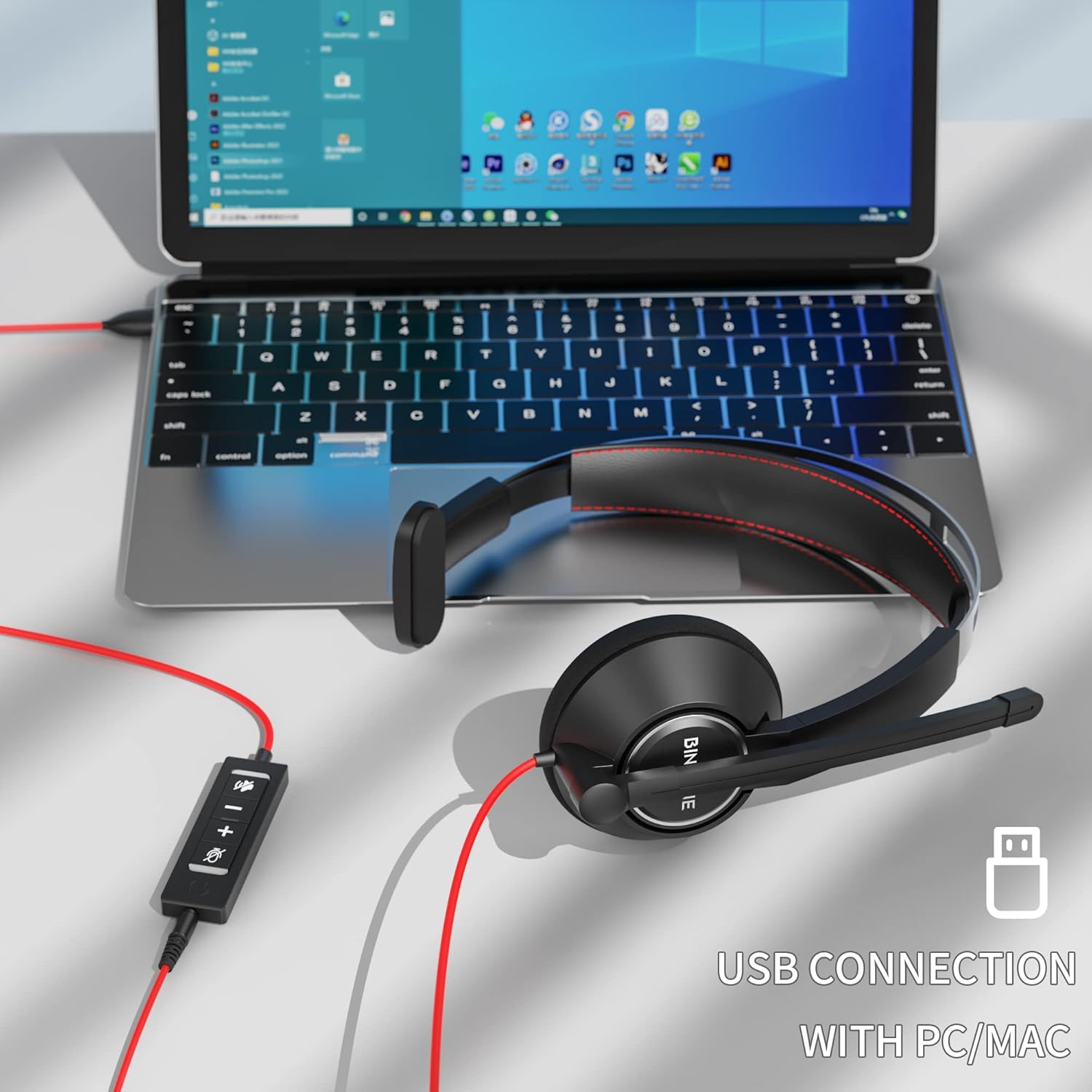
Image 4.1: The BINNUNE BH02 headset connected to a laptop via its USB cable, ready for use with PC or Mac systems.
4.2 Connecting via 3.5mm Jack
- Locate the 3.5mm audio jack on your mobile device, tablet, or computer.
- Plug the 3.5mm connector of the headset into the audio jack.
- The device should recognize the headset. Adjust volume directly on your device.

Image 4.2: A user engaging with a tablet while wearing the BINNUNE BH02 headset, demonstrating its 3.5mm connection capability for mobile devices.
5. പ്രവർത്തന നിർദ്ദേശങ്ങൾ
5.1 ഹെഡ്സെറ്റ് ധരിക്കൽ
- Place the ear cup over one ear and adjust the headband for a comfortable fit.
- The microphone boom can be rotated to position the microphone on either your left or right side.

Image 5.1: Two individuals wearing the BINNUNE BH02 headset, illustrating the microphone's flexibility to be worn on either the right or left side.
5.2 മൈക്രോഫോൺ ക്രമീകരിക്കൽ
- Gently bend the flexible microphone boom to position the microphone approximately 1-2 inches (2.5-5 cm) from your mouth.
- ഒപ്റ്റിമൽ വോയ്സ് പിക്കപ്പിനും നോയ്സ് റദ്ദാക്കലിനും വേണ്ടി മൈക്രോഫോൺ നിങ്ങളുടെ വായയുമായി വിന്യസിച്ചിട്ടുണ്ടെന്ന് ഉറപ്പാക്കുക.
5.3 Using In-line Controls (USB Connection Only)
The in-line control unit provides convenient access to audio functions:
- വോളിയം കൂട്ടുക (+): കേൾക്കുന്ന ശബ്ദം കൂട്ടാൻ അമർത്തുക.
- വോളിയം ഡൗൺ (-): കേൾക്കുന്ന ശബ്ദം കുറയ്ക്കാൻ അമർത്തുക.
- മൈക്രോഫോൺ മ്യൂട്ട് ബട്ടൺ: Press to mute or unmute the microphone. An indicator light on the control unit may show the mute status.

Image 5.2: A user wearing the BINNUNE BH02 headset while working on a laptop, illustrating its suitability for online communication platforms like Microsoft Teams, Zoom, Skype, and FaceTime.

Image 5.3: A woman smiling while wearing the BINNUNE BH02 headset, symbolizing clear and effective communication during calls.
6. പരിപാലനം
6.1 വൃത്തിയാക്കൽ
- ഹെഡ്സെറ്റിന്റെ പ്രതലങ്ങൾ മൃദുവായതും ഉണങ്ങിയതുമായ തുണി ഉപയോഗിച്ച് തുടയ്ക്കുക.
- ദുശ്ശാഠ്യമുള്ള അഴുക്കിന്, ചെറുതായി ഡി ഉപയോഗിക്കുകamp മൃദുവായ സോപ്പ് ഉപയോഗിച്ച് തുണി തുടയ്ക്കുക, എന്നിട്ട് ഉടൻ തന്നെ തുടച്ച് ഉണക്കുക.
- കഠിനമായ രാസവസ്തുക്കളോ, ലായകങ്ങളോ, അബ്രസീവ് ക്ലീനറുകളോ ഉപയോഗിക്കരുത്.
- Avoid getting moisture into the ear cups or microphone.
6.2 സംഭരണം
- ഹെഡ്സെറ്റ് നേരിട്ട് സൂര്യപ്രകാശം ഏൽക്കാത്തതും ഉയർന്ന താപനില ഏൽക്കാത്തതുമായ ഒരു തണുത്ത വരണ്ട സ്ഥലത്ത് സൂക്ഷിക്കുക.
- Avoid tangling the cable by coiling it neatly.
7. പ്രശ്നപരിഹാരം
| പ്രശ്നം | സാധ്യമായ കാരണം | പരിഹാരം |
|---|---|---|
| ഹെഡ്സെറ്റിൽ നിന്ന് ശബ്ദമില്ല |
|
|
| മൈക്രോഫോൺ പ്രവർത്തിക്കുന്നില്ല |
|
|
| സ്റ്റാറ്റിക് അല്ലെങ്കിൽ മോശം ഓഡിയോ നിലവാരം |
|
|
| കമ്പ്യൂട്ടർ ഹെഡ്സെറ്റ് തിരിച്ചറിഞ്ഞില്ല. |
|
|
8 സ്പെസിഫിക്കേഷനുകൾ
| ഫീച്ചർ | വിശദാംശങ്ങൾ |
|---|---|
| മോഡൽ | BH02 |
| കണക്റ്റിവിറ്റി ടെക്നോളജി | Wired (USB, 3.5mm) |
| ഹെഡ്ഫോണുകൾ ജാക്ക് | യുഎസ്ബി, 3.5 എംഎം |
| അനുയോജ്യമായ ഉപകരണങ്ങൾ | Computers (Mac, PC, Windows), Mobile Devices |
| മൈക്രോഫോൺ ഫോർമാറ്റ് | Boom (Noise Cancelling) |
| നിയന്ത്രണ തരം | Volume Control, Microphone Mute |
| ശൈലി | Mono (On Ear) |
| പ്രതിരോധം | 32 ഓം |
| മെറ്റീരിയൽ | പ്ലാസ്റ്റിക് |
| ഇനത്തിൻ്റെ ഭാരം | 0.2 കിലോഗ്രാം |
9. വാറൻ്റിയും പിന്തുണയും
For warranty information and technical support, please refer to the documentation provided with your purchase or visit the official BINNUNE webഉപഭോക്തൃ സേവനത്തിനായുള്ള കോൺടാക്റ്റ് വിശദാംശങ്ങൾ സാധാരണയായി ഉൽപ്പന്ന പാക്കേജിംഗിലോ നിർമ്മാതാവിന്റെ പിന്തുണ പേജിലോ ലഭ്യമാണ്.


