AURSINC NanoVNA-H4 Vector Network Analyzer Instruction Manual
Model: NanoVNA-H4
1. ഉൽപ്പന്നം കഴിഞ്ഞുview
The AURSINC NanoVNA-H4 is a compact, handheld Vector Network Analyzer designed for precise RF measurements. It features a 4-inch LCD display, a 1950mAh battery for portable use, and can also be powered via USB. This device is ideal for antenna performance measurement, S-parameter analysis, and various RF testing applications for hobbyists and professionals.
Equipped with the latest HW 4.3 version, the NanoVNA-H4 includes an SD card slot for convenient data storage and screenshots. Its improved frequency algorithm extends measurement capabilities up to 1.5GHz, offering excellent dynamic range across different frequency bands.

Figure 1.1: The NanoVNA-H4 Vector Network Analyzer with included cables, calibration kit, and RF Demo Kit.
2. പാക്കേജ് ഉള്ളടക്കം
താഴെ ലിസ്റ്റ് ചെയ്തിരിക്കുന്ന എല്ലാ ഇനങ്ങളും നിങ്ങളുടെ പാക്കേജിൽ ഉൾപ്പെടുത്തിയിട്ടുണ്ടെന്ന് ദയവായി പരിശോധിക്കുക:
- 1 x NanoVNA-H4 Host (with 1950mAh battery)
- 1 x യുഎസ്ബി ടൈപ്പ്-സി ഡാറ്റ കേബിൾ
- 2 x 30mm SMA Male to Male RG174 RF Cables
- 1 x SMA Simple Calibration Kit (OPEN/LOAD/SHORT)
- 1 x SMA Female to Female Connector
- 1 x PCB RF Tester Board (RF Demo Kit)
- 2 x 20cm Adapter Cables (for RF Demo Kit)
3. സജ്ജീകരണം
3.1 പ്രാരംഭ ചാർജിംഗ്
Before first use, ensure the NanoVNA-H4 is fully charged. Connect the included USB Type-C data cable to the device and a standard USB power adapter (not included) or a computer USB port. The device can be used while charging.
3.2 പവർ ഓൺ/ഓഫ്
To power on the device, press and hold the power button located on the side. To power off, press and hold the power button again until the display shuts down.
3.3 SD കാർഡ് ഇൻസ്റ്റലേഷൻ
The NanoVNA-H4 supports MicroSD cards up to 32GB for data storage and screenshots. Insert the MicroSD card into the dedicated slot on the side of the device. Ensure the card is inserted correctly to avoid damage. Note that only low-speed, SPI mode SD cards are currently compatible.

Figure 3.1: Location of the SD card slot on the NanoVNA-H4. An SD card is not included in the package.
4. Operating the NanoVNA-H4
4.1 ഉപയോക്തൃ ഇന്റർഫേസും നാവിഗേഷനും
The NanoVNA-H4 features a 4-inch touch-sensitive LCD display for interaction. Navigate through menus and settings by tapping on the screen. A stylus is included for precise input.
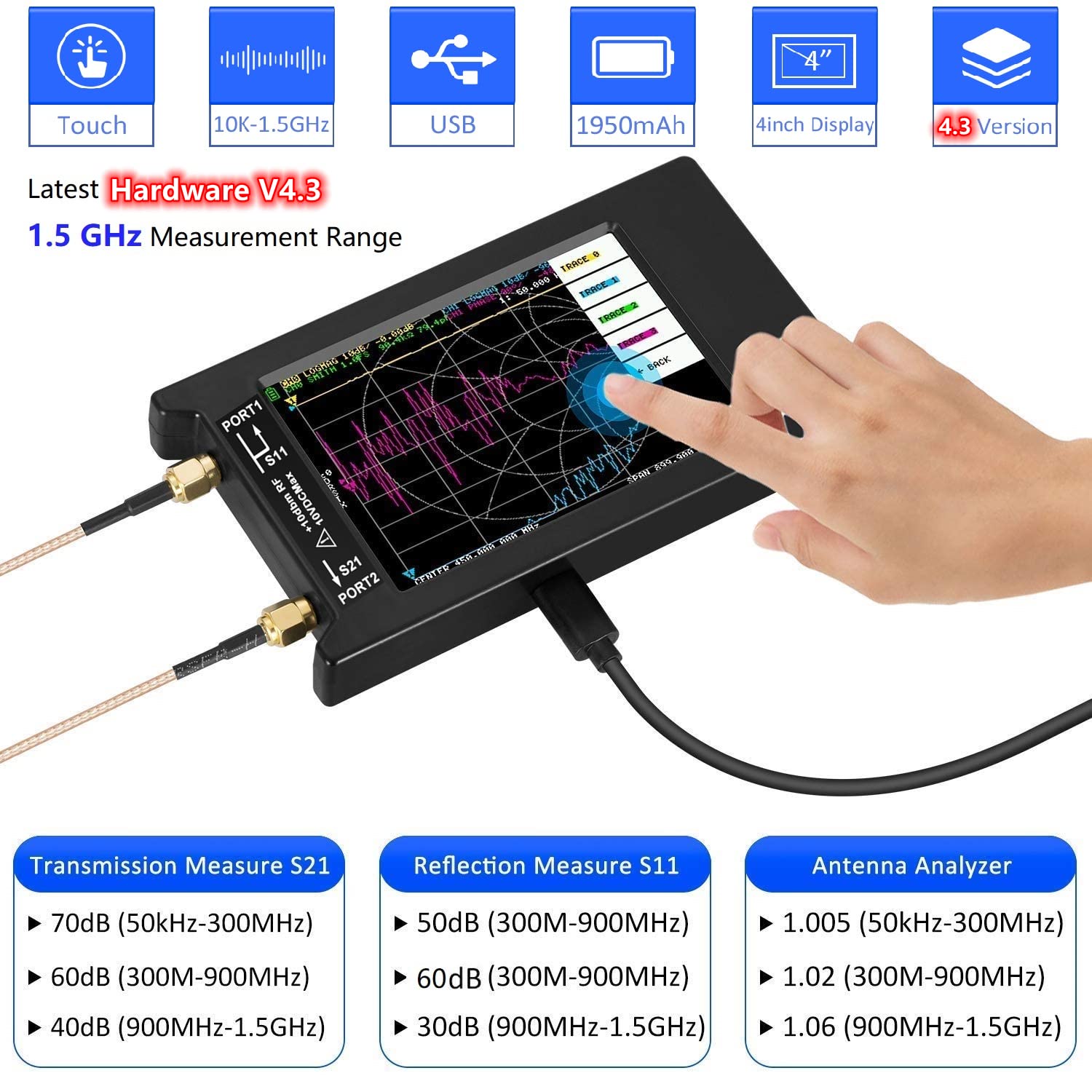
Figure 4.1: The NanoVNA-H4's 4-inch display supports touch input. Key features include 10KHz-1.5GHz frequency range, USB connectivity, 1950mAh battery, and Hardware Version 4.3.
4.2 കാലിബ്രേഷൻ
Calibration is crucial for accurate measurements. It should be performed whenever the frequency range is changed. The calibration status will be displayed on the screen. Use the provided OPEN, SHORT, and LOAD calibration standards.
- Connect the appropriate calibration standard (OPEN, SHORT, or LOAD) to the NanoVNA-H4's port.
- Follow the on-screen instructions to perform the calibration steps.
- Once calibration is complete, the status display will show 'CnDRSTX', where 'n' indicates the data number being loaded.

Figure 4.2: The calibration process involves connecting Open, Short, and Load standards to the device's ports.
4.3 അളവ് പരാമീറ്ററുകൾ
The NanoVNA-H4 can measure various S-parameters:
- S11 (Reflection Measurement): Measures the reflection coefficient of a device.
- S21 (Transmission Measurement): Measures the transmission coefficient between two ports.
For S12 and S22 measurements, the transceiver port wiring needs to be manually swapped.
4.4 PC Control with NanoVNASaver
The NanoVNA-H4 can be connected to a computer via the USB Type-C cable to use the NanoVNASaver software. This software allows for data extraction, display on a larger screen, and saving data to Touchstone (.snp) files for further analysis and simulation.
For more information and software downloads, please visit the official NanoVNA webസൈറ്റ്: http://nanovna.com

Figure 4.3: The NanoVNA-H4 connected to a PC, displaying measurement data via NanoVNASaver software.
5. Using the RF Demo Kit
The included RF Demo Kit is a PCB test board designed for learning and testing various RF circuits with your NanoVNA-H4. It features 18 functional modules, including filters, attenuators, and calibration circuits.

Figure 5.1: The RF Demo Kit PCB board, measuring 10cm x 10cm, featuring 18 distinct functional modules for RF testing.
5.1 Preparing the RF Demo Kit
- Connect the two 20cm SMA to IPEX adapter cables to the NanoVNA-H4 (or NanoVNA-F, as shown in some diagrams).
- Before testing specific circuits on the board, recalibrate your NanoVNA-H4 using the calibration circuits (13 Short, 14 Open, 15 Load, and 16 Thru) located on the RF Demo Kit itself. Save these parameters to SAVE 0 on your device.

ചിത്രം 5.2: ഉദാample setup showing the RF Demo Kit connected to a NanoVNA for circuit analysis.
5.2 ഫങ്ഷണൽ മൊഡ്യൂളുകൾ
The RF Demo Kit includes modules for testing various components and circuits, such as:
- 30MHz short wave low-pass filter (LPF)
- 100MHz FM high-pass filter (HPF)
- 433MHz common SAW band pass filter (BPF)
- 6.5MHz ceramic trap (BSF)
- Attenuators (-10dB, -3dB)
- RLC series-parallel circuits

Figure 5.3: Testing an RLC series-parallel circuit on the RF Demo Kit, displaying the S11 Smith Chart on the NanoVNA.
6 സ്പെസിഫിക്കേഷനുകൾ
| ഫീച്ചർ | സ്പെസിഫിക്കേഷൻ |
|---|---|
| ഫ്രീക്വൻസി റേഞ്ച് | 10KHz - 1.5GHz |
| പ്രദർശിപ്പിക്കുക | 4-inch LCD (Touch Screen) |
| ബാറ്ററി ശേഷി | 1950mAh |
| വൈദ്യുതി വിതരണം | USB Type-C (5V) or Internal Battery |
| ഹാർഡ്വെയർ പതിപ്പ് | HW 4.3 |
| SD കാർഡ് പിന്തുണ | Up to 32GB (MicroSD, low-speed, SPI mode) |
| Dynamic Range (50K-300MHz) | >70dB |
| Dynamic Range (300M-900MHz) | >60dB |
| Dynamic Range (900M-1.5GHz) | >40dB |
| പിസി സോഫ്റ്റ്വെയർ അനുയോജ്യത | NanoVNASaver (for Touchstone files) |
| RF Demo Kit Size | 10cm x 10cm (3.9in x 3.9in) |
| RF Demo Kit Modules | 18 functional modules (filters, attenuators, calibration) |
7. പ്രശ്നപരിഹാരം
7.1 പൊതുവായ പ്രശ്നങ്ങളും പരിഹാരങ്ങളും
- ഉപകരണം ഓണാക്കുന്നില്ല: Ensure the battery is charged. Connect the USB Type-C cable to a power source and try again.
- കൃത്യമല്ലാത്ത അളവുകൾ: Perform a full calibration using the provided OPEN, SHORT, and LOAD standards. Ensure cables are securely connected and not damaged. Recalibrate if the frequency range is changed.
- SD card not recognized: Ensure the MicroSD card is inserted correctly. Verify that it is a low-speed, SPI mode compatible card. Try formatting the card (this will erase all data on the card).
- No display or flickering screen: Recharge the device. If the issue persists, contact customer support.
- PC software (NanoVNASaver) not connecting: Ensure the USB cable is properly connected. Install the necessary drivers if prompted by your operating system. Restart both the NanoVNA-H4 and the computer.
8. പരിപാലനം
To ensure the longevity and optimal performance of your NanoVNA-H4, follow these maintenance guidelines:
- വൃത്തിയാക്കൽ: ഉപകരണം വൃത്തിയാക്കാൻ മൃദുവായതും ഉണങ്ങിയതുമായ തുണി ഉപയോഗിക്കുക. അബ്രസീവ് ക്ലീനറുകളോ ലായകങ്ങളോ ഉപയോഗിക്കുന്നത് ഒഴിവാക്കുക.
- സംഭരണം: നേരിട്ടുള്ള സൂര്യപ്രകാശത്തിൽ നിന്നും കടുത്ത താപനിലയിൽ നിന്നും മാറി തണുത്തതും വരണ്ടതുമായ സ്ഥലത്ത് ഉപകരണം സൂക്ഷിക്കുക.
- ബാറ്ററി കെയർ: For long-term storage, charge the battery to approximately 50% to prevent deep discharge. Recharge periodically if not in use for extended periods.
- കേബിൾ കെയർ: Handle RF cables carefully. Avoid sharp bends or kinks that can damage the internal conductors.
9. വാറൻ്റിയും പിന്തുണയും
AURSINC is committed to providing high-quality products and excellent customer service.
- വാറൻ്റി: This product comes with a 365-day warranty from the date of purchase.
- റിട്ടേണുകൾ/എക്സ്ചേഞ്ചുകൾ: We offer a 30-day exchange or return policy.
- കസ്റ്റമർ സർവീസ്: For any questions or concerns, our customer service team is available to assist you within 24 hours.

Figure 9.1: AURSINC's commitment to customer satisfaction, including warranty and support details.
Please refer to your purchase documentation or visit the AURSINC store on Amazon for detailed warranty terms and contact information.


