ആമുഖം
This manual provides comprehensive instructions for the setup, operation, and maintenance of your Plustek OpticFilm 8200i SE Film & Slide Scanner. The OpticFilm 8200i SE is designed for high-resolution scanning of 35mm negative film and mounted slides, featuring a built-in infrared channel for dust and scratch detection and removal.

Image: The Plustek OpticFilm 8200i SE scanner shown with included 35mm negative film stripe holders and a mounted slide holder.
പാക്കേജ് ഉള്ളടക്കം
താഴെ ലിസ്റ്റ് ചെയ്തിരിക്കുന്ന എല്ലാ ഇനങ്ങളും നിങ്ങളുടെ പാക്കേജിൽ ഉൾപ്പെടുത്തിയിട്ടുണ്ടെന്ന് ഉറപ്പാക്കുക:
- Plustek OpticFilm 8200i SE Scanner
- പവർ അഡാപ്റ്റർ
- USB കേബിൾ
- 35mm Negative Film Stripe Holder (x2 kits, total 4 holders)
- മൗണ്ടഡ് സ്ലൈഡ് ഹോൾഡർ
- ദ്രുത ഗൈഡ്
- Software DVD (SilverFast SE Plus 8)
- ചുമക്കുന്ന ബാഗ്
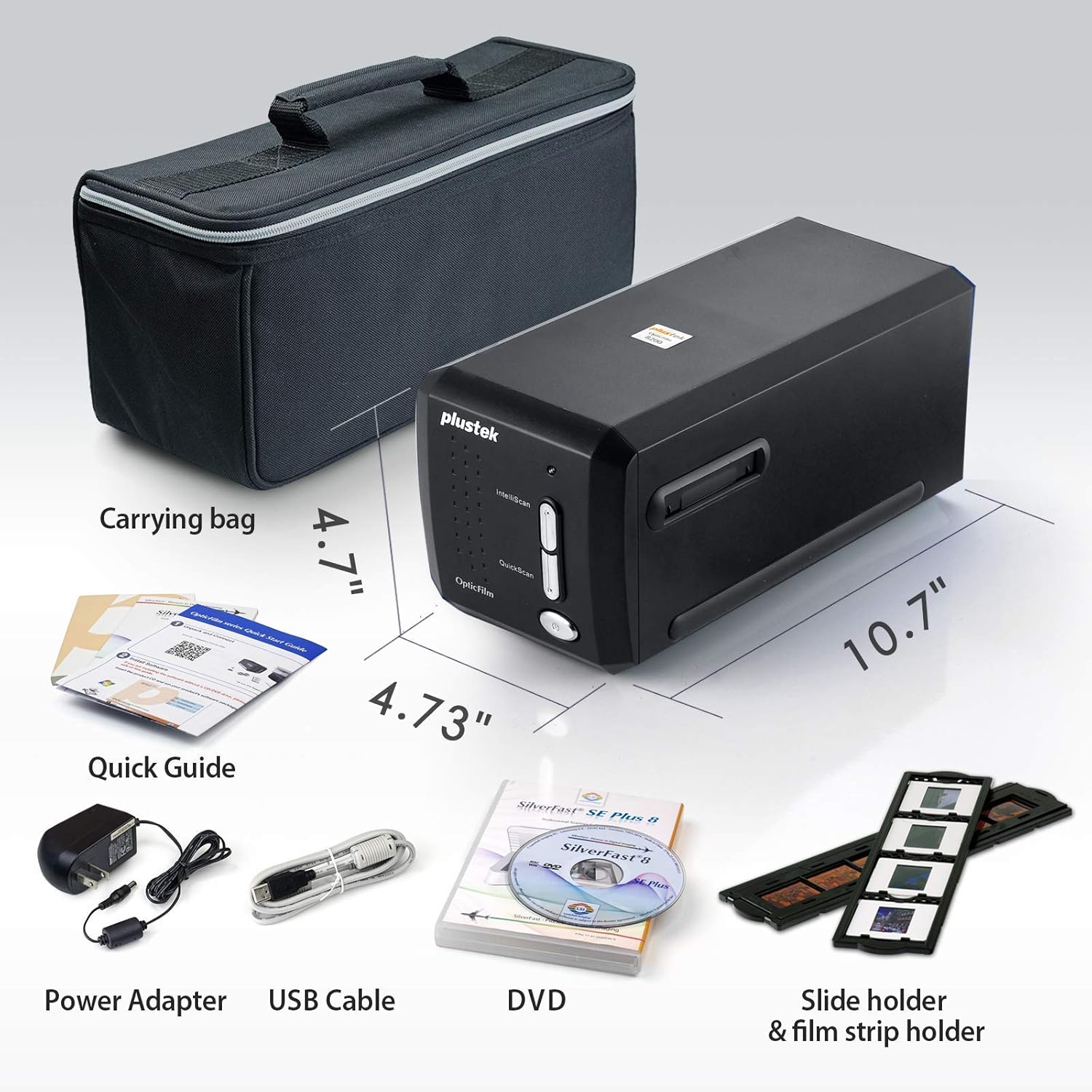
Image: All components included in the Plustek OpticFilm 8200i SE package, including the scanner, power adapter, USB cable, software DVD, quick guide, carrying bag, and film/slide holders.
സജ്ജമാക്കുക
- ഹാർഡ്വെയർ കണക്ഷൻ:
- പവർ അഡാപ്റ്റർ സ്കാനറിലേക്കും തുടർന്ന് ഒരു പവർ ഔട്ട്ലെറ്റിലേക്കും ബന്ധിപ്പിക്കുക.
- സ്കാനറിൽ നിന്ന് USB കേബിൾ നിങ്ങളുടെ കമ്പ്യൂട്ടറിൽ ലഭ്യമായ ഒരു USB പോർട്ടിലേക്ക് ബന്ധിപ്പിക്കുക.
- സോഫ്റ്റ്വെയർ ഇൻസ്റ്റാളേഷൻ:
- Insert the provided SilverFast SE Plus 8 software DVD into your computer's optical drive.
- Follow the on-screen instructions to install the software and necessary drivers.
- If your computer does not have an optical drive, or for the latest drivers, download them from the official Plustek website. The scanner supports Windows 7/8/10/11 and Mac OS 10.12 ~ 11.x.
- SilverFast License Registration:
- After installation, launch the SilverFast software.
- You will be prompted to register your free SilverFast license. Follow the steps provided, which typically involve entering your scanner's hardware serial number.

Image: A visual guide demonstrating the steps for registering the SilverFast software license, including locating the serial number and inputting registration details.
പ്രവർത്തന നിർദ്ദേശങ്ങൾ
Loading Film/Slides:
- For 35mm negative film strips, carefully insert the film into the 35mm Negative Film Stripe Holder. Ensure the film is flat and correctly aligned.
- For mounted slides, place the slide into the Mounted Slide Holder.
- ലോഡ് ചെയ്ത ഹോൾഡർ സ്കാനറിന്റെ ഫിലിം സ്ലോട്ടിലേക്ക് തിരുകുക.

Image: Two 35mm negative film holders, designed to securely hold film strips for scanning with the OpticFilm 8200i SE.
Scanning Process with SilverFast:
- Launch the SilverFast SE Plus 8 software.
- Select the appropriate film type (negative or slide) and film profile സോഫ്റ്റ്വെയറിനുള്ളിൽ.
- മുൻകൂട്ടി ഉപയോഗിക്കുകview function to adjust scanning area and settings.
- iSRD (ഇൻഫ്രാറെഡ് സ്മാർട്ട് റിമൂവൽ ഓഫ് ഡിഫെക്റ്റ്സ്): The scanner features a built-in infrared channel to detect and remove dust and scratches. Enable this function in the SilverFast software for optimal results.
- Multi-Exposure Function: For improved image quality and dynamic range, enable the Multi-Exposure feature in the software. This captures multiple exposures to enhance detail in highlights and shadows.
- Adjust other settings such as resolution (up to 7200 dpi), color depth (48-bit input), and image enhancements as needed.
- Initiate the scan. The scanned image will appear in the software interface.
- Save your scanned image in your desired format (e.g., TIFF, JPEG).

Image: A diagram illustrating how the infrared channel detects dust and scratches on film, showing the original source image, infrared scan, marker for defects, and the final corrected result.

Image: Screenshot of the SilverFast SE Plus 8 software interface, highlighting the iSRD (Infrared Dust and Scratch Removal) feature and its controls.

ചിത്രം: ഉദാamples demonstrating the effects of SilverFast NegaFix for film profiles, iSRD for defect removal, and Multi-Exposure for increased dynamic range, showing before and after comparisons.
മെയിൻ്റനൻസ്
- സ്കാനർ വൃത്തിയാക്കൽ: Use a soft, lint-free cloth to gently wipe the exterior of the scanner. Do not use liquid cleaners or abrasive materials.
- Cleaning Film/Slides: Before scanning, ensure your film and slides are free of dust and fingerprints. Use a soft brush or compressed air designed for photographic materials. Avoid touching the film surface directly.
- സംഭരണം: When not in use, store the scanner in a clean, dry, and dust-free environment, preferably in its original packaging or the provided carrying bag.
ട്രബിൾഷൂട്ടിംഗ്
പൊതുവായ പ്രശ്നങ്ങളും പരിഹാരങ്ങളും:
- സ്കാനർ കണ്ടെത്തിയില്ല:
- സ്കാനറിലേക്കും കമ്പ്യൂട്ടറിലേക്കും USB കേബിൾ സുരക്ഷിതമായി ബന്ധിപ്പിച്ചിട്ടുണ്ടെന്ന് ഉറപ്പാക്കുക.
- Verify the power adapter is connected and the scanner is powered on.
- Reinstall the scanner drivers from the Plustek webസൈറ്റ്.
- നിങ്ങളുടെ കമ്പ്യൂട്ടറിൽ മറ്റൊരു USB പോർട്ട് പരീക്ഷിക്കുക.
- Dust/Scratches on Scans:
- Ensure the film/slides are clean before scanning.
- Activate and properly configure the iSRD (Infrared Smart Removal of Defects) function in the SilverFast software. This feature is specifically designed to address dust and scratches.
- Poor Image Quality (Low Dynamic Range, Lack of Detail):
- Ensure the film/slide is correctly loaded and flat in the holder.
- Utilize the Multi-Exposure function in SilverFast to capture more detail in highlights and shadows.
- Check and adjust exposure, contrast, and color settings in the SilverFast software.
- Ensure you are scanning at an appropriate resolution for your needs (e.g., 7200 dpi for maximum detail).
- സോഫ്റ്റ്വെയർ ക്രാഷുകൾ അല്ലെങ്കിൽ ഫ്രീസുകൾ:
- Ensure your operating system meets the minimum system requirements (Windows 7 or later, Mac OS 10.12 or later).
- Update your SilverFast software and scanner drivers to the latest versions from the Plustek webസൈറ്റ്.
- സ്കാൻ ചെയ്യുമ്പോൾ മറ്റ് ആവശ്യമുള്ള ആപ്ലിക്കേഷനുകൾ അടയ്ക്കുക.
സ്പെസിഫിക്കേഷനുകൾ
| ഫീച്ചർ | വിവരണം |
|---|---|
| മോഡലിൻ്റെ പേര് | OpticFilm 8200i SE |
| സ്കാനർ തരം | Film (35mm Negative & Mounted Slides) |
| ഒപ്റ്റിക്കൽ മിഴിവ് | 7200 ഡിപിഐ |
| ഡൈനാമിക് റേഞ്ച് | Up to 3.6 Dmax |
| വർണ്ണ ആഴം | 48-bit input, 24/48-bit output |
| പ്രകാശ സ്രോതസ്സ് | എൽഇഡി |
| സെൻസർ തരം | സിസിഡി |
| കണക്റ്റിവിറ്റി | USB |
| Infrared Channel | Yes (for dust and scratch removal) |
| പിന്തുണയ്ക്കുന്ന OS | Windows 7/8/10/11, Mac OS 10.12 ~ 11.x |
വാറൻ്റിയും പിന്തുണയും
For detailed warranty information, please refer to the warranty card included with your product or visit the official Plustek website. Plustek provides technical support and driver updates through their webസൈറ്റ്.
Official Plustek Webസൈറ്റ്: www.plustek.com
It is recommended to regularly check the Plustek website for the latest software updates and support resources to ensure optimal performance of your scanner.


