ആമുഖം
This manual provides detailed instructions for the setup, operation, maintenance, and troubleshooting of your ECHTPower Wireless Bluetooth Ergonomic Vertical Mouse. Please read this manual thoroughly before using the device to ensure proper functionality and longevity.

Image: The ECHTPower Wireless Bluetooth Ergonomic Vertical Mouse, showing its vertical design and the included USB receiver.
ഉൽപ്പന്ന സവിശേഷതകൾ
- എർഗണോമിക് ലംബ രൂപകൽപ്പന: Designed to reduce wrist and forearm strain, promoting a natural hand posture.
- ട്രൈ-മോഡ് കണക്റ്റിവിറ്റി: Supports dual Bluetooth 5.0 connections and a 2.4GHz wireless USB connection, allowing control of up to three devices.
- ക്രമീകരിക്കാവുന്ന DPI: Switch between 1000, 1600, and 2400 DPI settings for precise cursor control.
- റീചാർജ് ചെയ്യാവുന്ന ബാറ്ററി: Built-in 700mAh battery provides up to 150 hours of continuous use on a 2-hour charge via Type-C port.
- നിശബ്ദ ക്ലിക്ക് ബട്ടണുകൾ: Main left and right click buttons are designed for quiet operation, reducing noise by 90% compared to traditional mice.
- 7 ബട്ടണുകൾ: Includes left click, right click, scroll wheel, DPI switch, forward, back, and device switch buttons.

Image: Comparison showing the natural wrist posture with the ergonomic vertical mouse versus the bent wrist posture with a traditional mouse.

Image: The mouse demonstrating its ability to connect to three different devices simultaneously via 2.4G and dual Bluetooth modes.
പാക്കേജ് ഉള്ളടക്കം
- ECHTPower Wireless Bluetooth Ergonomic Vertical Mouse
- യുഎസ്ബി റിസീവർ (മൗസിന്റെ അടിയിലുള്ള കമ്പാർട്ടുമെന്റിൽ സൂക്ഷിച്ചിരിക്കുന്നു)
- USB-C ചാർജിംഗ് കേബിൾ
- ഉപയോക്തൃ മാനുവൽ (ഈ പ്രമാണം)
സജ്ജീകരണ ഗൈഡ്
1. മൗസ് ചാർജ് ചെയ്യുന്നു
Before first use, it is recommended to fully charge the mouse. Connect the provided USB-C charging cable to the Type-C port on the front of the mouse and the other end to a USB power source (e.g., computer USB port, USB wall adapter).
- The LED light will indicate charging status.
- ഒരു ഫുൾ ചാർജിന് ഏകദേശം 2 മണിക്കൂർ എടുക്കും.
- The mouse can be used for up to 150 hours on a full charge (with lights off state).
- If the battery is low, the indicator light will blink.

Image: The mouse being charged via its Type-C port, highlighting the 700mAh battery capacity and 2-hour charging time.
2. മൗസ് ബന്ധിപ്പിക്കൽ
The ECHTPower mouse supports three connection modes: 2.4GHz Wireless USB and two Bluetooth 5.0 channels (BT1 and BT2).
- പവർ ഓൺ: മൗസിന്റെ അടിയിൽ പവർ സ്വിച്ച് കണ്ടെത്തി അത് "ഓൺ" സ്ഥാനത്തേക്ക് സ്ലൈഡ് ചെയ്യുക.
- കണക്ഷൻ മോഡ് തിരഞ്ഞെടുക്കുക: Press the "Device Switch Button" on the bottom of the mouse to cycle through the modes:
- 2.4GHz മോഡ്: The indicator light will show a specific color (refer to troubleshooting if not). Insert the USB receiver into an available USB port on your computer. The mouse should connect automatically.
- Bluetooth 1 (BT1) Mode: The indicator light will show a specific color. Press and hold the device switch button for 3-5 seconds until the indicator light flashes rapidly, indicating pairing mode.
- Bluetooth 2 (BT2) Mode: The indicator light will show a specific color. Press and hold the device switch button for 3-5 seconds until the indicator light flashes rapidly, indicating pairing mode.
- Pairing via Bluetooth (for BT1/BT2 modes):
- On your device (PC, Laptop, Mac, Tablet), go to Bluetooth settings.
- ഇതിനായി തിരയുക പുതിയ ഉപകരണങ്ങൾ.
- Select "ECHTPower Mouse" (or similar name) from the list of available devices.
- Confirm pairing. The indicator light on the mouse will stop flashing and remain solid once connected.
To switch between connected devices, simply press the "Device Switch Button" on the bottom of the mouse.

ചിത്രം: വിശദമായത് view of the mouse's underside, indicating the location of the power switch, device switch button, optical lens, and the compartment for the USB receiver.
പ്രവർത്തന നിർദ്ദേശങ്ങൾ
ബട്ടൺ പ്രവർത്തനങ്ങൾ
| ബട്ടൺ | ഫംഗ്ഷൻ |
|---|---|
| ഇടത് ക്ലിക്ക് ബട്ടൺ | Standard left mouse click. Silent operation. |
| ബട്ടൺ റൈറ്റ് ക്ലിക്ക് ചെയ്യുക | Standard right mouse click. Silent operation. |
| സ്ക്രോൾ വീൽ | മുകളിലേക്കും/താഴേക്കും സ്ക്രോൾ ചെയ്യുക, മധ്യത്തിൽ ക്ലിക്ക് ചെയ്യുക. |
| DPI സ്വിച്ച് ബട്ടൺ | Cycles through DPI settings: 1000, 1600, 2400. |
| ഫോർവേഡ് ബട്ടൺ | മുന്നോട്ട് നാവിഗേറ്റ് ചെയ്യുന്നു web ബ്രൗസറുകൾ അല്ലെങ്കിൽ file പര്യവേക്ഷകർ. |
| ബാക്ക് ബട്ടൺ | തിരികെ നാവിഗേറ്റ് ചെയ്യുന്നു web ബ്രൗസറുകൾ അല്ലെങ്കിൽ file പര്യവേക്ഷകർ. |
| Device Switch Button (bottom) | Switches between 2.4GHz, Bluetooth 1, and Bluetooth 2 modes. Long press to enter Bluetooth pairing mode. |

ചിത്രം: മുൻവശവും വശവും views of the mouse with labels for the DPI switch button, roller, left button, right button, forward button, back button, and LED light.
ഡിപിഐ ക്രമീകരിക്കുന്നു
Press the DPI switch button located on the top of the mouse, behind the scroll wheel, to cycle through the available DPI settings: 1000, 1600, and 2400. Each press will change the cursor sensitivity, allowing you to select the speed that best suits your needs.

Image: A visual representation of the DPI adjustment feature, indicating the three selectable DPI levels.
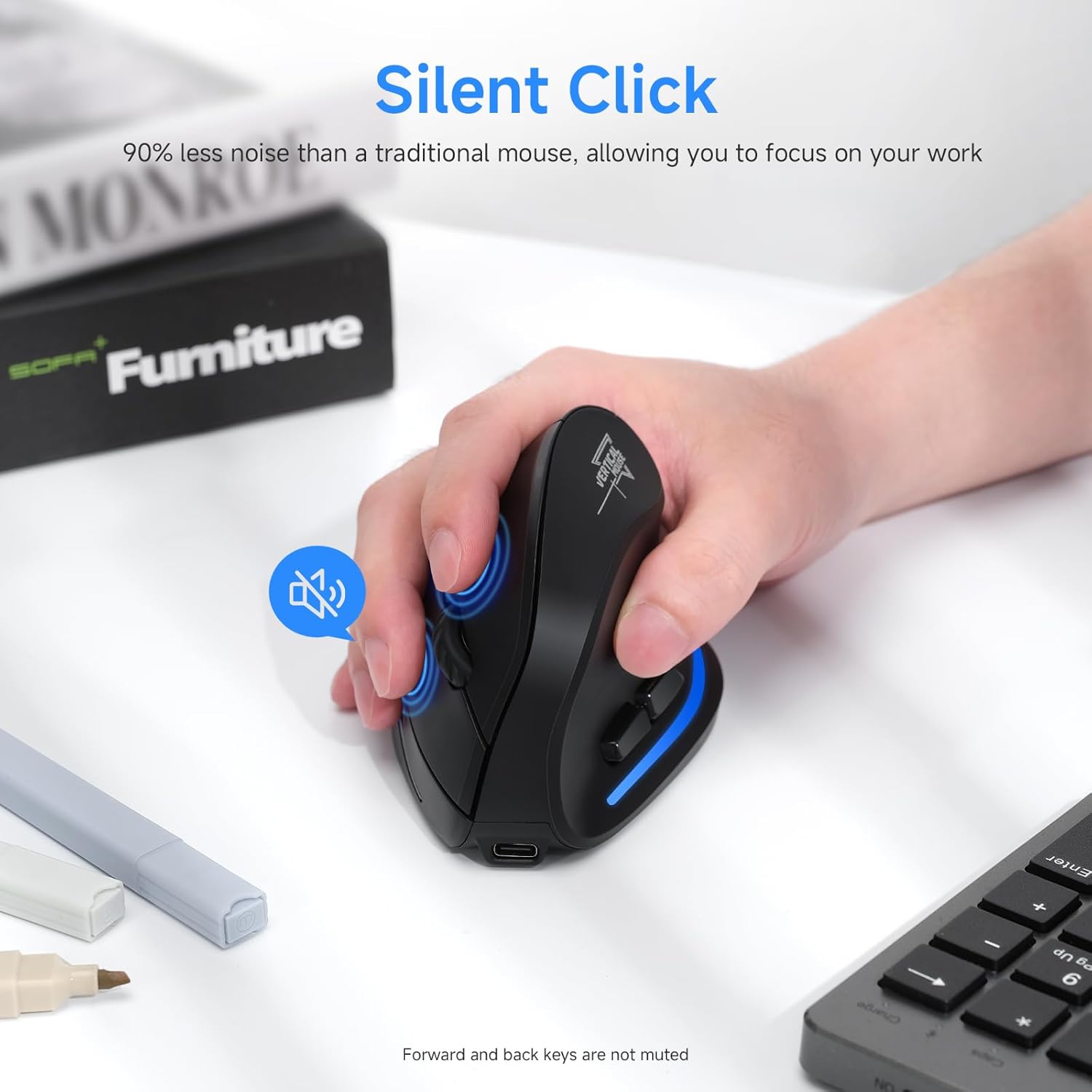
Image: A user's hand on the mouse, highlighting the silent click functionality of the main buttons. Note that forward and back keys are not muted.
മെയിൻ്റനൻസ്
- വൃത്തിയാക്കൽ: മൗസ് വൃത്തിയാക്കാൻ മൃദുവായതും ഉണങ്ങിയതുമായ ഒരു തുണി ഉപയോഗിക്കുക. കഠിനമായ അഴുക്കിന്, അല്പം ഡി.amp തുണി ഉപയോഗിക്കാം, പക്ഷേ ഉപകരണത്തിനുള്ളിൽ ഈർപ്പം പ്രവേശിക്കുന്നില്ലെന്ന് ഉറപ്പാക്കുക. കഠിനമായ രാസവസ്തുക്കളോ അബ്രസിവ് ക്ലീനറുകളോ ഉപയോഗിക്കരുത്.
- സംഭരണം: When not in use for extended periods, store the mouse in a cool, dry place. It is recommended to turn off the mouse to conserve battery life.
- ബാറ്ററി കെയർ: To prolong battery life, avoid fully discharging the mouse frequently. Charge it when the low battery indicator blinks.
- USB റിസീവർ: When transporting the mouse, store the USB receiver in its designated compartment on the bottom of the mouse to prevent loss.
ട്രബിൾഷൂട്ടിംഗ്
| പ്രശ്നം | സാധ്യമായ കാരണം | പരിഹാരം |
|---|---|---|
| മൗസ് പ്രതികരിക്കുന്നില്ല | Low battery; Mouse is off; Incorrect connection mode; USB receiver not properly inserted (2.4GHz mode); Bluetooth not paired (BT mode). | Charge the mouse; Turn on the mouse; Switch to the correct connection mode (2.4GHz, BT1, BT2); Re-insert USB receiver; Re-pair Bluetooth. |
| കഴ്സർ ചലനം ക്രമരഹിതമോ മന്ദഗതിയിലുള്ളതോ ആണ്. | Low battery; Dirty optical sensor; Surface not suitable for optical mouse; DPI setting too low. | Charge the mouse; Clean the optical sensor with a soft cloth; Use a mouse pad or a non-reflective, opaque surface; Increase DPI setting. |
| ബ്ലൂടൂത്ത് വഴി ബന്ധിപ്പിക്കാൻ കഴിയില്ല | Mouse not in pairing mode; Bluetooth on device is off; Interference; Already connected to another device. | Ensure mouse is in BT pairing mode (flashing light); Turn on Bluetooth on your device; Move closer to the device; Disconnect from other devices. |
| ബട്ടണുകൾ പ്രവർത്തിക്കുന്നില്ല | Software conflict; Mouse malfunction. | Restart your computer; Try the mouse on another device; If problem persists, contact customer support. |
സ്പെസിഫിക്കേഷനുകൾ
- മോഡൽ: SB-F35B
- കണക്റ്റിവിറ്റി: 2.4GHz Wireless, Bluetooth 5.0 (BT1, BT2)
- DPI ക്രമീകരണങ്ങൾ: 1000 / 1600 / 2400
- ബാറ്ററി ശേഷി: 700mAh റീചാർജ് ചെയ്യാവുന്ന ലിഥിയം ബാറ്ററി
- ചാർജിംഗ് സമയം: ഏകദേശം 2 മണിക്കൂർ
- ജോലി സമയം: Up to 150 hours (with lights off)
- ബട്ടണുകളുടെ എണ്ണം: 7 (Left, Right, Scroll Wheel, DPI, Forward, Back, Device Switch)
- കൈ ഓറിയൻ്റേഷൻ: Left (Note: Product images depict a right-handed mouse design.)
- ഇനത്തിൻ്റെ ഭാരം: 6.2 ഔൺസ്
- അളവുകൾ (LxWxH): Approximately 4.33 x 2.83 x 2.95 inches (110mm x 72mm x 75mm)
- അനുയോജ്യത: PC, Laptop, Mac, Windows (and other Bluetooth-enabled devices)
ചിത്രം: വിശദമായത് view of the mouse's underside, indicating the location of the power switch, device switch button, optical lens, and the compartment for the USB receiver.
ചിത്രം: മുൻവശവും വശവും views of the mouse with labels for the DPI switch button, roller, left button, right button, forward button, back button, and LED light, along with dimensions.
വാറൻ്റിയും പിന്തുണയും
ECHTPower products are designed for reliability and performance. For warranty information and technical support, please refer to the official ECHTPower webസൈറ്റ് അല്ലെങ്കിൽ അവരുടെ ഉപഭോക്തൃ സേവനവുമായി നേരിട്ട് ബന്ധപ്പെടുക.
ബന്ധപ്പെടാനുള്ള വിവരങ്ങൾ:
- Webസൈറ്റ്: Visit the ECHTPower Store on Amazon
- For further assistance, please consult the product listing page or contact the seller directly through Amazon's messaging system.


