1. ആമുഖം
The Hama MW-650 is a versatile 6-button optical wireless mouse designed for multi-device use. It offers flexible connectivity options via a 2.4 GHz USB-A receiver and Bluetooth, allowing seamless switching between up to three devices. The optical sensor provides precise cursor control, and adjustable DPI settings cater to various user preferences. This manual provides detailed instructions for setup, operation, maintenance, and troubleshooting to ensure optimal performance of your device.
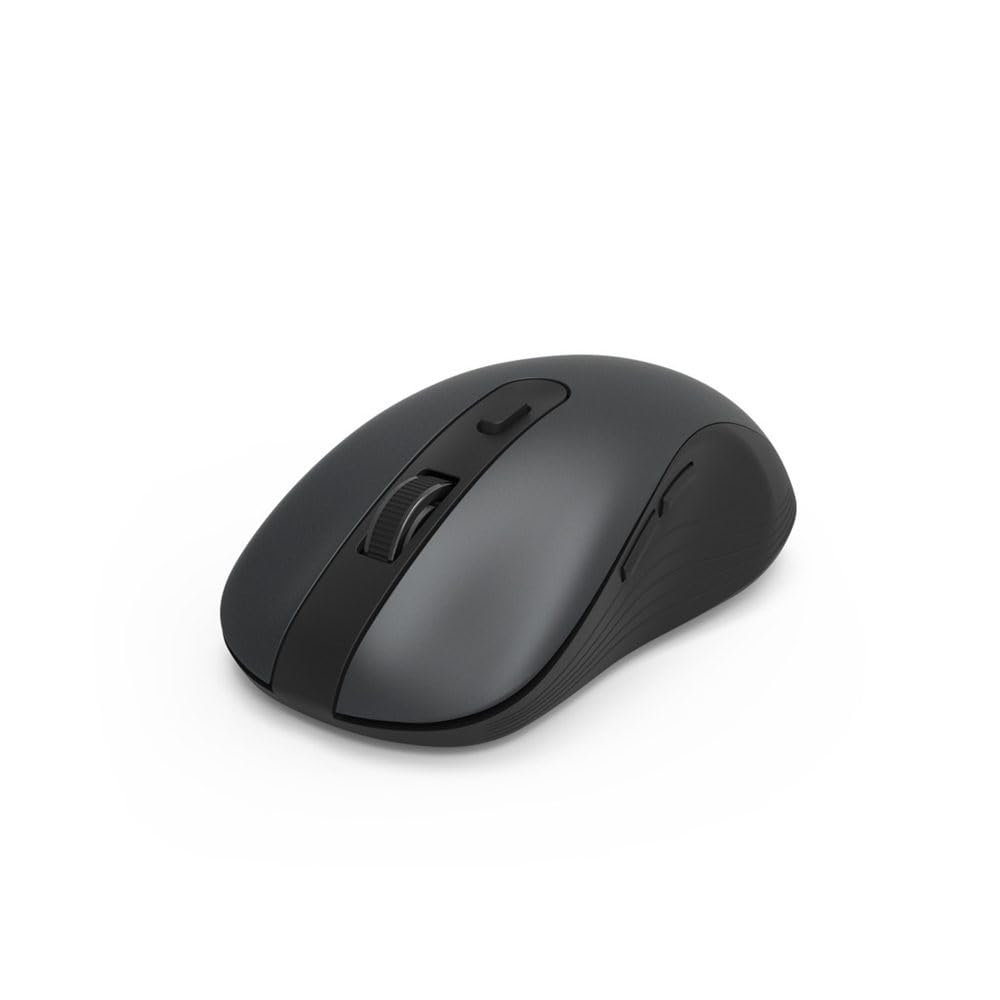
Image 1.1: Hama MW-650 Wireless Mouse (Top View)
2. പാക്കേജ് ഉള്ളടക്കം
പാക്കേജിൽ ഇനിപ്പറയുന്ന ഇനങ്ങൾ ഉണ്ടോ എന്ന് പരിശോധിക്കുക:
- 1 x Hama MW-650 6-Button Optical Wireless Mouse
- 1 x USB-A റിസീവർ
- 2 x എഎ മിഗ്നോൺ ബാറ്ററികൾ
- 1 x ഇൻസ്ട്രക്ഷൻ മാനുവൽ (ഈ ഡോക്യുമെന്റ്)

Image 2.1: Hama MW-650 Product Packaging
3. സജ്ജീകരണം
3.1. ബാറ്ററി ഇൻസ്റ്റാളേഷൻ
- മൗസിന്റെ അടിഭാഗത്ത് ബാറ്ററി കമ്പാർട്ട്മെന്റ് കണ്ടെത്തുക.
- ബാറ്ററി കമ്പാർട്ട്മെൻ്റ് കവർ തുറക്കുക.
- ശരിയായ പോളാരിറ്റി (+/-) ഉറപ്പാക്കിക്കൊണ്ട് രണ്ട് AA മിഗ്നോൺ ബാറ്ററികൾ ഇടുക.
- ബാറ്ററി കമ്പാർട്ട്മെൻ്റ് കവർ സുരക്ഷിതമായി അടയ്ക്കുക.
3.2. പവർ ഓൺ/ഓഫ്
On the underside of the mouse, slide the ON/OFF switch to the 'ON' position to power on the mouse. Slide it to 'OFF' when not in use to conserve battery life.

Image 3.1: Underside of Hama MW-650 Mouse with ON/OFF Switch and Receiver
3.3. കണക്റ്റിവിറ്റി ഓപ്ഷനുകൾ
The Hama MW-650 mouse supports two wireless connection methods: 2.4 GHz via USB-A receiver and Bluetooth.
3.3.1. 2.4 GHz USB-A Receiver Connection
- Remove the USB-A receiver from its storage slot on the underside of the mouse.
- Plug the USB-A receiver into an available USB-A port on your computer or laptop.
- ഓപ്പറേറ്റിംഗ് സിസ്റ്റം ആവശ്യമായ ഡ്രൈവറുകൾ യാന്ത്രികമായി കണ്ടെത്തി ഇൻസ്റ്റാൾ ചെയ്യണം.
- The mouse will connect automatically. The LED indicator for BT1/BT2 will not be lit when using the USB receiver.
3.3.2. ബ്ലൂടൂത്ത് കണക്ഷൻ
The mouse can connect to two separate Bluetooth devices (BT1 and BT2).
- മൗസ് ഓണാണെന്ന് ഉറപ്പാക്കുക.
- Press the 'BT1' or 'BT2' button on the underside of the mouse to select the desired Bluetooth channel. The corresponding LED will flash slowly.
- To enter pairing mode, press and hold the selected 'BT1' or 'BT2' button for approximately 3 seconds until the LED flashes rapidly.
- നിങ്ങളുടെ ഉപകരണത്തിൽ (പിസി, ലാപ്ടോപ്പ്, ടാബ്ലെറ്റ്, സ്മാർട്ട്ഫോൺ), ബ്ലൂടൂത്ത് പ്രവർത്തനക്ഷമമാക്കി പുതിയ ഉപകരണങ്ങൾക്കായി തിരയുക.
- Select "Hama MW-650" from the list of available devices to pair.
- Once successfully paired, the LED will stop flashing and remain steadily lit for a few seconds before turning off.
4. പ്രവർത്തന നിർദ്ദേശങ്ങൾ
4.1. മൗസിന്റെ അടിസ്ഥാന പ്രവർത്തനങ്ങൾ
The Hama MW-650 features 6 buttons and a scroll wheel:
- ഇടത് ക്ലിക്ക് ബട്ടൺ: Primary function, typically for selecting items or opening links.
- റൈറ്റ് ക്ലിക്ക് ബട്ടൺ: Secondary function, typically for context menus.
- സ്ക്രോൾ വീൽ: For scrolling up and down documents or web പേജുകൾ. ഒരു മിഡിൽ-ക്ലിക്ക് ഫംഗ്ഷനും അമർത്താം.
- DPI ബട്ടൺ: Located behind the scroll wheel, used to adjust cursor sensitivity.
- ഫോർവേഡ്/ബാക്ക്വേർഡ് ബട്ടണുകൾ: Located on the side of the mouse, typically used for navigating web പേജുകൾ അല്ലെങ്കിൽ ഫോൾഡറുകൾ.
4.2. ഉപകരണങ്ങൾക്കിടയിൽ മാറൽ
The MW-650 mouse allows you to switch between three connected devices (one via USB receiver, two via Bluetooth).
- To switch to a Bluetooth-connected device, press the 'BT1' or 'BT2' button on the underside of the mouse. The corresponding LED will light up briefly.
- To switch to the device connected via the USB receiver, press the 'USB' button (or the button without a BT label) on the underside of the mouse.

Image 4.1: Multi-Device Connectivity Example

Image 4.2: Multi-Device Setup with Monitor
4.3. DPI Sensitivity Adjustment
The mouse offers adjustable DPI (Dots Per Inch) settings to control cursor speed and sensitivity. Press the DPI button located behind the scroll wheel to cycle through the available sensitivities:
- 800 ഡിപിഐ
- 1200 DPI (സ്ഥിരസ്ഥിതി)
- 1600 ഡിപിഐ
- 2000 ഡിപിഐ
- 2400 ഡിപിഐ
Each press of the DPI button will change the sensitivity, allowing you to find the setting that best suits your task or preference.
5. പവർ മാനേജ്മെന്റ്
The Hama MW-650 mouse is designed with intelligent power management features to conserve battery life:
- ഓട്ടോമാറ്റിക് സ്റ്റാൻഡ്ബൈ മോഡ്: The mouse will automatically enter a standby mode after a period of inactivity. To wake it up, simply move the mouse or click any button.
- ഓൺ/ഓഫ് സ്വിച്ച്: For extended periods of non-use, slide the ON/OFF switch on the underside of the mouse to the 'OFF' position to completely power down the device and maximize battery life.
6. പരിചരണവും പരിപാലനവും
6.1. വൃത്തിയാക്കൽ
നിങ്ങളുടെ മൗസിന്റെ പ്രകടനവും രൂപഭംഗിയും നിലനിർത്താൻ:
- വൃത്തിയാക്കുന്നതിന് മുമ്പ് മൗസ് ഓഫ് ചെയ്തിട്ടുണ്ടെന്ന് ഉറപ്പാക്കുക.
- മൗസിന്റെ ഉപരിതലം തുടയ്ക്കാൻ മൃദുവായ, ഉണങ്ങിയ, ലിന്റ് രഹിത തുണി ഉപയോഗിക്കുക.
- കഠിനമായ അഴുക്കിന്, ചെറുതായി dampതുണിയിൽ വെള്ളം അല്ലെങ്കിൽ നേരിയ ക്ലീനിംഗ് ലായനി ഉപയോഗിക്കുക. കഠിനമായ രാസവസ്തുക്കളോ ഉരച്ചിലുകളോ ഉള്ള വസ്തുക്കൾ ഒഴിവാക്കുക.
- Clean the optical sensor area on the underside of the mouse periodically with a cotton swab to ensure accurate tracking.
6.2. ബാറ്ററി മാറ്റിസ്ഥാപിക്കൽ
When the mouse's performance degrades or it stops responding, it may be time to replace the batteries.
- Power off the mouse using the ON/OFF switch.
- താഴെയുള്ള ബാറ്ററി കമ്പാർട്ട്മെന്റ് തുറക്കുക.
- Remove the old AA batteries and dispose of them according to local regulations.
- Insert new AA Mignon batteries, observing correct polarity.
- ബാറ്ററി കമ്പാർട്ട്മെൻ്റ് അടയ്ക്കുക.
7. പ്രശ്നപരിഹാരം
If you encounter issues with your Hama MW-650 mouse, please refer to the following common solutions:
| പ്രശ്നം | സാധ്യമായ പരിഹാരം |
|---|---|
| Mouse does not respond. |
|
| കഴ്സർ ചലനം ക്രമരഹിതമോ മന്ദഗതിയിലുള്ളതോ ആണ്. |
|
| Cannot switch between devices. |
|
| ബ്ലൂടൂത്ത് ജോടിയാക്കൽ പരാജയപ്പെട്ടു. |
|
8 സാങ്കേതിക സവിശേഷതകൾ
| മോഡൽ നമ്പർ | 00182617 (MW-650) |
| കണക്റ്റിവിറ്റി ടെക്നോളജി | 2.4GHz RF (USB-A Receiver), Bluetooth 5.0 |
| മൂവ്മെന്റ് ഡിറ്റക്ഷൻ ടെക്നോളജി | ഒപ്റ്റിക്കൽ |
| ഡിപിഐ സംവേദനക്ഷമത | 800 / 1200 / 1600 / 2000 / 2400 DPI (adjustable) |
| ബട്ടണുകളുടെ എണ്ണം | 6 (including scroll wheel) |
| ഫോം ഫാക്ടർ | വലതു കൈ |
| പവർ ഉറവിടം | 2 x AA മിഗ്നോൺ ബാറ്ററികൾ (ഉൾപ്പെടുത്തിയിരിക്കുന്നു) |
| ബാറ്ററി ലൈഫ് | 288 ദിവസം വരെ (ഉപയോഗത്തെ ആശ്രയിച്ച്) |
| അനുയോജ്യമായ ഓപ്പറേറ്റിംഗ് സിസ്റ്റങ്ങൾ | Windows 11/10/8/7, Android 4.3 or higher, macOS 10.10 or higher, iOS 13 or higher |
| ഉൽപ്പന്ന അളവുകൾ (L x W x H) | 11.3 x 6.3 x 4 സെ.മീ (4.41 x 2.48 x 1.57 ഇഞ്ച്) |
| ഇനത്തിൻ്റെ ഭാരം | 3.62 ഔൺസ് |
| നിറം | കറുപ്പ് |
9. വാറൻ്റിയും പിന്തുണയും
വാറന്റി വിവരങ്ങൾക്കും സാങ്കേതിക പിന്തുണയ്ക്കും, ദയവായി ഔദ്യോഗിക Hama കാണുക. webസൈറ്റിൽ ബന്ധപ്പെടുകയോ അവരുടെ ഉപഭോക്തൃ സേവനവുമായി നേരിട്ട് ബന്ധപ്പെടുകയോ ചെയ്യുക. ഏതെങ്കിലും വാറന്റി ക്ലെയിമുകൾക്കായി നിങ്ങളുടെ വാങ്ങലിന്റെ തെളിവ് സൂക്ഷിക്കുക.
- നിർമ്മാതാവ്: Hama GmbH & Co KG
- Webസൈറ്റ്: www.hama.com


