ആമുഖം
This manual provides detailed instructions for the setup, operation, and maintenance of your Moultrie W800 All-Purpose Series A Trail Camera. Please read this guide thoroughly to ensure proper use and optimal performance of your device.
ഉൽപ്പന്നം കഴിഞ്ഞുview
The Moultrie W800 is a high-performance trail camera designed for capturing images and videos of wildlife. It features an Illumi-Night Sensor for clear nighttime captures and a robust design for outdoor use.
പ്രധാന സവിശേഷതകൾ:
- Captures 26 Megapixel images for high clarity.
- 70-foot flash and detection range.
- Fast 0.5 second trigger speed.
- Moultrie Smokescreen Camo Pattern for discreet placement.
ബോക്സിൽ എന്താണുള്ളത്:
- Moultrie W800 Trail Camera
- 8 AA ബാറ്ററികൾ
- മൗണ്ടിംഗ് സ്ട്രാപ്പ്

Image: Moultrie W800 Trail Camera in its retail packaging, showing the camera, batteries, and key features on the box.
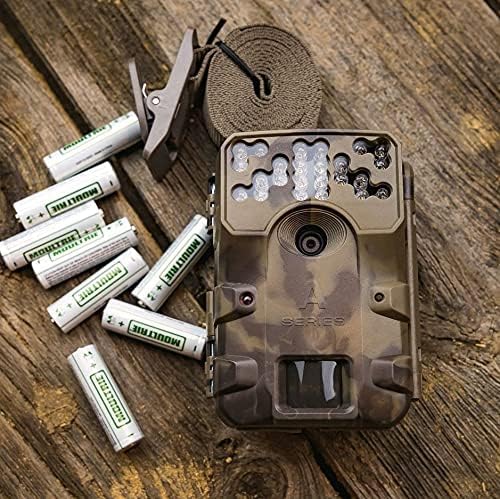
Image: The Moultrie W800 trail camera displayed with the included 8 AA batteries and a mounting strap, ready for setup.
സജ്ജമാക്കുക
1. ബാറ്ററി ഇൻസ്റ്റാളേഷൻ
- Open the camera housing latch.
- ബാറ്ററി കമ്പാർട്ടുമെന്റിലേക്ക് 8 AA ബാറ്ററികൾ തിരുകുക, ശരിയായ പോളാരിറ്റി (+/-) ഉറപ്പാക്കുക.
- Close the camera housing latch securely.
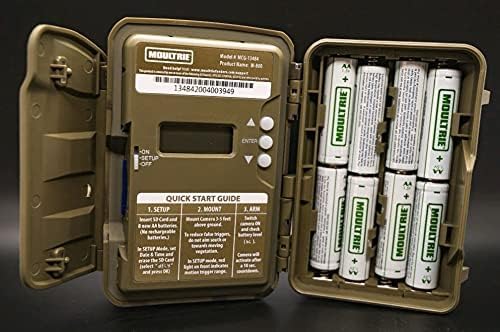
Image: An open Moultrie W800 camera, revealing the battery compartment on the right, the control panel with a small screen, and buttons on the left. This view is essential for battery and SD card installation.
2. എസ്ഡി കാർഡ് ഇൻസ്റ്റാളേഷൻ
- ക്യാമറ ഹൗസിംഗ് തുറന്നിരിക്കുമ്പോൾ, SD കാർഡ് സ്ലോട്ട് കണ്ടെത്തുക.
- Insert a standard SD card (up to 32GB) into the slot until it clicks into place. Ensure the card is inserted in the correct orientation.
- It is recommended to format the SD card using the camera's menu settings before first use.
3. ക്യാമറ ഘടിപ്പിക്കുന്നു
- Select a suitable location, typically a tree or post, where the camera can capture the desired area.
- Mount the camera approximately 3-5 feet above the ground.
- Use the provided mounting strap to secure the camera firmly. Thread the strap through the camera's mounting slots and tighten it around the object.
- Angle the camera to avoid direct sunlight and to minimize false triggers from swaying branches.

Image: A Moultrie W800 trail camera, in its camouflage casing, securely mounted to a tree trunk using a strap, demonstrating a typical field setup.
പ്രവർത്തന നിർദ്ദേശങ്ങൾ
അടിസ്ഥാന പ്രവർത്തനം
- പവർ ഓൺ/ഓഫ്: Locate the power switch inside the camera housing. Slide it to the 'ON' position to power on the camera. Slide to 'OFF' to power off.
- സജ്ജീകരണ മോഡ്: After powering on, the camera will typically enter 'SETUP' mode. In this mode, you can adjust settings such as date, time, photo/video mode, resolution, and trigger delay using the control buttons and display.
- Arming the Camera: Once settings are configured, slide the power switch to the 'ARM' position. The camera will initiate a countdown (e.g., 10 seconds) to allow you to leave the area without triggering a capture. After the countdown, the camera will be active and ready to detect motion.
- നില പരിശോധിക്കുന്നു: The small display inside the camera housing provides status information, including battery level, SD card status, and current mode.
മെയിൻ്റനൻസ്
- വൃത്തിയാക്കൽ: Periodically clean the camera lens and sensor window with a soft, lint-free cloth. Avoid abrasive materials or harsh chemicals.
- ബാറ്ററി പരിശോധന: Regularly check battery levels, especially before extended deployment. Replace all batteries simultaneously to ensure consistent power.
- SD കാർഡ് മാനേജുമെന്റ്: Format the SD card regularly to prevent data corruption and ensure optimal performance. Back up important images/videos before formatting.
- Housing Integrity: Ensure the camera housing latch is always securely closed to protect against moisture and dust.
ട്രബിൾഷൂട്ടിംഗ്
- ക്യാമറ ചിത്രങ്ങൾ എടുക്കുന്നില്ല:
- Check if the camera is in 'ARM' mode.
- Ensure the SD card is properly inserted and has sufficient free space.
- Verify that batteries have adequate charge.
- Check camera settings for trigger delay or sensitivity.
- SD കാർഡ് ഫോർമാറ്റ് ചെയ്യുക.
- മോശം ചിത്ര നിലവാരം:
- Clean the camera lens and sensor window.
- Ensure the camera is mounted at the recommended height and angle.
- Check for obstructions in front of the camera.
- ഹ്രസ്വ ബാറ്ററി ലൈഫ്:
- Use fresh, high-quality alkaline or lithium AA batteries.
- ഉയർന്ന താപനില ബാറ്ററി പ്രകടനത്തെ ബാധിച്ചേക്കാം.
- Frequent video recording or high trigger frequency can consume more power.
സ്പെസിഫിക്കേഷനുകൾ
Detailed technical specifications for the Moultrie W800 Trail Camera:
| ഫീച്ചർ | സ്പെസിഫിക്കേഷൻ |
|---|---|
| ഫലപ്രദമായ സ്റ്റിൽ റെസല്യൂഷൻ | 26 എം.പി |
| ട്രിഗർ വേഗത | 0.5 സെക്കൻഡ് |
| ഫ്ലാഷ് റേഞ്ച് | 70 അടി |
| കണ്ടെത്തൽ പരിധി | 70 അടി |
| ലോ ലൈറ്റ് ടെക്നോളജി | Illumi-Night Sensor (Night Color) |
| വീഡിയോ ക്യാപ്ചർ റെസല്യൂഷൻ | 720p |
| വീഡിയോ ക്യാപ്ചർ ഫോർമാറ്റ് | MPEG-4 |
| ഫ്ലാഷ് മെമ്മറി തരം | SD (32GB വരെ) |
| പവർ ഉറവിടം | 8 AA ബാറ്ററികൾ |
| കണക്റ്റിവിറ്റി ടെക്നോളജി | വയർലെസ് (വൈ-ഫൈ) |
| നിയന്ത്രണ രീതി | ആപ്പ് |
| പ്രത്യേക സവിശേഷതകൾ | മോഷൻ സെൻസർ, നൈറ്റ് വിഷൻ |
| അന്താരാഷ്ട്ര സംരക്ഷണ റേറ്റിംഗ് | IP54 |
| ഇനത്തിൻ്റെ ഭാരം | 1.12 പൗണ്ട് |
| പാക്കേജ് അളവുകൾ | 8.62 x 5.39 x 3.43 ഇഞ്ച് |
| യു.പി.സി | 053695134840 |

Image: The back of the Moultrie W800 retail box, detailing performance specifications such as trigger speed, detection range, flash range, battery life, and SD card compatibility.
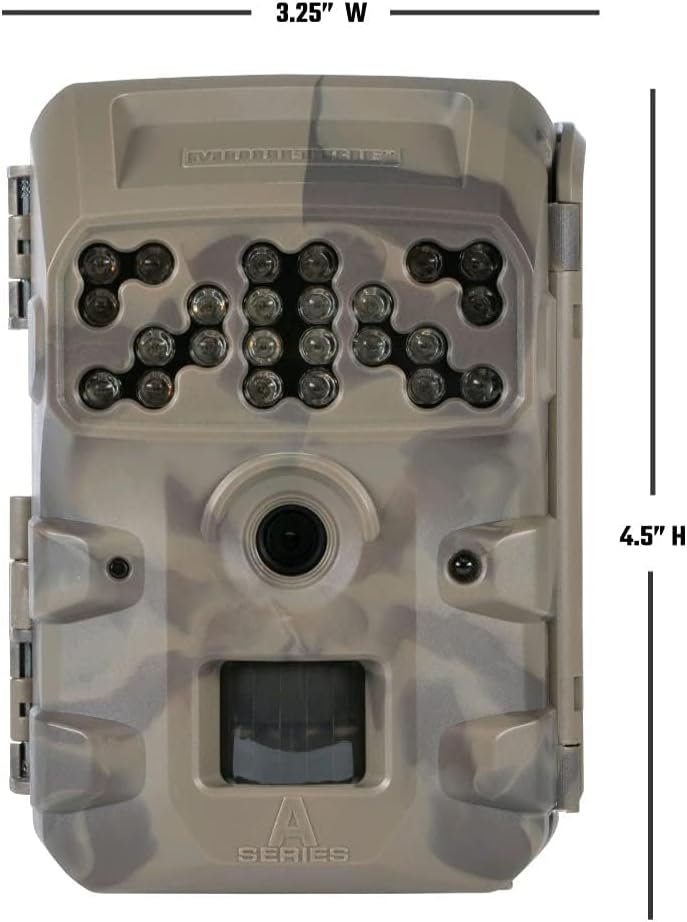
ചിത്രം: മുൻഭാഗം view of the Moultrie W800 trail camera with its dimensions clearly labeled: 3.25 inches wide and 4.5 inches high.
വാറൻ്റിയും പിന്തുണയും
വാറൻ്റി വിവരങ്ങൾ:
The Moultrie W800 Trail Camera comes with a 2 വർഷത്തെ വാറൻ്റി വാങ്ങിയ തീയതി മുതൽ, നിർമ്മാണ വൈകല്യങ്ങൾ ഉൾക്കൊള്ളുന്നു. വാറന്റി ക്ലെയിമുകൾക്കായി നിങ്ങളുടെ വാങ്ങിയതിന്റെ തെളിവ് സൂക്ഷിക്കുക.
ഉപഭോക്തൃ പിന്തുണ:
For technical assistance, troubleshooting, or warranty inquiries, please visit the official Moultrie support webസൈറ്റ്:


