1. ആമുഖം
This manual provides detailed instructions for the assembly, operation, and maintenance of your FLEXISPOT EN2 Electric Standing Desk. Please read this manual thoroughly before assembly and use to ensure proper function and safety. Keep this manual for future reference.
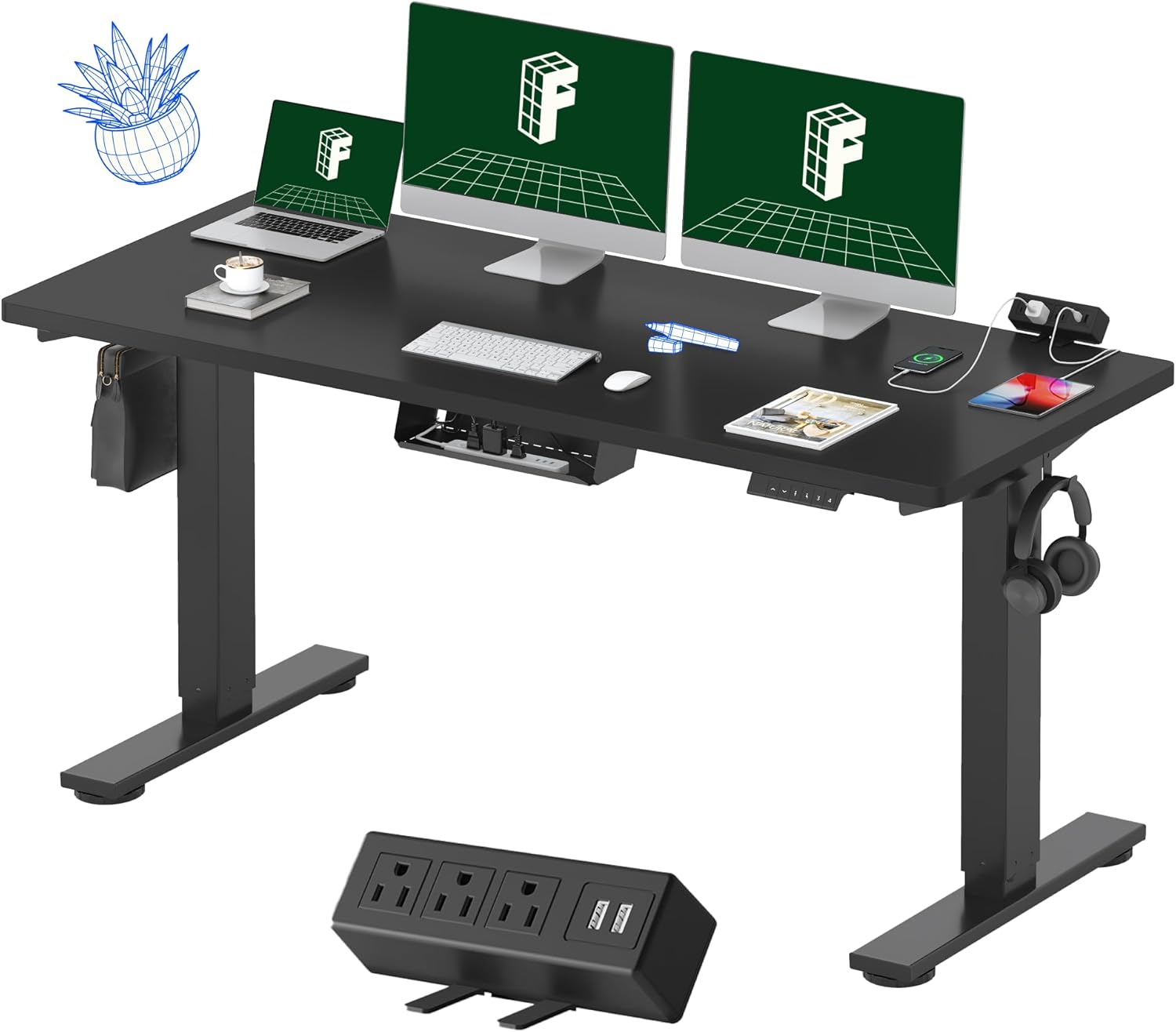
Figure 1: FLEXISPOT EN2 Electric Standing Desk
2 സുരക്ഷാ വിവരങ്ങൾ
ഉൽപ്പന്നത്തിന് പരിക്കോ കേടുപാടുകളോ ഉണ്ടാകാതിരിക്കാൻ, ഇനിപ്പറയുന്ന സുരക്ഷാ മാർഗ്ഗനിർദ്ദേശങ്ങൾ പാലിക്കുക:
- Always use the correct tools for assembly.
- പരമാവധി ഭാരം ശേഷി കവിയരുത് 176 പൗണ്ട് (80 കി.ഗ്രാം).
- Ensure the desk is properly anchored and stable on a level surface to prevent tipping.
- ജോലി സമയത്ത് കുട്ടികളെയും വളർത്തുമൃഗങ്ങളെയും മേശയിൽ നിന്ന് അകറ്റി നിർത്തുക.
- കൺട്രോൾ പാനലിലോ ഇലക്ട്രിക്കൽ ഘടകങ്ങൾക്ക് സമീപമോ ദ്രാവകങ്ങൾ നേരിട്ട് വയ്ക്കുന്നത് ഒഴിവാക്കുക.
- മേശയുടെ ഇലക്ട്രിക്കൽ ഘടകങ്ങൾ വേർപെടുത്തുകയോ പരിഷ്കരിക്കുകയോ ചെയ്യരുത്. സേവനത്തിനായി ഉപഭോക്തൃ പിന്തുണയുമായി ബന്ധപ്പെടുക.
3. ഉൽപ്പന്ന ഘടകങ്ങൾ
The FLEXISPOT EN2 desk features a robust design with integrated functionalities for an ergonomic workspace.
3.1 Whole-Piece Desktop
The desk is equipped with a spacious, single-piece desktop made from FSC-Certified wood, providing a stable and continuous work surface. This design enhances stability compared to multi-piece desktops.

Figure 2: Single-Piece Desktop for Enhanced Stability
3.2 Removable Desktop Power Outlet
A convenient clamp-on power strip is included, featuring 3 AC outlets (125V/12A) and 2 USB charging ports (5V/2A). This can be positioned on the back or side of the desk for easy access.
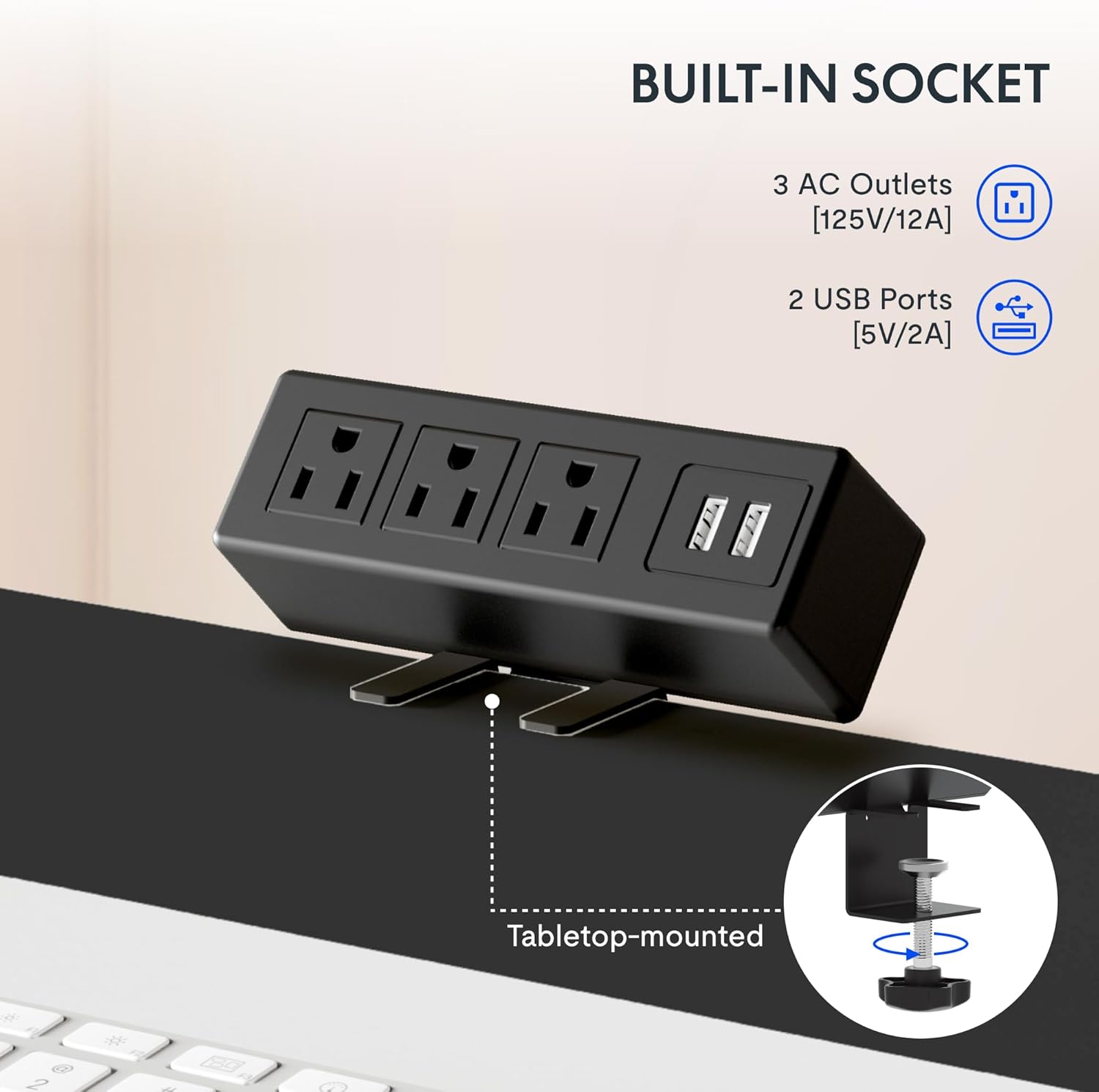
Figure 3: Integrated Power Outlet with USB Ports
3.3 ഡിജിറ്റൽ നിയന്ത്രണ പാനൽ
The desk features a 6-button digital controller with an LED display for precise height adjustments and memory presets.

ചിത്രം 4: ഡിജിറ്റൽ നിയന്ത്രണ പാനൽ
3.4 Cable Management and Accessories
The desk includes a cable management device to help organize wires and maintain a tidy workspace. Adjustable foot pads ensure stability on uneven floors, and storage hooks provide convenient places for headphones or bags.

Figure 5: Cable Management and Accessories
4. അസംബ്ലി നിർദ്ദേശങ്ങൾ
The FLEXISPOT EN2 desk typically arrives in two separate packages: one for the desktop and one for the desk frame. Ensure you have both packages before beginning assembly. An electric drill (not included) may be required for certain steps.

Figure 6: Desk Packaging (Two Separate Boxes)
4.1 പായ്ക്ക് ചെയ്യലും തയ്യാറാക്കലും
- Carefully unpack all components and verify against the parts list provided in your package.
- Place all components on a soft, clean surface to prevent scratches.
4.2 ഫ്രെയിം അസംബ്ലി
- Assemble the desk legs and crossbar according to the included diagram. Ensure the crossbar is extended to the maximum sign and screws are only loosely tightened until the desktop is attached.
- Attach the lifting columns to the feet.
4.3 Desktop Attachment
- Carefully place the desktop upside down on a soft surface.
- Align the assembled frame with the pre-drilled holes on the desktop.
- Secure the frame to the desktop using the provided screws. Once the frame is attached, fully tighten the crossbar screws.
4.4 Control Panel and Power Strip Installation
- Mount the digital control panel to the underside of the desktop in the desired location (typically on the right side).
- cl അറ്റാച്ചുചെയ്യുകamp power strip to the back or side edge of the desktop.
- Connect all necessary cables from the motor, control panel, and power strip to the control box. Ensure all connections are secure.
4.5 കേബിൾ മാനേജ്മെന്റ്
Utilize the included cable management device and ties to organize and secure all power and data cables, preventing tangles and ensuring smooth desk operation.

Figure 7: Effective Cable Management
5. പ്രവർത്തന നിർദ്ദേശങ്ങൾ
Your FLEXISPOT EN2 desk allows for easy height adjustment to switch between sitting and standing positions.
5.1 അടിസ്ഥാന ഉയര ക്രമീകരണം
- ഉപയോഗിക്കുക മുകളിലേക്ക് (▲) ഒപ്പം താഴേക്ക് (▼) buttons on the digital control panel to adjust the desk height. The current height will be displayed on the LED screen.
- The desk adjusts smoothly from 28.1 ഇഞ്ച് (71.4 സെ.മീ) വരെ 45.7 ഇഞ്ച് (116.1 സെ.മീ).
- The motor operates quietly, typically below 50 dB.
5.2 മെമ്മറി പ്രീസെറ്റുകൾ
The control panel features 4 programmable memory presets to save your preferred sitting and standing heights.
- മുകളിലേക്കും താഴേക്കും ബട്ടണുകൾ ഉപയോഗിച്ച് നിങ്ങൾക്ക് ആവശ്യമുള്ള ഉയരത്തിലേക്ക് ഡെസ്ക് ക്രമീകരിക്കുക.
- അമർത്തുക M button (or similar memory set button) followed by one of the numbered preset buttons (1, 2, 3, അല്ലെങ്കിൽ 4). The display will confirm the setting.
- സേവ് ചെയ്ത ഉയരം തിരിച്ചുവിളിക്കാൻ, അനുബന്ധ നമ്പർ നൽകിയ പ്രീസെറ്റ് ബട്ടൺ അമർത്തുക.
5.3 Smart Anti-Collision System
The desk is equipped with a smart anti-collision system. If the desk encounters an obstacle during height adjustment, it will automatically stop and reverse slightly to prevent damage.
Figure 8: Anti-Collision System in Action
6. പരിപാലനം
പതിവ് അറ്റകുറ്റപ്പണികൾ നിങ്ങളുടെ സ്റ്റാൻഡിംഗ് ഡെസ്കിന്റെ ദീർഘായുസ്സും മികച്ച പ്രകടനവും ഉറപ്പാക്കുന്നു.
- വൃത്തിയാക്കൽ: ഡെസ്ക്ടോപ്പും ഫ്രെയിമും ഒരു സോഫ്റ്റ്, ഡി ക്ലീനർ ഉപയോഗിച്ച് തുടയ്ക്കുക.amp തുണി. ഫിനിഷിന് കേടുവരുത്തുന്ന ഉരച്ചിലുകൾ നിറഞ്ഞ ക്ലീനറുകളോ കഠിനമായ രാസവസ്തുക്കളോ ഒഴിവാക്കുക.
- കേബിൾ മാനേജുമെന്റ്: Periodically check and reorganize cables to prevent tangles and ensure they do not interfere with the desk's movement.
- ഫാസ്റ്റനറുകൾ: ഇടയ്ക്കിടെ എല്ലാ സ്ക്രൂകളും ബോൾട്ടുകളും ഇറുകിയതാണെന്ന് ഉറപ്പുവരുത്തുക. ആവശ്യമെങ്കിൽ വീണ്ടും മുറുക്കുക.
- മോട്ടോർ: മോട്ടോർ അറ്റകുറ്റപ്പണികൾ ഇല്ലാത്തതാണ്. മോട്ടോർ ഹൗസിംഗ് ലൂബ്രിക്കേറ്റ് ചെയ്യാനോ തുറക്കാനോ ശ്രമിക്കരുത്.
7. പ്രശ്നപരിഹാരം
If you encounter issues with your FLEXISPOT EN2 desk, refer to the following common troubleshooting steps:
- ഡെസ്ക് നീങ്ങുന്നില്ല:
- എല്ലാ പവർ കണക്ഷനുകളും സുരക്ഷിതമായി പ്ലഗ് ഇൻ ചെയ്തിട്ടുണ്ടെന്ന് ഉറപ്പാക്കാൻ അവ പരിശോധിക്കുക.
- പവർ ഔട്ട്ലെറ്റ് പ്രവർത്തനക്ഷമമാണോയെന്ന് പരിശോധിക്കുക.
- Perform a reset (refer to your specific control panel instructions for reset procedures, often involving holding down certain buttons).
- അസമമായ ചലനം:
- Ensure the desk is on a level surface. Adjust the foot pads if necessary.
- Check that all frame screws, especially those on the crossbar, are securely tightened.
- ഡിസ്പ്ലേയിലെ പിശക് കോഡുകൾ:
- Refer to the specific error code in your control panel's supplementary guide (if provided) or contact customer support.
- ആന്റി-കൊളിഷൻ സിസ്റ്റം ഇടയ്ക്കിടെ ട്രിഗർ ചെയ്യുന്നു:
- Ensure there are no obstructions in the desk's path during adjustment.
- Check if the desk is overloaded beyond its weight capacity.
ഈ ഘട്ടങ്ങൾ പ്രശ്നം പരിഹരിക്കുന്നില്ലെങ്കിൽ, ദയവായി FLEXISPOT ഉപഭോക്തൃ പിന്തുണയുമായി ബന്ധപ്പെടുക.
8 സ്പെസിഫിക്കേഷനുകൾ
Key technical specifications for the FLEXISPOT EN2 Electric Standing Desk:

Figure 9: Desk Dimensions and Features Overview
| ഫീച്ചർ | സ്പെസിഫിക്കേഷൻ |
|---|---|
| ബ്രാൻഡ് | ഫ്ലെക്സിസ്പോട്ട് |
| മോഡൽ | EN2 |
| Desktop Dimensions (W x D) | 60" x 24" (152.4 സെ.മീ x 60.96 സെ.മീ) |
| ഡെസ്ക്ടോപ്പ് കനം | 1 ഇഞ്ച് (2.54 സെ.മീ) |
| ഉയരം ക്രമീകരിക്കൽ ശ്രേണി | 28.1" - 45.7" (71.4 സെ.മീ - 116.1 സെ.മീ) |
| പരമാവധി ഭാരം ശേഷി | 176 പൗണ്ട് (80 കി.ഗ്രാം) |
| മോട്ടോർ ശബ്ദ നില | 50 ഡിബിയിൽ കുറവ് |
| നിയന്ത്രണ പാനൽ | Digital with 4 Memory Presets |
| പവർ let ട്ട്ലെറ്റ് | 3 എസി ഔട്ട്ലെറ്റുകൾ (125V/12A), 2 യുഎസ്ബി പോർട്ടുകൾ (5V/2A) |
| ഫ്രെയിം മെറ്റീരിയൽ | Industrial-grade Alloy Steel |
| ഡെസ്ക്ടോപ്പ് മെറ്റീരിയൽ | FSC-Certified Wood |
| അസംബ്ലി ആവശ്യമാണ് | അതെ |
9. വാറൻ്റിയും പിന്തുണയും
FLEXISPOT provides comprehensive warranty coverage for your EN2 Electric Standing Desk:
- Frame & Motor: 5 വർഷത്തെ പരിമിത വാറൻ്റി.
- Controller, Switch, Electronics: 2 വർഷത്തെ പരിമിത വാറൻ്റി.
For warranty claims, technical assistance, or further inquiries, please visit the official FLEXISPOT website or contact their customer support directly. You can find more information and products at the ആമസോണിലെ ഫ്ലെക്സിസ്പോട്ട് സ്റ്റോർ.


