1. ആമുഖം
This manual provides detailed instructions for the proper use and maintenance of your WIKICO 4K Camcorder AF3. Please read this manual thoroughly before operating the device to ensure optimal performance and longevity.

Figure 1.1: WIKICO 4K Camcorder with attached accessories.

Figure 1.2: Key features of the WIKICO 4K Camcorder.
2. പാക്കേജ് ഉള്ളടക്കം
താഴെ ലിസ്റ്റ് ചെയ്തിരിക്കുന്ന എല്ലാ ഇനങ്ങളും നിങ്ങളുടെ പാക്കേജിൽ ഉൾപ്പെടുത്തിയിട്ടുണ്ടെന്ന് ഉറപ്പാക്കുക:
- WIKICO 4K Camcorder AF3
- ബാഹ്യ മൈക്രോഫോൺ
- ലെൻസ് ഹുഡ്
- ഹാൻഡ്ഹെൽഡ് സ്റ്റെബിലൈസർ
- Fill Light with 35 LED beads
- 2 x Rechargeable Lithium Polymer Batteries (NP-40, 3.7V 1500mAh)
- 360° Remote Control
- Battery Charger (dual charger)
- USB 2.0 ഡാറ്റ കേബിൾ
- പവർ അഡാപ്റ്റർ
- 32GB SD മെമ്മറി കാർഡ്
- ക്യാമറ ബാഗ്
- ഉപയോക്തൃ മാനുവൽ

Figure 2.1: All included accessories with the WIKICO 4K Camcorder.
3. ആരംഭിക്കുന്നു
3.1. ബാറ്ററി, SD കാർഡ് ഇൻസ്റ്റാളേഷൻ
- Open the battery/SD card compartment cover located at the bottom of the camcorder.
- Insert the fully charged Lithium Polymer battery into the battery slot, ensuring correct polarity.
- Insert the 32GB SD memory card into the SD card slot until it clicks into place.
- കമ്പാർട്ട്മെൻ്റ് കവർ സുരക്ഷിതമായി അടയ്ക്കുക.

Figure 3.1: Battery and SD card insertion points.
3.2. ആക്സസറികൾ ഘടിപ്പിക്കൽ
The camcorder comes with several accessories that can be attached to enhance your recording experience:
- ബാഹ്യ മൈക്രോഫോൺ: Connect the microphone to the designated port on the camcorder.
- ലെൻസ് ഹുഡ്: Attach the lens hood to the front of the lens to reduce glare and protect the lens.
- ഹാൻഡ്ഹെൽഡ് സ്റ്റെബിലൈസർ: Mount the camcorder onto the stabilizer for improved shot stability.
- വെളിച്ചം നിറയ്ക്കുക: Attach the fill light to the hot shoe mount on top of the camcorder for additional illumination in low-light conditions.
4. അടിസ്ഥാന പ്രവർത്തനം
4.1. പവർ ഓൺ/ഓഫ്
To power on the camcorder, open the 3.0-inch IPS flip screen. To power off, close the screen or press and hold the power button.

Figure 4.1: Camcorder with flip screen open, revealing control buttons.
4.2. ഫോട്ടോ, വീഡിയോ മോഡുകൾക്കിടയിൽ മാറൽ
Use the 'MODE' button on the camcorder or the remote control to switch between photo and video recording modes. The current mode will be displayed on the screen.
4.3. സൂം ഫംഗ്ഷൻ
The camcorder features 18X digital zoom. Use the zoom rocker switch on the top of the camcorder or the zoom buttons on the remote control to zoom in or out.
4.4. ഓട്ടോഫോക്കസ്
The camcorder supports autofocus. To focus, gently tap the 'photograph' button. A red focus frame will appear and turn green upon successful focus. This ensures clear and sharp images.

Figure 4.2: Autofocus in action, indicated by a green frame.

Figure 4.3: Comparison of focused and unfocused images.
5. വിപുലമായ സവിശേഷതകൾ
5.1. വൈഫൈ പ്രവർത്തനം
Activate the WiFi function to remotely control the camcorder using a smartphone or tablet. This allows for live preview, remote recording, and sharing of photos and videos.

Figure 5.1: Using the WiFi function to connect the camcorder to a smartphone.
Scan this QR code to download the companion app: http://qr24.cn/EqyM2h
5.2. PC Camera Function
Connect the camcorder to your computer via USB to use it as a PC camera for video calls or live streaming.
5.3. Night Vision and Fill Light
The camcorder supports night vision for recording in low-light environments. Additionally, the included fill light provides extra illumination to capture clear images and videos even in dark settings.
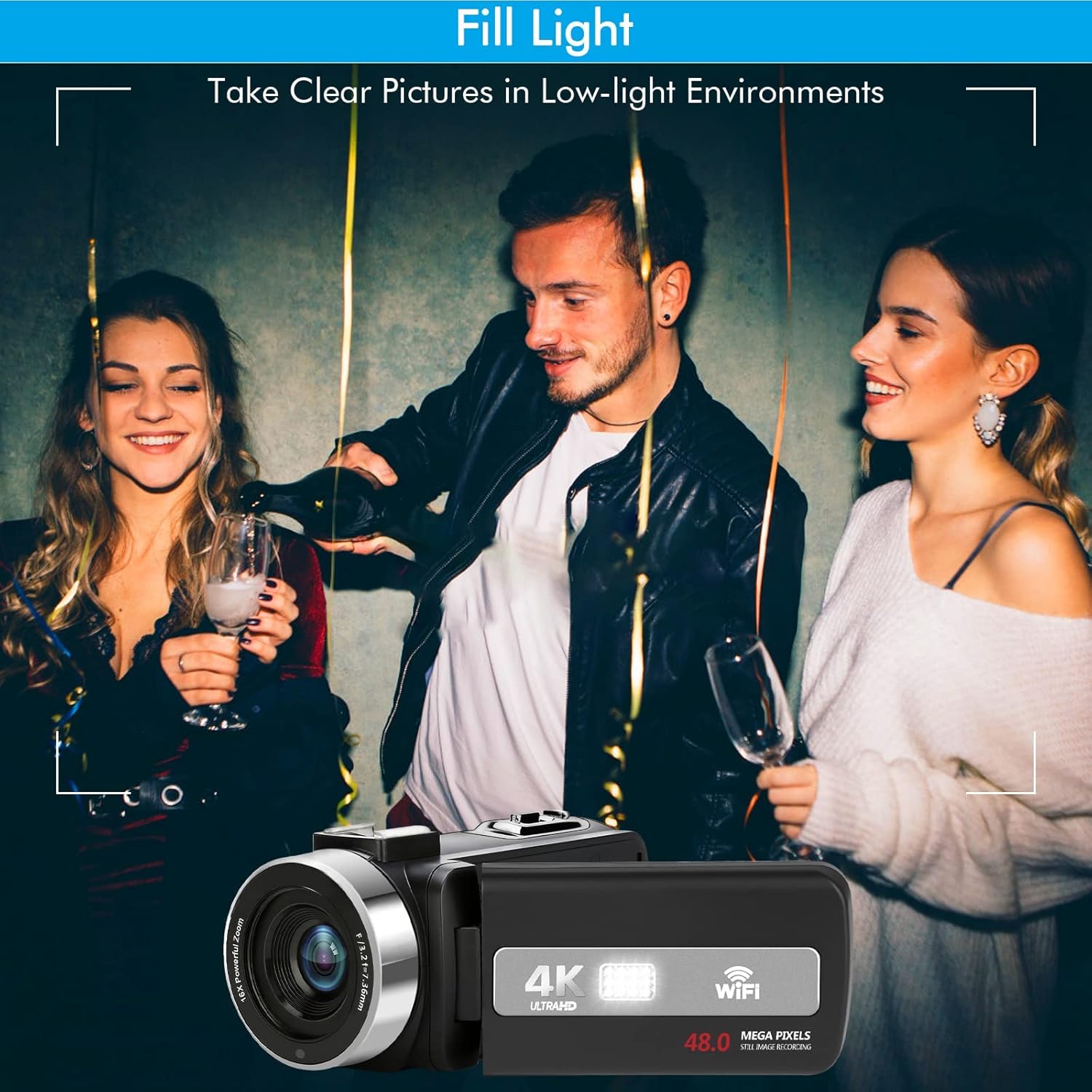
Figure 5.2: Utilizing the fill light for clear pictures in low-light environments.
5.4. വിദൂര നിയന്ത്രണ പ്രവർത്തനം
The included 360° remote control allows you to operate the camcorder from a distance, controlling power, mode switching, zoom, and recording functions without touching the device.

ചിത്രം 5.3: സൗകര്യപ്രദമായ പ്രവർത്തനത്തിനായി റിമോട്ട് കൺട്രോൾ.
5.5. Other Recording Functions
The camcorder supports various recording functions:
- ചാർജ് ചെയ്യുമ്പോൾ റെക്കോർഡിംഗ്: Continue recording even when the battery is low by connecting the camcorder to a power source.
- ടൈം-ലാപ്സ് ഫോട്ടോഗ്രഫി: Capture sequences of images over time to create time-lapse videos.
- സ്ലോ മോഷൻ: Record videos in slow motion for dramatic effects.
- പ്രവർത്തനം താൽക്കാലികമായി നിർത്തുക: Pause and resume video recording without creating multiple files.
- സെൽഫി മോഡ്: Utilize the rotatable screen for easy self-recording.

Figure 5.4: Various advanced recording features.
5.6. HDMI ഔട്ട്പുട്ട്
Connect the camcorder to an HDTV using the provided HDMI cable to view നിങ്ങളുടെ റെക്കോർഡിംഗുകൾ ഒരു വലിയ സ്ക്രീനിൽ.

Figure 5.5: Camcorder connected to a laptop for webcam use and to a TV via HDMI.
6. പരിചരണവും പരിപാലനവും
- Keep the camcorder and accessories dry. Do not expose them to moisture.
- Clean the lens with a soft, lint-free cloth specifically designed for optical surfaces.
- Avoid dropping or subjecting the camcorder to strong impacts.
- Store the camcorder in the provided camera bag when not in use to protect it from dust and scratches.
- ബാറ്ററിയുടെ ആരോഗ്യം നിലനിർത്താൻ, ഉപയോഗത്തിലില്ലെങ്കിൽ പോലും, ബാറ്ററികൾ പതിവായി ചാർജ് ചെയ്യുക.
7. പ്രശ്നപരിഹാരം
If you encounter issues with your WIKICO 4K Camcorder, please refer to the following common solutions:
- കാംകോർഡർ ഓണാക്കുന്നില്ല: ബാറ്ററി പൂർണ്ണമായും ചാർജ്ജ് ചെയ്തിട്ടുണ്ടെന്നും ശരിയായി ചേർത്തിട്ടുണ്ടെന്നും ഉറപ്പാക്കുക.
- മോശം ഇമേജ്/വീഡിയോ ഗുണമേന്മ: Check lens cleanliness, ensure adequate lighting, and verify focus settings.
- SD card error: Reinsert the SD card, try a different compatible SD card, or format the card (this will erase all data).
- വൈഫൈ കണക്ഷൻ പ്രശ്നങ്ങൾ: Ensure the camcorder's WiFi is enabled and your smart device is within range. Refer to the app's instructions for connection.
- No audio recording: Check if the external microphone is properly connected and enabled in settings.
For persistent issues, please contact WIKICO customer support.
8 സ്പെസിഫിക്കേഷനുകൾ
| ഫീച്ചർ | വിശദാംശങ്ങൾ |
|---|---|
| ബ്രാൻഡ് | വിക്കികോ |
| മോഡൽ നമ്പർ | AF3 |
| കാംകോർഡർ തരം | വീഡിയോ ക്യാമറ |
| വീഡിയോ ക്യാപ്ചർ റെസല്യൂഷൻ | 4K (3840x2160) |
| ചിത്ര മിഴിവ് | 48.0എംപി |
| ഡിജിറ്റൽ സൂം | 18X |
| സ്ക്രീൻ വലിപ്പം | 3 Inches (IPS Flip Touch Screen) |
| കണക്റ്റിവിറ്റി ടെക്നോളജി | വൈഫൈ |
| ഫോട്ടോ സെൻസർ ടെക്നോളജി | CMOS |
| ഫ്ലാഷ് മെമ്മറി തരം | SD |
| വീഡിയോ ക്യാപ്ചർ ഫോർമാറ്റ് | MP4 |
| പ്രത്യേക സവിശേഷതകൾ | Infrared (Night Vision), Lightweight, Time Lapse, Autofocus, PC Camera Function, Remote Control, Record While Charging |
| ഇനത്തിൻ്റെ ഭാരം | 7.8 ഔൺസ് |
| ഉൽപ്പന്ന അളവുകൾ | 5 x 2.2 x 2.5 ഇഞ്ച് |
| ബാറ്ററികൾ | 2 ലിഥിയം പോളിമർ ബാറ്ററികൾ ആവശ്യമാണ് |
9. വാറൻ്റിയും പിന്തുണയും
WIKICO provides a 12 മാസ വാറൻ്റി for this product, covering replacement or refund for eligible issues. Additionally, lifetime technical support is available for all customers.
For warranty claims, technical assistance, or any inquiries, please contact WIKICO customer support through the official channels provided at the time of purchase or on the WIKICO webസൈറ്റ്.


