ആമുഖം
This instruction manual provides detailed guidance for the safe and proper assembly, operation, and maintenance of your Perlegear PGTVS02 Tabletop TV Stand. Please read all instructions carefully before installation to ensure correct setup and to prevent damage or injury. Keep this manual for future reference.

ചിത്രം: മുൻഭാഗം view of the Perlegear PGTVS02 Tabletop TV Stand, showcasing its black finish and tempered glass base.
സുരക്ഷാ വിവരങ്ങൾ
പ്രധാനപ്പെട്ട സുരക്ഷാ നിർദ്ദേശങ്ങൾ:
- Verify that your TV's weight and VESA pattern are within the stand's specifications before installation. This stand supports TVs from 23 to 60 inches, weighing up to 99 lbs (45 kg), with VESA patterns from 75x75mm to 400x400mm.
- Do not exceed the maximum load capacity. Overloading can result in serious injury or property damage.
- Ensure all screws are securely tightened before use. Do not overtighten screws to avoid stripping.
- Install the stand on a stable, level surface. Uneven surfaces can cause instability.
- Keep children and pets away from the assembly area. Small parts may be a choking hazard.
- If any parts are missing or damaged, do not attempt to assemble. Contact Perlegear customer support for assistance.

Image: Illustrates the Perlegear stand's wider base (16.8 inches) for enhanced stability compared to a narrower alternative (11.4 inches).
ഉൽപ്പന്ന സവിശേഷതകൾ
- ദൃഢമായ നിർമ്മാണം: Features a stable tempered-glass base and a reinforced metal frame for secure TV support. Includes safety screws to firmly attach the TV to the stand.
- ഉയരം ക്രമീകരിക്കാവുന്ന: Offers 9 height settings to position your TV at an optimal viewing ലെവൽ.
- വിശാലമായ അനുയോജ്യത: Designed for most 23''–60'' LCD, LED, and OLED TVs weighing up to 99 lbs (45 kg). Compatible with VESA mounting patterns ranging from 75x75mm to 400x400mm.
- ഡ്രിൽ ഫ്രീ ഇൻസ്റ്റലേഷൻ: Provides a simple setup process with included hardware and instructions, requiring no drilling.
- സംയോജിത കേബിൾ മാനേജ്മെൻ്റ്: Helps organize and conceal cables for a tidy appearance.

Image: Illustrates the wide compatibility of the stand for TVs between 23 and 60 inches, along with supported VESA mounting patterns.
പാക്കേജ് ഉള്ളടക്കം
Please check to ensure all components are present and undamaged before beginning assembly. If any parts are missing or defective, please contact Perlegear customer support.
- ടെമ്പർഡ് ഗ്ലാസ് ബേസ്
- പിന്തുണ കോളം
- ടിവി മൗണ്ടിംഗ് പ്ലേറ്റ്
- TV Brackets (2 pcs)
- Hardware Kit (screws, washers, spacers, Allen key, wrench)
- ഇൻസ്ട്രക്ഷൻ മാനുവൽ
സജ്ജീകരണ നിർദ്ദേശങ്ങൾ
Follow these steps carefully for a secure and stable installation.
1 പ്രീ-ഇൻസ്റ്റലേഷൻ ചെക്ക്ലിസ്റ്റ്
- ടിവി വലുപ്പം: Ensure your TV is between 23 and 60 inches.
- ടിവി ഭാരം: Confirm your TV weighs no more than 99 lbs (45 kg).
- VESA പാറ്റേൺ: Check the four mounting holes on the back of your TV. Measure the horizontal and vertical distance between them. This stand supports VESA patterns from 75x75mm to 400x400mm.

Image: A visual guide to identifying and measuring your TV's VESA mounting pattern (horizontal x vertical distance).
2. അസംബ്ലി ഘട്ടങ്ങൾ
- അടിസ്ഥാനം കൂട്ടിച്ചേർക്കുക: Attach the support column to the tempered glass base using the provided screws and tools. Ensure it is firmly secured.
- ടിവി മൗണ്ടിംഗ് പ്ലേറ്റ് ഘടിപ്പിക്കുക: പിന്തുണാ നിരയുടെ മുകളിൽ ടിവി മൗണ്ടിംഗ് പ്ലേറ്റ് ഉറപ്പിക്കുക.
- ടിവി ബ്രാക്കറ്റുകൾ ടിവിയിൽ ഘടിപ്പിക്കുക: Select the appropriate screws, washers, and spacers from the hardware kit that fit your TV's VESA holes. Attach the two TV brackets to the back of your TV. Ensure the brackets are level and securely fastened.
- ടിവി സ്റ്റാൻഡിലേക്ക് ഘടിപ്പിക്കുക: Carefully lift your TV and hook the TV brackets onto the TV mounting plate. Secure the TV to the stand using the safety screws provided, typically located at the bottom of the TV brackets.
- കേബിൾ മാനേജുമെന്റ്: Route your TV cables through the integrated cable management system on the support column to keep them organized and out of sight.

Image: Visual representation of the straightforward installation process, highlighting that assembly hardware and detailed instructions are included, and no drilling is required.

ചിത്രം: വിശദമായത് view of the stand's base, showing security screws for TV attachment, the thick steel column, and non-slip pads for stability.
പ്രവർത്തന നിർദ്ദേശങ്ങൾ
ഉയരം ക്രമീകരിക്കൽ
The Perlegear PGTVS02 stand offers 9 different height settings to optimize your viewing experience. To adjust the height:
- Ensure the TV is securely mounted to the brackets.
- With assistance, carefully lift the TV slightly to disengage it from its current height setting on the support column.
- Adjust the TV to the desired height by aligning the mounting holes on the brackets with the corresponding holes on the support column.
- Re-engage the safety screws to lock the TV in the new position. Always ensure the TV is stable after adjustment.
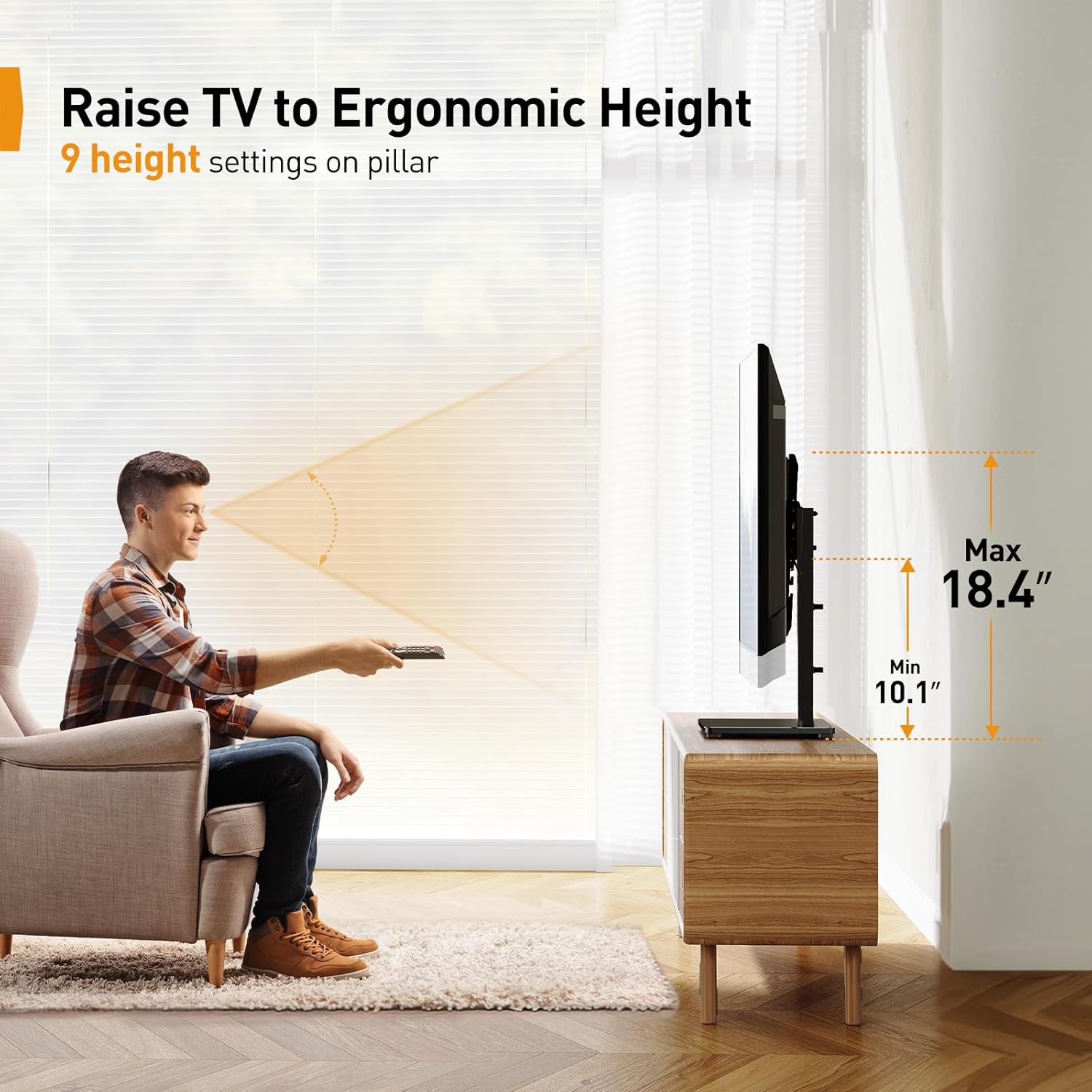
Image: Depicts a user enjoying a TV mounted on the stand, highlighting the ability to raise the TV to an ergonomic height with 9 available settings.
കേബിൾ മാനേജ്മെൻ്റ്
Utilize the integrated cable management clips or channels on the support column to route and conceal power cords and AV cables. This helps maintain a clean and organized entertainment area.
മെയിൻ്റനൻസ്
- വൃത്തിയാക്കൽ: Wipe the stand with a soft, dry cloth. For stubborn marks on the tempered glass, use a mild glass cleaner. Avoid abrasive cleaners or solvents.
- ആനുകാലിക പരിശോധനകൾ: എല്ലാ സ്ക്രൂകളും കണക്ഷനുകളും ഇറുകിയതും സുരക്ഷിതവുമാണെന്ന് ഉറപ്പാക്കാൻ ഇടയ്ക്കിടെ പരിശോധിക്കുക. ആവശ്യമെങ്കിൽ വീണ്ടും മുറുക്കുക.
- പരിശോധന: തേയ്മാനം, കേടുപാടുകൾ അല്ലെങ്കിൽ അസ്ഥിരതയുടെ ലക്ഷണങ്ങൾക്കായി സ്റ്റാൻഡ് പരിശോധിക്കുക. എന്തെങ്കിലും പ്രശ്നങ്ങൾ കണ്ടെത്തിയാൽ, ഉപയോഗം നിർത്തി ഉപഭോക്തൃ പിന്തുണയുമായി ബന്ധപ്പെടുക.
ട്രബിൾഷൂട്ടിംഗ്
എന്തെങ്കിലും പ്രശ്നങ്ങൾ നേരിടുകയാണെങ്കിൽ, ഇനിപ്പറയുന്ന പൊതുവായ പ്രശ്നങ്ങളും പരിഹാരങ്ങളും പരിശോധിക്കുക:
- ടിവി നിലവാരമില്ലാത്തതാണ്: Ensure the TV brackets are installed evenly on the back of the TV and that the stand's base is on a level surface. Adjust as needed.
- Stand feels wobbly: Double-check that all screws are tightened according to the assembly instructions. Ensure the stand is placed on a firm, level surface.
- TV does not fit the stand: Verify your TV's size, weight, and VESA pattern against the specifications in this manual. If they do not match, the stand may not be compatible with your TV.
- വിട്ടുപോയ ഭാഗങ്ങൾ: Do not proceed with assembly. Contact Perlegear customer support immediately for replacement parts.
സ്പെസിഫിക്കേഷനുകൾ
| സ്പെസിഫിക്കേഷൻ | വിശദാംശങ്ങൾ |
|---|---|
| മോഡൽ നമ്പർ | പിജിടിവിഎസ്02 |
| അനുയോജ്യമായ ടിവി വലുപ്പങ്ങൾ | 23'' – 60'' |
| പരമാവധി ലോഡ് കപ്പാസിറ്റി | 99 പൗണ്ട് (45 കി.ഗ്രാം) |
| VESA അനുയോജ്യത | 75x75mm, 100x100mm, 100x200mm, 200x100mm, 200x200mm, 200x300mm, 200x400mm, 300x300mm, 400x200mm, 400x300mm, 400x400mm |
| ഉയരം ക്രമീകരിക്കൽ | 9 ക്രമീകരണങ്ങൾ |
| അടിസ്ഥാന മെറ്റീരിയൽ | ടെമ്പർഡ് ഗ്ലാസ് |
| Column/Frame Material | Reinforced Metal |
| ഉൽപ്പന്ന അളവുകൾ | 2.72 x 9.53 x 17.56 inches (approximate, packaging) |
| ഇനത്തിൻ്റെ ഭാരം | 8.39 പൗണ്ട് |
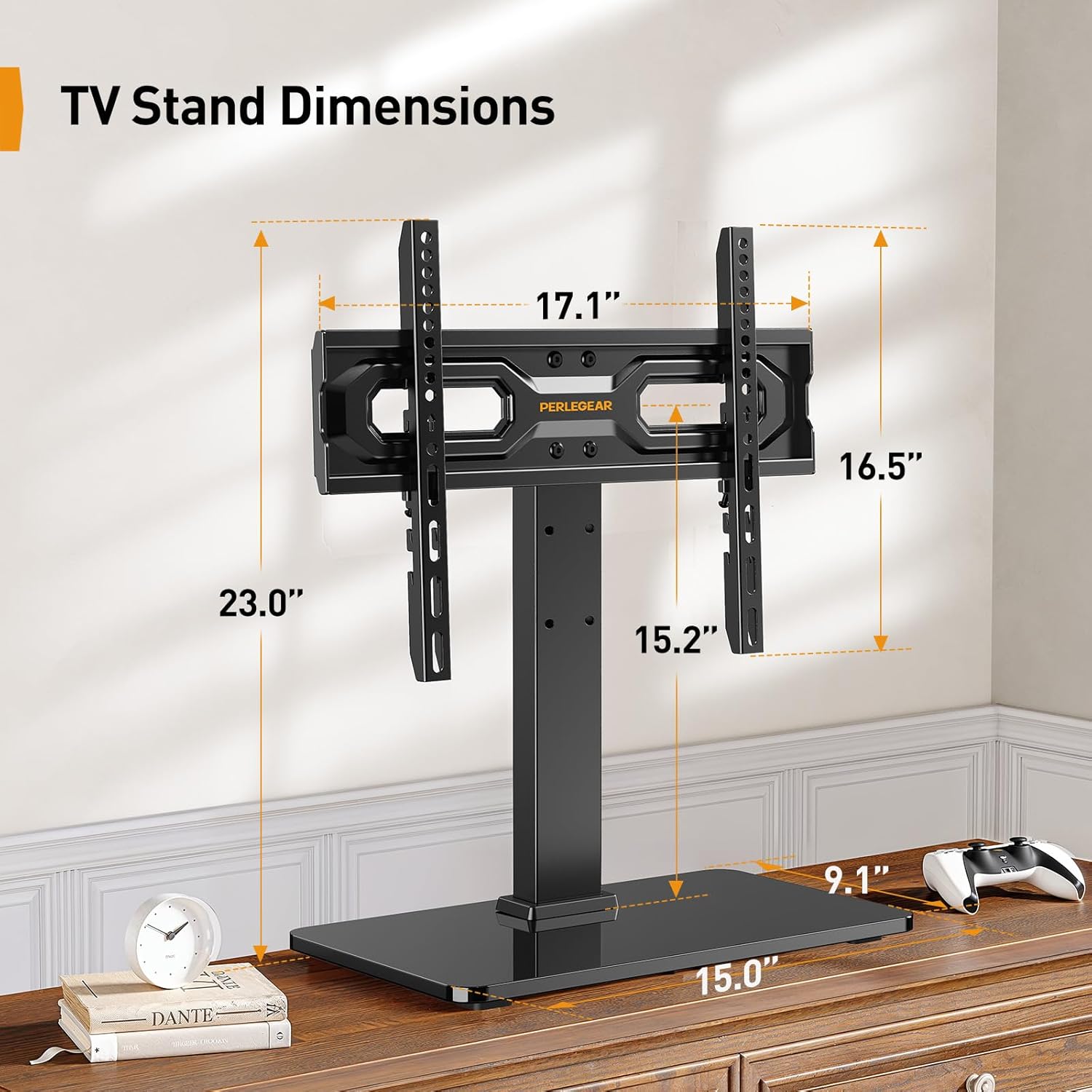
Image: Detailed dimensions of the Perlegear PGTVS02 TV stand, including height, width, and base measurements.
വാറൻ്റിയും പിന്തുണയും
Perlegear is committed to providing high-quality products. If you encounter any problems during installation or use, or if you have questions regarding your Perlegear PGTVS02 Tabletop TV Stand, please do not hesitate to contact our customer support team. We are available to assist you with any concerns.
For support, please visit the official Perlegear webസൈറ്റ് അല്ലെങ്കിൽ നിങ്ങളുടെ വാങ്ങലിനൊപ്പം നൽകിയിരിക്കുന്ന കോൺടാക്റ്റ് വിവരങ്ങൾ റഫർ ചെയ്യുക.


