1. ആമുഖം
Thank you for choosing the Dascert Q38 Wireless Bluetooth Earbuds. These earbuds are designed to provide a comfortable and immersive audio experience, perfect for sports and daily use. Featuring Bluetooth 5.1 technology, IP7 waterproofing, and a long-lasting battery, the Q38 earbuds offer stable connectivity and high-fidelity stereo sound.
ശരിയായ പ്രവർത്തനം ഉറപ്പാക്കുന്നതിനും അതിന്റെ ആയുസ്സ് പരമാവധിയാക്കുന്നതിനും ഉൽപ്പന്നം ഉപയോഗിക്കുന്നതിന് മുമ്പ് ദയവായി ഈ മാനുവൽ ശ്രദ്ധാപൂർവ്വം വായിക്കുക.
2. പാക്കേജ് ഉള്ളടക്കം
പാക്കേജിൽ എല്ലാ ഇനങ്ങളും ഉണ്ടെന്ന് ഉറപ്പാക്കുക:
- Dascert Q38 Wireless Earbuds (Left and Right)
- ചാർജിംഗ് കേസ്
- USB-C ചാർജിംഗ് കേബിൾ
- ഉപയോക്തൃ മാനുവൽ
- Earhooks (pre-installed or included separately)
- Multiple sizes of Eartips (S, M, L)

3. ഉൽപ്പന്നം കഴിഞ്ഞുview
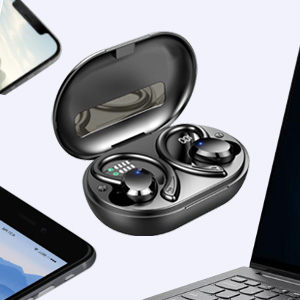
The Dascert Q38 earbuds are designed for comfort and performance, especially during physical activity. Key features include secure earhooks, IP7 waterproofing, and intuitive touch controls.
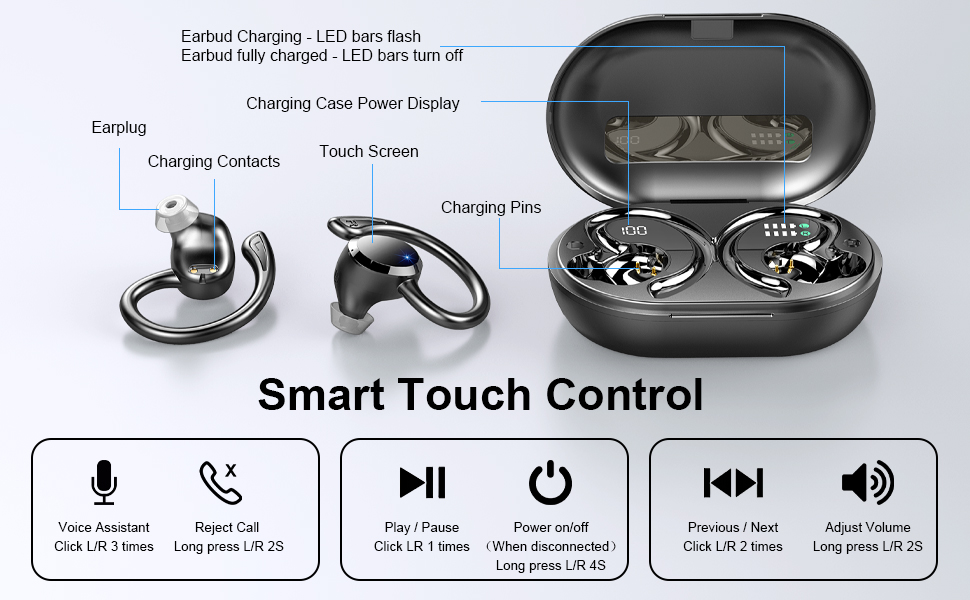
3.1 ഇയർബഡ് ഘടകങ്ങൾ

- ഇയർഹുക്ക്: Provides a secure and comfortable fit, ideal for sports.
- ടച്ച് കൺട്രോൾ ഏരിയ: പ്ലേബാക്ക്, കോളുകൾ, വോയ്സ് അസിസ്റ്റന്റ് എന്നിവ കൈകാര്യം ചെയ്യുന്നതിന്.
- LED സൂചകം: Shows charging status and connection status.
- ചാർജിംഗ് കോൺടാക്റ്റുകൾ: പവറിനായി ചാർജിംഗ് കേസുമായി ബന്ധിപ്പിക്കുന്നു.
- മൈക്രോഫോൺ: കോളുകൾക്കും വോയ്സ് കമാൻഡുകൾക്കും.
3.2 ചാർജിംഗ് കേസ് ഘടകങ്ങൾ
- ഡിജിറ്റൽ LED ഡിസ്പ്ലേ: Shows the charging case battery percentagഇ (1%-100%).
- Earbud Charging Indicators: LED bars for Left (L) and Right (R) earbuds, flashing when charging and turning off when fully charged.
- USB-C ചാർജിംഗ് പോർട്ട്: For fast charging the case.

4. സജ്ജീകരണം
4.1 പ്രാരംഭ ചാർജ്
ആദ്യമായി ഉപയോഗിക്കുന്നതിന് മുമ്പ്, ഇയർബഡുകളും ചാർജിംഗ് കേസും പൂർണ്ണമായും ചാർജ് ചെയ്യുക.
- രണ്ട് ഇയർബഡുകളും ചാർജിംഗ് കേസിൽ വയ്ക്കുക.
- Connect the USB-C charging cable to the charging port on the case and plug the other end into a USB power adapter (not included) or a computer's USB port.
- The LED display on the case will show the battery percentage, and the earbud indicators will flash during charging.
- Charging takes approximately 1 hour for earbuds and 1.5 hours for the case.

4.2 Pairing with a Device (One-Step Pairing)
സൗകര്യത്തിനായി ഇയർബഡുകളിൽ വൺ-സ്റ്റെപ്പ് ജോടിയാക്കൽ സവിശേഷതയുണ്ട്.
- ചാർജിംഗ് കേസ് തുറക്കുക. ഇയർബഡുകൾ സ്വയമേവ ഓണാകുകയും ജോടിയാക്കൽ മോഡിലേക്ക് പ്രവേശിക്കുകയും ചെയ്യും.
- നിങ്ങളുടെ സ്മാർട്ട്ഫോണിലോ ബ്ലൂടൂത്ത് പ്രവർത്തനക്ഷമമാക്കിയ ഉപകരണത്തിലോ, ബ്ലൂടൂത്ത് ക്രമീകരണങ്ങളിലേക്ക് പോകുക.
- ഇതിനായി തിരയുക ലഭ്യമായ ഉപകരണങ്ങളുടെ പട്ടികയിൽ "Q38" എന്ന് ടൈപ്പ് ചെയ്ത് കണക്റ്റ് ചെയ്യാൻ അത് തിരഞ്ഞെടുക്കുക.
- കണക്റ്റ് ചെയ്തുകഴിഞ്ഞാൽ, ഒരു വോയ്സ് പ്രോംപ്റ്റ് വിജയകരമായ ജോടിയാക്കൽ സ്ഥിരീകരിക്കും.

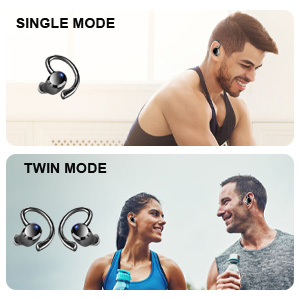
You can use either earbud independently (single mode) or both together (twin mode).
4.3 Choosing the Right Eartips
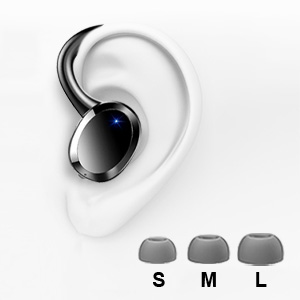
Selecting the correct eartip size is crucial for optimal sound quality and comfort. A proper seal enhances bass and noise isolation.
- Try each size (S, M, L) to find the one that fits snugly and comfortably in your ear canal.
- The earbud should feel secure and create a good seal without causing discomfort.
5. പ്രവർത്തന നിർദ്ദേശങ്ങൾ
5.1 പവർ ഓൺ/ഓഫ്
- പവർ ഓൺ: Open the charging case, or long press the touch control area on either earbud for 4 seconds if disconnected.
- പവർ ഓഫ്: Place the earbuds back into the charging case and close the lid. Alternatively, long press the touch control area on either earbud for 4 seconds if disconnected.
5.2 ടച്ച് നിയന്ത്രണങ്ങൾ
The Dascert Q38 earbuds feature multi-function touch panels for easy control.
| ഫംഗ്ഷൻ | ആക്ഷൻ |
|---|---|
| പ്ലേ/താൽക്കാലികമായി നിർത്തുക | Click L or R once |
| അടുത്ത ഗാനം | Click R twice |
| മുൻ ഗാനം | Click L twice |
| വോളിയം കൂട്ടുക | R 2 സെക്കൻഡ് ദീർഘനേരം അമർത്തുക |
| വോളിയം ഡൗൺ | Long press L for 2 seconds |
| കോളിന് ഉത്തരം നൽകുക/ഹാംഗ് അപ്പ് ചെയ്യുക | Click L or R once |
| കോൾ നിരസിക്കുക | Long press L or R for 2 seconds |
| വോയ്സ് അസിസ്റ്റന്റ് (സിരി/ഗൂഗിൾ അസിസ്റ്റന്റ്) സജീവമാക്കുക | Click L or R three times |
5.3 ഇയർബഡുകൾ ധരിക്കൽ
The ergonomic design with earhooks ensures a secure and comfortable fit.
- ഇടത് (L) ഉം വലത് (R) ഉം ഇയർബഡുകൾ തിരിച്ചറിയുക.
- നിങ്ങളുടെ ഇയർ കനാലിലേക്ക് ഇയർബഡ് മൃദുവായി തിരുകുക.
- Adjust the earhook over your ear until it feels secure and comfortable.

6. പരിപാലനവും പരിചരണവും
- വൃത്തിയാക്കൽ: Regularly clean the earbuds, especially the eartips and charging contacts, with a soft, dry cloth. For stubborn dirt, a slightly damp cloth or alcohol wipe can be used, ensuring no liquid enters the earbud openings.
- സംഭരണം: ഉപയോഗത്തിലില്ലാത്തപ്പോൾ, ഇയർബഡുകൾ സംരക്ഷിക്കുന്നതിനും ചാർജ്ജ് ചെയ്ത നിലയിൽ നിലനിർത്തുന്നതിനും അവ ചാർജിംഗ് കേസിൽ സൂക്ഷിക്കുക.
- ജല പ്രതിരോധം: The earbuds are IP7 waterproof, meaning they can withstand sweat, rain, and splashes. However, they are not designed for swimming or submersion for extended periods. Ensure earbuds are dry before placing them back in the charging case.
- തീവ്രമായ താപനില ഒഴിവാക്കുക: Do not expose the earbuds or charging case to extreme heat or cold, as this can damage the battery and internal components.

7. പ്രശ്നപരിഹാരം
If you encounter issues with your Dascert Q38 earbuds, please refer to the following common problems and solutions:
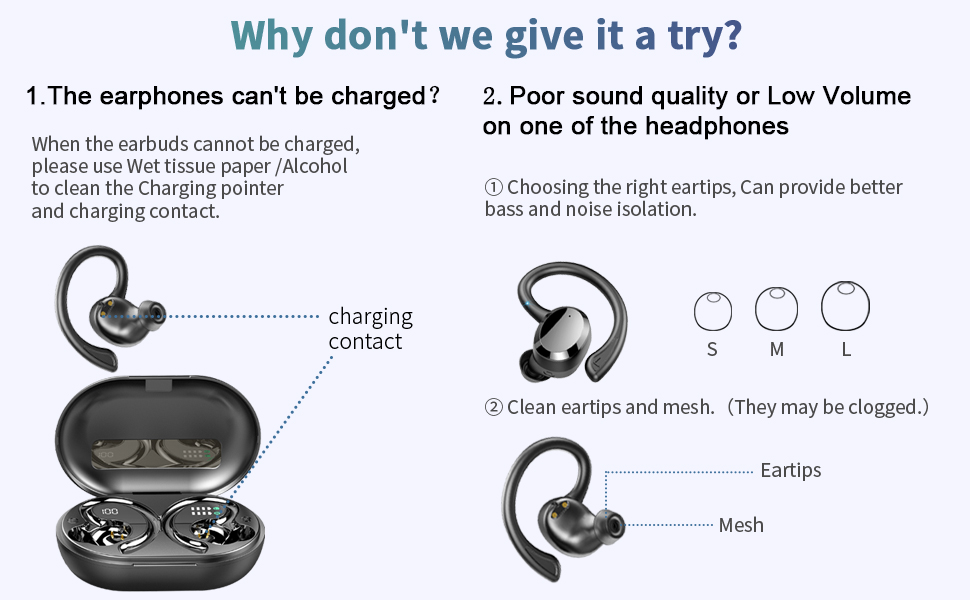
| പ്രശ്നം | പരിഹാരം |
|---|---|
| ഇയർബഡുകൾ ചാർജ് ചെയ്യുന്നില്ല |
|
| Poor sound quality or low volume |
|
| ഇയർബഡുകൾ ജോടിയാക്കുന്നില്ല അല്ലെങ്കിൽ കണക്റ്റുചെയ്യുന്നില്ല |
|
| ഒരു ഇയർബഡ് മാത്രമേ പ്രവർത്തിക്കൂ |
|
8 സ്പെസിഫിക്കേഷനുകൾ
| ഫീച്ചർ | വിശദാംശങ്ങൾ |
|---|---|
| മോഡലിൻ്റെ പേര് | Q38[NEW] |
| കണക്റ്റിവിറ്റി ടെക്നോളജി | വയർലെസ്സ് (ബ്ലൂടൂത്ത് 5.1) |
| ജല പ്രതിരോധ നില | IP7 വാട്ടർപ്രൂഫ് |
| കളിസമയം (ഇയർബഡുകൾ) | 5-6 മണിക്കൂർ (ഒറ്റ ചാർജ്) |
| ആകെ പ്ലേടൈം (ചാർജിംഗ് കേസിനൊപ്പം) | 48 മണിക്കൂർ വരെ |
| ചാർജിംഗ് സമയം (ഇയർബഡുകൾ) | ഏകദേശം 1 മണിക്കൂർ |
| ചാർജിംഗ് സമയം (കേസ്) | ഏകദേശം 1.5 മണിക്കൂർ |
| ചാർജിംഗ് പോർട്ട് | USB-C |
| നിയന്ത്രണ തരം | ടച്ച്, വോയ്സ് കൺട്രോൾ |
| ചെവി പ്ലേസ്മെൻ്റ് | ഇയർഹുക്കുകളോടെ ഇൻ ഇയർ |
| ശബ്ദ നിയന്ത്രണം | സജീവ നോയ്സ് റദ്ദാക്കൽ |
| ഫ്രീക്വൻസി റേഞ്ച് | 20 ഹെർട്സ് - 20,000 ഹെർട്സ് |
| ഇനത്തിൻ്റെ ഭാരം | 2.54 ഔൺസ് |
| ഉൽപ്പന്ന അളവുകൾ | 3.64 x 2.47 x 1.12 ഇഞ്ച് |
9. വാറൻ്റിയും പിന്തുണയും
Dascert products come with a standard manufacturer's warranty. For detailed warranty information, please refer to the warranty card included in your package or visit the official Dascert webസൈറ്റ്.
If you require technical support or have any questions regarding your Dascert Q38 Wireless Bluetooth Earbuds, please contact our customer service team:
- ഇമെയിൽ: നൽകിയിട്ടില്ല
- ഫോൺ: നൽകിയിട്ടില്ല
- ഓൺലൈൻ പിന്തുണ: സന്ദർശിക്കുക Dascert Store on Amazon പതിവുചോദ്യങ്ങൾക്കും അധിക ഉറവിടങ്ങൾക്കും.
Please have your model number (Q38[NEW]) and purchase date ready when contacting support.
10 സുരക്ഷാ വിവരങ്ങൾ
- Do not disassemble or attempt to repair the earbuds or charging case.
- കുട്ടികളിൽ നിന്നും വളർത്തുമൃഗങ്ങളിൽ നിന്നും അകന്നു നിൽക്കുക.
- കേൾവിക്ക് കേടുപാടുകൾ സംഭവിക്കുന്നത് തടയാൻ, ഉയർന്ന അളവിലുള്ള അളവിൽ ദീർഘനേരം എക്സ്പോഷർ ചെയ്യുന്നത് ഒഴിവാക്കുക.
- ആംബിയന്റ് ശബ്ദങ്ങൾ കേൾക്കാൻ കഴിയാത്തത് അപകടകരമായേക്കാവുന്ന സാഹചര്യങ്ങളിൽ (ഉദാ: ഡ്രൈവിംഗ്, സൈക്ലിംഗ്, ഗതാഗതത്തിൽ നടക്കുക) ഇയർബഡുകൾ ഉപയോഗിക്കരുത്.
- പ്രാദേശിക ചട്ടങ്ങൾക്കനുസൃതമായി ഉൽപ്പന്നം ഉത്തരവാദിത്തത്തോടെ വിനിയോഗിക്കുക.


