1. ആമുഖം
This manual provides comprehensive instructions for the safe and effective operation, maintenance, and troubleshooting of your Mytee S300-H Tempo Heated Spotter. Please read this manual thoroughly before operating the unit and retain it for future reference.
1.1 സുരക്ഷാ വിവരങ്ങൾ
Always observe basic safety precautions when using electrical appliances to reduce the risk of fire, electric shock, or injury. This includes:
- ഉപയോഗിക്കുന്നതിന് മുമ്പ് എല്ലാ നിർദ്ദേശങ്ങളും വായിക്കുക.
- ശരിയായി നിലയുറപ്പിച്ച ഔട്ട്ലെറ്റിലേക്ക് മാത്രം ബന്ധിപ്പിക്കുക.
- യൂണിറ്റ് വെള്ളത്തിൽ മുക്കരുത്.
- കേടായ ചരട് അല്ലെങ്കിൽ പ്ലഗ് ഉപയോഗിച്ച് പ്രവർത്തിക്കരുത്.
- പ്രവർത്തന സമയത്ത് കുട്ടികളെയും വളർത്തുമൃഗങ്ങളെയും യൂണിറ്റിൽ നിന്ന് അകറ്റി നിർത്തുക.
- Use only recommended cleaning solutions.
2. ഉൽപ്പന്നം കഴിഞ്ഞുview
The Mytee S300-H Tempo Heated Spotter is a compact and powerful heated carpet extractor designed for efficient spot cleaning and interior maintenance. Its features include:
- Powerful Vacuum Motor: Produces 85 inches of water lift for maximum extraction, reducing drying times with its two-stagഇ ഡിസൈൻ.
- ഉപയോക്തൃ-സൗഹൃദ ഡിസൈൻ: Features one-switch operation and easy-to-open caps for solution and recovery tanks, enhancing convenience and safety.
- നീണ്ടുനിൽക്കുന്ന നിർമ്മാണം: Built with Mytee’s robust roto-molded housing for long-lasting performance, and includes an Air Lite Upholstery Tool.
- പോർട്ടബിൾ, ഒതുക്കമുള്ളത്: With a 1-gallon tank capacity and weighing only 26 pounds, it is easy to transport and store.
2.1 ഘടകങ്ങൾ
Familiarize yourself with the main components of your S300-H Tempo Heated Spotter:

ചിത്രം 1: നിറഞ്ഞു view of the Mytee S300-H Tempo Heated Spotter, showing the main unit, vacuum hose, solution hose, and upholstery tool.

ചിത്രം 2: വശം view of the unit, highlighting the control panel with power switches and the quick-connect fitting for the solution hose.
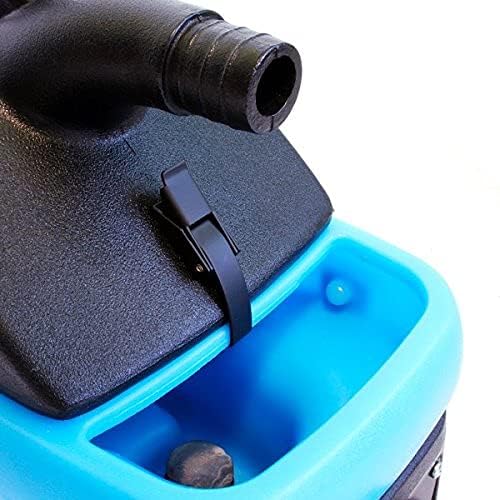
ചിത്രം 3: Close-up of the easy-to-open cap for the solution tank, located on the top of the unit.
3. സജ്ജീകരണം
3.1 പ്രാരംഭ അസംബ്ലി
- പാക്കേജിംഗിൽ നിന്ന് എല്ലാ ഘടകങ്ങളും അൺപാക്ക് ചെയ്യുക.
- Ensure all hoses and the upholstery tool are present.
- Attach the vacuum hose to the vacuum port on the unit.
- Connect the solution hose to the quick-connect fitting on the unit and to the upholstery tool.
3.2 സൊല്യൂഷൻ ടാങ്ക് നിറയ്ക്കൽ
- Open the solution tank cap (refer to Figure 3).
- Fill the tank with clean water and the recommended carpet cleaning solution according to the solution manufacturer's instructions. Do not overfill.
- Securely close the solution tank cap.
4. പ്രവർത്തന നിർദ്ദേശങ്ങൾ
4.1 പവർ ചെയ്യുന്നു
- ഗ്രൗണ്ടഡ് ഇലക്ട്രിക്കൽ ഔട്ട്ലെറ്റിലേക്ക് പവർ കോർഡ് പ്ലഗ് ചെയ്യുക.
- Turn on the "Vacuum" switch.
- Turn on the "Pump" switch.
- If heated cleaning is desired, turn on the "Heater" switch. Allow a few minutes for the water to heat up.
4.2 ശുചീകരണ പ്രക്രിയ
- Pre-test the cleaning solution on an inconspicuous area of the material to be cleaned for colorfastness.
- Position the upholstery tool over the area to be cleaned.
- Press the trigger on the upholstery tool to spray the cleaning solution onto the surface.
- While spraying, pull the tool slowly across the surface to extract the dirty solution. Overlap passes slightly.
- For heavily soiled areas, repeat the process. For best results, perform a final pass without spraying solution to maximize extraction of moisture.
- Monitor the recovery tank for dirty water.
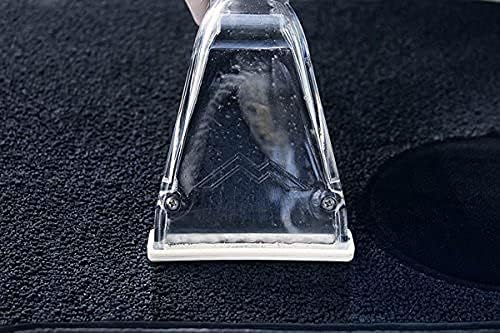
ചിത്രം 4: The upholstery tool in action, demonstrating the cleaning process on a carpeted surface.
4.3 Emptying the Recovery Tank
- Turn off all switches and unplug the unit.
- Locate the recovery tank drain.
- Carefully drain the dirty water into a suitable receptacle.
- Rinse the recovery tank with clean water if necessary.
5. പരിപാലനം
5.1 പതിവ് വൃത്തിയാക്കൽ
- After each use, empty and rinse both the solution and recovery tanks thoroughly.
- Flush the solution lines by running clean water through the system.
- Clean the upholstery tool, removing any debris from the nozzle and extraction head.
- പരസ്യം ഉപയോഗിച്ച് യൂണിറ്റിൻ്റെ പുറംഭാഗം തുടയ്ക്കുകamp തുണി.
5.2 സംഭരണം
Store the unit in a clean, dry place, away from extreme temperatures. Ensure all tanks are empty and hoses are properly coiled to prevent damage.
6. പ്രശ്നപരിഹാരം
| പ്രശ്നം | സാധ്യമായ കാരണം | പരിഹാരം |
|---|---|---|
| യൂണിറ്റ് പവർ ഓണാക്കുന്നില്ല. | Not plugged in; circuit breaker tripped; faulty power switch. | Check power connection; reset circuit breaker; contact service center. |
| No spray from upholstery tool. | Solution tank empty; pump switch off; clogged nozzle; kinked solution hose. | Refill solution tank; turn on pump switch; clean nozzle; straighten hose. |
| കുറഞ്ഞ സക്ഷൻ. | Recovery tank full; vacuum hose clogged or disconnected; vacuum motor issue. | Empty recovery tank; check hose connections and clear obstructions; contact service center. |
| ഹീറ്റർ പ്രവർത്തിക്കുന്നില്ല. | Heater switch off; electrical issue. | Turn on heater switch; ensure adequate power supply; contact service center. |
| യൂണിറ്റിൽ നിന്ന് വെള്ളം ഒഴുകുന്നു. | Loose hose connection; damaged tank or seal; internal component issue. | Check all connections; inspect tanks and seals for damage; contact service center. |
For issues not listed or if solutions do not resolve the problem, please contact Mytee customer support.
7 സ്പെസിഫിക്കേഷനുകൾ
| ഫീച്ചർ | വിശദാംശങ്ങൾ |
|---|---|
| മോഡൽ നമ്പർ | S300-H |
| നിർമ്മാതാവ് | മൈറ്റി |
| ഇനത്തിൻ്റെ ഭാരം | 26 പൗണ്ട് |
| പാക്കേജ് അളവുകൾ | 24.25 x 22 x 10 ഇഞ്ച് |
| ടാങ്ക് കപ്പാസിറ്റി | 1 Gallon (Solution & Recovery) |
| വാട്ടർ ലിഫ്റ്റ് | 85 ഇഞ്ച് |
| വാക്വം മോട്ടോർ | രണ്ട്-സെtage |
| നിറം | White (Unit housing is black and blue) |
| ASIN | B09GPR8VY3 |
8. വാറൻ്റിയും പിന്തുണയും
8.1 വാറൻ്റി വിവരങ്ങൾ
Mytee offers a limited lifetime warranty on the body of the S300-H Tempo Heated Spotter. Additionally, there is a one-year warranty covering the pump, vacuum motor, and heating system. Please retain your proof of purchase for warranty claims.
8.2 ഉപഭോക്തൃ പിന്തുണ
For technical assistance, warranty service, or to locate a service center, please visit the official Mytee website or contact their customer support directly. Mytee maintains a national network of authorized service centers to assist you.


