ആമുഖം
The 1Mii Aux Bluetooth Adapter B07 Pro aptX is a versatile device designed to bring wireless audio streaming and hands-free calling capabilities to your car's audio system or any other non-Bluetooth audio device with a 3.5mm auxiliary input. Featuring advanced Bluetooth 5.3 technology and aptX-HD support, it ensures stable connections and high-fidelity sound quality. Its compact design and intuitive controls make it an ideal solution for upgrading your audio experience.
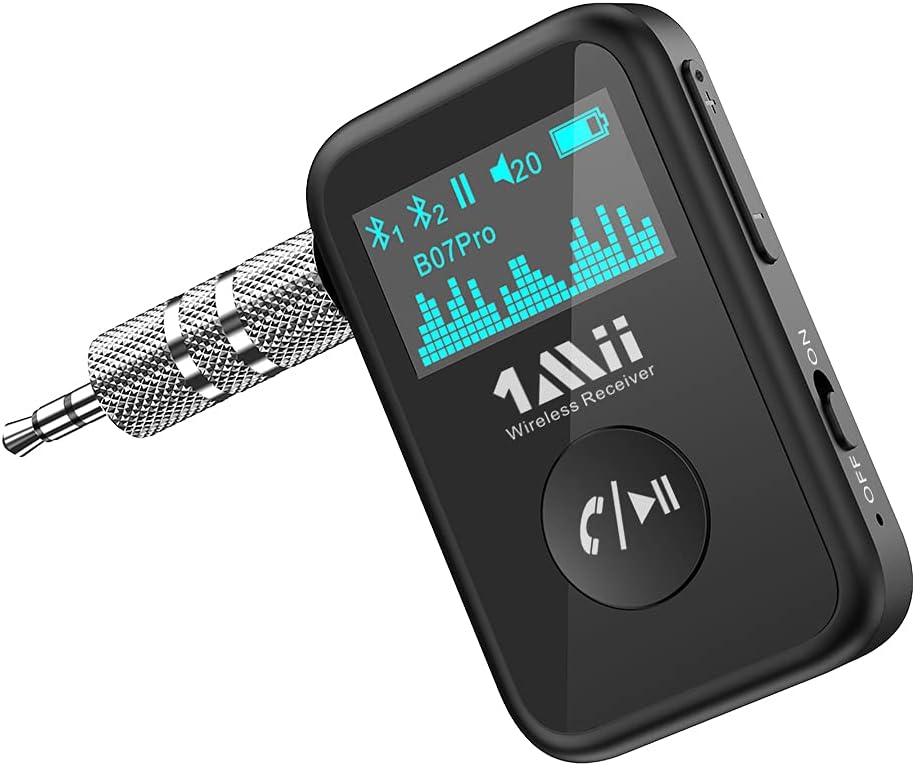
Figure 1: 1Mii Aux Bluetooth Adapter B07 Pro aptX with 3.5mm adapter.
പാക്കേജ് ഉള്ളടക്കം
താഴെ പറയുന്ന ഇനങ്ങൾക്കായി ബോക്സ് ചെക്ക് ചെയ്യുക:
- 1Mii Aux Bluetooth Adapter (B07Pro)
- 3.5 എംഎം ഓഡിയോ കേബിൾ
- 3.5mm Metal Adapter
- USB-C ചാർജിംഗ് കേബിൾ
- ഉപയോക്തൃ മാനുവൽ

Figure 2: Contents included in the 1Mii B07Pro package.
ഉൽപ്പന്നം കഴിഞ്ഞുview ഫീച്ചറുകളും
The 1Mii B07Pro is engineered for superior audio performance and user convenience:
- Bluetooth 5.3 & Stable Connection: Equipped with the latest Bluetooth 5.3 technology, ensuring instant pairing and maintaining a strong, stable connection. It is backward compatible with older Bluetooth versions.
- aptX-HD Support & HiFi Music: Built-in JL chip supports aptX-HD decoding, restoring CD-level high-fidelity stereo sound quality at 24bit/48Hz for an immersive audio experience.
- Volume Control & OLED Display: Features dedicated volume up/down buttons for easy audio adjustment. The OLED display clearly shows connection status, playing status, volume level, battery life, and connected device information.
- Built-in Microphone & Hands-Free Calls: Allows for one-click answering, hanging up, refusing, or redialing calls. Supports voice commands via the built-in microphone.
- നീണ്ട ബാറ്ററി ലൈഫ്: Provides up to 15 hours of continuous music playback or call time on a single charge.

Figure 3: Dynamic OLED display panel showing pairing status, playing status, volume, battery level, and phone number.

Figure 4: Illustration of the advanced Bluetooth 5.3 chip for stable and high-quality audio transmission.

Figure 5: The 1Mii B07Pro offers up to 15 hours of continuous use, with approximately 2 hours for a full charge and 120 hours of standby time.
വീഡിയോ 1: ഔദ്യോഗിക ഉൽപ്പന്നം അവസാനിച്ചുview of the 1Mii B07Pro+ Aux Bluetooth Adapter, highlighting its features and design.
സജ്ജീകരണ നിർദ്ദേശങ്ങൾ
വേഗത്തിലും എളുപ്പത്തിലും സജ്ജീകരിക്കുന്നതിന് ഈ ഘട്ടങ്ങൾ പാലിക്കുക:
- പവർ ഓൺ: Locate the ON/OFF slider switch on the side of the device and slide it to the "ON" position. The OLED display will light up, indicating the device is powered on and automatically entering pairing mode.
- പ്ലഗ് ഇൻ: Connect the 1Mii B07Pro to your car's auxiliary input using either the provided 3.5mm metal adapter (for a compact direct connection) or the 3.5mm audio cable (for more flexibility). Ensure a secure connection.
- നിങ്ങളുടെ ഉപകരണവുമായി ജോടിയാക്കുക: On your smartphone or other Bluetooth-enabled device, go to the Bluetooth settings. Look for "B07Pro" in the list of available devices and select it to pair. The OLED display on the 1Mii B07Pro will confirm successful connection.
- സംഗീതം പ്ലേ ചെയ്യുക: Once paired, select your desired audio source on your phone (music app, podcast, navigation) and begin playback. The audio will now stream wirelessly through your car's speakers.

Figure 6: Visual guide for powering on, plugging in, pairing, and playing music with the 1Mii B07Pro.
Video 2: Detailed operation video for the 1Mii B07Pro Bluetooth Music Receiver, demonstrating connection and basic functions.
പ്രവർത്തന നിർദ്ദേശങ്ങൾ
Utilize the device's controls for seamless audio and call management:
- സംഗീത പ്ലേബാക്ക്:
- പ്ലേ/താൽക്കാലികമായി നിർത്തുക: Short press the multi-function button (phone/play icon).
- വോളിയം നിയന്ത്രണം: Use the dedicated volume up (+) and volume down (-) buttons on the side of the device.
- അടുത്തത് / മുമ്പത്തെ ട്രാക്ക്: Long press the volume up (+) button for the next track, and long press the volume down (-) button for the previous track.
- ഹാൻഡ്സ് ഫ്രീ കോളിംഗ്:
- ഉത്തരം/അവസാന കോൾ: Short press the multi-function button when a call comes in or during a call.
- കോൾ നിരസിക്കുക: Long press the multi-function button when a call comes in.
- അവസാന നമ്പർ വീണ്ടും ഡയൽ ചെയ്യുക: മൾട്ടി-ഫംഗ്ഷൻ ബട്ടൺ രണ്ടുതവണ അമർത്തുക.
- വോയ്സ് അസിസ്റ്റന്റിനെ സജീവമാക്കുക: Hold the multi-function button for 2 seconds to activate your phone's voice assistant (e.g., Siri, Google Assistant).

Figure 7: The 1Mii B07Pro connected and operating in a car's auxiliary port, providing stable wireless connection.

Figure 8: The adapter supports dual link, allowing seamless switching between two connected phones for music streaming or calls.
മെയിൻ്റനൻസ്
To ensure the longevity and optimal performance of your 1Mii Aux Bluetooth Adapter, please follow these maintenance guidelines:
- ചാർജിംഗ്: Use the provided USB-C charging cable to charge the device. Connect the USB-C end to the adapter and the USB-A end to a compatible USB power source (e.g., car charger, wall adapter, computer USB port). A full charge takes approximately 2 hours.
- വൃത്തിയാക്കൽ: Wipe the device with a soft, dry cloth. Avoid using abrasive cleaners, solvents, or strong chemicals, as these can damage the surface and internal components.
- സംഭരണം: ദീർഘനേരം ഉപയോഗിക്കാത്തപ്പോൾ, നേരിട്ടുള്ള സൂര്യപ്രകാശവും കടുത്ത താപനിലയും ഏൽക്കാത്ത ഒരു തണുത്തതും വരണ്ടതുമായ സ്ഥലത്ത് അഡാപ്റ്റർ സൂക്ഷിക്കുക.
- ബാറ്ററി കെയർ: To preserve battery health, avoid fully discharging the device frequently. Charge it regularly, even if not in constant use.
ട്രബിൾഷൂട്ടിംഗ്
If you encounter issues with your 1Mii Aux Bluetooth Adapter, refer to the following common problems and solutions:
| പ്രശ്നം | സാധ്യമായ കാരണം | പരിഹാരം |
|---|---|---|
| ഉപകരണം പവർ ഓണാക്കുന്നില്ല. | Low battery; Power switch is OFF. | Charge the device fully. Ensure the ON/OFF switch is in the "ON" position. |
| Cannot pair with my phone. | Device not in pairing mode; Bluetooth is off on phone; Too many paired devices. | Ensure the device is in pairing mode (OLED display active). Turn on Bluetooth on your phone. Forget previous Bluetooth devices on your phone and try pairing again. |
| ഓഡിയോ ഇല്ല അല്ലെങ്കിൽ മോശം ഓഡിയോ നിലവാരം. | Incorrect AUX input selected; Volume too low; Loose connection. | Ensure your car stereo (or audio device) is set to the correct AUX input. Increase volume on both the adapter and your car stereo/phone. Check that the 3.5mm connection is secure. |
| ഇടവിട്ടുള്ള കണക്ഷൻ. | Distance from device; Interference from other wireless devices. | Keep your phone close to the adapter. Minimize other active Bluetooth or Wi-Fi devices nearby. |
സ്പെസിഫിക്കേഷനുകൾ
| ഫീച്ചർ | വിശദാംശങ്ങൾ |
|---|---|
| ഉൽപ്പന്ന അളവുകൾ | 2.17 x 1.38 x 0.47 ഇഞ്ച് |
| ഇനത്തിൻ്റെ ഭാരം | 4.2 ഔൺസ് |
| ഇനം മോഡൽ നമ്പർ | B07Pro |
| ബാറ്ററികൾ | 1 ലിഥിയം പോളിമർ ബാറ്ററികൾ ആവശ്യമാണ് (ഉൾപ്പെടുത്തിയിരിക്കുന്നു) |
| കണക്റ്റിവിറ്റി ടെക്നോളജി | വയർലെസ്സ് (ബ്ലൂടൂത്ത് 5.3) |
| പവർ ഉറവിടം | ബാറ്ററി പവർ |
| മെറ്റീരിയൽ | പ്ലാസ്റ്റിക് |
| പ്രത്യേക സവിശേഷതകൾ | Hands-Free Calls, Fast Charging, Built-In Microphone, OLED Display, aptX-HD |
| ബാറ്ററി ലൈഫ് (സംഗീതം/കോളുകൾ) | 15 മണിക്കൂർ വരെ |
വാറൻ്റിയും പിന്തുണയും
1Mii products are designed and manufactured to the highest quality standards. This product is covered by a manufacturer's warranty against defects in materials and workmanship. For specific warranty terms and conditions, please refer to the warranty card included in your package or visit the official 1Mii webസൈറ്റ്.
For technical support, troubleshooting assistance, or any inquiries regarding your 1Mii Aux Bluetooth Adapter, please contact 1Mii customer service through their official support channels. Contact information can typically be found in the user manual or on the 1Mii webസൈറ്റ്.
കുറിപ്പ്: വാറന്റി ക്ലെയിമുകൾക്കുള്ള വാങ്ങിയതിന്റെ തെളിവായി നിങ്ങളുടെ വാങ്ങൽ രസീത് സൂക്ഷിക്കുക.


