1. ആമുഖം
Thank you for choosing the BOROFONE BR15 Portable Bluetooth Speaker. This manual provides essential information for setting up, operating, and maintaining your speaker. Please read it carefully before use to ensure optimal performance and longevity of your device. The BR15 is a versatile portable speaker designed for various audio playback needs, featuring Bluetooth connectivity, FM radio, and support for TF cards and USB drives.
2. ഉൽപ്പന്നം കഴിഞ്ഞുview
The BOROFONE BR15 is a compact and robust portable Bluetooth speaker. It features a camouflage green design and is built for on-the-go use.
പ്രധാന സവിശേഷതകൾ:
- ബ്ലൂടൂത്ത് 5.0: സ്ഥിരവും കാര്യക്ഷമവുമായ വയർലെസ് കണക്ഷന് വേണ്ടി.
- ബാറ്ററി ശേഷി: 1200mAh, providing approximately 2.5 hours of music playback or talk time.
- ഔട്ട്പുട്ട് പവർ: 5W x 2, delivering clear audio.
- വെള്ളത്തെ പ്രതിരോധിക്കുന്ന: Designed to withstand splashes.
- ഒന്നിലധികം പ്ലേബാക്ക് മോഡുകൾ: Supports Bluetooth, FM radio, TF card, and USB disk playback.
- TWS ഫംഗ്ഷൻ: Allows connection of two BR15 speakers for stereo sound.
സ്പീക്കർ ഘടകങ്ങൾ:
Familiarize yourself with the speaker's physical components and controls.
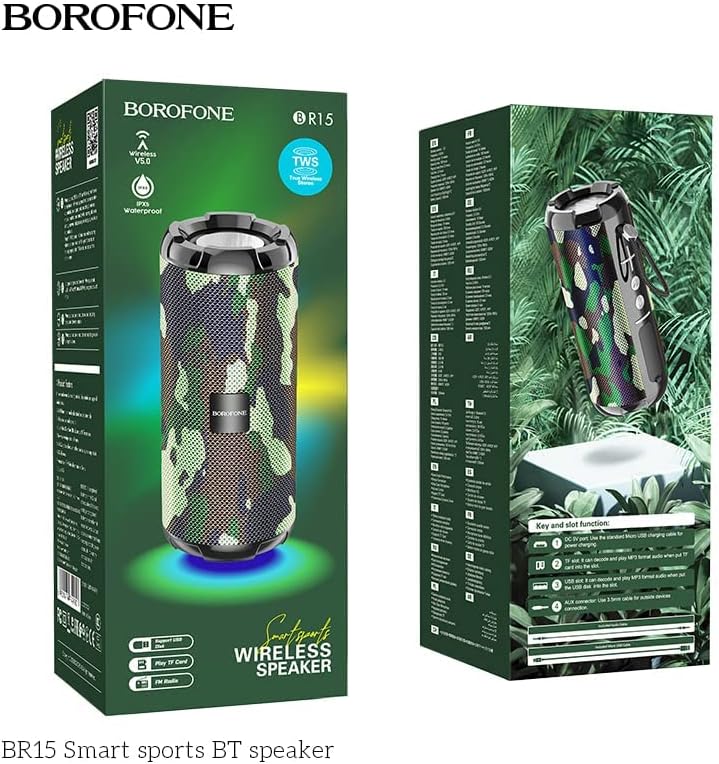
Image: The BOROFONE BR15 speaker packaging, illustrating the various buttons and ports for user reference.
The packaging image above highlights the 'Key and slot function' area, which typically includes:
- പവർ ബട്ടൺ: സ്പീക്കർ ഓൺ അല്ലെങ്കിൽ ഓഫ് ചെയ്യാൻ.
- മോഡ് ബട്ടൺ (M): To switch between Bluetooth, FM radio, TF card, and USB disk modes.
- വോളിയം കൂട്ടുക/അടുത്ത ട്രാക്ക് ബട്ടൺ (+): അടുത്ത ട്രാക്കിനായി ഷോർട്ട് പ്രസ്സ് ചെയ്യുക, വോളിയം കൂട്ടാൻ ദീർഘനേരം അമർത്തുക.
- വോളിയം കുറയ്ക്കൽ/മുമ്പത്തെ ട്രാക്ക് ബട്ടൺ (-): മുമ്പത്തെ ട്രാക്കിനായി ഷോർട്ട് പ്രസ്സ് ചെയ്യുക, വോളിയം കുറയ്ക്കാൻ ദീർഘനേരം അമർത്തുക.
- പ്ലേ/താൽക്കാലികമായി നിർത്തുക ബട്ടൺ: To play or pause audio, answer/end calls.
- ചാർജിംഗ് പോർട്ട്: സ്പീക്കർ ചാർജ് ചെയ്യുന്നതിനുള്ള യുഎസ്ബി പോർട്ട്.
- ടിഎഫ് കാർഡ് സ്ലോട്ട്: മൈക്രോ എസ്ഡി കാർഡിൽ നിന്ന് നേരിട്ട് സംഗീതം പ്ലേ ചെയ്യുന്നതിന്.
- USB പോർട്ട്: For playing music directly from a USB flash drive.
- AUX-ഇൻ പോർട്ട്: 3.5mm ഓഡിയോ കേബിൾ വഴി ബാഹ്യ ഓഡിയോ ഉപകരണങ്ങൾ ബന്ധിപ്പിക്കുന്നതിന്.
3. സജ്ജീകരണം
3.1 സ്പീക്കർ ചാർജ് ചെയ്യുന്നു
- നൽകിയിരിക്കുന്ന USB ചാർജിംഗ് കേബിൾ സ്പീക്കറിന്റെ ചാർജിംഗ് പോർട്ടുമായി ബന്ധിപ്പിക്കുക.
- കേബിളിന്റെ മറ്റേ അറ്റം ഒരു USB പവർ അഡാപ്റ്ററുമായി (ഉൾപ്പെടുത്തിയിട്ടില്ല) അല്ലെങ്കിൽ ഒരു കമ്പ്യൂട്ടറിന്റെ USB പോർട്ടുമായി ബന്ധിപ്പിക്കുക.
- ചാർജ് ചെയ്യുമ്പോൾ ചാർജിംഗ് ഇൻഡിക്കേറ്റർ ലൈറ്റ് പ്രകാശിക്കും, സാധാരണയായി ചുവപ്പ് നിറത്തിൽ.
- Charging takes approximately 2 hours. The indicator light will turn off or change color (e.g., blue) when fully charged.
3.2 പവർ ഓൺ/ഓഫ്
- പവർ ഓണാക്കാൻ: Press and hold the Power button for a few seconds until you hear an audible prompt or see an indicator light.
- പവർ ഓഫ് ചെയ്യാൻ: കേൾക്കാവുന്ന ഒരു പ്രോംപ്റ്റ് കേൾക്കുന്നതുവരെയോ ഇൻഡിക്കേറ്റർ ലൈറ്റ് ഓഫാകുന്നതുവരെയോ പവർ ബട്ടൺ വീണ്ടും കുറച്ച് സെക്കൻഡ് അമർത്തിപ്പിടിക്കുക.
4. പ്രവർത്തന നിർദ്ദേശങ്ങൾ
4.1 ബ്ലൂടൂത്ത് ജോടിയാക്കൽ
- Ensure the speaker is powered on and in Bluetooth mode (indicated by a flashing blue LED and an audible prompt). If not, press the 'M' (Mode) button to switch to Bluetooth mode.
- നിങ്ങളുടെ സ്മാർട്ട്ഫോണിലോ ടാബ്ലെറ്റിലോ, ബ്ലൂടൂത്ത് പ്രവർത്തനക്ഷമമാക്കി ലഭ്യമായ ഉപകരണങ്ങൾക്കായി തിരയുക.
- Select "BOROFONE BR15" from the list of devices.
- ജോടിയാക്കിക്കഴിഞ്ഞാൽ, സ്പീക്കർ ഒരു കേൾക്കാവുന്ന സ്ഥിരീകരണം പുറപ്പെടുവിക്കും, നീല എൽഇഡി മിന്നുന്നത് നിർത്തി ഉറച്ചതായി തുടരും.
- ഇപ്പോൾ നിങ്ങളുടെ ഉപകരണത്തിൽ നിന്ന് സ്പീക്കറിലൂടെ ഓഡിയോ പ്ലേ ചെയ്യാൻ കഴിയും.
4.2 Playing Music from TF Card/USB Disk
- Insert a TF card (MicroSD) or USB flash drive with MP3 audio files into the respective slot on the speaker.
- The speaker will automatically detect the storage device and switch to the corresponding playback mode. If not, press the 'M' (Mode) button to cycle through modes until you reach TF card or USB disk mode.
- Use the Play/Pause, Next Track (+), and Previous Track (-) buttons to control playback.
4.3 എഫ്എം റേഡിയോ മോഡ്
- എഫ്എം റേഡിയോ പ്രോംപ്റ്റ് കേൾക്കുന്നത് വരെ 'എം' (മോഡ്) ബട്ടൺ ആവർത്തിച്ച് അമർത്തുക.
- ലഭ്യമായ സ്റ്റേഷനുകൾ സ്വയമേവ സ്കാൻ ചെയ്ത് സംരക്ഷിക്കാൻ, പ്ലേ/താൽക്കാലികമായി നിർത്തുക ബട്ടൺ അമർത്തിപ്പിടിക്കുക. സ്പീക്കർ സ്റ്റേഷനുകൾ സ്വയമേവ സ്കാൻ ചെയ്ത് സംഭരിക്കും.
- Use the Next Track (+) and Previous Track (-) buttons to switch between saved stations.
4.4 TWS (ട്രൂ വയർലെസ് സ്റ്റീരിയോ) പ്രവർത്തനം
The TWS function allows you to connect two BOROFONE BR15 speakers together for a true stereo sound experience.
- Ensure both BR15 speakers are powered off.
- Power on both speakers. They should both be in Bluetooth pairing mode.
- On one of the speakers, double-press the Play/Pause button. The speaker will attempt to connect to the other BR15 speaker.
- Once successfully paired, you will hear an audible confirmation. The main speaker's LED will flash, and the secondary speaker's LED will be solid.
- Now, connect your smartphone or tablet to the main speaker via Bluetooth as described in section 4.1.
- രണ്ട് സ്പീക്കറുകളിലൂടെയും ഓഡിയോ ഇപ്പോൾ സ്റ്റീരിയോയിൽ പ്ലേ ചെയ്യും.
4.5 വോളിയം നിയന്ത്രണം
- വോളിയം വർദ്ധിപ്പിക്കുക: '+' ബട്ടൺ ദീർഘനേരം അമർത്തുക.
- വോളിയം കുറയ്ക്കുക: '-' ബട്ടൺ ദീർഘനേരം അമർത്തുക.
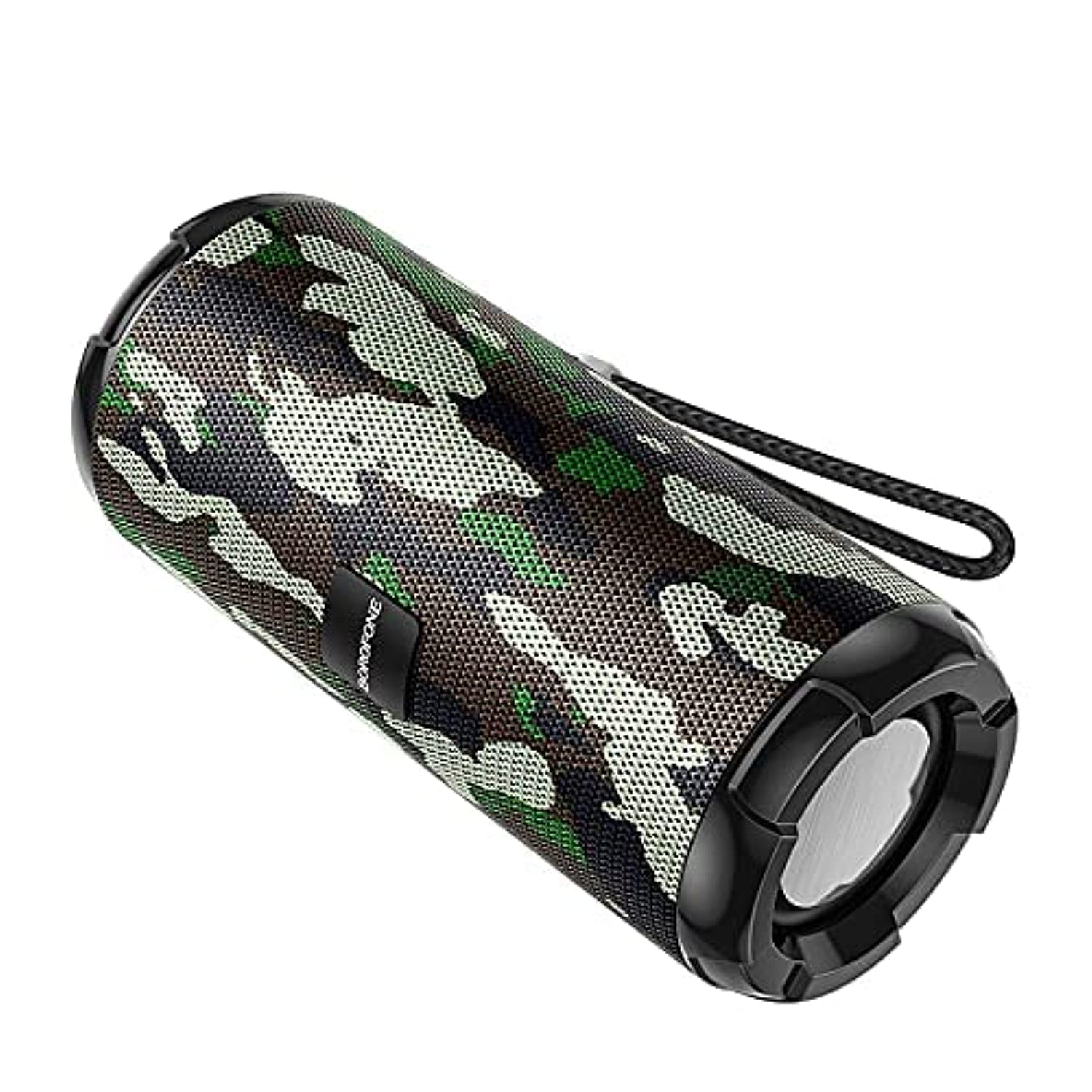
Image: The BOROFONE BR15 Portable Bluetooth Speaker, showcasing its camouflage green finish and cylindrical design.
5. പരിപാലനം
5.1 വൃത്തിയാക്കൽ
- വൃത്തിയാക്കുന്നതിന് മുമ്പ് എപ്പോഴും സ്പീക്കർ ഓഫ് ചെയ്യുക.
- Use a soft, dry, lint-free cloth to wipe the exterior of the speaker.
- അബ്രാസീവ് ക്ലീനറുകൾ, ആൽക്കഹോൾ, ബെൻസീൻ അല്ലെങ്കിൽ മറ്റ് രാസ ലായകങ്ങൾ എന്നിവ ഉപയോഗിക്കരുത്, കാരണം ഇവ ഉപരിതലത്തിനോ ആന്തരിക ഘടകങ്ങളോ കേടുവരുത്തിയേക്കാം.
5.2 സംഭരണം
- നേരിട്ടുള്ള സൂര്യപ്രകാശത്തിൽ നിന്നും കടുത്ത താപനിലയിൽ നിന്നും മാറി തണുത്തതും വരണ്ടതുമായ സ്ഥലത്ത് സ്പീക്കർ സൂക്ഷിക്കുക.
- ദീർഘനേരം സൂക്ഷിക്കുകയാണെങ്കിൽ, ബാറ്ററിയുടെ ആരോഗ്യം നിലനിർത്താൻ ഓരോ ഏതാനും മാസത്തിലും ഏകദേശം 50% വരെ ബാറ്ററി ചാർജ് ചെയ്യുക.
5.3 ബാറ്ററി കെയർ
- ബാറ്ററി ഇടയ്ക്കിടെ പൂർണ്ണമായും ഡിസ്ചാർജ് ചെയ്യുന്നത് ഒഴിവാക്കുക.
- 60°C (140°F) ന് മുകളിലോ -10°C (14°F) ന് താഴെയോ ഉള്ള താപനിലയിൽ സ്പീക്കറിനെ തുറന്നുകാട്ടരുത്.
- നൽകിയിരിക്കുന്ന ചാർജിംഗ് കേബിളോ സാക്ഷ്യപ്പെടുത്തിയ തത്തുല്യമായതോ മാത്രം ഉപയോഗിക്കുക.
6. പ്രശ്നപരിഹാരം
| പ്രശ്നം | സാധ്യമായ കാരണം | പരിഹാരം |
|---|---|---|
| സ്പീക്കർ പവർ ഓൺ ചെയ്യുന്നില്ല. | കുറഞ്ഞ ബാറ്ററി. | കുറഞ്ഞത് 30 മിനിറ്റെങ്കിലും സ്പീക്കർ ചാർജ് ചെയ്യുക. |
| ബ്ലൂടൂത്ത് വഴി ജോടിയാക്കാൻ കഴിയില്ല. | Speaker not in pairing mode; Bluetooth disabled on device; speaker too far. | Ensure speaker is in Bluetooth mode (flashing LED). Enable Bluetooth on your device. Move speaker closer to your device (within 10 meters). |
| ശബ്ദമില്ല. | ശബ്ദം വളരെ കുറവാണ്; തെറ്റായ മോഡ്; ഉപകരണം പ്ലേ ചെയ്യുന്നില്ല. | Increase speaker and device volume. Check if the speaker is in the correct mode (Bluetooth, TF, USB, FM). Ensure audio is playing on your connected device. |
| എഫ്എം റേഡിയോ റിസപ്ഷൻ മോശമാണ്. | ദുർബലമായ സിഗ്നൽ. | Move the speaker to an open area or closer to a window. |
| TWS ജോടിയാക്കൽ പരാജയപ്പെടുന്നു. | Speakers too far apart; one speaker already paired. | Ensure both speakers are close to each other. Disconnect any existing Bluetooth connections from both speakers before attempting TWS pairing. |
7 സ്പെസിഫിക്കേഷനുകൾ
| ഫീച്ചർ | സ്പെസിഫിക്കേഷൻ |
|---|---|
| മോഡലിൻ്റെ പേര് | BR15 |
| ബ്ലൂടൂത്ത് പതിപ്പ് | 5.0 |
| ചിപ്പ് | ജെറി |
| ബാറ്ററി ശേഷി | 1200mAh |
| ചാർജിംഗ് സമയം | ഏകദേശം 2 മണിക്കൂർ |
| സംഗീതം / സംസാര സമയം | ഏകദേശം 2.5 മണിക്കൂർ |
| സ്പീക്കർ യൂണിറ്റ് | 45mm x 2 |
| ഔട്ട്പുട്ട് പവർ | 5W 2 |
| അളവുകൾ (L x W x H) | 162mm x 70mm x 70mm (6.38 x 2.76 x 2.76 ഇഞ്ച്) |
| ഭാരം | വ്യക്തമാക്കിയിട്ടില്ല |
| മെറ്റീരിയൽ | പ്ലാസ്റ്റിക് |
| നിറം | കാമഫ്ലേജ് ഗ്രീൻ |
| ജല പ്രതിരോധം | അതെ |
| കണക്റ്റിവിറ്റി | Bluetooth, TF Card, USB Disk, FM Radio, AUX-in, TWS |
| അനുയോജ്യമായ ഉപകരണങ്ങൾ | സ്മാർട്ട്ഫോൺ, ടാബ്ലെറ്റ് |

Image: The BOROFONE BR15 Portable Bluetooth Speaker positioned outdoors, highlighting its portability and design.
8. വാറൻ്റിയും പിന്തുണയും
BOROFONE products are designed and manufactured to the highest quality standards. For information regarding warranty coverage, please refer to the warranty card included with your purchase or visit the official BOROFONE website. If you encounter any issues or require technical assistance, please contact BOROFONE customer support through their official channels.
No official product videos were provided for this model.


