ആമുഖം
Thank you for choosing the Borofone BR15 Portable Bluetooth Speaker. This manual provides essential information for the safe and efficient use of your device. Please read it thoroughly before operating the speaker and keep it for future reference.
ഉൽപ്പന്നം കഴിഞ്ഞുview
The Borofone BR15 is a versatile portable Bluetooth speaker designed for various environments, including sports activities. It features Bluetooth 5.0 connectivity, a durable plastic build, and water resistance.
പ്രധാന സവിശേഷതകൾ:
- ബ്ലൂടൂത്ത് 5.0: സ്ഥിരവും കാര്യക്ഷമവുമായ വയർലെസ് കണക്ഷൻ ഉറപ്പാക്കുന്നു.
- വാട്ടർപ്രൂഫ് ഡിസൈൻ: Provides protection against water splashes, suitable for outdoor use.
- ഒന്നിലധികം പ്ലേബാക്ക് മോഡുകൾ: Supports Bluetooth, FM Radio, TF Card, USB Disk, and TWS (True Wireless Stereo).
- പോർട്ടബിൾ, മോടിയുള്ള: Compact size with a robust plastic construction.
- നീണ്ട ബാറ്ററി ലൈഫ്: 1200 mAh battery offers up to 2.5 hours of music or talk time.
സ്പീക്കർ ഘടകങ്ങൾ:
Familiarize yourself with the speaker's layout:
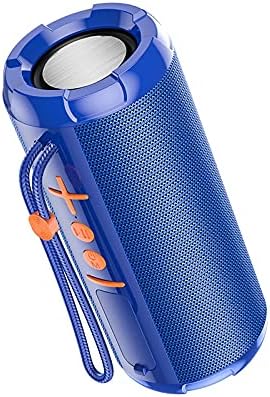
ചിത്രം 1: മുൻഭാഗം view of the Borofone BR15 speaker, showing the control panel with power, volume, and mode buttons.

ചിത്രം 2: വശം view of the Borofone BR15 speaker, highlighting its cylindrical design and the Borofone branding.
- പവർ ബട്ടൺ: സ്പീക്കർ ഓൺ/ഓഫ് ചെയ്യുന്നു.
- വോളിയം കൂട്ടുക/അടുത്ത ട്രാക്ക് ബട്ടൺ: ശബ്ദം കൂട്ടുന്നു അല്ലെങ്കിൽ അടുത്ത ട്രാക്കിലേക്ക് പോകുന്നു.
- വോളിയം കുറയ്ക്കൽ/മുമ്പത്തെ ട്രാക്ക് ബട്ടൺ: ശബ്ദം കുറയ്ക്കുന്നു അല്ലെങ്കിൽ മുമ്പത്തെ ട്രാക്കിലേക്ക് പോകുന്നു.
- പ്ലേ/താൽക്കാലികമായി നിർത്തുക ബട്ടൺ: Controls music playback and answers/ends calls.
- മോഡ് ബട്ടൺ: Switches between Bluetooth, FM Radio, TF Card, and USB Disk modes.
- ചാർജിംഗ് പോർട്ട്: ചാർജിംഗ് കേബിൾ ബന്ധിപ്പിക്കുന്നതിന്.
- ടിഎഫ് കാർഡ് സ്ലോട്ട്: For inserting a MicroSD card.
- USB പോർട്ട്: For connecting a USB flash drive.
സജ്ജമാക്കുക
1. സ്പീക്കറെ ചുമതലപ്പെടുത്തൽ:
- നൽകിയിരിക്കുന്ന ചാർജിംഗ് കേബിൾ സ്പീക്കറിന്റെ ചാർജിംഗ് പോർട്ടുമായി ബന്ധിപ്പിക്കുക.
- കേബിളിന്റെ മറ്റേ അറ്റം ഒരു USB പവർ അഡാപ്റ്ററുമായി (ഉൾപ്പെടുത്തിയിട്ടില്ല) അല്ലെങ്കിൽ ഒരു കമ്പ്യൂട്ടറിന്റെ USB പോർട്ടുമായി ബന്ധിപ്പിക്കുക.
- ചാർജിംഗ് ഇൻഡിക്കേറ്റർ ലൈറ്റ് പ്രകാശിക്കും. ചാർജ് ചെയ്യാൻ ഏകദേശം 2 മണിക്കൂർ എടുക്കും.
- പൂർണ്ണമായി ചാർജ് ചെയ്തുകഴിഞ്ഞാൽ, ഇൻഡിക്കേറ്റർ ലൈറ്റ് മാറുകയോ ഓഫാകുകയോ ചെയ്യും. ചാർജിംഗ് കേബിൾ വിച്ഛേദിക്കുക.
2. പവർ ഓൺ/ഓഫ്:
- To power on, press and hold the Power button for a few seconds until you hear an audible prompt.
- പവർ ഓഫ് ചെയ്യാൻ, സ്പീക്കർ ഓഫാകുന്നതുവരെ പവർ ബട്ടൺ വീണ്ടും അമർത്തിപ്പിടിക്കുക.
3. ബ്ലൂടൂത്ത് ജോടിയാക്കൽ:
- Ensure the speaker is powered on and in Bluetooth mode (indicated by a flashing LED or audible prompt). If not, press the Mode button to switch to Bluetooth.
- നിങ്ങളുടെ സ്മാർട്ട്ഫോണിലോ, ടാബ്ലെറ്റിലോ, അല്ലെങ്കിൽ മറ്റ് അനുയോജ്യമായ ഉപകരണത്തിലോ ബ്ലൂടൂത്ത് പ്രവർത്തനക്ഷമമാക്കുക.
- ഇതിനായി തിരയുക "BR15" in the list of available Bluetooth devices.
- Select "BR15" to connect. Once paired, you will hear a confirmation sound, and the LED indicator will stop flashing.
- ഉപകരണത്തിന്റെ ബ്ലൂടൂത്ത് സജീവവും പരിധിക്കുള്ളിലുമാണെങ്കിൽ, സ്പീക്കർ പവർ ഓൺ ചെയ്യുമ്പോൾ അവസാനം ജോടിയാക്കിയ ഉപകരണവുമായി യാന്ത്രികമായി വീണ്ടും കണക്റ്റുചെയ്യും.
പ്രവർത്തന നിർദ്ദേശങ്ങൾ
സംഗീത പ്ലേബാക്ക്:
- പ്ലേ/താൽക്കാലികമായി നിർത്തുക: Play/Pause ബട്ടൺ ഒരിക്കൽ അമർത്തുക.
- അടുത്ത ട്രാക്ക്: വോളിയം അപ്പ് ബട്ടൺ അമർത്തിപ്പിടിക്കുക.
- മുമ്പത്തെ ട്രാക്ക്: വോളിയം ഡൗൺ ബട്ടൺ അമർത്തിപ്പിടിക്കുക.
- വോളിയം കൂട്ടുക: വോളിയം അപ്പ് ബട്ടൺ ചുരുക്കി അമർത്തുക.
- വോളിയം താഴേക്ക്: വോളിയം ഡൗൺ ബട്ടൺ ചുരുക്കി അമർത്തുക.
Call Handling (in Bluetooth mode):
- മറുപടി കോൾ: Play/Pause ബട്ടൺ ഒരിക്കൽ അമർത്തുക.
- കോൾ അവസാനിപ്പിക്കുക: ഒരു കോൾ സമയത്ത് പ്ലേ/പോസ് ബട്ടൺ ഒരിക്കൽ അമർത്തുക.
- കോൾ നിരസിക്കുക: പ്ലേ/പോസ് ബട്ടൺ അമർത്തിപ്പിടിക്കുക.
മോഡ് സ്വിച്ചിംഗ്:
Press the Mode button repeatedly to cycle through available modes:
- ബ്ലൂടൂത്ത് മോഡ്: വയർലെസ് ഓഡിയോ സ്ട്രീമിംഗിനായി.
- എഫ്എം റേഡിയോ മോഡ്: Automatically scans and plays FM stations.
- ടിഎഫ് കാർഡ് മോഡ്: ഓഡിയോ പ്ലേ ചെയ്യുന്നു files from a MicroSD card (insert card before selecting mode).
- USB Disk Mode: ഓഡിയോ പ്ലേ ചെയ്യുന്നു files from a USB flash drive (insert drive before selecting mode).
- TWS മോഡ് (ട്രൂ വയർലെസ് സ്റ്റീരിയോ): Connects two BR15 speakers for stereo sound. (Instructions for TWS pairing are typically separate and more detailed, but I'll keep it brief here as the JSON doesn't provide specifics).
മെയിൻ്റനൻസ്
- വൃത്തിയാക്കൽ: സ്പീക്കർ തുടയ്ക്കാൻ മൃദുവായതും ഉണങ്ങിയതുമായ തുണി ഉപയോഗിക്കുക. അബ്രാസീവ് ക്ലീനറുകളോ ലായകങ്ങളോ ഉപയോഗിക്കരുത്.
- ജല പ്രതിരോധം: The speaker is waterproof, but it is not designed for submersion. Ensure the charging port cover is securely closed to maintain water resistance. Avoid exposing it to strong jets of water.
- സംഭരണം: നേരിട്ടുള്ള സൂര്യപ്രകാശത്തിൽ നിന്നും കടുത്ത താപനിലയിൽ നിന്നും മാറി തണുത്തതും വരണ്ടതുമായ സ്ഥലത്ത് സ്പീക്കർ സൂക്ഷിക്കുക.
- ബാറ്ററി കെയർ: To prolong battery life, charge the speaker fully before first use and at least once every three months if not used regularly.
ട്രബിൾഷൂട്ടിംഗ്
| പ്രശ്നം | പരിഹാരം |
|---|---|
| സ്പീക്കർ പവർ ഓൺ ചെയ്യുന്നില്ല. | ബാറ്ററി ചാർജ്ജ് ചെയ്തിട്ടുണ്ടെന്ന് ഉറപ്പാക്കുക. സ്പീക്കർ ഒരു പവർ സ്രോതസ്സുമായി ബന്ധിപ്പിച്ച് വീണ്ടും ശ്രമിക്കുക. |
| ബ്ലൂടൂത്ത് വഴി ജോടിയാക്കാൻ കഴിയില്ല. |
|
| ശബ്ദമില്ല അല്ലെങ്കിൽ കുറഞ്ഞ ശബ്ദമില്ല. |
|
| എഫ്എം റേഡിയോ റിസപ്ഷൻ മോശമാണ്. | Move the speaker to an open area, away from obstructions or interference. Some speakers use the charging cable as an antenna; try connecting it. |
സ്പെസിഫിക്കേഷനുകൾ
| മോഡലിൻ്റെ പേര്: | BR15 |
| ബ്രാൻഡ്: | Borofone |
| ബ്ലൂടൂത്ത് പതിപ്പ്: | 5.0 |
| ബ്ലൂടൂത്ത് ചിപ്പ്: | Jerry JL |
| ബാറ്ററി ശേഷി: | 1200 mAh |
| ചാർജിംഗ് സമയം: | ഏകദേശം 2 മണിക്കൂർ |
| സംഗീതം/സംവാദ സമയം: | 2.5 മണിക്കൂർ വരെ |
| സ്പീക്കർ യൂണിറ്റ്: | 45mm x 2 |
| പവർ ഔട്ട്പുട്ട്: | 5W 2 |
| അളവുകൾ (L x W x H): | 162 x 70 x 70 മിമി |
| മെറ്റീരിയൽ: | പ്ലാസ്റ്റിക് |
| വാട്ടർപ്രൂഫ്: | അതെ |
| കണക്റ്റിവിറ്റി: | ബ്ലൂടൂത്ത് |
| ഊർജ്ജ സ്രോതസ്സ്: | ബാറ്ററി പവർ |
| ഓഡിയോ putട്ട്പുട്ട് മോഡ്: | സ്റ്റീരിയോ |
| മൗണ്ടിംഗ് തരം: | ടേബിൾടോപ്പ് |
| അനുയോജ്യമായ ഉപകരണങ്ങൾ: | ലാപ്ടോപ്പ്, സ്മാർട്ട്ഫോൺ, ടാബ്ലെറ്റ് |
| പിന്തുണയ്ക്കുന്ന മോഡുകൾ: | Bluetooth, FM Radio, TF Card, USB Disk, TWS |
വാറൻ്റിയും പിന്തുണയും
For warranty information and technical support, please refer to the warranty card included with your product or visit the official Borofone webസൈറ്റ്. വാങ്ങിയതിന്റെ തെളിവായി നിങ്ങളുടെ വാങ്ങൽ രസീത് സൂക്ഷിക്കുക.
If you encounter any issues not covered in this manual, please contact Borofone customer service for assistance.


