ആമുഖം
Thank you for choosing the BOROFONE BR16 Portable Bluetooth Speaker. This manual provides essential information for setting up, operating, and maintaining your device. Please read it carefully before use to ensure optimal performance and longevity.
ഉൽപ്പന്നം കഴിഞ്ഞുview
പാക്കേജ് ഉള്ളടക്കം
- BOROFONE BR16 Portable Bluetooth Speaker
- യുഎസ്ബി ചാർജിംഗ് കേബിൾ
- ഉപയോക്തൃ മാനുവൽ
സ്പീക്കർ ഘടകങ്ങളും നിയന്ത്രണങ്ങളും
ചിത്രം 1: പിൻഭാഗം view of the BOROFONE BR16 speaker, showing the power switch, USB-A port, Micro-USB charging port, TF card slot, and control buttons. The speaker's model and specifications are visible on the back label.

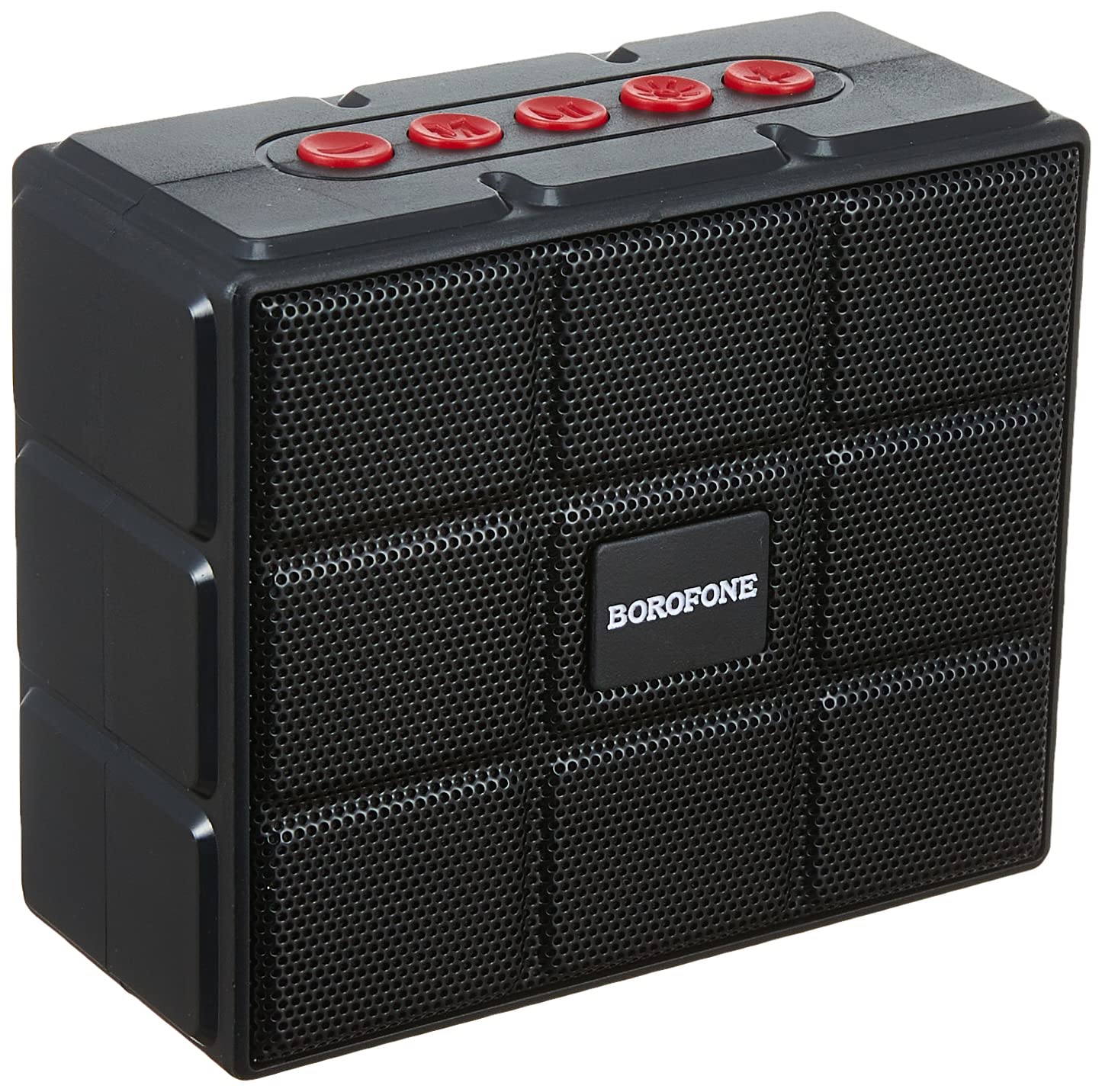
ചിത്രം 2: ഫ്രണ്ട് view of the BOROFONE BR16 speaker, featuring a protective grille and the BOROFONE logo.

ചിത്രം 3: വിശദമായി view of the speaker's back label, displaying model number BR16, Wireless version V5.1, Input DC 5V/1A, Power 5W x 1, and Battery Rated Capacity 1200mAh, along with CE, FCC, RoHS, and CCC certifications.
- വൈദ്യുതി സ്വിച്ച്: Located on the side/rear, used to turn the speaker ON/OFF.
- നിയന്ത്രണ ബട്ടണുകൾ: (Red buttons on top) For playback control (play/pause, volume up/down, track skip) and mode selection.
- USB-A പോർട്ട്: For U disk (USB flash drive) playback.
- മൈക്രോ-യുഎസ്ബി പോർട്ട്: സ്പീക്കർ ചാർജ് ചെയ്തതിന്.
- ടിഎഫ് കാർഡ് സ്ലോട്ട്: For playing music from a MicroSD/TF card.
സജ്ജമാക്കുക
സ്പീക്കറെ കുറ്റപ്പെടുത്തുന്നു
- Connect the Micro-USB end of the provided charging cable to the speaker's Micro-USB port.
- കേബിളിന്റെ USB-A അറ്റം ഒരു USB പവർ അഡാപ്റ്ററുമായി (ഉൾപ്പെടുത്തിയിട്ടില്ല) അല്ലെങ്കിൽ ഒരു കമ്പ്യൂട്ടറിന്റെ USB പോർട്ടുമായി ബന്ധിപ്പിക്കുക.
- ചാർജിംഗ് ഇൻഡിക്കേറ്റർ ലൈറ്റ് പ്രകാശിക്കും. സാധാരണയായി ചാർജ് ചെയ്യാൻ ഏകദേശം 3 മണിക്കൂർ എടുക്കും.
- പൂർണ്ണമായി ചാർജ് ചെയ്തുകഴിഞ്ഞാൽ, ഇൻഡിക്കേറ്റർ ലൈറ്റ് മാറുകയോ ഓഫാകുകയോ ചെയ്യാം. ചാർജിംഗ് കേബിൾ വിച്ഛേദിക്കുക.

ചിത്രം 4: The USB charging cable included with the speaker, featuring a standard USB-A connector and a Micro-USB connector.
പവർ ചെയ്യുന്നത് ഓൺ/ഓഫ്
- To power on, slide the ON/OFF switch to the "ON" position. You will hear an audible prompt.
- പവർ ഓഫ് ചെയ്യാൻ, ഓൺ/ഓഫ് സ്വിച്ച് "ഓഫ്" സ്ഥാനത്തേക്ക് സ്ലൈഡ് ചെയ്യുക.
പ്രവർത്തന നിർദ്ദേശങ്ങൾ
ബ്ലൂടൂത്ത് മോഡ്
- Ensure the speaker is powered on. It will automatically enter Bluetooth pairing mode, indicated by a flashing LED light and an audible prompt.
- നിങ്ങളുടെ ഉപകരണത്തിൽ (സ്മാർട്ട്ഫോൺ, ടാബ്ലെറ്റ്, ലാപ്ടോപ്പ്), ബ്ലൂടൂത്ത് പ്രവർത്തനക്ഷമമാക്കി ലഭ്യമായ ഉപകരണങ്ങൾക്കായി തിരയുക.
- Select "BOROFONE BR16" from the list of devices.
- Once paired, the LED indicator will stop flashing, and you will hear a confirmation sound.
- ഇപ്പോൾ നിങ്ങളുടെ ഉപകരണത്തിൽ നിന്ന് സ്പീക്കറിലൂടെ ഓഡിയോ പ്ലേ ചെയ്യാൻ കഴിയും.
കുറിപ്പ്: The speaker supports Bluetooth 5.1 for stable and efficient wireless connection.
എഫ്എം റേഡിയോ മോഡ്
- സ്പീക്കറിൽ പവർ.
- Press the Mode button (one of the red control buttons) to switch to FM radio mode.
- ലഭ്യമായ എഫ്എം സ്റ്റേഷനുകൾ സ്വയമേവ സ്കാൻ ചെയ്ത് സംരക്ഷിക്കാൻ പ്ലേ/പോസ് ബട്ടൺ അമർത്തിപ്പിടിക്കുക.
- Use the Volume Up/Down buttons (or track skip buttons) to navigate between saved stations.
TF Card / U Disk Playback
- Insert a TF (MicroSD) card into the TF card slot or a USB flash drive into the USB-A port.
- സ്പീക്കർ സ്റ്റോറേജ് ഉപകരണം സ്വയമേവ കണ്ടെത്തി ഓഡിയോ പ്ലേ ചെയ്യാൻ തുടങ്ങും. files.
- Use the control buttons for playback (play/pause, next/previous track, volume).
TWS (True Wireless Stereo) Function (If Supported)
If you have two BOROFONE BR16 speakers, you can pair them together for a True Wireless Stereo experience.
- Ensure both BR16 speakers are powered on and not connected to any Bluetooth device.
- On one speaker, press and hold the TWS pairing button (refer to specific button function if available, otherwise try Play/Pause or Mode button).
- The speakers will attempt to pair with each other. Once successful, you will hear a confirmation sound.
- Connect your device to one of the paired speakers via Bluetooth. Audio will now play in stereo through both speakers.
കുറിപ്പ്: The TWS function allows two speakers to act as left and right channels for a more immersive sound.
മെയിൻ്റനൻസ്
- Keep the speaker dry. Do not expose it to extreme temperatures or humidity.
- മൃദുവായതും ഉണങ്ങിയതുമായ തുണി ഉപയോഗിച്ച് സ്പീക്കർ വൃത്തിയാക്കുക. അബ്രസീവ് ക്ലീനറുകളോ ലായകങ്ങളോ ഉപയോഗിക്കരുത്.
- സ്പീക്കറെ ശക്തമായ ആഘാതങ്ങൾക്ക് വിധേയമാക്കുകയോ താഴെയിടുകയോ ചെയ്യുന്നത് ഒഴിവാക്കുക.
- When not in use for extended periods, charge the speaker at least once every three months to maintain battery health.
ട്രബിൾഷൂട്ടിംഗ്
| പ്രശ്നം | പരിഹാരം |
|---|---|
| സ്പീക്കർ ഓണാക്കുന്നില്ല. | ബാറ്ററി ചാർജ്ജ് ചെയ്തിട്ടുണ്ടെന്ന് ഉറപ്പാക്കുക. USB ചാർജിംഗ് കേബിൾ ഉപയോഗിച്ച് സ്പീക്കർ ഒരു പവർ സ്രോതസ്സുമായി ബന്ധിപ്പിക്കുക. |
| ബ്ലൂടൂത്ത് വഴി ജോടിയാക്കാൻ കഴിയില്ല. |
|
| ശബ്ദമില്ല അല്ലെങ്കിൽ കുറഞ്ഞ ശബ്ദമില്ല. |
|
| എഫ്എം റേഡിയോ റിസപ്ഷൻ മോശമാണ്. |
|
സ്പെസിഫിക്കേഷനുകൾ
| മോഡൽ | BR16 |
| ബ്രാൻഡ് | ബോറോഫോൺ |
| ബ്ലൂടൂത്ത് പതിപ്പ് | 5.1 |
| ചിപ്പ് | ജെഎൽ എസി 6965ഇ |
| ബാറ്ററി ശേഷി | 1200mAh |
| ചാർജിംഗ് സമയം | ഏകദേശം 3 മണിക്കൂർ |
| സംഗീതം / സംസാര സമയം | ഏകദേശം 4 മണിക്കൂർ |
| സ്പീക്കർ യൂണിറ്റ് | 52mm x 1 |
| ഔട്ട്പുട്ട് പവർ | 5W |
| അളവുകൾ | 100 x 84 x 47 മിമി (ഏകദേശം 3.9 x 3.3 x 1.85 ഇഞ്ച്) |
| ഭാരം | 245g (approx. 0.54 lbs) |
| മെറ്റീരിയൽ | പ്ലാസ്റ്റിക് |
| കണക്റ്റിവിറ്റി | Bluetooth, FM Radio, TF Card, U Disk, TWS |
| അനുയോജ്യമായ ഉപകരണങ്ങൾ | സ്മാർട്ട്ഫോണുകൾ, ടാബ്ലെറ്റുകൾ, ലാപ്ടോപ്പുകൾ |
| നിയന്ത്രണ രീതി | ഫിസിക്കൽ ബട്ടണുകൾ |
| ജല പ്രതിരോധം | Yes (Specific IP rating not provided, assume splash-proof) |
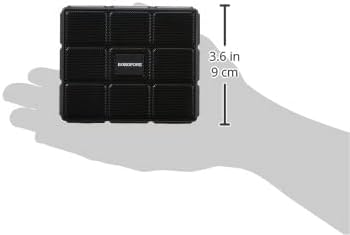
ചിത്രം 5: The BOROFONE BR16 speaker held in a hand, illustrating its compact and portable design with approximate dimensions of 3.6 inches (9 cm).
വാറൻ്റിയും പിന്തുണയും
For warranty information or technical support, please refer to the documentation provided with your purchase or contact your retailer.

ചിത്രം 6: The official BOROFONE company logo.


