1. ആമുഖം
Thank you for choosing the Srihome SH052 5MP 4K UHD WiFi IP Camera. This manual provides detailed instructions to help you set up, operate, and maintain your security camera effectively. Please read this manual thoroughly before use and retain it for future reference.

Image: The Srihome SH052 camera, a white PTZ unit with two antennas, shown alongside a smartphone displaying a live feed of a house, illustrating remote monitoring capabilities.
2. ഉൽപ്പന്നം കഴിഞ്ഞുview
2.1 പ്രധാന സവിശേഷതകൾ
- ഉയർന്ന മിഴിവ്: 5 Megapixel (5MP) sensor, providing 4K UHD (3840 x 2160p) video quality.
- പാൻ & ടിൽറ്റ് പ്രവർത്തനം: Offers a 355° horizontal pan and 70° vertical tilt for comprehensive area coverage.
- വയർലെസ് കണക്റ്റിവിറ്റി: Supports 2.4G Wi-Fi for flexible placement and connection.
- എപി ഹോട്ട്സ്പോട്ട് മോഡ്: Allows direct connection to a smartphone without a router for initial setup or local access.
- പ്രാദേശിക സംഭരണം: Supports MicroSD cards up to 128GB for video recording.
- ടു-വേ ഓഡിയോ: ബിൽറ്റ്-ഇൻ മൈക്രോഫോണും സ്പീക്കറും തത്സമയ ആശയവിനിമയം സാധ്യമാക്കുന്നു.
- വിപുലമായ കണ്ടെത്തൽ: Features Motion Tracking, Motion Detection Alerts, and Human Detection to minimize false alarms.
- Versatile Night Vision: Includes Day Vision, Infrared Night Vision, and Color Night Vision with a starlight lens and warm light.
- വെതർപ്രൂഫ് ഡിസൈൻ: IP65 rated for outdoor use, resistant to dust and water.

ചിത്രം: ഒരു ഇൻഫോഗ്രാഫിക് ഷോക്asing the Srihome SH052 camera's main features, including 5MP resolution, Wi-Fi connectivity, IP65 waterproof rating, two-way audio, motion detection, and MicroSD card support.
2.2 പാക്കേജ് ഉള്ളടക്കം
പാക്കേജിൽ എല്ലാ ഇനങ്ങളും ഉണ്ടെന്ന് ഉറപ്പാക്കുക:
- ശ്രീഹോം SH052 ഐപി ക്യാമറ
- ഉപയോക്തൃ മാനുവൽ
- മൗണ്ടിംഗ് സ്ക്രൂകൾ
- പവർ അഡാപ്റ്റർ

Image: A visual representation of the Srihome SH052 camera's packing list, including the camera, user manual, mounting screws, and power adapter.
3. സജ്ജീകരണ നിർദ്ദേശങ്ങൾ
3.1 ക്യാമറയിൽ പവർ ചെയ്യൽ
- നൽകിയിരിക്കുന്ന പവർ അഡാപ്റ്റർ ക്യാമറയുടെ പവർ ഇൻപുട്ട് പോർട്ടുമായി ബന്ധിപ്പിക്കുക.
- പവർ അഡാപ്റ്റർ ഒരു സാധാരണ ഇലക്ട്രിക്കൽ ഔട്ട്ലെറ്റിലേക്ക് പ്ലഗ് ചെയ്യുക.
- The camera will power on and initiate its self-test sequence. Wait for the indicator light to show a stable status, typically a flashing blue or green light, indicating it's ready for connection.
3.2 Installing the Srihome App
- Download the "Srihome" app from your smartphone's app store (Google Play Store for Android or Apple App Store for iOS).
- Install the app and create a new user account if you don't already have one.
3.3 ക്യാമറ വൈഫൈയിലേക്ക് ബന്ധിപ്പിക്കുന്നു
Ensure your smartphone is connected to a 2.4GHz Wi-Fi network. The Srihome SH052 camera supports 2.4GHz Wi-Fi only.
- Open the Srihome app and tap the "+" icon to add a new device.
- Follow the on-screen instructions to select your camera model and connection method (e.g., Wi-Fi configuration, QR code scan).
- Enter your 2.4GHz Wi-Fi network name (SSID) and password when prompted.
- Position your phone near the camera during the pairing process. The camera will confirm successful connection verbally.
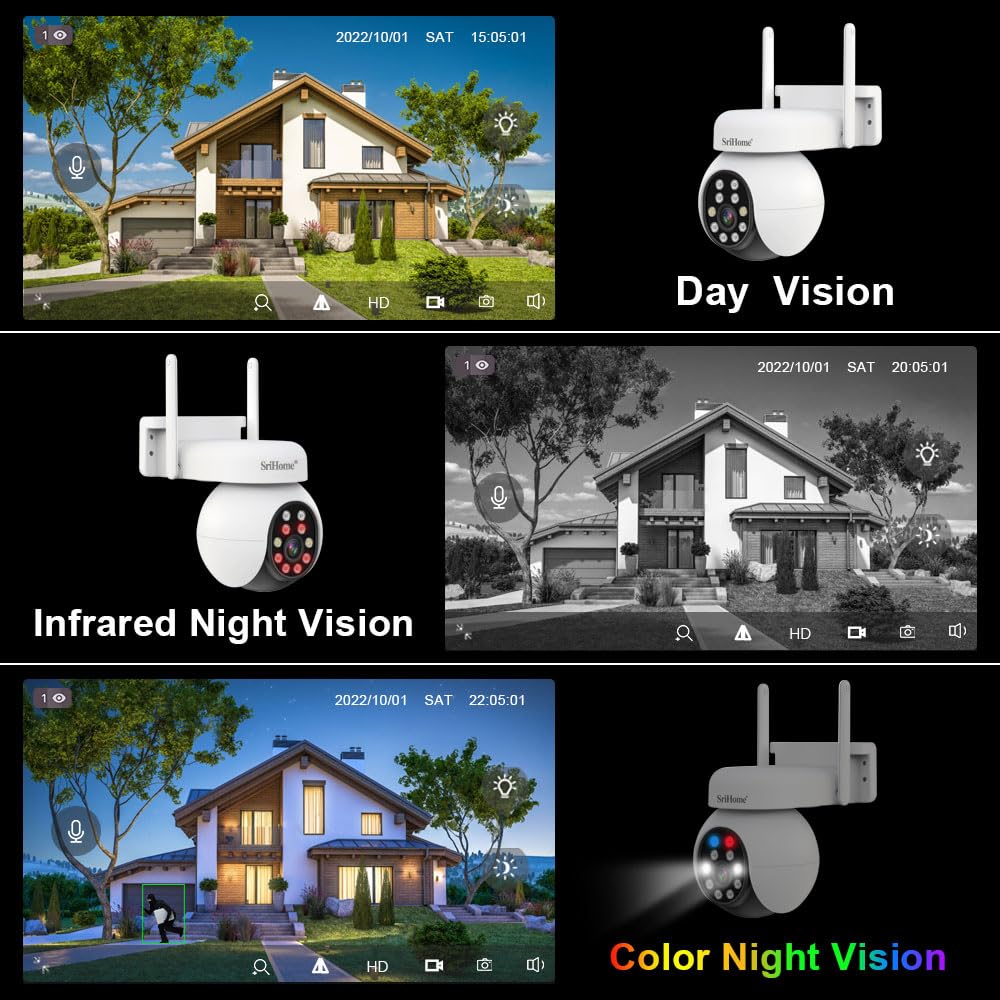
Image: The Srihome SH052 camera with visual indicators of 2.4GHz Wi-Fi signal strength, demonstrating its wireless connectivity feature.
3.4 മൈക്രോ എസ്ഡി കാർഡ് ഇൻസ്റ്റാളേഷൻ (ഓപ്ഷണൽ)
To enable local video recording, install a MicroSD card (up to 128GB, Class 10 or higher recommended).
- Locate the MicroSD card slot on the camera (refer to the camera's physical diagram if available).
- Gently insert the MicroSD card into the slot until it clicks into place.
- In the Srihome app, navigate to the camera settings and format the MicroSD card for optimal performance.
4. പ്രവർത്തന നിർദ്ദേശങ്ങൾ
4.1 തത്സമയം View and Pan & Tilt Control
Access the live video feed through the Srihome app. Use the on-screen controls to adjust the camera's viewing ആംഗിൾ.
- പാൻ: Swipe horizontally on the live view screen or use the directional controls to rotate the camera 355°.
- ടിൽറ്റ്: Swipe vertically on the live view screen or use the directional controls to tilt the camera 70°.

ചിത്രം: തത്സമയം പ്രദർശിപ്പിക്കുന്ന ഒരു സ്മാർട്ട്ഫോൺ സ്ക്രീൻ view from the Srihome SH052 camera, with overlayed arrows indicating the pan (300°) and tilt (90°) rotation capabilities controlled by touch gestures.
4.2 ടു-വേ ഓഡിയോ കമ്മ്യൂണിക്കേഷൻ
The camera's built-in microphone and speaker allow for two-way communication.
- ലൈവിൽ view interface, tap the microphone icon to speak through the camera.
- ക്യാമറയുടെ സ്ഥാനത്ത് നിന്ന് ഓഡിയോ കേൾക്കാൻ സ്പീക്കർ ഐക്കണിൽ ടാപ്പ് ചെയ്യുക.

Image: A depiction of the two-way audio function, showing a user speaking to a courier at their door and a family interacting through the camera's app interface.
4.3 നൈറ്റ് വിഷൻ മോഡുകൾ
The Srihome SH052 offers multiple night vision options:
- പകൽ ദർശനം: Standard color video during daylight hours.
- ഇൻഫ്രാറെഡ് നൈറ്റ് വിഷൻ: Automatically switches to black and white video in low light using infrared LEDs.
- കളർ നൈറ്റ് വിഷൻ: Utilizes a starlight lens and warm light LEDs to provide full-color video even in very low light conditions. This mode can be activated manually or set to 'Smart Mode' to turn on automatically upon motion detection.

Image: A visual comparison demonstrating the camera's Day Vision (full color), Infrared Night Vision (black and white), and Color Night Vision (full color in low light) capabilities.
4.4 Motion Detection and Human Detection
Configure motion detection settings in the app to receive alerts for activity.
- ചലനം കണ്ടെത്തൽ: The camera detects movement within its field of view and sends real-time alerts to your smartphone.
- മനുഷ്യ കണ്ടെത്തൽ: An advanced feature that distinguishes human shapes from other moving objects (like pets or swaying branches) to reduce false alarms.

Image: An illustration of the Human Detection feature, showing the camera successfully identifying a human figure (triggering an alarm) while ignoring a cat (no alarm).

Image: A smartphone displaying a real-time alarm notification from the Srihome SH052 camera, indicating motion detection.
5. പരിപാലനം
5.1 ക്യാമറ വൃത്തിയാക്കൽ
Regularly clean the camera lens and housing to ensure clear image quality and proper operation.
- ക്യാമറ ബോഡി തുടയ്ക്കാൻ മൃദുവായതും ഉണങ്ങിയതുമായ ഒരു തുണി ഉപയോഗിക്കുക.
- For the lens, use a lens cleaning cloth and specialized lens cleaning solution to avoid scratches.
- കഠിനമായ രാസവസ്തുക്കളോ ഉരച്ചിലുകൾ ഉപയോഗിക്കരുത്.
5.2 ഫേംവെയർ അപ്ഡേറ്റുകൾ
Periodically check the Srihome app for available firmware updates. Keeping your camera's firmware updated ensures optimal performance, security, and access to new features.
- Navigate to the camera settings within the Srihome app.
- Look for a "Firmware Update" or "Device Upgrade" option.
- Follow the on-screen instructions to download and install any available updates. Ensure the camera remains powered on during the update process.
5.3 പരിസ്ഥിതി പരിഗണനകൾ
The Srihome SH052 camera is IP65 waterproof and dustproof, making it suitable for outdoor use. However, extreme weather conditions can still impact performance.
- Ensure the camera is securely mounted to prevent damage from strong winds.
- While waterproof, avoid submerging the camera in water.
- Operating temperature range is typically -10°C to 50°C (13°F to 122°F).

Image: An illustration emphasizing the camera's IP65 waterproof and dustproof design, showing its resilience in sunny, thundery, and snowy weather conditions.
6. പ്രശ്നപരിഹാരം
If you encounter issues with your Srihome SH052 camera, refer to the following common problems and solutions:
- ക്യാമറ വൈഫൈയിലേക്ക് കണക്റ്റ് ചെയ്യുന്നില്ല:
- നിങ്ങളുടെ വൈഫൈ നെറ്റ്വർക്ക് 2.4GHz ആണെന്ന് ഉറപ്പാക്കുക. ക്യാമറ 5GHz നെറ്റ്വർക്കുകളെ പിന്തുണയ്ക്കുന്നില്ല.
- ആപ്പിൽ വൈഫൈ പാസ്വേഡ് ശരിയായി നൽകിയിട്ടുണ്ടെന്ന് ഉറപ്പാക്കുക.
- സിഗ്നൽ ശക്തി മെച്ചപ്പെടുത്താൻ ക്യാമറ വൈഫൈ റൂട്ടറിന് അടുത്തേക്ക് നീക്കുക.
- ക്യാമറയും റൂട്ടറും പുനരാരംഭിക്കുക.
- മോശം ചിത്രത്തിന്റെ ഗുണനിലവാരം:
- മൃദുവായ തുണി ഉപയോഗിച്ച് ക്യാമറ ലെൻസ് വൃത്തിയാക്കുക.
- Ensure sufficient lighting for optimal day vision.
- നിങ്ങളുടെ ഇന്റർനെറ്റ് കണക്ഷൻ വേഗത പരിശോധിക്കുക; വേഗത കുറഞ്ഞ കണക്ഷൻ സ്ട്രീമിംഗ് ഗുണനിലവാരത്തെ ബാധിച്ചേക്കാം.
- In the app, ensure the video quality setting is set to HD or 4K if available.
- MicroSD Card Not Recording or Recognized:
- Ensure the MicroSD card is correctly inserted.
- Format the MicroSD card through the camera settings in the Srihome app.
- Use a high-quality MicroSD card (Class 10 or U1/U3 recommended) from a reputable brand. Some brands like Sandisk have been reported to have compatibility issues by users.
- Check if the card capacity exceeds 128GB, which is the maximum supported.
- No Audio or Two-Way Talk Issues:
- Ensure the microphone and speaker icons are enabled in the app's live view.
- നിങ്ങളുടെ സ്മാർട്ട്ഫോണിന്റെ വോളിയം ക്രമീകരണങ്ങൾ പരിശോധിക്കുക.
- Verify that there are no obstructions blocking the camera's microphone or speaker.
- പതിവ് ബന്ധം വിച്ഛേദിക്കലുകൾ:
- Improve Wi-Fi signal strength by relocating the camera or router.
- മറ്റ് ഇലക്ട്രോണിക് ഉപകരണങ്ങളിൽ നിന്നുള്ള ഇടപെടൽ കുറയ്ക്കുക.
- നിങ്ങളുടെ റൂട്ടറിന്റെ ഫേംവെയർ കാലികമാണെന്ന് ഉറപ്പാക്കുക.
7 സ്പെസിഫിക്കേഷനുകൾ
| ഫീച്ചർ | വിവരണം |
|---|---|
| മോഡലിൻ്റെ പേര് | SH052 5MP CCTV Camera PTZ |
| റെസലൂഷൻ | 5MP, 2160p (3840 x 2160) |
| പാൻ/ടിൽറ്റ് ശ്രേണി | പാൻ 355°, ചരിവ് 70° |
| കണക്റ്റിവിറ്റി | 2.4GHz Wi-Fi (Wireless) |
| സംഭരണം | മൈക്രോഎസ്ഡി കാർഡ് (128 ജിബി വരെ) |
| ഓഡിയോ | ടു-വേ ഓഡിയോ (ബിൽറ്റ്-ഇൻ മൈക്കും സ്പീക്കറും) |
| നൈറ്റ് വിഷൻ | Infrared, Color Night Vision (Starlight lens, warm light) |
| കണ്ടെത്തൽ | Motion Detection, Human Detection, Motion Tracking |
| കാലാവസ്ഥ പ്രതിരോധം | IP65 വാട്ടർപ്രൂഫ് ആൻഡ് ഡസ്റ്റ് പ്രൂഫ് |
| ഉപയോഗ പരിസ്ഥിതി | ഇൻഡോർ, ഔട്ട്ഡോർ |
| പവർ ഉറവിടം | കോർഡഡ് ഇലക്ട്രിക് |
| അനുയോജ്യമായ ഉപകരണങ്ങൾ | സ്മാർട്ട്ഫോൺ (ആൻഡ്രോയിഡ്, iOS) |
| ഉൽപ്പന്ന അളവുകൾ | 20 x 10 x 6 സെ.മീ |
| ഇനത്തിൻ്റെ ഭാരം | 500 ഗ്രാം |
8. വാറൻ്റിയും പിന്തുണയും
8.1 വാറൻ്റി വിവരങ്ങൾ
The Srihome SH052 camera comes with a 1 വർഷത്തെ വാറൻ്റി വാങ്ങിയ തീയതി മുതൽ. സാധാരണ ഉപയോഗത്തിലുള്ള നിർമ്മാണ വൈകല്യങ്ങളും തകരാറുകളും ഈ വാറന്റി ഉൾക്കൊള്ളുന്നു. വാറന്റി ക്ലെയിമുകൾക്കായി നിങ്ങളുടെ വാങ്ങിയതിന്റെ തെളിവ് സൂക്ഷിക്കുക.
8.2 ഉപഭോക്തൃ പിന്തുണ
For technical assistance, troubleshooting, or warranty inquiries, please contact Srihome customer support:
- ഇമെയിൽ: support@megaaelectronics.com or megaaelectronics@gmail.com
- WhatsApp: 8328671337


