ആമുഖം
This manual provides comprehensive instructions for the installation, operation, and maintenance of the Fortinet FortiSwitch 100 FS-148F-POE Ethernet Switch. Designed for secure access, this switch delivers outstanding security, performance, and manageability. It is a secure, simple, and scalable solution suitable for businesses of all sizes. The FortiSwitch integrates tightly into the Fortinet Security Fabric via FortiLink, allowing direct management from the familiar FortiGate interface, providing complete visibility and control over users and devices.
ഉൽപ്പന്നം കഴിഞ്ഞുview
The FortiSwitch 100 FS-148F-POE is a high-performance Ethernet switch featuring 48 ports, designed for robust network connectivity and Power over Ethernet (PoE) capabilities. It supports Layer 2 functionality and is manageable, making it ideal for various network environments requiring secure and efficient data transmission.

ചിത്രം 1: മുൻഭാഗം view of the Fortinet FortiSwitch 100 FS-148F-POE, showing 48 Ethernet ports and status indicators.
പ്രധാന സവിശേഷതകൾ:
- 48 Ethernet Ports: Provides extensive connectivity for multiple devices.
- പവർ ഓവർ ഇഥർനെറ്റ് (PoE): Delivers power and data over a single Ethernet cable, simplifying deployment of PoE-enabled devices.
- Manageable Layer 2 Switch: Offers advanced network management capabilities and supports Layer 2 protocols for efficient data forwarding.
- FortiLink Integration: Seamlessly integrates with FortiGate for centralized management and enhanced security.
- ശക്തമായ ഡിസൈൻ: മെറ്റൽ സിasing ensures durability and reliable operation.
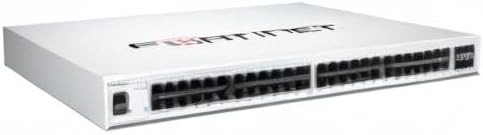
ചിത്രം 2: കോണാകൃതിയിലുള്ളത് view of the Fortinet FortiSwitch 100 FS-148F-POE, highlighting its compact design and port layout.
സജ്ജീകരണവും ഇൻസ്റ്റാളേഷനും
Follow these steps to properly set up your FortiSwitch 100 FS-148F-POE.
- സ്വിച്ച് അൺപാക്ക് ചെയ്യുക: Carefully remove the switch and all accessories from the packaging. Verify that all components listed in the packing list are present.
- മൗണ്ടിംഗ് (ഓപ്ഷണൽ): The switch can be placed on a flat surface or mounted in a standard 19-inch rack. Use appropriate rack-mount brackets if rack mounting. Ensure adequate ventilation around the device.
- പവർ ബന്ധിപ്പിക്കുക: നൽകിയിരിക്കുന്ന പവർ കോർഡ് സ്വിച്ചിന്റെ പവർ ഇൻപുട്ടിലേക്കും തുടർന്ന് ഗ്രൗണ്ടഡ് ഇലക്ട്രിക്കൽ ഔട്ട്ലെറ്റിലേക്കും ബന്ധിപ്പിക്കുക.
- നെറ്റ്വർക്ക് കേബിളുകൾ ബന്ധിപ്പിക്കുക: Connect your network devices (computers, access points, IP cameras, etc.) to the Ethernet ports on the front panel using standard RJ45 Ethernet cables. For PoE devices, ensure they are connected to PoE-enabled ports.
- പ്രാരംഭ കോൺഫിഗറേഷൻ: For initial setup and management, connect a management workstation to one of the switch's Ethernet ports. Refer to the FortiSwitch documentation for detailed instructions on accessing the management interface (CLI or web-based GUI) and configuring basic network settings, VLANs, and FortiLink integration.
Note: For detailed FortiLink integration and advanced configurations, consult the official Fortinet documentation and FortiGate administration guides.
പ്രവർത്തന നിർദ്ദേശങ്ങൾ
Once the FortiSwitch is powered on and connected, it will begin operating. The switch functions as a Layer 2 device, forwarding Ethernet frames between connected devices.
നില സൂചകങ്ങൾ:
Observe the LED indicators on the front panel for operational status:
- പവർ എൽഇഡി: Indicates power status (On: Powered, Off: No power).
- സിസ്റ്റം LED: Indicates system health (e.g., Green: Normal operation, Amber: Warning, Red: Error). Refer to the full manual for specific blink patterns.
- പോർട്ട് LED-കൾ: Each Ethernet port has LEDs indicating link status and activity (e.g., Green: Link established, Blinking Green: Activity, Amber: PoE status).
Management Access:
The FortiSwitch is primarily managed through a FortiGate firewall when integrated via FortiLink. Alternatively, it can be managed directly via its command-line interface (CLI) accessible through a console port or SSH, or via a web-based graphical user interface (GUI) if enabled and configured.
- ഫോർട്ടിലിങ്ക് മാനേജ്മെൻ്റ്: For most deployments, the FortiSwitch will be managed as a FortiLink-enabled device from the FortiGate interface, providing a single pane of glass for network and security management.
- Direct Management: For standalone operation or initial setup, access the switch's IP address via a web browser or use an SSH client to connect to the CLI. Default IP addresses and login credentials should be changed immediately after initial access for security purposes.
മെയിൻ്റനൻസ്
Regular maintenance ensures optimal performance and longevity of your FortiSwitch.
- പരിസ്ഥിതി നിയന്ത്രണം: Ensure the switch operates within its specified temperature and humidity ranges. Maintain proper airflow around the device to prevent overheating.
- വൃത്തിയാക്കൽ: Periodically clean the exterior of the switch with a soft, dry cloth. Do not use liquid or aerosol cleaners directly on the device. Ensure ventilation openings are free from dust and obstructions.
- ഫേംവെയർ അപ്ഡേറ്റുകൾ: Regularly check the Fortinet support website for the latest firmware updates. Applying updates can improve performance, add new features, and address security vulnerabilities. Follow Fortinet's recommended update procedures.
- കേബിൾ മാനേജുമെന്റ്: Ensure all network cables are securely connected and properly routed to prevent accidental disconnections or damage.
- ബാക്കപ്പ് കോൺഫിഗറേഷൻ: Periodically back up the switch's configuration to an external storage device. This allows for quick restoration in case of a system reset or failure.
ട്രബിൾഷൂട്ടിംഗ്
This section provides solutions to common issues you might encounter with your FortiSwitch.
| പ്രശ്നം | സാധ്യമായ കാരണം | പരിഹാരം |
|---|---|---|
| സ്വിച്ച് ഓണാക്കുന്നില്ല. | No power supply; faulty power cord/outlet. | Check power cord connection; try a different power outlet; ensure power source is active. |
| ബന്ധിപ്പിച്ച പോർട്ടിൽ ലിങ്ക് ലൈറ്റ് ഇല്ല. | Incorrect cable; faulty cable; device not powered on; port disabled. | Verify cable type (Ethernet); replace cable; ensure connected device is powered on; check switch port status in management interface. |
| PoE ഉപകരണത്തിന് വൈദ്യുതി ലഭിക്കുന്നില്ല. | Device not PoE-compatible; insufficient PoE budget; faulty cable; port not configured for PoE. | Confirm device PoE compatibility; check switch's PoE budget and power consumption of devices; use a known good Ethernet cable; verify PoE settings for the port in the management interface. |
| Cannot access management interface. | തെറ്റായ IP വിലാസം; നെറ്റ്വർക്ക് കണക്റ്റിവിറ്റി പ്രശ്നം; ഫയർവാൾ ആക്സസ് തടയുന്നു. | Verify switch IP address; ensure management workstation is on the same subnet; check network cables; temporarily disable firewalls for testing. |
For more advanced troubleshooting or persistent issues, refer to the comprehensive Fortinet FortiSwitch documentation or contact Fortinet technical support.
സ്പെസിഫിക്കേഷനുകൾ
| ആട്രിബ്യൂട്ട് | വിശദാംശങ്ങൾ |
|---|---|
| ബ്രാൻഡ് | ഫോർട്ടിനെറ്റ് |
| മോഡൽ | FS-148F-POE |
| തുറമുഖങ്ങളുടെ എണ്ണം | 48 |
| സ്വിച്ച് തരം | നിയന്ത്രിത ലെയർ 2 |
| ഇൻ്റർഫേസ് തരം | PoE (പവർ ഓവർ ഇഥർനെറ്റ്) |
| പോ ബജറ്റ് | 370 W |
| വൈദ്യുതി ഉപഭോഗം | 476.30 W |
| വാല്യംtage | 48 വോൾട്ട് (DC) |
| കേസ് മെറ്റീരിയൽ | ലോഹം |
| ഉൽപ്പന്ന അളവുകൾ | 12 x 17 x 2 ഇഞ്ച് |
| ഇനത്തിൻ്റെ ഭാരം | 13.22 പൗണ്ട് |
| യു.പി.സി | 842382199824 |
| ആദ്യ തീയതി ലഭ്യമാണ് | ഒക്ടോബർ 13, 2021 |
വാറൻ്റിയും പിന്തുണയും
Fortinet products typically come with a standard limited hardware warranty. For specific warranty terms and conditions applicable to your FortiSwitch 100 FS-148F-POE, please refer to the warranty information included with your product or visit the official Fortinet webസൈറ്റ്.
സാങ്കേതിക സഹായം:
For technical assistance, product registration, and access to documentation, knowledge base articles, and software downloads, please visit the Fortinet Support Portal:
It is recommended to register your product upon purchase to ensure access to full support services and warranty benefits.


