1. ആമുഖം
The Phomemo P12 PRO is a compact, portable Bluetooth thermal label maker designed for various labeling needs in home, office, and school environments. This device utilizes thermal printing technology, eliminating the need for ink or toner. It connects wirelessly to your smartphone or tablet via Bluetooth, allowing you to design and print labels using the dedicated 'Print Master' application.
The P12 PRO supports a variety of label materials, including standard plastic labels, satin ribbons, and iron-on labels, offering versatility for organizing, crafting, and personalizing items. Its built-in rechargeable battery ensures portability and convenience.

Figure 1: Phomemo P12 PRO Label Maker with a roll of label tape and a smartphone displaying the 'Print Master' app.
2. സജ്ജീകരണം
2.1. ബോക്സിൽ എന്താണുള്ളത്?
- Phomemo P12 PRO Label Maker
- ലേബൽ ടേപ്പ് റോൾ (മുൻകൂട്ടി ഇൻസ്റ്റാൾ ചെയ്തതോ പ്രത്യേകം ഉൾപ്പെടുത്തിയതോ)
- യുഎസ്ബി ടൈപ്പ്-സി ചാർജിംഗ് കേബിൾ
- ഉപയോക്തൃ മാനുവൽ (ഈ പ്രമാണം)
2.2 ഉപകരണം ചാർജ് ചെയ്യുന്നു
Before initial use, fully charge the P12 PRO. Connect the provided USB Type-C cable to the charging port on the device and to a standard USB power adapter (not included) or a computer's USB port. The charging indicator light will provide feedback on the charging status.
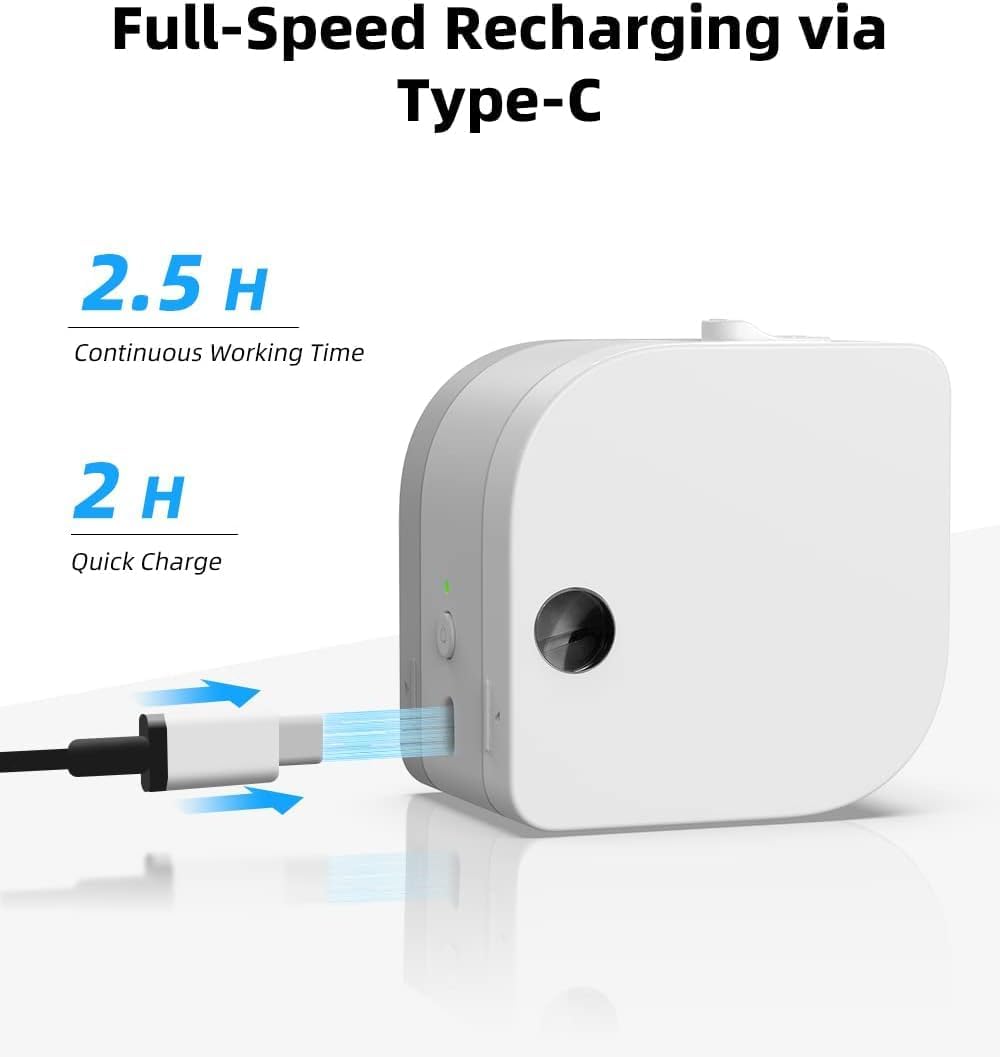
Figure 2: The P12 PRO charging via its Type-C port. A full charge takes approximately 2 hours and provides up to 2.5 hours of continuous working time.
2.3. App Installation and Bluetooth Pairing
The Phomemo P12 PRO operates via the 'Print Master' application. Follow these steps to install the app and pair your device:
- ആപ്പ് ഡൗൺലോഡ് ചെയ്യുക: ഇതിനായി തിരയുക 'Print Master' in the Apple App Store (for iOS devices) or Google Play Store (for Android devices) and install it.
- പവർ ഓൺ: Press and hold the power button on the P12 PRO until the indicator light turns on.
- ബ്ലൂടൂത്ത് പ്രവർത്തനക്ഷമമാക്കുക: നിങ്ങളുടെ സ്മാർട്ട്ഫോണിലോ ടാബ്ലെറ്റിലോ ബ്ലൂടൂത്ത് പ്രവർത്തനക്ഷമമാക്കിയിട്ടുണ്ടെന്ന് ഉറപ്പാക്കുക.
- ആപ്പ് തുറന്ന് ബന്ധിപ്പിക്കുക: Open the 'Print Master' app. The app will automatically search for available Phomemo devices. Select 'P12 PRO' from the list to establish a connection. The device indicator light will change to confirm a successful connection.

Figure 3: The 'Print Master' app interface, demonstrating Bluetooth connectivity and options for customizing labels with borders and icons.
3. പ്രവർത്തന നിർദ്ദേശങ്ങൾ
3.1. ലേബൽ ടേപ്പ് ലോഡുചെയ്യുന്നു
- കവർ തുറക്കുക: Gently push the cover release button (if present) or lift the top cover of the device.
- ടേപ്പ് തിരുകുക: Place the label tape roll into the compartment with the label end extending out through the printer's output slot. Ensure the tape is aligned correctly.
- കവർ അടയ്ക്കുക: കവർ ശരിയായ സ്ഥാനത്ത് ക്ലിക്കായി വരുന്നത് വരെ ദൃഢമായി അടയ്ക്കുക.
3.2. ലേബലുകൾ സൃഷ്ടിക്കലും അച്ചടിക്കലും
The 'Print Master' app provides extensive customization options for your labels:
- ടെക്സ്റ്റ് ഇൻപുട്ട്: Enter your desired text. The app supports multiple lines of text.
- Fonts and Styles: Choose from over 154 fonts and adjust text size, bolding, italics, and alignment.
- Borders and Icons: Select from 78 frames and thousands of icons, graphics, and symbols to enhance your labels.
- പ്രത്യേക സവിശേഷതകൾ: Create barcodes, QR codes, and utilize various templates for specific applications (e.g., date labels, price tags).

ചിത്രം 4: ഉദാamples of labels with clear text and icons, suitable for school items and organization.

Figure 5: The P12 PRO's versatility in creating labels for kitchen organization, including date and content labels.
3.3. Supported Label Types
The P12 PRO is compatible with 12mm wide label tapes and supports various materials:
- Plastic Labels: Water-resistant, abrasion-resistant, oil-resistant, and strong adhesive for general use.
- Satin Ribbon Labels: Ideal for gift wrapping, crafts, and decorative purposes.
- Iron-on Labels: For labeling clothing and fabric items.
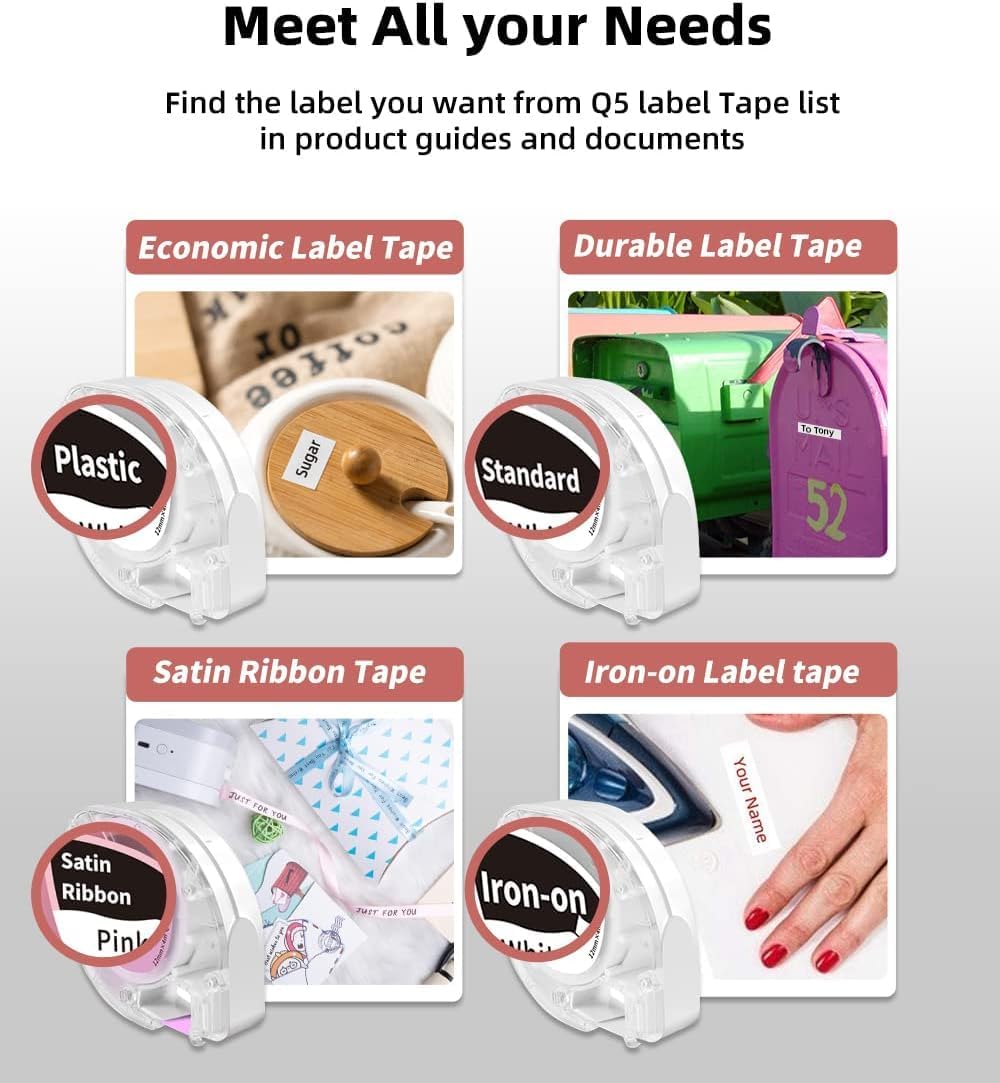
Figure 6: A selection of label tape types compatible with the Phomemo P12 PRO, including plastic, standard, satin ribbon, and iron-on options.

Figure 7: Demonstrating the application of an iron-on label for clothing, a feature supported by the P12 PRO.
3.4. കട്ടിംഗ് ലേബലുകൾ
After printing, use the built-in serrated tear-off knife to cleanly cut the label from the tape roll. This ensures a smooth and quick cut.
4. പരിപാലനം
4.1. പ്രിന്റ് ഹെഡ് വൃത്തിയാക്കൽ
ഒപ്റ്റിമൽ പ്രിന്റ് നിലവാരം നിലനിർത്താൻ, പ്രിന്റ് ഹെഡ് ഇടയ്ക്കിടെ വൃത്തിയാക്കുക. മൃദുവായ, ലിന്റ് രഹിത തുണി ഉപയോഗിച്ച് നേരിയ തോതിൽ തുടയ്ക്കുക.ampened with isopropyl alcohol. Gently wipe the print head surface. Ensure the device is powered off before cleaning.
4.2. ബാറ്ററി പരിചരണം
The P12 PRO features a built-in lithium-ion battery. To prolong battery life:
- ബാറ്ററി ഇടയ്ക്കിടെ പൂർണ്ണമായും ഡിസ്ചാർജ് ചെയ്യുന്നത് ഒഴിവാക്കുക.
- ദീർഘനേരം ഉപയോഗിക്കാത്തപ്പോൾ ഉപകരണം തണുത്തതും വരണ്ടതുമായ സ്ഥലത്ത് സൂക്ഷിക്കുക.
- If the device will not be used for a long time, charge it to about 50% every few months.
5. പ്രശ്നപരിഹാരം
5.1. ഉപകരണം ഓണാക്കുന്നില്ല
- ഉപകരണം പൂർണ്ണമായും ചാർജ് ചെയ്തിട്ടുണ്ടെന്ന് ഉറപ്പാക്കുക. ടൈപ്പ്-സി കേബിൾ ഉപയോഗിച്ച് ഒരു പവർ സ്രോതസ്സുമായി ബന്ധിപ്പിക്കുക.
- കുറച്ച് സെക്കൻഡ് നേരത്തേക്ക് പവർ ബട്ടൺ അമർത്തിപ്പിടിക്കുക.
5.2. Cannot Connect via Bluetooth
- Verify that the P12 PRO is powered on and within range of your mobile device.
- നിങ്ങളുടെ മൊബൈൽ ഉപകരണത്തിൽ ബ്ലൂടൂത്ത് പ്രവർത്തനക്ഷമമാക്കിയിട്ടുണ്ടെന്ന് ഉറപ്പാക്കുക.
- Restart the 'Print Master' app and try connecting again.
- If issues persist, try restarting both the P12 PRO and your mobile device.
5.3. മോശം പ്രിന്റ് നിലവാരം
- Check if the label tape is correctly installed and not jammed.
- മെയിന്റനൻസ് വിഭാഗത്തിൽ വിവരിച്ചിരിക്കുന്നതുപോലെ പ്രിന്റ് ഹെഡ് വൃത്തിയാക്കുക.
- Ensure you are using genuine Phomemo label tapes.
- Check the battery level; low battery can affect print quality.
5.4. Label Jamming
- ഉപകരണം ഉടൻ ഓഫാക്കുക.
- Open the cover and carefully remove any jammed label tape.
- Reinstall the label tape, ensuring it is properly aligned.
6 സ്പെസിഫിക്കേഷനുകൾ
| ഫീച്ചർ | വിശദാംശങ്ങൾ |
|---|---|
| മോഡലിൻ്റെ പേര് | Phomemo P12 Pro |
| പ്രിൻ്റിംഗ് ടെക്നോളജി | തെർമൽ |
| റെസലൂഷൻ | 203 ഡിപിഐ |
| കണക്റ്റിവിറ്റി | Bluetooth 4.0 or above, USB Type-C |
| അനുയോജ്യമായ സിസ്റ്റങ്ങൾ | ആൻഡ്രോയിഡ്, ഐഒഎസ് |
| Max Label Width | 12 മി.മീ |
| ബാറ്ററി ശേഷി | 1000mAh ലിഥിയം അയൺ (റീചാർജ് ചെയ്യാവുന്നത്) |
| ചാർജിംഗ് സമയം | ഏകദേശം 2 മണിക്കൂർ |
| തുടർച്ചയായ ജോലി സമയം | ഏകദേശം 2.5 മണിക്കൂർ |
| ഓട്ടോ ഷട്ട്-ഓഫ് | 15 മിനിറ്റ് നിഷ്ക്രിയത്വത്തിന് ശേഷം |
| അളവുകൾ | 4.8 x 4.5 x 2.67 ഇഞ്ച് |
| ഇനത്തിൻ്റെ ഭാരം | 7.8 ഔൺസ് |
7. വാറൻ്റിയും പിന്തുണയും
7.1. വാറൻ്റി വിവരങ്ങൾ
The Phomemo P12 PRO Label Maker Machine comes with a 2 വർഷത്തെ വാറൻ്റി വാങ്ങിയ തീയതി മുതൽ. സാധാരണ ഉപയോഗത്തിലുള്ള നിർമ്മാണ വൈകല്യങ്ങളും തകരാറുകളും ഈ വാറന്റി ഉൾക്കൊള്ളുന്നു. വാറന്റി ക്ലെയിമുകൾക്കായി നിങ്ങളുടെ വാങ്ങിയതിന്റെ തെളിവ് സൂക്ഷിക്കുക.
7.2. ഉപഭോക്തൃ പിന്തുണ
For technical assistance, troubleshooting not covered in this manual, or warranty inquiries, please contact Phomemo customer support through their official website or the contact information provided with your product packaging. Please have your model number (P12 Pro) and purchase details ready when contacting support.


