1. ഉൽപ്പന്നം കഴിഞ്ഞുview
The Walfront ZK-502L is a compact and versatile Bluetooth 5.0 stereo audio amplifier module designed for DIY speaker projects. It offers robust power output and various protection features, making it suitable for a wide range of audio applications, including home audio systems and car audio modifications.
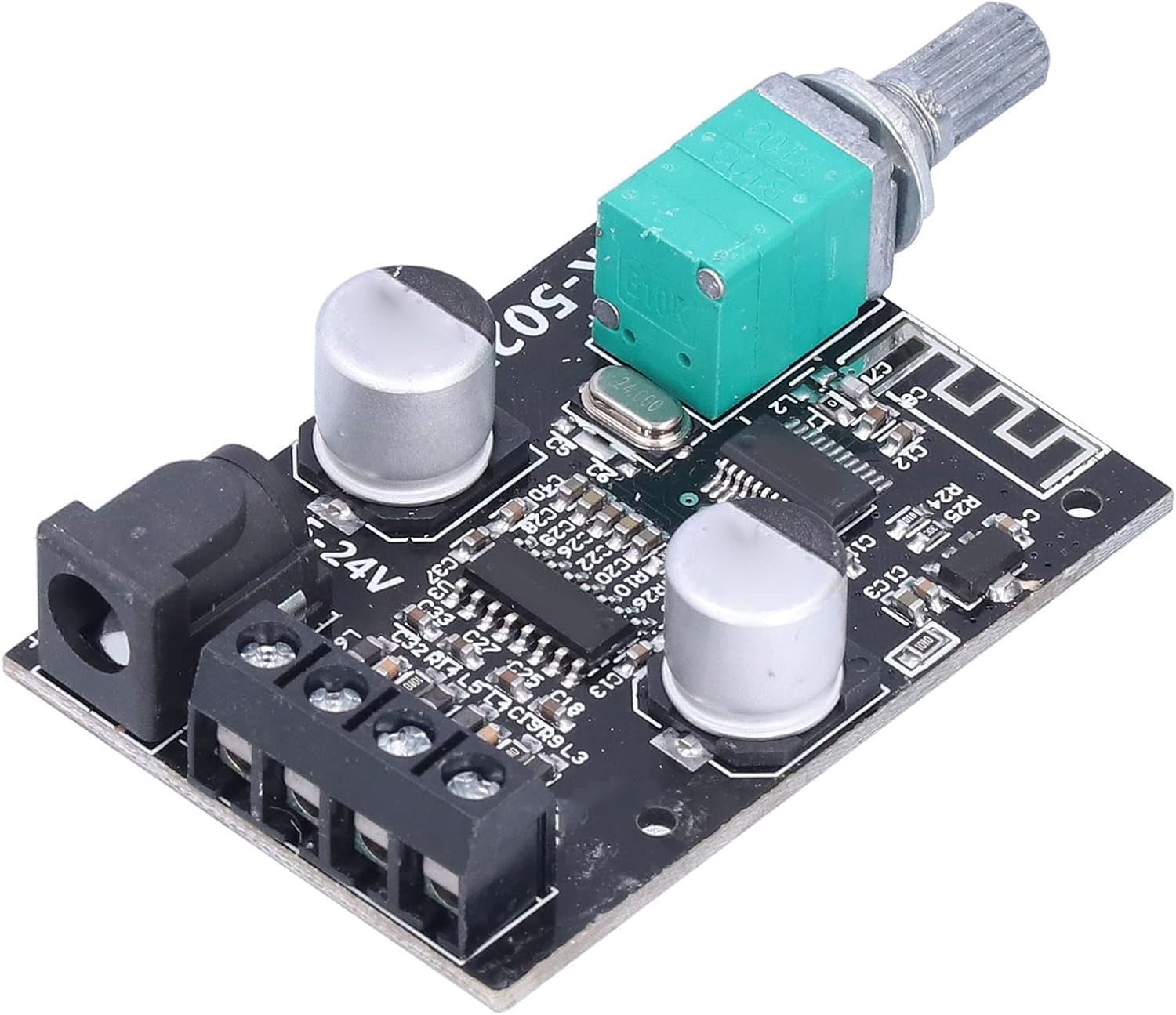
Figure 1: ZK-502L Bluetooth Power Amplifier Board. This image shows the compact design of the amplifier board with its various components, including the volume potentiometer, power input, and speaker terminals.
2 പ്രധാന സവിശേഷതകൾ
- ബ്ലൂടൂത്ത് 5.0 കണക്റ്റിവിറ്റി: Enables direct wireless audio streaming from compatible devices.
- വിശാലമായ പവർ സപ്ലൈ ശ്രേണി: Operates with DC 5-24V, compatible with various power adapters, including most laptop power ports.
- ഉയർന്ന അനുയോജ്യത: Supports a variety of speakers with impedances from 4Ω to 8Ω and power ratings from 30W to 200W.
- Built-in Filter Capacitor: Enhances sound signal processing for clearer audio output.
- Integrated Potentiometer: Knob design for convenient power ON/OFF and volume adjustment.
- ശക്തമായ സംരക്ഷണ സംവിധാനങ്ങൾ: Features reverse connection protection, overvoltagഇ സംരക്ഷണം, undervoltage protection, over-temperature protection, short circuit protection, and self-recovery overheating protection.
- Clean Audio Performance: Designed to eliminate POPs sound during power-on, song skipping, and pausing.
- Acrylic Protective Shell: Provides physical protection for the board components.
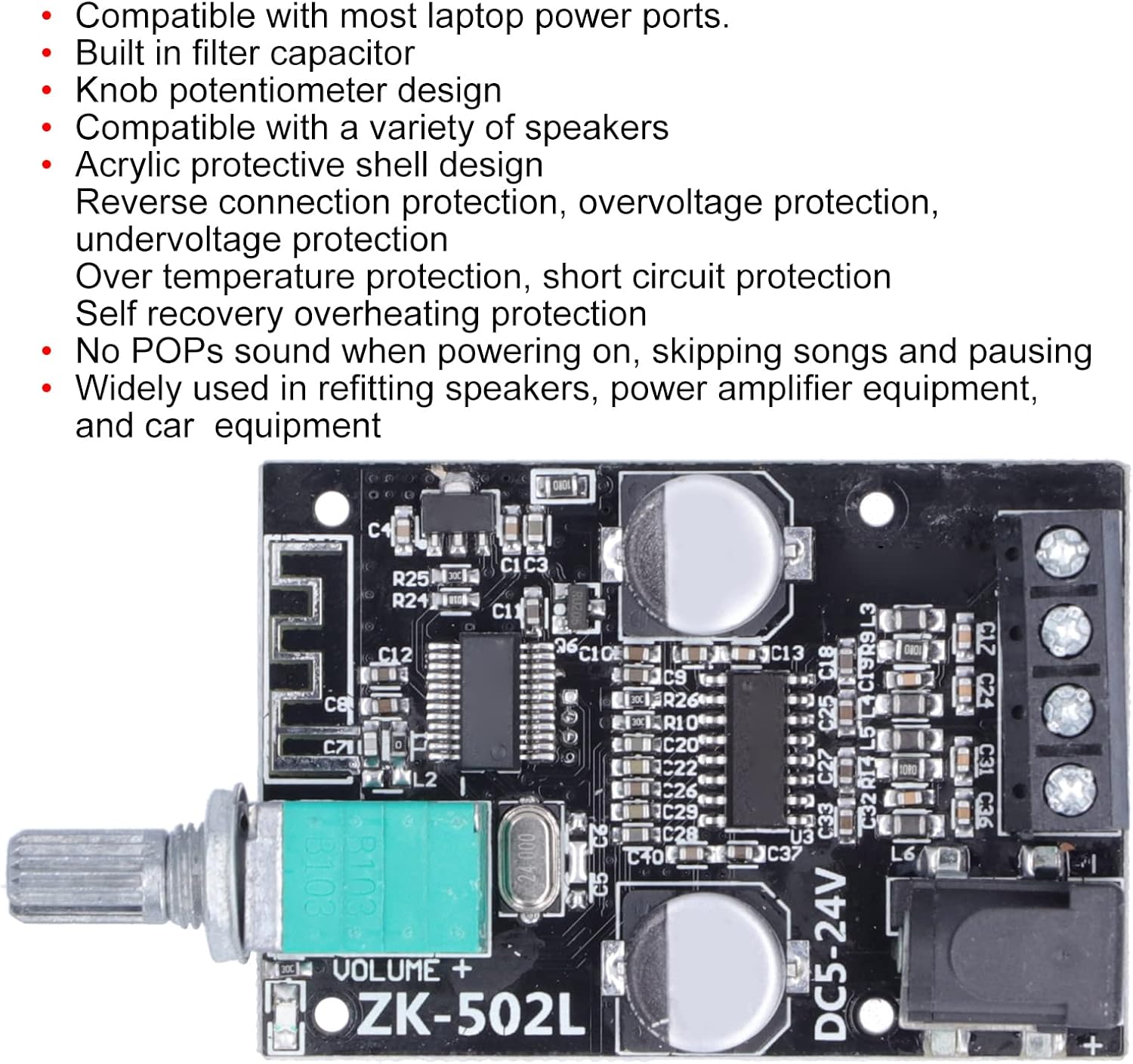
ചിത്രം 2: വിശദമായി view of the ZK-502L board highlighting key components and protection features.
3 സാങ്കേതിക സവിശേഷതകൾ
| പരാമീറ്റർ | മൂല്യം |
|---|---|
| മോഡൽ | ZK 502L |
| ബ്ലൂടൂത്ത് പതിപ്പ് | 5.0 |
| ചാനലുകൾ | 2 (സ്റ്റീരിയോ) |
| ഇൻപുട്ട് വോളിയംtage | DC 5V-24V |
| ഔട്ട്പുട്ട് പവർ | Up to 50W per channel (Total 100W) |
| Adapted Speaker Impedance | 4Ω-8Ω |
| Adapted Speaker Power | 30W-200W |
| സിഗ്നൽ-ടു-നോയിസ് റേഷ്യോ (എസ്എൻആർ) | >90 ഡിബി |
| ആശയവിനിമയ ദൂരം | Up to 15 meters (Max, unobstructed) |
| അളവുകൾ (പാക്കേജ്) | 4.61 x 2.68 x 1.85 ഇഞ്ച് |
| ഇനത്തിൻ്റെ ഭാരം | 2.82 ഔൺസ് |

Figure 3: Physical dimensions and key electrical specifications of the ZK-502L board.
4. സജ്ജീകരണ ഗൈഡ്
4.1. പാക്കേജ് ഉള്ളടക്കം
ഇൻസ്റ്റാളേഷൻ ആരംഭിക്കുന്നതിന് മുമ്പ്, എല്ലാ ഘടകങ്ങളും ഉണ്ടെന്ന് ഉറപ്പാക്കുക:
- ZK-502L ബ്ലൂടൂത്ത് പവർ Ampലൈഫ് ബോർഡ്
- Acrylic protective shell components
- മൗണ്ടിംഗ് ഹാർഡ്വെയർ (സ്ക്രൂകൾ, സ്റ്റാൻഡ്ഓഫുകൾ)
- DC power cable with 2.1mm jack
- Small screwdriver (for terminal connections)

Figure 4: Contents of the ZK-502L amplifier kit, including the board, protective casing, and accessories.
4.2. പവർ കണക്ഷൻ
Connect a DC power supply (5V-24V) to the amplifier board. You can use either the DC 2.1mm socket or the terminal block labeled "DC5-24V". Ensure correct polarity when using the terminal block (+ to +, - to -) to prevent damage. For high power output, a higher voltage (e.g., 12V or 24V) is recommended.
4.3 സ്പീക്കർ കണക്ഷൻ
Connect your speakers to the output terminals on the board. The board supports two channels (stereo). Ensure that the positive (+) and negative (-) terminals of each speaker are connected to the corresponding terminals on the amplifier board. The board is compatible with speakers having an impedance of 4Ω to 8Ω.

Figure 5: Diagram illustrating the correct connection of speakers and power supply to the ZK-502L ampലൈഫ് ബോർഡ്.
5. പ്രവർത്തന നിർദ്ദേശങ്ങൾ
5.1. പവർ ഓൺ/ഓഫ്, വോളിയം നിയന്ത്രണം
The integrated knob potentiometer controls both power and volume. Rotate the knob clockwise to turn the unit ON and increase volume. Rotate counter-clockwise to decrease volume and turn the unit OFF.
5.2. ബ്ലൂടൂത്ത് ജോടിയാക്കൽ
- ഉറപ്പാക്കുക amplifier board is powered on. The LED indicator will flash, indicating it is in Bluetooth pairing mode.
- നിങ്ങളുടെ മൊബൈൽ ഉപകരണത്തിൽ (സ്മാർട്ട്ഫോൺ, ടാബ്ലെറ്റ് മുതലായവ), ബ്ലൂടൂത്ത് പ്രവർത്തനക്ഷമമാക്കി ലഭ്യമായ ഉപകരണങ്ങൾക്കായി തിരയുക.
- Locate and select the device named "BT-WUZHI" (or similar, as indicated by a voice prompt "Beep").
- Once successfully paired, the LED indicator on the amplifier board will remain steadily lit.
5.3. ഓഡിയോ പ്ലേബാക്ക്
After successful pairing, you can play audio from your connected device. The amplifier board will output the audio through the connected speakers. Use the potentiometer knob to adjust the overall volume. A voice prompt will sound if the Bluetooth connection is disconnected.
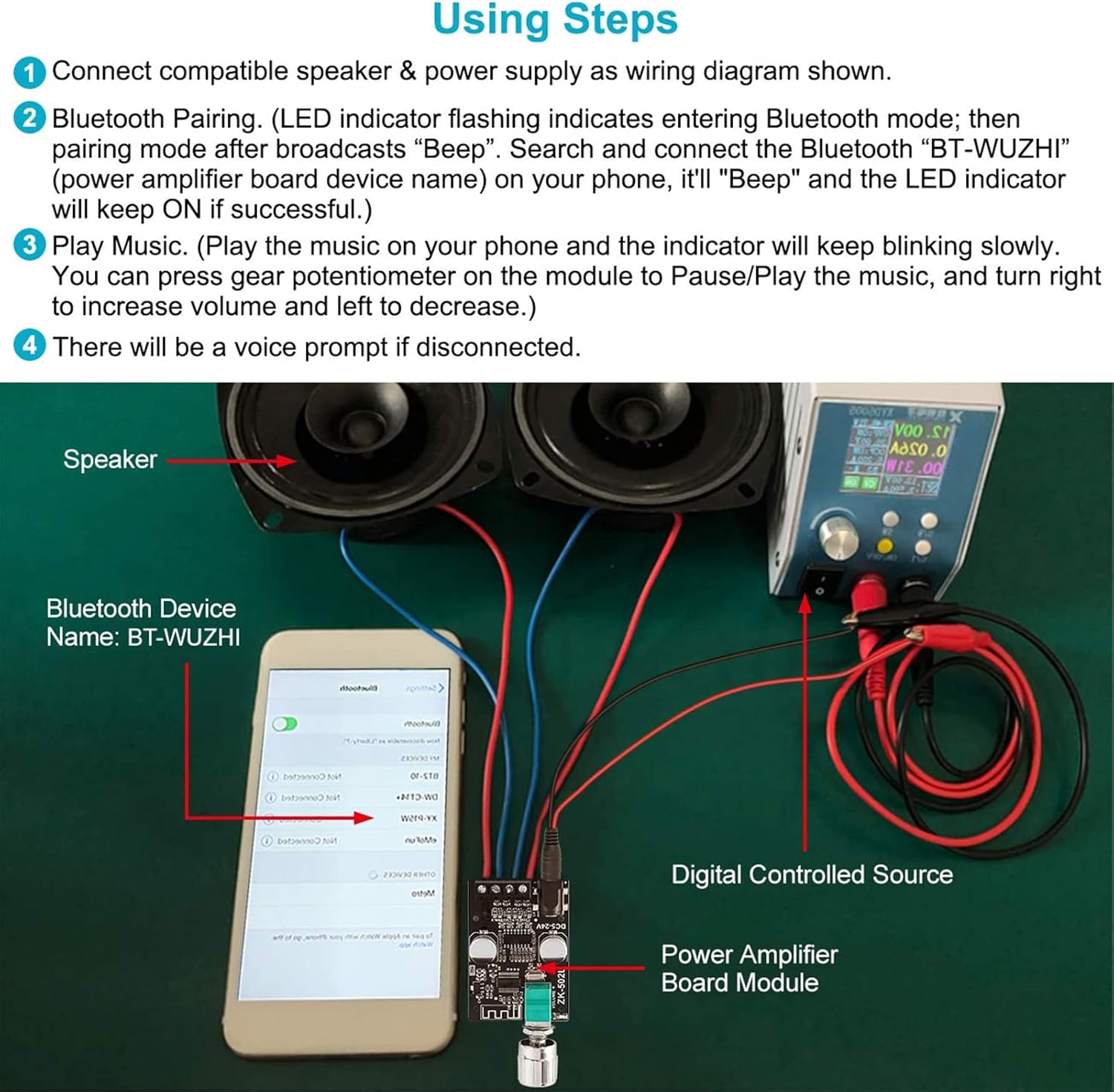
Figure 6: Visual guide demonstrating the steps for connecting and using the ZK-502L amplifier board with a mobile device and speakers.
6. പ്രശ്നപരിഹാരം
| പ്രശ്നം | സാധ്യമായ കാരണം | പരിഹാരം |
|---|---|---|
| No power/LED off | Incorrect power connection; Power supply issue; Potentiometer turned off. | വൈദ്യുതി വിതരണം വോളിയം പരിശോധിക്കുകtage (5-24V) and polarity. Ensure power adapter is functional. Rotate potentiometer clockwise to turn on. |
| ശബ്ദ ഔട്ട്പുട്ട് ഇല്ല | Speakers not connected correctly; Bluetooth not paired; Volume too low; Damaged speakers. | Check speaker wiring and polarity. Confirm Bluetooth is paired (LED solid). Increase volume on both amplifier and source device. Test with different speakers. |
| Bluetooth connection unstable/drops | ഉപകരണം വളരെ അകലെയാണ് amplifier; Interference from other devices; Low battery on source device. | Reduce distance between amplifier and source device (max 15m). Move away from strong Wi-Fi routers or other Bluetooth devices. Ensure source device has sufficient battery. |
| വികലമായ ശബ്ദം | Volume too high (clipping); Speaker impedance mismatch; Faulty audio source. | Reduce volume. Ensure speakers are 4Ω-8Ω. Test with a different audio source. |
| "POPs" sound | This model is designed to prevent POPs sound. If experienced, check power supply stability or speaker connections. | Ensure stable power supply. Re-check all connections. If issue persists, contact support. |
7. പരിപാലനം
- വൃത്തിയാക്കൽ: വൃത്തിയാക്കാൻ മൃദുവായതും ഉണങ്ങിയതുമായ തുണി ഉപയോഗിക്കുക amplifier board and protective casing. Avoid using liquid cleaners or solvents.
- സംഭരണം: ദീർഘകാലത്തേക്ക് ഉപയോഗിക്കാത്തപ്പോൾ, സൂക്ഷിക്കുക ampനേരിട്ടുള്ള സൂര്യപ്രകാശത്തിൽ നിന്നും കടുത്ത താപനിലയിൽ നിന്നും അകലെ, തണുത്തതും വരണ്ടതുമായ സ്ഥലത്ത് ലിഫയർ വയ്ക്കുക.
- കൈകാര്യം ചെയ്യൽ: Handle the board with care to avoid damaging electronic components. Avoid static discharge.
8. വാറൻ്റിയും പിന്തുണയും
Walfront products are manufactured to high quality standards. For information regarding warranty coverage and terms, please refer to the documentation provided with your purchase or contact your retailer.
For technical assistance or inquiries, please contact Walfront customer support through the official Walfront store on Amazon or their designated support channels. Provide your product model (ZK 502L) and a detailed description of your issue for efficient service.
ഓൺലൈൻ ഉറവിടങ്ങൾ:
- Walfront Store on Amazon: Visit the Walfront Store


