1. ആമുഖം
Thank you for choosing the Crivit Vibrating Fitness Device. This full-body training device combines strengthening exercises with alternating vibrations to provide a gentle yet effective workout. It features an anti-slip surface, integrated push-up handles, expanders for varied exercises, and metallic nubs for foot massage. This manual provides essential information for safe operation, setup, maintenance, and troubleshooting. Please read it thoroughly before first use and keep it for future reference.
2 പ്രധാനപ്പെട്ട സുരക്ഷാ വിവരങ്ങൾ
WARNING: To reduce the risk of serious injury, read all instructions and warnings before using this device.
- Vibration training is not suitable for pregnant women, individuals with pacemakers, or those suffering from epilepsy. Consult a physician before use if you have any pre-existing medical conditions.
- This box weighs more than 15 kg (33 lbs) and should only be lifted by two people to prevent injury.
- Ensure the device is placed on a stable, level surface during use.
- പ്രവർത്തന സമയത്ത് കുട്ടികളെയും വളർത്തുമൃഗങ്ങളെയും ഉപകരണത്തിൽ നിന്ന് അകറ്റി നിർത്തുക.
- ഉപകരണത്തിന് കേടുപാടുകൾ സംഭവിക്കുകയോ പ്രവർത്തിക്കാതിരിക്കുകയോ ചെയ്താൽ അത് ഉപയോഗിക്കരുത്.
- Always unplug the device from the power outlet when not in use or before cleaning.
- ഉപകരണം വെള്ളത്തിലോ അമിതമായ ഈർപ്പത്തിലോ തുറന്നുകാട്ടരുത്.
- വ്യായാമ സമയത്ത് ഉചിതമായ അത്ലറ്റിക് പാദരക്ഷകൾ ധരിക്കുക.
3. പാക്കേജ് ഉള്ളടക്കം
Please check the package contents upon unpacking to ensure all parts are present and undamaged.
- വൈബ്രേഷൻ പ്ലേറ്റ്
- Remote Control (wearable as a wristband)
- 2 x Training Bands (Expanders)
- പരിശീലന മാറ്റ്
- ഉപയോക്തൃ മാനുവൽ
- പവർ അഡാപ്റ്റർ

Image: All components included in the package, including the vibration plate, remote control, training bands, and training mat.
4. ഉൽപ്പന്നം കഴിഞ്ഞുview
Familiarize yourself with the different parts of your Crivit Vibrating Fitness Device.

ചിത്രം: മുകളിൽ view of the Crivit Vibration Plate, showing the control panel, anti-slip surface, and attachment points for resistance bands.
- Anti-slip Surface: Provides secure footing during workouts.
- Integrated Push-up Handles: Can be fixed in two positions for varied exercises.
- Metallic Nubs: Located on the surface for foot massage.
- നിയന്ത്രണ പാനൽ: Displays program information and allows manual adjustments.
- ഗതാഗത ചക്രങ്ങൾ: Integrated for easy movement of the device.
- Suction Feet: Provide stability during use.

ചിത്രം: താഴെ view of the Crivit Vibration Plate, highlighting the transport wheels and suction cup feet for stability.
5. സജ്ജീകരണം
- അൺപാക്ക്: പാക്കേജിംഗിൽ നിന്ന് എല്ലാ ഘടകങ്ങളും ശ്രദ്ധാപൂർവ്വം നീക്കം ചെയ്യുക.
- പ്ലേസ്മെൻ്റ്: Place the vibration plate on a firm, level, and non-slip surface. Ensure there is enough space around the device for safe exercise.
- പവർ കണക്ഷൻ: Connect the power adapter to the device and then plug it into a suitable power outlet.
- ആക്സസറികൾ ഘടിപ്പിക്കുക (ഓപ്ഷണൽ):
- റെസിസ്റ്റൻസ് ബാൻഡുകൾ: Attach the training bands to the designated attachment points on the sides of the plate.
- Push-up Handles: Insert the integrated push-up handles into the desired positions.
- റിമോട്ട് കൺട്രോൾ: Ensure the remote control has working batteries. It can be worn as a wristband for convenience during workouts.
6. പ്രവർത്തന നിർദ്ദേശങ്ങൾ
6.1 പവർ ഓൺ/ഓഫ്
- Press the power button on the control panel or remote control to turn the device on.
- Press the power button again to turn the device off.
6.2 Programs and Modes
The Crivit Vibrating Fitness Device offers 6 workout programs: 5 pre-set programs and 1 manual program.
- Pre-set Programs (P1-P5): These programs offer varying vibration intensities and durations, designed for different fitness levels and goals. Select a program using the 'Program' button on the control panel or remote.
- മാനുവൽ പ്രോഗ്രാം: In manual mode, you can adjust the vibration intensity (amplitude) and duration yourself. The vibration amplitude ranges from 0-10 mm. Use the '+' and '-' buttons to adjust intensity.
6.3 റിമോട്ട് കൺട്രോൾ ഉപയോഗിക്കുന്നു
The remote control allows for convenient operation during your workout. It can be worn as a wristband.
- പവർ ബട്ടൺ: ഉപകരണം ഓൺ/ഓഫ് ചെയ്യുന്നു.
- പ്രോഗ്രാം ബട്ടൺ: Cycles through the pre-set programs (P1-P5) and manual mode.
- '+' / '-' ബട്ടണുകൾ: Adjust vibration intensity in manual mode or navigate settings.
6.4 Workout Examples and QR Code
The device is designed for strength and endurance training. For detailed workout examples and demonstrations, you can access online videos by scanning the QR code provided in the product gallery or original manual. You will need a QR code scanner application on your phone or tablet.
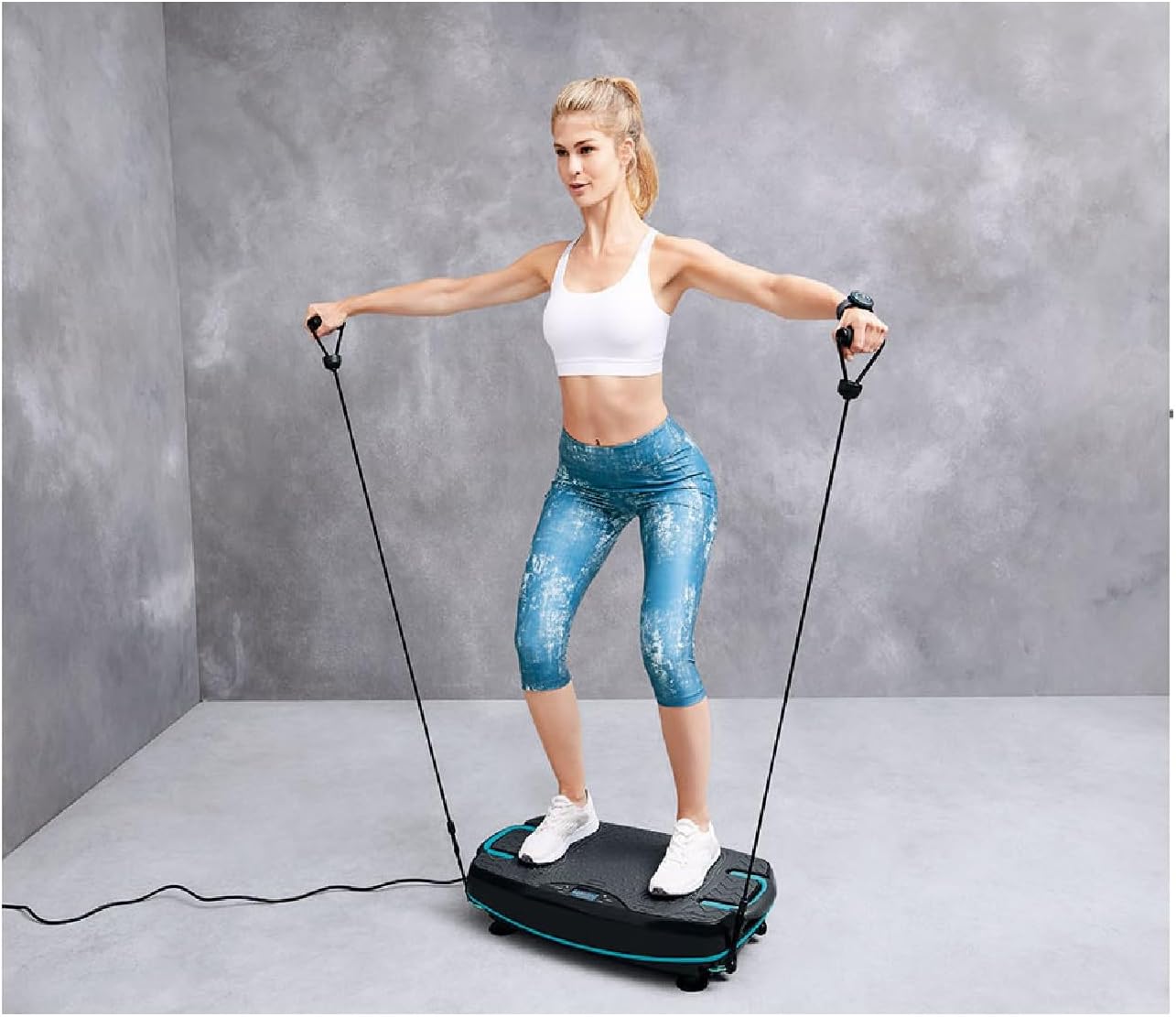
Image: A user demonstrating an exercise using the resistance bands attached to the vibration plate.

Image: A collage showing multiple exercise positions and movements that can be performed with the Crivit Vibration Plate, including push-ups, core work, and resistance band exercises.
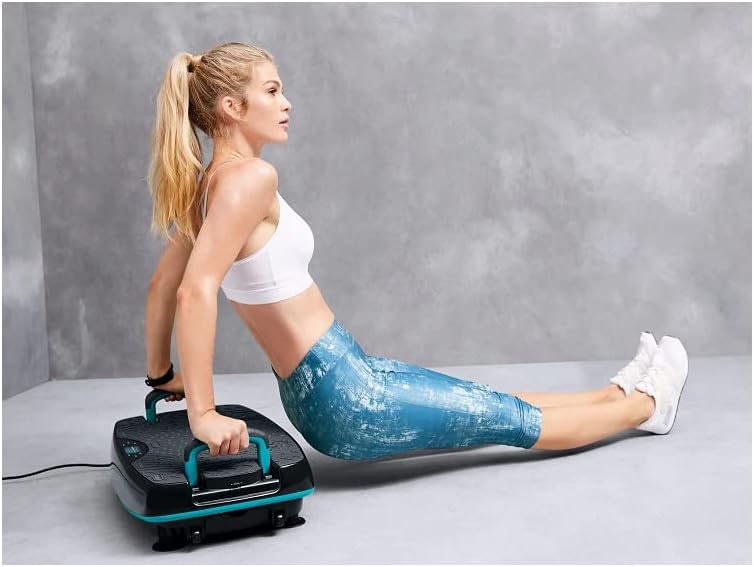
Image: A user demonstrating triceps dips, utilizing the integrated push-up handles of the vibration plate for upper body strength training.

Image: A user performing a core strengthening exercise while seated on the Crivit Vibration Plate, engaging abdominal muscles.
7. പരിപാലനവും പരിചരണവും
- വൃത്തിയാക്കൽ: Always unplug the device before cleaning. Wipe the surface with a soft, damp തുണി. ഉരച്ചിലുകളുള്ള ക്ലീനറുകളോ ലായകങ്ങളോ ഉപയോഗിക്കരുത്.
- സംഭരണം: Store the device in a cool, dry place, away from direct sunlight and extreme temperatures. Use the integrated transport wheels to move the device easily.
- പരിശോധന: Regularly check the power cord and all components for any signs of wear or damage. If any damage is found, discontinue use and contact customer support.
8. പ്രശ്നപരിഹാരം
If you encounter issues with your device, please refer to the following common problems and solutions.
| പ്രശ്നം | സാധ്യമായ കാരണം | പരിഹാരം |
|---|---|---|
| ഉപകരണം പവർ ഓണാക്കുന്നില്ല. | Not plugged in; power outlet issue; remote control battery low. | Ensure power cord is securely plugged in. Test the outlet with another device. Replace remote control batteries. |
| വൈബ്രേഷൻ ദുർബലമാണ് അല്ലെങ്കിൽ പൊരുത്തമില്ലാത്തതാണ്. | Incorrect program selected; device overloaded. | Select a higher intensity program or adjust manually. Ensure user weight does not exceed maximum capacity (130 kg). |
| പ്രവർത്തന സമയത്ത് അസാധാരണമായ ശബ്ദം. | Device not on a level surface; internal component issue. | ഉപകരണം പരന്നതും സ്ഥിരതയുള്ളതുമായ ഒരു പ്രതലത്തിലാണെന്ന് ഉറപ്പാക്കുക. ശബ്ദം തുടരുകയാണെങ്കിൽ, ഉപയോഗം നിർത്തി ഉപഭോക്തൃ പിന്തുണയുമായി ബന്ധപ്പെടുക. |
9 സ്പെസിഫിക്കേഷനുകൾ
| ഫീച്ചർ | വിശദാംശങ്ങൾ |
|---|---|
| ബ്രാൻഡ് | ക്രിവിറ്റ് |
| മോഡൽ | B09JZC259W |
| പരമാവധി ഭാരം ശുപാർശ | 130 കിലോഗ്രാം (ഏകദേശം 286 പൗണ്ട്) |
| നിയന്ത്രണ തരം | റിമോട്ട് കൺട്രോൾ |
| ഡിസ്പ്ലേ തരം | എൽഇഡി |
| ഹാൻഡിൽ തരം | Integrated (Push-up handles) |
| മോട്ടോർ പവർ | 0.27 horsepower (200 W) |
| പ്രോഗ്രാമുകളുടെ എണ്ണം | 5 (pre-set) + 1 (manual) |
| പ്രതിരോധ നിലകളുടെ എണ്ണം | 2 (for push-up handle positions) |
| ഓപ്പറേറ്റിംഗ് മോഡ് | ഓട്ടോമാറ്റിക് |
| പവർ ഉറവിടം | ഇലക്ട്രിക് കേബിൾ |
| നിറം | കറുപ്പ് അല്ലെങ്കിൽ ചാരനിറം |
| മെറ്റീരിയൽ | Alloy Steel or Aluminum |
| ഉൽപ്പന്ന അളവുകൾ (L x W x H) | 72.5 x 37.5 x 15 സെ.മീ (ഏകദേശം 28.5 x 14.8 x 5.9 ഇഞ്ച്) |
| ഇനത്തിൻ്റെ ഭാരം | 15 കിലോഗ്രാം (ഏകദേശം 33 പൗണ്ട്) |
| ഫ്രീക്വൻസി റേഞ്ച് | 5-16 Hz |
| വൈബ്രേഷൻ Ampഅക്ഷാംശം | 0-10 മി.മീ |
10. വാറൻ്റിയും പിന്തുണയും
For information regarding warranty coverage, technical support, or replacement parts, please refer to the warranty card included with your product or contact the manufacturer directly. Keep your purchase receipt as proof of purchase.
Manufacturer: Crivit


