ആമുഖം
Thank you for choosing the SOAIY MC7 Karaoke Microphone. This manual provides essential information for the safe and effective use of your device. Please read it thoroughly before operation and retain it for future reference.
പാക്കേജ് ഉള്ളടക്കം
പായ്ക്ക് ചെയ്യുമ്പോള്, എല്ലാ ഇനങ്ങളും ഉണ്ടെന്നും നല്ല നിലയിലാണെന്നും ഉറപ്പാക്കുക:
- SOAIY MC7 Karaoke Microphone (Blue)
- ചാർജിംഗ് കേബിൾ
- ഉപയോക്തൃ മാനുവൽ (ഈ പ്രമാണം)
ഉൽപ്പന്നം കഴിഞ്ഞുview
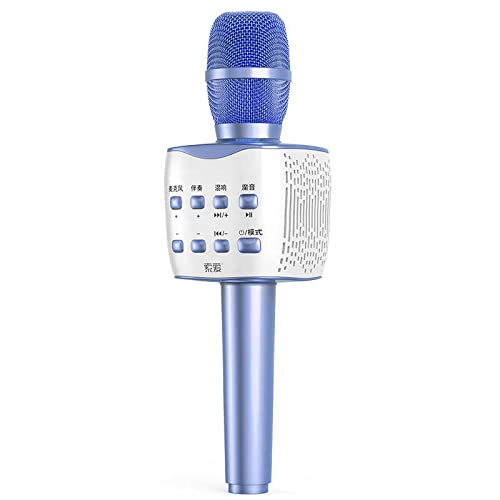
ചിത്രം 1: SOAIY MC7 Karaoke Microphone. This image displays the microphone's overall design, including the blue mesh microphone head, the white control panel with various buttons, and the blue handle.
The SOAIY MC7 is a portable karaoke microphone designed for entertainment. It features an integrated speaker and controls for audio playback, microphone volume, and vocal effects.
നിയന്ത്രണ പാനൽ ലേഔട്ട്
ചിത്രം 2: Control Panel. This image provides a detailed view of the microphone's control buttons, including those for volume, track navigation, and mode selection.
The control panel typically includes the following functions:
- പവർ / മോഡ് ബട്ടൺ: To turn the device on/off and switch between operating modes (e.g., Bluetooth, AUX).
- മൈക്രോഫോൺ വോളിയം നിയന്ത്രണം: Buttons to increase or decrease the microphone's vocal volume.
- എക്കോ/റിവേർബ് അഡ്ജസ്റ്റ്മെന്റ്: Buttons to add or reduce the echo effect for vocals.
- സംഗീത പ്ലേബാക്ക് നിയന്ത്രണങ്ങൾ: Buttons for previous track, next track, and play/pause (when connected to a music source).
- Other Sound Effects/Modes: Additional buttons for various vocal effects or accompaniment adjustments.
സജ്ജമാക്കുക
മൈക്രോഫോൺ ചാർജ് ചെയ്യുന്നു
- Locate the charging port on the microphone (usually at the bottom or side).
- Connect the provided charging cable to the microphone and a suitable USB power adapter (not included) or a computer USB port.
- The charging indicator light will illuminate (color may vary, e.g., red) during charging and turn off or change color when fully charged.
- ആദ്യ ഉപയോഗത്തിന് മുമ്പ് പൂർണ്ണമായി ചാർജ് ചെയ്യാൻ ഏകദേശം 2-3 മണിക്കൂർ അനുവദിക്കുക.
പവർ ചെയ്യുന്നത് ഓൺ/ഓഫ്
- പവർ ഓണാക്കാൻ: Press and hold the Power/Mode button for a few seconds until the indicator light turns on and you hear a prompt.
- പവർ ഓഫ് ചെയ്യാൻ: Press and hold the Power/Mode button again for a few seconds until the indicator light turns off and you hear a prompt.
പ്രവർത്തന നിർദ്ദേശങ്ങൾ
ബ്ലൂടൂത്ത് കണക്ഷൻ
- Ensure the microphone is powered on and in Bluetooth pairing mode (it may automatically enter this mode upon power-on, indicated by a flashing light or voice prompt).
- നിങ്ങളുടെ സ്മാർട്ട്ഫോണിലോ, ടാബ്ലെറ്റിലോ, അല്ലെങ്കിൽ മറ്റ് ബ്ലൂടൂത്ത് പ്രവർത്തനക്ഷമമാക്കിയ ഉപകരണത്തിലോ, ബ്ലൂടൂത്ത് ക്രമീകരണങ്ങളിലേക്ക് പോകുക.
- ഇതിനായി തിരയുക available devices and select "SOAIY MC7" (or similar name) from the list.
- Once connected, you will hear a confirmation sound or voice prompt.
- You can now play music from your device through the microphone's speaker and sing along.
Using the Microphone for Karaoke
- സംഗീത പ്ലേബാക്ക്: Use the Play/Pause, Previous Track, and Next Track buttons on the microphone to control your music.
- മൈക്രോഫോൺ വോളിയം: Adjust the microphone's vocal volume using the dedicated volume buttons.
- എക്കോ ഇഫക്റ്റ്: Use the Echo/Reverb buttons to add or reduce the echo effect to your voice for a more immersive karaoke experience.
- മോഡ് സ്വിച്ചിംഗ്: Press the Power/Mode button briefly to cycle through available modes (e.g., Bluetooth, AUX, TF Card if supported).
AUX Connection (if applicable)
If your microphone supports an AUX input, you can connect it to an audio source using a 3.5mm audio cable (not included). Switch the microphone to AUX mode and play audio from your connected device.
മെയിൻ്റനൻസ്
- വൃത്തിയാക്കൽ: മൃദുവായതും ഉണങ്ങിയതുമായ തുണി ഉപയോഗിച്ച് മൈക്രോഫോൺ തുടയ്ക്കുക. അബ്രാസീവ് ക്ലീനറുകളോ ലായകങ്ങളോ ഉപയോഗിക്കരുത്.
- സംഭരണം: നേരിട്ടുള്ള സൂര്യപ്രകാശവും കടുത്ത താപനിലയും ഏൽക്കാത്ത തണുത്തതും വരണ്ടതുമായ സ്ഥലത്ത് മൈക്രോഫോൺ സൂക്ഷിക്കുക.
- ബാറ്ററി കെയർ: ബാറ്ററി ലൈഫ് വർദ്ധിപ്പിക്കാൻ, ബാറ്ററി ഇടയ്ക്കിടെ പൂർണ്ണമായും ഡിസ്ചാർജ് ചെയ്യുന്നത് ഒഴിവാക്കുക. ദീർഘനേരം ഉപയോഗിച്ചിട്ടില്ലെങ്കിൽ പോലും പതിവായി ചാർജ് ചെയ്യുക.
- വാട്ടർ എക്സ്പോഷർ: ഈ ഉപകരണം വാട്ടർപ്രൂഫ് അല്ല. വെള്ളത്തിലോ അമിതമായ ഈർപ്പത്തിലോ സമ്പർക്കം ഒഴിവാക്കുക.
ട്രബിൾഷൂട്ടിംഗ്
| പ്രശ്നം | സാധ്യമായ കാരണം | പരിഹാരം |
|---|---|---|
| മൈക്രോഫോൺ ഓണാക്കുന്നില്ല. | കുറഞ്ഞ ബാറ്ററി. | മൈക്രോഫോൺ പൂർണ്ണമായും ചാർജ് ചെയ്യുക. |
| ബ്ലൂടൂത്ത് വഴി ബന്ധിപ്പിക്കാൻ കഴിയില്ല. | Microphone not in pairing mode; device Bluetooth off; too far from device. | Ensure microphone is in pairing mode. Turn on Bluetooth on your device. Move microphone closer to your device (within 10 meters). Forget previous connections on your device and try pairing again. |
| മൈക്രോഫോണിൽ നിന്ന് ശബ്ദമില്ല. | Microphone volume too low; mute function active; incorrect mode. | Increase microphone volume. Check if microphone is muted. Ensure the correct operating mode is selected. |
| Music playback issues. | Low battery; poor Bluetooth connection; music source issue. | Charge the microphone. Re-establish Bluetooth connection. Check music playback on your source device. |
സ്പെസിഫിക്കേഷനുകൾ
- ബ്രാൻഡ്: SOAIY
- മോഡൽ: MC7
- നിറം: നീല
- കണക്റ്റിവിറ്റി: Bluetooth (may also support AUX, TF card)
- ഊർജ്ജ സ്രോതസ്സ്: റീചാർജ് ചെയ്യാവുന്ന ബാറ്ററി
- ഉൾപ്പെടുത്തിയ ഘടകങ്ങൾ: Microphone, Charging Cable
സുരക്ഷാ വിവരങ്ങൾ
- ഉപകരണം ഡിസ്അസംബ്ലിംഗ് ചെയ്യുകയോ പരിഷ്കരിക്കുകയോ ചെയ്യരുത്.
- തീവ്രമായ താപനില, നേരിട്ടുള്ള സൂര്യപ്രകാശം, തുറന്ന തീജ്വാലകൾ എന്നിവയിൽ നിന്ന് അകന്നുനിൽക്കുക.
- ശക്തമായ ആഘാതങ്ങൾക്ക് ഉപകരണം ഇടുകയോ ഇടുകയോ ചെയ്യുന്നത് ഒഴിവാക്കുക.
- വെള്ളത്തിലോ മറ്റ് ദ്രാവകങ്ങളിലോ തുറന്നുകാട്ടരുത്.
- പ്രാദേശിക നിയന്ത്രണങ്ങൾ അനുസരിച്ച് ഉപകരണവും അതിന്റെ ബാറ്ററിയും ഉത്തരവാദിത്തത്തോടെ നിർമാർജനം ചെയ്യുക.


