1. പ്രധാന സുരക്ഷാ നിർദ്ദേശങ്ങൾ
ഉപകരണം ഉപയോഗിക്കുന്നതിന് മുമ്പ് ദയവായി ഈ നിർദ്ദേശങ്ങൾ ശ്രദ്ധാപൂർവ്വം വായിക്കുക, ഭാവിയിലെ റഫറൻസിനായി സൂക്ഷിക്കുക. ഈ നിർദ്ദേശങ്ങൾ പാലിക്കുന്നതിൽ പരാജയപ്പെടുന്നത് വൈദ്യുതാഘാതം, തീപിടുത്തം അല്ലെങ്കിൽ ഗുരുതരമായ പരിക്കിന് കാരണമായേക്കാം.
- വോളിയം ഉറപ്പാക്കുകtagറേറ്റിംഗ് ലേബലിൽ സൂചിപ്പിച്ചിരിക്കുന്ന e നിങ്ങളുടെ മെയിൻ വോള്യവുമായി പൊരുത്തപ്പെടുന്നുtage.
- അമിതമായി ചൂടാകാതിരിക്കാൻ ഹീറ്റർ മൂടരുത്.
- ഒരു ബാത്ത്, ഷവർ, നീന്തൽക്കുളം എന്നിവയുടെ തൊട്ടടുത്ത് ഈ ഹീറ്റർ ഉപയോഗിക്കരുത്.
- Keep flammable materials such as furniture, curtains, and other combustible items at least 1 meter (3 feet) from the front and sides of the heater.
- ഉപയോഗിക്കാത്തപ്പോൾ എപ്പോഴും ഹീറ്റർ അൺപ്ലഗ് ചെയ്യുക.
- കേടായ ഒരു ചരടോ പ്ലഗോ ഉപയോഗിച്ച് ഹീറ്റർ പ്രവർത്തിപ്പിക്കരുത്, അല്ലെങ്കിൽ ഹീറ്റർ തകരാറിലായതിനുശേഷം അല്ലെങ്കിൽ ഏതെങ്കിലും വിധത്തിൽ താഴെ വീണുപോയതിനുശേഷം അല്ലെങ്കിൽ കേടുപാടുകൾ സംഭവിച്ചതിനുശേഷം.
- ഈ ഉപകരണം, അവരുടെ സുരക്ഷയ്ക്ക് ഉത്തരവാദിയായ ഒരു വ്യക്തി ഉപകരണത്തിൻ്റെ ഉപയോഗത്തെ സംബന്ധിച്ച മേൽനോട്ടമോ നിർദ്ദേശമോ നൽകിയിട്ടില്ലെങ്കിൽ, ശാരീരികമോ ഇന്ദ്രിയപരമോ മാനസികമോ ആയ കഴിവുകൾ കുറഞ്ഞതോ അനുഭവത്തിൻ്റെയും അറിവിൻ്റെയും അഭാവം ഉള്ള വ്യക്തികൾക്ക് (കുട്ടികൾ ഉൾപ്പെടെ) ഉപയോഗിക്കാൻ ഉദ്ദേശിച്ചുള്ളതല്ല.
- കുട്ടികൾ ഉപകരണം ഉപയോഗിച്ച് കളിക്കുന്നില്ലെന്ന് ഉറപ്പാക്കാൻ മേൽനോട്ടം വഹിക്കണം.
2. ഉൽപ്പന്നം കഴിഞ്ഞുview
The Tristar KA-5819 is a smart electric convector heater designed for efficient room heating. It offers multiple control options and safety features.
പ്രധാന സവിശേഷതകൾ:
- പവർ ഔട്ട്പുട്ട്: Up to 2000W with 3 adjustable heat settings (750W, 1250W, 2000W).
- നിയന്ത്രണ ഓപ്ഷനുകൾ: Manual via integrated digital LCD screen, remote control, or smartphone app (Tuya Smart).
- ടൈമർ പ്രവർത്തനം: Programmable timer from 1 to 24 hours.
- Anti-freeze Mode: Automatically activates 2000W heating when ambient temperature is too low.
- സുരക്ഷ: Overheating protection and stable integrated feet.
- കണക്റ്റിവിറ്റി: Compatible with 2.4 GHz WiFi networks for smart control.
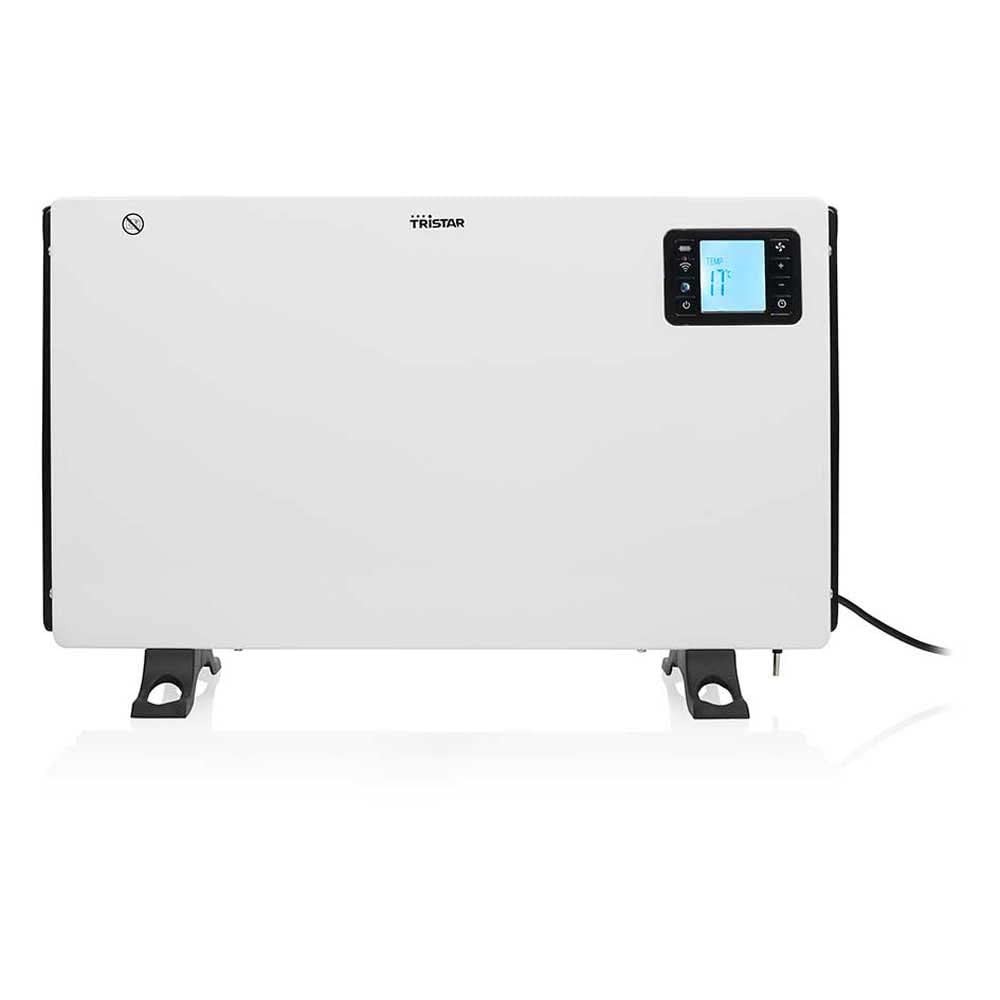
ചിത്രം 1: വശം view of the Tristar KA-5819 convector heater. This image highlights the main power switch, air vents, and the sturdy integrated feet that provide stability. The power cord is visible at the bottom right.
3. സജ്ജീകരണം
3.1 അൺപാക്കിംഗ്
Carefully remove the heater from its packaging. Retain the packaging for future storage or disposal. Check for any damage during transit. The package should include the convector heater, a remote control (with CR2032 battery), and this user manual.
3.2 പ്ലേസ്മെൻ്റ്
- Place the heater on a firm, level surface. The integrated feet ensure stability.
- Ensure there is at least 1 meter (3 feet) of clear space around the heater from walls, furniture, and other objects to allow for proper air circulation and prevent fire hazards.
- Do not place the heater directly below a power socket.
- Avoid placing the heater in areas where it could be easily knocked over or where children or pets might come into contact with it.
3.3 പവർ കണക്ഷൻ
Plug the power cord into a suitable 240V electrical outlet. Ensure the outlet is properly grounded and can handle the heater's 2000W power consumption.
4. പ്രവർത്തന നിർദ്ദേശങ്ങൾ
4.1 പ്രാരംഭ പവർ ഓൺ
Flip the main power switch located on the side of the unit to the 'ON' position. The digital LCD screen will illuminate.
4.2 Manual Control (Digital LCD Screen)
Use the control buttons on the heater's digital LCD screen to adjust settings. The screen displays the current ambient temperature and selected settings.
- പവർ ക്രമീകരണങ്ങൾ: Select between 750W, 1250W, or 2000W for desired heat output.
- തെർമോസ്റ്റാറ്റ്: Set the desired room temperature. The heater will automatically regulate its operation to maintain this temperature.
- ടൈമർ: Activate the timer function to set the heater to operate for a specific duration (1 to 24 hours).
4.3 റിമോട്ട് കൺട്രോൾ ഓപ്പറേഷൻ
The included remote control allows convenient adjustment of settings from a distance. Ensure the CR2032 battery is correctly installed. Point the remote control towards the heater's display panel.
- പവർ ബട്ടൺ: Turn the heater ON/OFF.
- Mode/Heat Setting Button: Cycle through 750W, 1250W, and 2000W power levels.
- താപനില കൂട്ടുകയോ കുറയ്ക്കുകയോ ചെയ്യുന്നതിനുള്ള ബട്ടണുകൾ: Adjust the desired thermostat temperature.
- ടൈമർ ബട്ടൺ: Set or adjust the operating timer.
4.4 Smart Control (Tuya Smart App)
For advanced control and remote operation, download the free Tuya Smart app from the Apple App Store or Google Play Store.
- അപ്ലിക്കേഷൻ ഡൗൺലോഡുചെയ്യുക: ഇതിനായി തിരയുക നിങ്ങളുടെ ഉപകരണത്തിന്റെ ആപ്പ് സ്റ്റോറിൽ "Tuya Smart" ഡൗൺലോഡ് ചെയ്ത് ഇൻസ്റ്റാൾ ചെയ്യുക.
- രജിസ്റ്റർ ചെയ്യുക/ലോഗിൻ ചെയ്യുക: Create an account or log in to your existing Tuya Smart account.
- ഉപകരണം ചേർക്കുക: Follow the in-app instructions to add the Tristar KA-5819 heater. Ensure your smartphone is connected to a 2.4 GHz WiFi network during the pairing process.
- നിയന്ത്രണം: Once paired, you can control all heater functions (power, heat settings, thermostat, timer, anti-freeze mode) from your smartphone, even when away from home.
4.5 ആന്റി-ഫ്രീസ് മോഡ്
The anti-freeze function automatically activates the 2000W heating mode if the ambient temperature drops below a certain threshold (typically around 5°C / 41°F) to prevent freezing. This mode can usually be enabled or disabled via the digital display or the Tuya Smart app.
5. പരിപാലനം
5.1 വൃത്തിയാക്കൽ
- വൃത്തിയാക്കുന്നതിന് മുമ്പ് എല്ലായ്പ്പോഴും ഹീറ്റർ അൺപ്ലഗ് ചെയ്ത് പൂർണ്ണമായും തണുക്കാൻ അനുവദിക്കുക.
- ഒരു മൃദുവായ, ഡി ഉപയോഗിച്ച് ബാഹ്യ പ്രതലങ്ങൾ തുടയ്ക്കുകamp തുണി. ഉരച്ചിലുകളുള്ള ക്ലീനറുകളോ ലായകങ്ങളോ ഉപയോഗിക്കരുത്.
- ഹീറ്റർ വെള്ളത്തിൽ മുക്കരുത് അല്ലെങ്കിൽ ഹീറ്ററിന്റെ ഉള്ളിലേക്ക് വെള്ളം ഒഴുകാൻ അനുവദിക്കരുത്.
- Periodically clean the air intake and outlet grilles with a vacuum cleaner to remove dust and lint.
5.2 സംഭരണം
When not in use for extended periods, store the heater in a cool, dry place. It is recommended to store it in its original packaging to protect it from dust and damage.
6. പ്രശ്നപരിഹാരം
| പ്രശ്നം | സാധ്യമായ കാരണം | പരിഹാരം |
|---|---|---|
| ഹീറ്റർ ഓണാക്കുന്നില്ല. | No power supply; Main power switch OFF; Overheating protection activated. | Check power cord connection and wall outlet; Ensure main power switch is ON; Unplug, let cool for 30 minutes, then plug back in. |
| ഹീറ്റർ ചൂട് ഉൽപാദിപ്പിക്കുന്നില്ല അല്ലെങ്കിൽ ആവശ്യത്തിന് ചൂട് ഉൽപാദിപ്പിക്കുന്നില്ല. | Low power setting selected; Thermostat set too low; Room size exceeds heater capacity. | Increase power setting (750W, 1250W, 2000W); Adjust thermostat to a higher temperature; Ensure room size is within 20 m² recommended. |
| റിമോട്ട് കൺട്രോൾ പ്രവർത്തിക്കുന്നില്ല. | Battery depleted; Obstruction between remote and heater; Remote not pointed correctly. | Replace CR2032 battery; Remove any obstructions; Point remote directly at the heater's display panel. |
| App control not working / Cannot connect to WiFi. | Incorrect WiFi password; Not connected to 2.4 GHz WiFi; Heater not in pairing mode; Router issues. | Verify WiFi password; Ensure your phone is on a 2.4 GHz network during setup; Follow app instructions to put heater in pairing mode; Restart router and heater. |
| അസാധാരണമായ ശബ്ദം അല്ലെങ്കിൽ മണം. | Dust accumulation; Internal malfunction. | Unplug and clean the heater (see Maintenance); If problem persists, discontinue use and contact customer support. |
7 സ്പെസിഫിക്കേഷനുകൾ
| ബ്രാൻഡ് | ട്രൈസ്റ്റാർ |
| മോഡൽ നമ്പർ | കെഎ-5819 |
| അളവുകൾ (L x W x H) | 60.5 x 21 x 37.5 സെ.മീ |
| ഭാരം | 3.12 കി.ഗ്രാം |
| പവർ ഔട്ട്പുട്ട് | 750W / 1250W / 2000W |
| വാല്യംtage | 240 വോൾട്ട് |
| ചൂടാക്കൽ രീതി | സംവഹനം |
| ശബ്ദ നില | 35 ഡെസിബെൽ |
| മെറ്റീരിയൽ | ലോഹം |
| പ്രത്യേക സവിശേഷതകൾ | Remote Control, Digital LCD Display, Smart App Control (Tuya Smart), Timer, Anti-freeze Mode, Overheating Protection |
| ശുപാർശ ചെയ്യുന്ന മുറിയുടെ വലിപ്പം | 20 m² വരെ |
| കണക്റ്റിവിറ്റി | 2.4 ജിഗാഹെർട്സ് വൈഫൈ |
8. വാറൻ്റിയും പിന്തുണയും
For warranty information, please refer to the warranty card included with your product or visit the official Tristar website. If you encounter any issues or require technical assistance, please contact Tristar customer support. Keep your purchase receipt as proof of purchase.
- നിർമ്മാതാവ്: ട്രൈസ്റ്റാർ
- Webസൈറ്റ്: www.tristar.eu


