ആമുഖം
The Logitech Signature M650 Wireless Mouse is designed for enhanced productivity and comfort. Featuring an adaptive SmartWheel for precise and fast scrolling, silent clicks with SilentTouch technology, and customizable side buttons, it offers a versatile and quiet user experience. This mouse connects wirelessly via Bluetooth Low Energy or the Logi Bolt USB receiver, making it compatible with a wide range of operating systems including PC, Mac, and Chromebook.
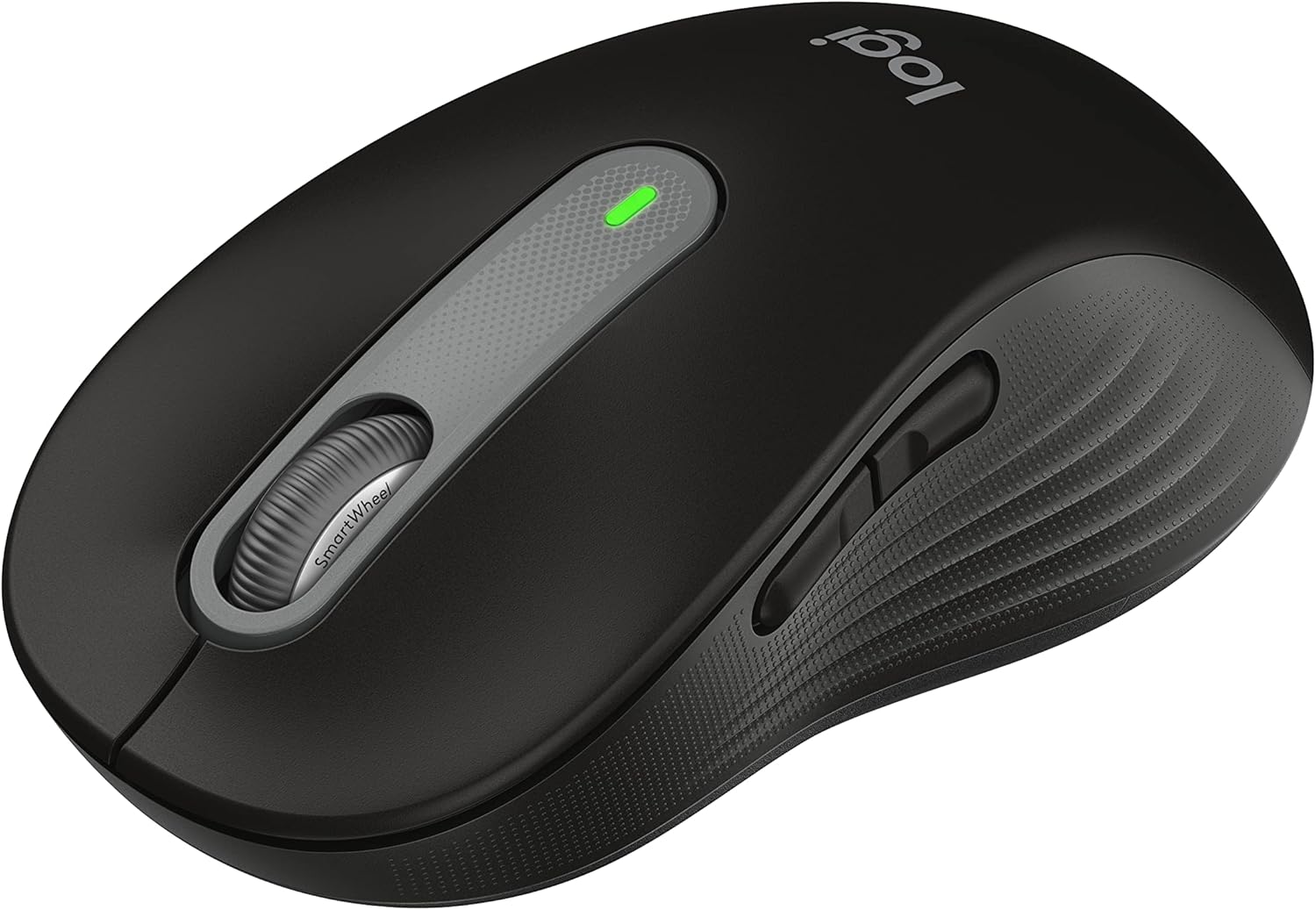
Figure 1: Logitech Signature M650 Wireless Mouse (Black)
സജ്ജമാക്കുക
1. അൺബോക്സിംഗും പ്രാരംഭ പരിശോധനയും
Carefully remove all components from the packaging. Ensure the mouse and the Logi Bolt USB receiver are present. The mouse comes with a pre-installed battery.

Figure 2: Logitech Signature M650 Packaging
2. നിങ്ങളുടെ മൗസ് ബന്ധിപ്പിക്കുന്നു
The Signature M650 offers two connection methods: Logi Bolt USB receiver or Bluetooth Low Energy.
ഓപ്ഷൻ എ: ലോഗി ബോൾട്ട് യുഎസ്ബി റിസീവർ
- Remove the Logi Bolt USB receiver from the mouse's battery compartment.
- നിങ്ങളുടെ കമ്പ്യൂട്ടറിൽ ലഭ്യമായ ഒരു USB പോർട്ടിലേക്ക് ലോഗി ബോൾട്ട് USB റിസീവർ പ്ലഗ് ചെയ്യുക.
- Turn on the mouse using the power switch located on the bottom. The LED indicator should turn solid green, indicating a successful connection.
ഓപ്ഷൻ ബി: ബ്ലൂടൂത്ത് ലോ എനർജി
- താഴെ സ്ഥിതിചെയ്യുന്ന പവർ സ്വിച്ച് ഉപയോഗിച്ച് മൗസ് ഓണാക്കുക.
- Press and hold the connect button on the bottom of the mouse until the LED indicator starts blinking rapidly, indicating pairing mode.
- On your computer, open Bluetooth settings and select the Logitech Signature M650 from the list of available devices to pair.

Figure 3: Connect via Bluetooth or Logi Bolt USB receiver
3. Installing Logitech Options+ Software
To unlock the full potential of your Signature M650, including customizable buttons and advanced SmartWheel settings, download and install the Logitech Options+ software from the official Logitech webസൈറ്റ് (www.logitech.com/optionsplus വഴി). ഈ സോഫ്റ്റ്വെയർ വിൻഡോസിനും മാകോസിനും ലഭ്യമാണ്.
പ്രവർത്തന നിർദ്ദേശങ്ങൾ
1. മൗസിന്റെ അടിസ്ഥാന പ്രവർത്തനങ്ങൾ
- ഇടത് ക്ലിക്ക്: പ്രാഥമിക പ്രവർത്തനം, തിരഞ്ഞെടുപ്പ്.
- വലത് ക്ലിക്കിൽ: സന്ദർഭ മെനു.
- സ്ക്രോൾ വീൽ: ലംബ സ്ക്രോളിംഗ്.
2. സ്മാർട്ട് വീൽ സ്ക്രോളിംഗ്
സ്മാർട്ട് വീൽ രണ്ട് മോഡുകൾക്കിടയിൽ യാന്ത്രികമായി മാറുന്നു:
- ലൈൻ-ബൈ-ലൈൻ കൃത്യത: Ideal for detailed work and navigating documents.
- സൂപ്പർ-ഫാസ്റ്റ് ഫ്രീ സ്പിൻ: ദീർഘനേരത്തേക്ക് വേഗത്തിൽ സ്ക്രോൾ ചെയ്യുന്നതിന് web pages or spreadsheets. Simply flick the wheel to activate.

ചിത്രം 4: സ്മാർട്ട് വീൽ ഉപയോഗിച്ചുള്ള കൃത്യതയും വേഗതയുമുള്ള സ്ക്രോളിംഗ്
3. ഇഷ്ടാനുസൃതമാക്കാവുന്ന സൈഡ് ബട്ടണുകൾ
The two side buttons on your Signature M650 can be customized using the Logitech Options+ software. You can assign them to various shortcuts such as back/forward navigation, copy/paste, or other functions to enhance your workflow.

Figure 5: Customize buttons to your favorite shortcuts
4. സൈലന്റ് ടച്ച് സാങ്കേതികവിദ്യ
The Signature M650 features SilentTouch technology, which reduces clicking noise by 90% compared to traditional mice. This allows for a quieter work environment, minimizing distractions for you and those around you.

Figure 6: 90% less clicking noise with SilentTouch technology
5. Ergonomics and Sizing
The mouse is designed for comfort during long hours of use, featuring a contoured shape, soft thumb area, and rubber side grips. The M650 is available in different sizes to accommodate various hand sizes, ensuring an optimal fit.

Figure 7: Designed for small-to-medium sized hands

Figure 8: Comfort shape and feel with rubber side grips

Figure 9: Available in two sizes (M650 and M650 L)
മെയിൻ്റനൻസ്
1. ബാറ്ററി മാറ്റിസ്ഥാപിക്കൽ
The Logitech Signature M650 boasts a 24-month battery life, which may vary based on usage. When the battery is low, the LED indicator on the mouse will turn red. To replace the battery:
- മൗസിന്റെ അടിയിൽ ബാറ്ററി കമ്പാർട്ട്മെന്റ് കണ്ടെത്തുക.
- കമ്പാർട്ട്മെന്റ് കവർ തുറക്കുക.
- പഴയ AA ബാറ്ററി നീക്കം ചെയ്യുക.
- ശരിയായ പോളാരിറ്റി ഉറപ്പാക്കിക്കൊണ്ട് ഒരു പുതിയ AA ബാറ്ററി ഇടുക.
- ബാറ്ററി കമ്പാർട്ട്മെൻ്റ് കവർ സുരക്ഷിതമായി അടയ്ക്കുക.
2. ക്ലീനിംഗ് നിർദ്ദേശങ്ങൾ
മികച്ച പ്രകടനവും രൂപഭംഗിയും നിലനിർത്താൻ, നിങ്ങളുടെ മൗസ് പതിവായി വൃത്തിയാക്കുക:
- മൃദുവായ, ലിന്റ് രഹിത തുണി ഉപയോഗിക്കുകampവെള്ളം അല്ലെങ്കിൽ മൃദുവായ ക്ലീനിംഗ് ലായനി ഉപയോഗിച്ചാണ്.
- കഠിനമായ രാസവസ്തുക്കൾ, അബ്രസീവ് ക്ലീനറുകൾ, അല്ലെങ്കിൽ ലായകങ്ങൾ എന്നിവ ഉപയോഗിക്കുന്നത് ഒഴിവാക്കുക.
- Do not immerse the mouse in water or any liquid.
- Clean the optical sensor on the bottom of the mouse with a dry cotton swab to ensure accurate tracking.
ട്രബിൾഷൂട്ടിംഗ്
| പ്രശ്നം | സാധ്യമായ കാരണം | പരിഹാരം |
|---|---|---|
| മൗസ് പ്രതികരിക്കുന്നില്ല | Low battery; Receiver unplugged; Bluetooth not paired. | Replace battery; Re-insert Logi Bolt receiver; Re-pair Bluetooth connection. |
| ക്രമരഹിതമായ കഴ്സർ ചലനം | Dirty optical sensor; Unsuitable surface. | Clean optical sensor; Use on a clean, non-reflective surface or mouse pad. |
| സൈഡ് ബട്ടണുകൾ പ്രവർത്തിക്കുന്നില്ല | Logitech Options+ not installed or configured. | Install Logitech Options+ software and customize button assignments. |
കൂടുതൽ സഹായത്തിന്, ദയവായി ഔദ്യോഗിക ലോജിടെക് പിന്തുണ പരിശോധിക്കുക. website or the User Guide PDF.
വീഡിയോ 1: ഉൽപ്പന്നം കഴിഞ്ഞുview വീഡിയോ. ഈ വീഡിയോയിൽ ഒരു പൊതുവായ വിവരണം നൽകുന്നുview of the Logitech Signature M650 Wireless Mouse, demonstrating its key features and design.
സ്പെസിഫിക്കേഷനുകൾ
- മോഡൽ: എം650 (910-006268)
- കണക്റ്റിവിറ്റി: Bluetooth Low Energy, Logi Bolt USB Receiver (Radio Frequency)
- ചലനം കണ്ടെത്തൽ സാങ്കേതികവിദ്യ: ഒപ്റ്റിക്കൽ
- ബാറ്ററി ലൈഫ്: 24 മാസം വരെ (ഉപയോക്താവിന്റെയും കമ്പ്യൂട്ടിംഗ് സാഹചര്യങ്ങളുടെയും അടിസ്ഥാനത്തിൽ വ്യത്യാസപ്പെടാം)
- ഊർജ്ജ സ്രോതസ്സ്: 1 x AA ബാറ്ററി (ഉൾപ്പെടുത്തിയിരിക്കുന്നു)
- നിശബ്ദ ക്ലിക്കുകൾ: Yes, with SilentTouch Technology (90% less click noise)
- ഇഷ്ടാനുസൃതമാക്കാവുന്ന ബട്ടണുകൾ: Yes, via Logitech Options+ software
- സ്മാർട്ട് വീൽ: Yes, adaptive scroll
- എർണോണോമിക്സ്: Contoured shape, soft thumb area, rubber side grips
- അളവുകൾ (LxWxH): 4.22 x 2.43 x 0.1 inches (approximate, for Small-Medium size)
- ഭാരം: 3.57 ഔൺസ് (ഏകദേശം)
- Hardware Platform Compatibility: പിസി, ലിനക്സ്, മാക്
- ഓപ്പറേറ്റിംഗ് സിസ്റ്റം അനുയോജ്യത: Linux, Chrome OS, Windows, macOS
- മെറ്റീരിയൽ: Made with recycled plastic (specific percentage may vary by color/model)
- മാതൃരാജ്യം: ചൈന
- ആദ്യം ലഭ്യമായത്: 11 ജനുവരി 2022
വാറൻ്റിയും പിന്തുണയും
ലോജിടെക് ഉൽപ്പന്നങ്ങൾ സാധാരണയായി പരിമിതമായ ഹാർഡ്വെയർ വാറണ്ടിയോടെയാണ് വരുന്നത്. നിർദ്ദിഷ്ട വാറന്റി വിശദാംശങ്ങൾ, രജിസ്ട്രേഷൻ, സാങ്കേതിക പിന്തുണ എന്നിവയ്ക്കായി, ദയവായി ഔദ്യോഗിക ലോജിടെക് പിന്തുണ സന്ദർശിക്കുക. webസൈറ്റ് അല്ലെങ്കിൽ നിങ്ങളുടെ ഉൽപ്പന്നത്തിൽ ഉൾപ്പെടുത്തിയിരിക്കുന്ന ഡോക്യുമെന്റേഷൻ പരിശോധിക്കുക.
You can also download the full User Guide in PDF format from the following link: Logitech Signature M650 User Guide (PDF)
For software downloads and advanced customization, visit: ലോജിടെക് ഓപ്ഷനുകൾ+


