1. ആമുഖം
The idinio® Smart WiFi Cord Dimmer offers a seamless blend of traditional control comfort and smart functionalities. This dimmer utilizes phase-cut technology and allows for adjustable minimum brightness, making it suitable for various lighting types. It integrates with your existing Wi-Fi network and can be controlled via a dedicated app or voice assistants like Alexa and Google Assistant.
This manual provides essential information for the safe and efficient use of your idinio® Smart WiFi Cord Dimmer. Please read it thoroughly before installation and operation.
2. സവിശേഷതകൾ
- Transforms any conventional lamp into a dimmable smart lamp.
- Integrates into an existing Wi-Fi router for smart control.
- Functions as a conventional cord dimmer/switch for daily use.
- Includes both black and white interchangeable housings to match your decor.
- Features phase-cut technology, ideal for dimmable LED lamps up to 50W and halogen lamp100W വരെ.
- Adjustable minimum brightness setting.
- Supports central control, dimming, scenarios, and time programs via a compatible app.
- Compatible with voice control via Amazon Alexa and Google Assistant.
- Easy installation or replacement of existing cord switches.
- Integrated strain relief ensures reliable and durable operation.
3 സുരക്ഷാ വിവരങ്ങൾ
പരിക്കുകളോ കേടുപാടുകളോ തടയുന്നതിന് എല്ലായ്പ്പോഴും ഇനിപ്പറയുന്ന സുരക്ഷാ മാർഗ്ഗനിർദ്ദേശങ്ങൾ പാലിക്കുക:
- ഇൻസ്റ്റാളേഷൻ അല്ലെങ്കിൽ അറ്റകുറ്റപ്പണിക്ക് മുമ്പ് വൈദ്യുതി വിതരണം വിച്ഛേദിച്ചിട്ടുണ്ടെന്ന് ഉറപ്പാക്കുക.
- Installation should only be performed by a qualified electrician if you are unsure.
- ഈർപ്പം അല്ലെങ്കിൽ അങ്ങേയറ്റത്തെ താപനിലയിലേക്ക് ഉപകരണം തുറന്നുകാട്ടരുത്.
- Do not exceed the maximum load ratings (50W for LED, 100W for Halogen).
- This device is designed for indoor use only (IP20 protection class).
- കുട്ടികൾക്ക് ലഭ്യമാകാതെ സൂക്ഷിക്കുക.
4. പാക്കേജ് ഉള്ളടക്കം
പാക്കേജ് തുറക്കുമ്പോൾ, എല്ലാ ഘടകങ്ങളും ഉണ്ടെന്നും കേടുപാടുകൾ സംഭവിച്ചിട്ടില്ലെന്നും ഉറപ്പാക്കുക:
- idinio® Smart WiFi Cord Dimmer (pre-assembled with black housing)
- White interchangeable housing
- ഉപയോക്തൃ മാനുവൽ (ഈ പ്രമാണം)

Figure 1: idinio® Smart WiFi Cord Dimmer with its packaging and a smartphone displaying the control app.
5. സജ്ജീകരണവും ഇൻസ്റ്റാളേഷനും
The idinio® Smart WiFi Cord Dimmer is designed for easy installation, replacing an existing cord switch or being integrated into a new lamp ചരട്.
5.1. ഫിസിക്കൽ ഇൻസ്റ്റലേഷൻ
- പവർ വിച്ഛേദിക്കുക: എൽ ഉറപ്പാക്കുകamp is unplugged from the mains power supply before beginning installation.
- തുറന്ന താമസസ്ഥലം: Carefully open the dimmer housing. The dimmer comes pre-assembled with the black housing. If you wish to use the white housing, gently separate the two halves of the black housing and replace them with the white ones.
- വയർ കണക്ഷൻ: എൽ ബന്ധിപ്പിക്കുകamp's power cord to the dimmer's terminals according to the wiring diagram provided inside the dimmer or on the product label. Ensure proper polarity (Live and Neutral). The integrated strain relief should be used to secure the cable.
- താമസസ്ഥലം അടയ്ക്കുക: Securely close the dimmer housing, ensuring all wires are properly seated and not pinched.
- പ്ലഗ് ഇൻ: എൽ പ്ലഗ് ചെയ്യുകamp back into the mains power supply.

Figure 2: The idinio® Smart WiFi Cord Dimmer showing both black and white housing options.

Figure 3: Disassembled white housing, showing internal structure for wiring.
5.2. വൈഫൈ, ആപ്പ് സജ്ജീകരണം
- അപ്ലിക്കേഷൻ ഡൗൺലോഡുചെയ്യുക: Download the compatible smart home app (e.g., Tuya Smart or Smart Life) from your smartphone's app store.
- രജിസ്റ്റർ ചെയ്യുക/ലോഗിൻ ചെയ്യുക: ആപ്പ് തുറന്ന് ഒരു പുതിയ അക്കൗണ്ട് രജിസ്റ്റർ ചെയ്യുക അല്ലെങ്കിൽ നിലവിലുള്ള ഒരു അക്കൗണ്ട് ഉപയോഗിച്ച് ലോഗിൻ ചെയ്യുക.
- ഉപകരണം ചേർക്കുക: Follow the in-app instructions to add a new device. Typically, you will select 'Lighting' or 'Dimmer' and then 'Wi-Fi Device'.
- ജോടിയാക്കൽ മോഡ്: Put the dimmer into pairing mode. This usually involves pressing and holding the reset button on the dimmer until the indicator light flashes rapidly. Refer to the specific app's instructions for exact pairing procedures.
- വൈഫൈയിലേക്ക് കണക്റ്റുചെയ്യുക: Enter your 2.4GHz Wi-Fi network name and password in the app. The dimmer will connect to your network.
- ഉപകരണത്തിൻ്റെ പേരുമാറ്റുക: Once connected, you can rename the dimmer within the app for easier identification (e.g., 'Living Room Lamp').
5.3. Adjusting Minimum Brightness
The dimmer allows you to set a minimum brightness level to prevent flickering or ensure stable operation with certain LED lamps. This adjustment is typically done via a small screw or button on the dimmer itself, often labeled 'Min.' or similar. Use a small screwdriver to carefully adjust this setting while the lamp is on, until stable dimming is achieved at the lowest desired level.
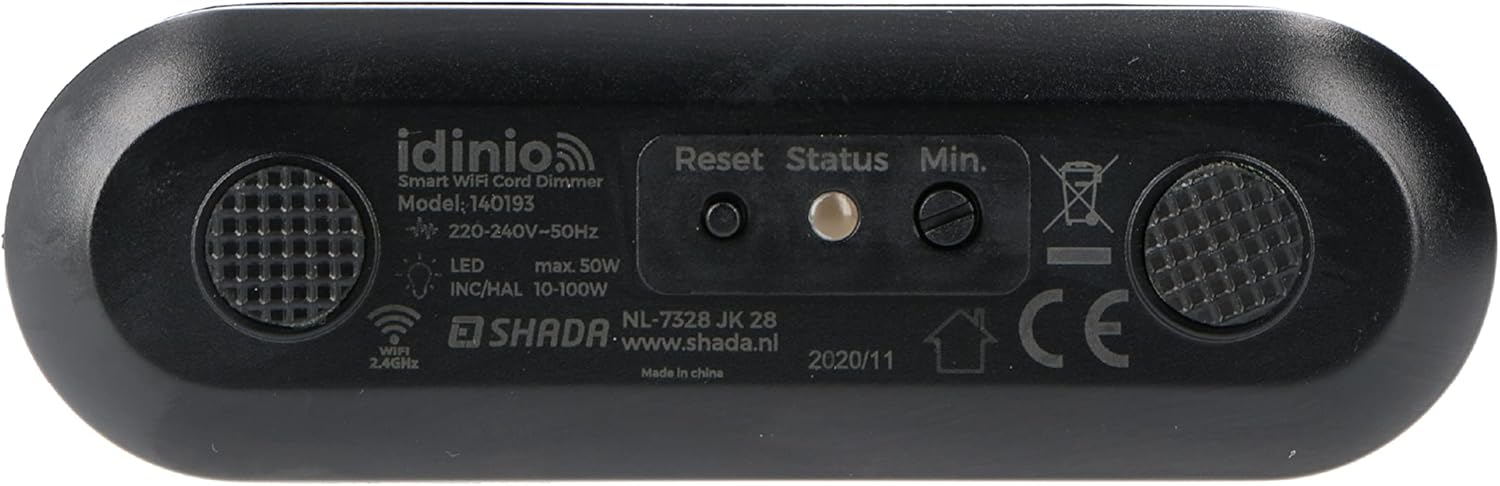
ചിത്രം 4: താഴെ view of the dimmer, showing the 'Min.' adjustment point and other labels.
6. പ്രവർത്തന നിർദ്ദേശങ്ങൾ
The idinio® Smart WiFi Cord Dimmer offers multiple ways to control your lighting.
6.1. മാനുവൽ നിയന്ത്രണം
The dimmer features a rotary knob for traditional manual control:
- ഓൺ/ഓഫ് ചെയ്യുക: Press the rotary knob to toggle the light on or off.
- മങ്ങുന്നു: തെളിച്ചം വർദ്ധിപ്പിക്കാൻ നോബ് ഘടികാരദിശയിലും തെളിച്ചം കുറയ്ക്കാൻ എതിർ ഘടികാരദിശയിലും തിരിക്കുക.

Figure 5: Close-up of the dimmer's control knob.
6.2. ആപ്പ് നിയന്ത്രണം
Using the compatible smart home app, you can control your dimmer from anywhere with an internet connection:
- റിമോട്ട് ഓൺ/ഓഫ്: Toggle the light on or off from your smartphone or tablet.
- റിമോട്ട് ഡിമ്മിംഗ്: Adjust the brightness level using a slider in the app.
- ഷെഡ്യൂളിംഗ്: Set schedules for the light to turn on/off or dim at specific times.
- Scenes/Scenarios: Create custom scenes (e.g., 'Movie Night', 'Reading') that adjust the light to predefined settings.
- ഗ്രൂപ്പ് നിയന്ത്രണം: Group multiple idinio dimmers or other smart devices together for simultaneous control.
6.3. ശബ്ദ നിയന്ത്രണം
Integrate your idinio® Smart WiFi Cord Dimmer with Amazon Alexa or Google Assistant for hands-free control:
- അക്കൗണ്ട് ലിങ്ക് ചെയ്യുക: In the Alexa or Google Home app, enable the skill for your smart home app (e.g., Tuya Smart or Smart Life) and link your accounts.
- ഉപകരണങ്ങൾ കണ്ടെത്തുക: പുതിയ ഉപകരണങ്ങൾ കണ്ടെത്താൻ നിങ്ങളുടെ വോയ്സ് അസിസ്റ്റന്റിനോട് ആവശ്യപ്പെടുക.
- വോയ്സ് കമാൻഡുകൾ: ഇനിപ്പറയുന്നതുപോലുള്ള കമാൻഡുകൾ ഉപയോഗിക്കുക:
- "Alexa, turn on Living Room Lamp."
- "Hey Google, dim Living Room Lamp 50% വരെ."
- "Alexa, turn off Living Room Lamp."
7 സാങ്കേതിക സവിശേഷതകൾ
| പരാമീറ്റർ | മൂല്യം |
|---|---|
| മോഡൽ നമ്പർ | 140193 |
| വാല്യംtagഇ/ആവൃത്തി | 230-240 V~ / 50Hz |
| Maximum Load (LED) | 50 W |
| Maximum Load (Halogen) | 10-100 W |
| പ്രവർത്തന താപനില | 0°C മുതൽ 40°C വരെ |
| സംരക്ഷണ ക്ലാസ് | IP20 |
| അളവുകൾ (L x W x D) | 97 x 31 x 40 മിമി |
| വയർലെസ് കണക്റ്റിവിറ്റി | 2.4GHz വൈഫൈ |
| വോയ്സ് അസിസ്റ്റന്റ് അനുയോജ്യത | ആമസോൺ അലക്സ, ഗൂഗിൾ അസിസ്റ്റൻ്റ് |
8. പ്രശ്നപരിഹാരം
If you encounter issues with your idinio® Smart WiFi Cord Dimmer, refer to the following common problems and solutions:
- ലൈറ്റ് ഓണാക്കുന്നില്ല:
- എൽ ആണോയെന്ന് പരിശോധിക്കുകamp is properly plugged in and the power outlet is active.
- Verify the wiring connections inside the dimmer.
- എൽ ഉറപ്പാക്കുകamp bulb is functional.
- Light does not dim or flickers:
- Ensure you are using dimmable LED or halogen bulbs.
- Adjust the minimum brightness setting on the dimmer (refer to Section 5.3).
- മൊത്തം വാട്ട് ഉണ്ടോ എന്ന് പരിശോധിക്കുകtage of the bulbs exceeds the dimmer's maximum load.
- വൈഫൈ/ആപ്പിലേക്ക് കണക്റ്റ് ചെയ്യാൻ കഴിയുന്നില്ല:
- Ensure your Wi-Fi network is 2.4GHz. This dimmer does not support 5GHz networks.
- Check your Wi-Fi password and network stability.
- Ensure the dimmer is in pairing mode (indicator light flashing rapidly).
- Move the dimmer closer to your Wi-Fi router during setup.
- Restart your Wi-Fi router and try pairing again.
- ശബ്ദ നിയന്ത്രണം പ്രവർത്തിക്കുന്നില്ല:
- Ensure your smart home app account is correctly linked to Alexa or Google Assistant.
- Verify the device name in the voice assistant app matches the one in your smart home app.
- നിങ്ങളുടെ വോയ്സ് അസിസ്റ്റന്റ് ആപ്പിൽ ഉപകരണങ്ങൾ വീണ്ടും കണ്ടെത്താൻ ശ്രമിക്കുക.
9. പരിപാലനം
The idinio® Smart WiFi Cord Dimmer requires minimal maintenance:
- വൃത്തിയാക്കൽ: വൃത്തിയാക്കുന്നതിന് മുമ്പ് വൈദ്യുതി ബന്ധം വിച്ഛേദിക്കുക. മൃദുവായതും ഉണങ്ങിയതുമായ തുണി ഉപയോഗിച്ച് ഉപരിതലം തുടയ്ക്കുക. അബ്രസീവ് ക്ലീനറുകളോ ലായകങ്ങളോ ഉപയോഗിക്കരുത്.
- സംഭരണം: If storing the dimmer for an extended period, keep it in a cool, dry place away from direct sunlight and moisture.
10. വാറൻ്റിയും പിന്തുണയും
For warranty information and technical support, please refer to the documentation provided with your purchase or contact idinio customer service through their official website or the retailer where you purchased the product. Keep your proof of purchase for warranty claims.


