ആമുഖം
Thank you for choosing the Redragon S129W 3-in-1 Gaming Combo. This package includes a gaming keyboard, a gaming mouse, and a gaming headset, designed to enhance your gaming experience. This manual provides detailed instructions for setup, operation, maintenance, and troubleshooting to ensure optimal performance of your new peripherals.
പാക്കേജ് ഉള്ളടക്കം
- Redragon S129W Gaming Keyboard
- Redragon S129W Gaming Mouse
- Redragon S129W Gaming Headset
- ഉപയോക്തൃ മാനുവൽ (ഈ പ്രമാണം)
സജ്ജമാക്കുക
പൊതുവായ കണക്ഷൻ
All components of the Redragon S129W combo connect via wired USB (keyboard and mouse) or 3.5mm audio jack (headset). Ensure your computer has available USB ports and a 3.5mm audio jack.
കീബോർഡ് സജ്ജീകരണം
- നിങ്ങളുടെ കമ്പ്യൂട്ടറിൽ ലഭ്യമായ USB പോർട്ട് കണ്ടെത്തുക.
- കീബോർഡിന്റെ USB കണക്റ്റർ USB പോർട്ടിലേക്ക് പ്ലഗ് ചെയ്യുക.
- Your operating system will automatically detect and install the necessary drivers.

Image: The Redragon S129W keyboard showing its wired USB connection point.
മൗസ് സജ്ജീകരണം
- നിങ്ങളുടെ കമ്പ്യൂട്ടറിൽ ലഭ്യമായ USB പോർട്ട് കണ്ടെത്തുക.
- മൗസിന്റെ USB കണക്ടർ USB പോർട്ടിലേക്ക് പ്ലഗ് ചെയ്യുക.
- Your operating system will automatically detect and install the necessary drivers.
ഹെഡ്സെറ്റ് സജ്ജീകരണം
- Locate the 3.5mm audio jack on your computer. This is typically a green port for audio output and a pink port for microphone input, or a single combined port.
- Plug the 3.5mm audio jack of the headset into the corresponding port on your computer.
- Adjust audio settings in your operating system if necessary to select the headset as the default playback and recording device.

Image: The Redragon S129W headset, highlighting its 3.5mm audio jack connection.
പ്രവർത്തന നിർദ്ദേശങ്ങൾ
കീബോർഡ് പ്രവർത്തനം
The Redragon S129W keyboard is a full-sized keyboard with 108 keys and RGB backlighting. It connects via a wired USB connection, ensuring stable and responsive input.

ചിത്രം: മുകളിൽ നിന്ന് താഴേക്ക് view of the Redragon S129W keyboard, showcasing അതിന്റെ പൂർണ്ണ ലേഔട്ടും RGB ബാക്ക്ലൈറ്റിംഗും.

ചിത്രം: ആംഗിൾഡ് view of the Redragon S129W keyboard, highlighting the keycaps and side profile.
RGB ബാക്ക്ലൈറ്റിംഗ്
The keyboard features customizable RGB backlighting. Specific key combinations (often Fn + a designated key) can be used to cycle through lighting modes, adjust brightness, or change colors. Refer to the quick start guide or Redragon's official website for detailed key commands for lighting control.
മൗസ് ഓപ്പറേഷൻ
The Redragon S129W mouse is a wired optical mouse equipped with six buttons, designed for precision and control in gaming. It features adjustable DPI settings.

ചിത്രം: മുകളിൽ view of the Redragon S129W mouse, showing its ergonomic design and button layout.

ചിത്രം: ആംഗിൾഡ് view of the Redragon S129W mouse, highlighting the scroll wheel and side buttons.
ക്രമീകരിക്കാവുന്ന ഡിപിഐ
The mouse offers a three-stage adjustable DPI (Dots Per Inch) of 800, 1200, and 1600. A dedicated DPI button (usually located near the scroll wheel) allows you to cycle through these settings to match your preference for speed and precision.
പ്രോഗ്രാം ചെയ്യാവുന്ന ബട്ടണുകൾ
The six buttons on the mouse may be programmable using Redragon's proprietary software, available for download from their official website. This allows for custom macros and functions.
ഹെഡ്സെറ്റ് പ്രവർത്തനം
The Redragon S129W headset provides clear audio and communication through its 3.5mm jack connection. It features comfortable ear cups and an integrated microphone.
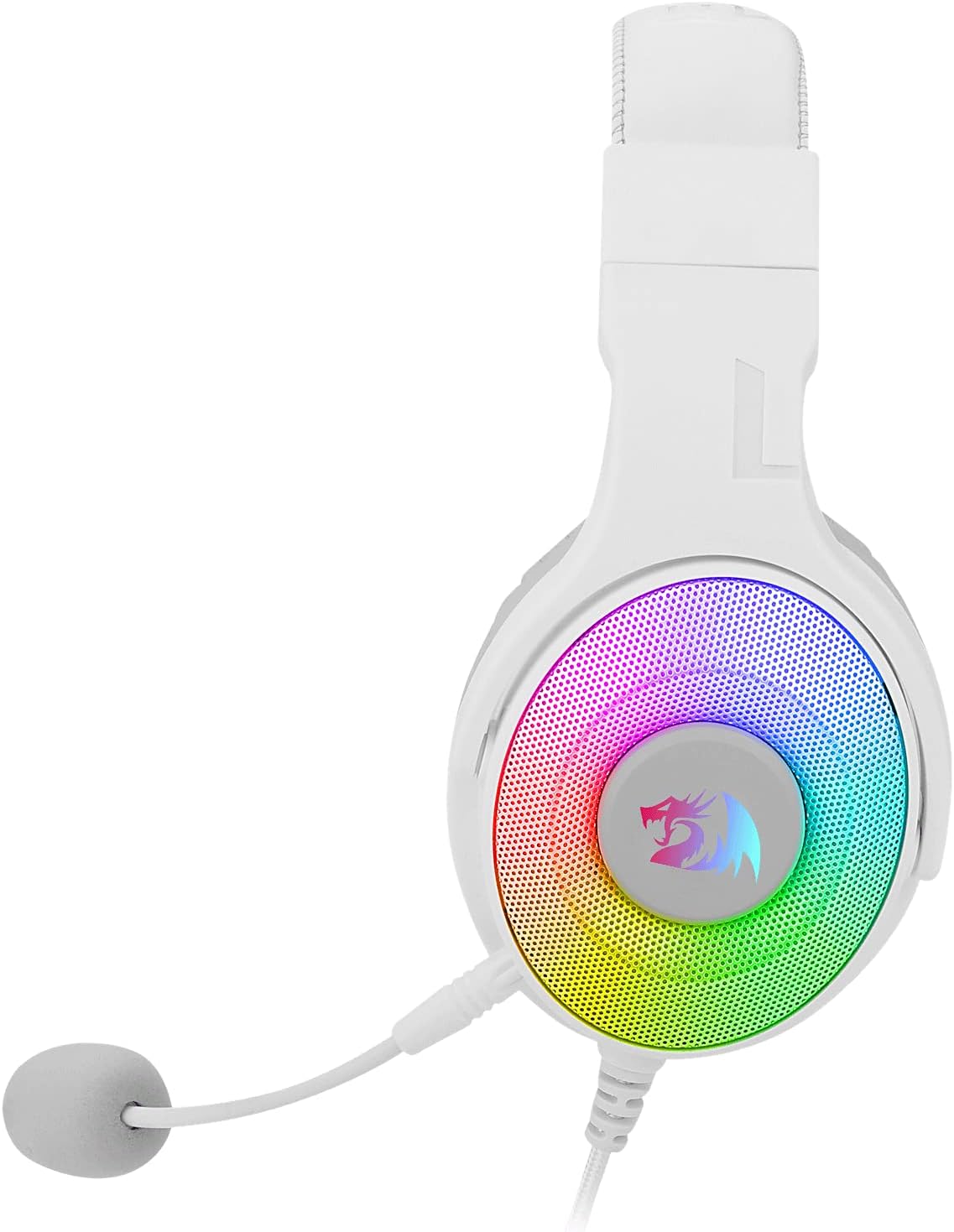
ചിത്രം: വശം view of the Redragon S129W headset, showing the ear cup design and microphone placement.

ചിത്രം: ക്ലോസ്-അപ്പ് view of the Redragon S129W headset's ear cup, illustrating the padding for comfort.
മൈക്രോഫോൺ ഉപയോഗം
Ensure the microphone is positioned correctly for clear voice capture. Adjust microphone sensitivity through your computer's sound settings.
വോളിയം നിയന്ത്രണം
Volume can be adjusted using the inline control on the headset cable or through your computer's operating system volume settings.
മെയിൻ്റനൻസ്
To ensure the longevity and optimal performance of your Redragon S129W gaming combo, follow these maintenance guidelines:
- വൃത്തിയാക്കൽ: Use a soft, dry cloth to wipe down the surfaces of the keyboard, mouse, and headset. For stubborn dirt, a slightly damp തുണി ഉപയോഗിക്കാം, പക്ഷേ ഈർപ്പം ആന്തരിക ഘടകങ്ങളിലേക്ക് പ്രവേശിക്കുന്നില്ലെന്ന് ഉറപ്പാക്കുക. കഠിനമായ രാസവസ്തുക്കളോ ഉരച്ചിലുകളുള്ള ക്ലീനറുകളോ ഒഴിവാക്കുക.
- കേബിൾ കെയർ: Avoid bending or twisting cables excessively. Do not pull on the cables to disconnect devices; always grasp the connector.
- സംഭരണം: ഉപയോഗത്തിലില്ലാത്തപ്പോൾ, കടുത്ത താപനിലയിൽ നിന്നും നേരിട്ടുള്ള സൂര്യപ്രകാശത്തിൽ നിന്നും അകന്ന്, വൃത്തിയുള്ളതും വരണ്ടതുമായ അന്തരീക്ഷത്തിൽ ഉപകരണങ്ങൾ സൂക്ഷിക്കുക.
- Headset Ear Pads: Periodically check ear pads for wear and tear. Clean gently with a soft, damp ആവശ്യമെങ്കിൽ തുണി.
ട്രബിൾഷൂട്ടിംഗ്
If you encounter issues with your Redragon S129W combo, refer to the following common solutions:
കീബോർഡ്/മൗസ് പ്രതികരിക്കുന്നില്ല
- കണക്ഷൻ പരിശോധിക്കുക: നിങ്ങളുടെ കമ്പ്യൂട്ടറിലെ പ്രവർത്തിക്കുന്ന ഒരു USB പോർട്ടിലേക്ക് USB കേബിൾ സുരക്ഷിതമായി പ്ലഗ് ചെയ്തിട്ടുണ്ടെന്ന് ഉറപ്പാക്കുക. മറ്റൊരു USB പോർട്ട് പരീക്ഷിക്കുക.
- കമ്പ്യൂട്ടർ പുനരാരംഭിക്കുക: ഒരു ലളിതമായ പുനരാരംഭം പലപ്പോഴും കണക്റ്റിവിറ്റി പ്രശ്നങ്ങൾ പരിഹരിക്കും.
- ഡ്രൈവർ പ്രശ്നങ്ങൾ: While usually plug-and-play, ensure your operating system's drivers are up to date.
Headset No Sound/Microphone Not Working
- കണക്ഷൻ പരിശോധിക്കുക: Ensure the 3.5mm audio jack is fully inserted into the correct port on your computer.
- വോളിയം ലെവലുകൾ: Verify that the volume is not muted or set too low on the inline control, in your operating system, or within the application you are using.
- ഡിഫോൾട്ട് ഉപകരണം: In your computer's sound settings, ensure the headset is selected as the default playback and recording device.
- മൈക്രോഫോൺ നിശബ്ദമാക്കുക: Check if the microphone has a physical mute switch on the inline control and ensure it is not activated.
RGB ലൈറ്റിംഗ് പ്രവർത്തിക്കുന്നില്ല
- പവർ പരിശോധിക്കുക: ഉപകരണം ശരിയായി ബന്ധിപ്പിച്ചിട്ടുണ്ടെന്നും വൈദ്യുതി ലഭിക്കുന്നുണ്ടെന്നും ഉറപ്പാക്കുക.
- ലൈറ്റിംഗ് നിയന്ത്രണങ്ങൾ: Experiment with the keyboard's dedicated lighting control keys (e.g., Fn + specific keys) to ensure lighting is not turned off or set to a very dim mode.
സ്പെസിഫിക്കേഷനുകൾ
| ഫീച്ചർ | വിശദാംശങ്ങൾ |
|---|---|
| ബ്രാൻഡ് | റെഡ്രാഗൺ |
| മോഡൽ | S129W |
| കണക്റ്റിവിറ്റി ടെക്നോളജി | Wired USB (Keyboard, Mouse), 3.5mm Jack (Headset) |
| കീബോർഡ് വിവരണം | Full-sized keyboard with 108 keys |
| കീബോർഡ് ബാക്ക്ലൈറ്റിംഗ് | RGB |
| മൗസ് തരം | Wired Optical Mouse with Six Buttons |
| മൗസ് ഡിപിഐ | 800, 1200, 1600 (3-stagഇ ക്രമീകരിക്കാവുന്ന) |
| അനുയോജ്യമായ ഉപകരണങ്ങൾ | ലാപ്ടോപ്പ്, പേഴ്സണൽ കമ്പ്യൂട്ടർ |
| ഇനത്തിൻ്റെ ഭാരം | 3.43 പൗണ്ട് (ആകെ പാക്കേജ്) |
| ബാറ്ററികൾ ആവശ്യമാണ് | ഇല്ല |
വാറൻ്റിയും പിന്തുണയും
Redragon products are designed for durability and performance. For warranty information, technical support, or to download the latest drivers and software, please visit the official Redragon webസൈറ്റിൽ ബന്ധപ്പെടുക അല്ലെങ്കിൽ അവരുടെ ഉപഭോക്തൃ സേവനവുമായി ബന്ധപ്പെടുക. വാറന്റി ക്ലെയിമുകൾക്കുള്ള വാങ്ങലിന്റെ തെളിവായി നിങ്ങളുടെ വാങ്ങൽ രസീത് സൂക്ഷിക്കുക.