1. ആമുഖം
Thank you for choosing the LENRUE A52 Portable Bluetooth Speaker. This manual provides essential information for setting up, operating, and maintaining your speaker to ensure optimal performance and longevity. Please read it carefully before use.

Image 1.1: The LENRUE A52 Portable Bluetooth Speaker in Powder Blue.
2. ബോക്സിൽ എന്താണുള്ളത്?
അൺപാക്ക് ചെയ്യുമ്പോൾ, താഴെ ലിസ്റ്റ് ചെയ്തിരിക്കുന്ന എല്ലാ ഇനങ്ങളും ഉണ്ടെന്ന് ഉറപ്പാക്കുക:
- 1 x LENRUE A52 Bluetooth Speaker
- 1 x USB ചാർജിംഗ് കേബിൾ
- 1 x ഉപയോക്തൃ മാനുവൽ

Image 2.1: The LENRUE A52 speaker, charging cable, and user manual as included in the package.
3. നിയന്ത്രണങ്ങളും സൂചകങ്ങളും
Familiarize yourself with the speaker's buttons and ports for easy operation.
3.1 Top Panel Buttons
Image 3.1: Top panel buttons including Power, Volume Down, Volume Up, and Play/Pause/Answer Call.
- പവർ ബട്ടൺ (⏻): Long press to power on/off. Short press for other functions (e.g., mode switch).
- വോളിയം താഴേക്ക് (-): Short press to decrease volume. Long press for previous track.
- വോളിയം കൂട്ടുക (+): Short press to increase volume. Long press for next track.
- Play/Pause/Answer Call (▶/❚❚): Short press to play/pause music. Short press to answer/end a call. Long press to reject a call.
3.2 പിൻ പോർട്ടുകൾ
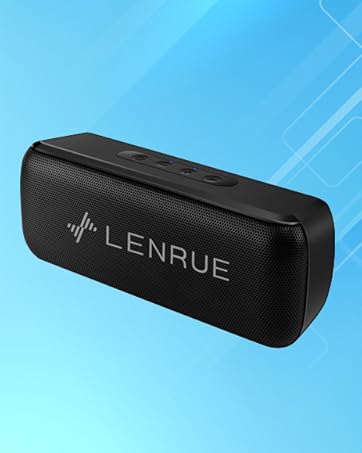
Image 3.2: Rear ports for USB, TF card, and DC 5V charging.
- USB പോർട്ട്: For USB flash drive playback.
- ടിഎഫ് കാർഡ് സ്ലോട്ട്: For Micro SD card playback (supports up to 32GB).
- DC 5V ചാർജിംഗ് പോർട്ട്: For charging the speaker using the provided USB cable.
4. സജ്ജീകരണം
4.1 സ്പീക്കർ ചാർജ് ചെയ്യുന്നു
- Connect the small end of the USB charging cable to the DC 5V port on the speaker.
- USB കേബിളിന്റെ വലിയ അറ്റം ഒരു USB പവർ അഡാപ്റ്ററുമായി (ഉൾപ്പെടുത്തിയിട്ടില്ല) അല്ലെങ്കിൽ ഒരു കമ്പ്യൂട്ടറിന്റെ USB പോർട്ടുമായി ബന്ധിപ്പിക്കുക.
- The charging indicator light will illuminate. Once fully charged, the light may change color or turn off, depending on the model.
- A full charge provides approximately 16-24 hours of playtime.
4.2 പവർ ഓൺ/ഓഫ്
- പവർ ഓണിലേക്ക്: Long press the Power button (⏻) until you hear an audible prompt or see an indicator light.
- പവർ ഓഫ് ചെയ്യാൻ: Long press the Power button (⏻) again until you hear an audible prompt or the indicator light turns off.
5. പ്രവർത്തന നിർദ്ദേശങ്ങൾ
5.1 ബ്ലൂടൂത്ത് ജോടിയാക്കൽ
നിങ്ങളുടെ സ്പീക്കർ ഒരു ബ്ലൂടൂത്ത് പ്രവർത്തനക്ഷമമാക്കിയ ഉപകരണവുമായി ബന്ധിപ്പിക്കാൻ:
- Ensure the speaker is powered on and in Bluetooth mode (it usually defaults to Bluetooth mode upon power-on). The indicator light will flash, indicating it's ready for pairing.
- നിങ്ങളുടെ ഉപകരണത്തിൽ (സ്മാർട്ട്ഫോൺ, ടാബ്ലെറ്റ് മുതലായവ), ബ്ലൂടൂത്ത് പ്രവർത്തനക്ഷമമാക്കി ലഭ്യമായ ഉപകരണങ്ങൾക്കായി തിരയുക.
- കണ്ടെത്തിയ ഉപകരണങ്ങളുടെ പട്ടികയിൽ നിന്ന് "സൗണ്ട്മേറ്റ്" തിരഞ്ഞെടുക്കുക.
- Once connected, the speaker will provide an audible confirmation, and the indicator light will stop flashing and remain solid.
5.2 TWS (True Wireless Stereo) Connection
You can pair two LENRUE A52 speakers together for a stereo sound experience.
Image 5.1: Visual representation of two speakers establishing a TWS connection.
- Turn on both LENRUE A52 speakers. Ensure they are not currently connected to any other Bluetooth devices.
- Double-click the Power button (⏻) on ഒന്ന് of the speakers. This speaker will initiate TWS pairing.
- The speakers will automatically connect to each other, indicated by an audible "beep" sound.
- Now, on your device, search for Bluetooth devices and select "Soundmate". Only one "Soundmate" will appear.
- കണക്റ്റ് ചെയ്തുകഴിഞ്ഞാൽ, സ്റ്റീരിയോയിലെ രണ്ട് സ്പീക്കറുകളിലൂടെയും ഓഡിയോ പ്ലേ ചെയ്യും.
5.3 Multiple Playback Modes
സ്പീക്കർ വിവിധ ഓഡിയോ ഉറവിടങ്ങളെ പിന്തുണയ്ക്കുന്നു:
- ബ്ലൂടൂത്ത് മോഡ്: Connect wirelessly to your device as described above.
- യുഎസ്ബി ഫ്ലാഷ് ഡ്രൈവ് പ്ലേബാക്ക്: Insert a USB flash drive containing MP3 audio fileUSB പോർട്ടിലേക്ക് s. സ്പീക്കർ സ്വയമേവ USB മോഡിലേക്ക് മാറുകയും പ്ലേബാക്ക് ആരംഭിക്കുകയും ചെയ്യും.
- മൈക്രോ എസ്ഡി കാർഡ് പ്ലേബാക്ക്: Insert a Micro SD card (up to 32GB) containing MP3 audio fileTF കാർഡ് സ്ലോട്ടിലേക്ക് s. സ്പീക്കർ സ്വയമേവ TF കാർഡ് മോഡിലേക്ക് മാറുകയും പ്ലേബാക്ക് ആരംഭിക്കുകയും ചെയ്യും.
5.4 ഹാൻഡ്സ് ഫ്രീ കോളിംഗ്
നിങ്ങളുടെ സ്മാർട്ട്ഫോണുമായി ബ്ലൂടൂത്ത് വഴി ബന്ധിപ്പിക്കുമ്പോൾ, ഹാൻഡ്സ് ഫ്രീ കോളുകൾക്കായി സ്പീക്കർ ഉപയോഗിക്കാം.
- കോളിന് ഉത്തരം നൽകുക: When an incoming call rings, short press the Play/Pause/Answer Call button (▶/❚❚) to answer.
- കോൾ അവസാനിപ്പിക്കുക: During a call, short press the Play/Pause/Answer Call button (▶/❚❚) to end the call.
- കോൾ നിരസിക്കുക: When an incoming call rings, long press the Play/Pause/Answer Call button (▶/❚❚) to reject the call.

Image 5.2: The LENRUE A52 speaker in an outdoor setting, demonstrating its portability.
6. പരിപാലനം
6.1 വൃത്തിയാക്കൽ
- മൃദുവായതും ഉണങ്ങിയതുമായ തുണി ഉപയോഗിച്ച് സ്പീക്കർ തുടയ്ക്കുക.
- അബ്രാസീവ് ക്ലീനറുകൾ, ആൽക്കഹോൾ, കെമിക്കൽ ലായകങ്ങൾ എന്നിവ ഉപയോഗിക്കരുത്, കാരണം ഇവ ഉപരിതലത്തിന് കേടുവരുത്തും.
6.2 ബാറ്ററി കെയർ
- To prolong battery life, fully charge the speaker before first use.
- Avoid exposing the speaker to extreme temperatures (hot or cold).
- If the speaker will not be used for an extended period, charge it at least once every three months.
6.3 സംഭരണം
- Store the speaker in a cool, dry place away from direct sunlight and moisture.
7. പ്രശ്നപരിഹാരം
If you encounter issues with your LENRUE A52 speaker, refer to the following common problems and solutions:
Q1: How to use two speakers in Bluetooth mode at the same time (TWS)?
ഉത്തരം:
- Turn on both speakers and ensure they are disconnected from all other devices.
- Double-click the power button on either of the two speakers to initiate TWS pairing.
- TWS pairing will automatically complete after a "beep" sound.
- Select the device name "Soundmate" on your phone's Bluetooth settings to pair with your speakers.
- You can now play music with double surround stereo sound.
Q2: How does the microphone work?
ഉത്തരം: The microphone functions only in Bluetooth mode. When a call comes in, press the Play/Pause/Answer Call button (▶/❚❚) to answer the call through the speaker.
8 സ്പെസിഫിക്കേഷനുകൾ
Detailed technical specifications for the LENRUE A52 Portable Bluetooth Speaker:
Image 8.1: Dimensions of the LENRUE A52 Portable Bluetooth Speaker.
| ഫീച്ചർ | വിശദാംശങ്ങൾ |
|---|---|
| മോഡലിൻ്റെ പേര് | A52 |
| ബ്രാൻഡ് | ലെൻറു |
| കണക്റ്റിവിറ്റി ടെക്നോളജി | ബ്ലൂടൂത്ത് 5.0 |
| സ്പീക്കർ തരം | പോർട്ടബിൾ ബ്ലൂടൂത്ത് സ്പീക്കർ |
| പ്രത്യേക ഫീച്ചർ | Stereo Pairing (TWS) |
| പവർ ഉറവിടം | ബാറ്ററി പവർ |
| ബാറ്ററി ശേഷി | 1500 mAh (1.6E+3 Milliamp മണിക്കൂറുകൾ) |
| കളിസമയം | 16-24 മണിക്കൂർ |
| ചാർജിംഗ് സമയം | Approximately 16 Hours (initial charge) |
| സ്പീക്കർ പരമാവധി ഔട്ട്പുട്ട് പവർ | 8 വാട്ട്സ് |
| ഫ്രീക്വൻസി പ്രതികരണം | 20 Hz |
| ഉൽപ്പന്ന അളവുകൾ | 1.7"D x 6"W x 2.25"H |
| ഇനത്തിൻ്റെ ഭാരം | 9.2 ഔൺസ് |
| അനുയോജ്യമായ ഉപകരണങ്ങൾ | iOS, Android ഉപകരണങ്ങൾ |
| പ്ലേബാക്ക് മോഡുകൾ | Bluetooth, USB Flash Disk, Micro SD Card |
| വാട്ടർപ്രൂഫ് | ഇല്ല |
9. വാറൻ്റി
The LENRUE A52 Portable Bluetooth Speaker comes with a Limited Warranty. Please refer to the warranty card included in your package or contact customer support for details regarding warranty terms and conditions.
10. പിന്തുണ
For further assistance, technical support, or inquiries not covered in this manual, please contact LENRUE customer service through the retailer where you purchased the product or visit the official LENRUE webസൈറ്റ്.


