ഉപയോക്തൃ മാനുവൽ
Strong SRT 8119 Digital Terrestrial DVB-T2 HDMI Decoder with Display
മോഡൽ: SRT8119
1. ആമുഖം
This manual provides comprehensive instructions for the installation, operation, and maintenance of your Strong SRT 8119 Digital Terrestrial DVB-T2 HDMI Decoder. Please read this manual carefully before using the device to ensure proper functionality and to prevent damage.
The Strong SRT 8119 is designed to receive free-to-air TV programs in high definition, supporting the H.265 standard. It offers features such as recording capabilities, a 700-channel memory capacity, Electronic Program Guide (EPG), parental controls, and various channel editing options for an enhanced viewഅനുഭവം.
2 സുരക്ഷാ വിവരങ്ങൾ
വൈദ്യുതാഘാതം, തീപിടുത്തം അല്ലെങ്കിൽ ഉപകരണത്തിന് കേടുപാടുകൾ എന്നിവ ഒഴിവാക്കാൻ ഇനിപ്പറയുന്ന സുരക്ഷാ മുൻകരുതലുകൾ എപ്പോഴും പാലിക്കുക:
- മഴയോ ഈർപ്പമോ ഉപകരണത്തെ തുറന്നുകാട്ടരുത്.
- സി തുറക്കരുത്.asing. എല്ലാ സേവനങ്ങളും യോഗ്യതയുള്ള ഉദ്യോഗസ്ഥർക്ക് റഫർ ചെയ്യുക.
- ഉപകരണത്തിന് ചുറ്റും ശരിയായ വായുസഞ്ചാരം ഉറപ്പാക്കുക. വായുസഞ്ചാര ദ്വാരങ്ങൾ തടയരുത്.
- ഉപകരണത്തിനൊപ്പം നൽകിയിട്ടുള്ള പവർ അഡാപ്റ്റർ മാത്രം ഉപയോഗിക്കുക.
- Disconnect the device from the power outlet during lightning storms or when unused for long periods.
- നേരിട്ടുള്ള സൂര്യപ്രകാശം, താപ സ്രോതസ്സുകൾ, ശക്തമായ കാന്തികക്ഷേത്രങ്ങൾ എന്നിവയിൽ നിന്ന് ഉപകരണം അകറ്റി നിർത്തുക.
3. പാക്കേജ് ഉള്ളടക്കം
പാക്കേജിൽ എല്ലാ ഇനങ്ങളും ഉണ്ടെന്ന് ഉറപ്പാക്കുക:
- Strong SRT 8119 Digital Terrestrial DVB-T2 HDMI Decoder
- റിമോട്ട് കൺട്രോൾ (2 AAA ബാറ്ററികൾ ഉൾപ്പെടെ)
- ഉപയോക്തൃ മാനുവൽ (ഈ പ്രമാണം)
- പവർ അഡാപ്റ്റർ

Figure 3.1: Packaging of the Strong SRT 8119 decoder, showing the product box with branding and key features listed.
4. ഉൽപ്പന്നം കഴിഞ്ഞുview
4.1. ഫ്രണ്ട് പാനൽ

ചിത്രം 4.1: മുൻഭാഗം view of the Strong SRT 8119 decoder, featuring the display, Strong logo, Dolby Audio branding, and a USB port on the right.
- ഡിസ്പ്ലേ: ചാനൽ നമ്പറോ സമയമോ കാണിക്കുന്നു.
- USB പോർട്ട്: For connecting USB storage devices for media playback and software updates.
- പവർ സൂചകം: ഉപകരണത്തിന്റെ പവർ സ്റ്റാറ്റസ് സൂചിപ്പിക്കുന്നു.
4.2. പിൻ പാനൽ

ചിത്രം 4.2: പിൻഭാഗം view of the Strong SRT 8119 decoder, clearly showing the input and output ports labeled for connection to a terrestrial antenna, HDMI TV, SCART TV, and S/PDIF coaxial audio output.
- ആന്റ് ഇൻ: Connects to your terrestrial antenna.
- എച്ച്ഡിഎംഐ: High-Definition Multimedia Interface output for connecting to an HD TV.
- ടിവി SCART: SCART output for connecting to older TVs.
- Coaxial S/PDIF: ഡിജിറ്റൽ ഓഡിയോ ഔട്ട്പുട്ട്.
- DC IN: Power input for the external power adapter.
4.3. റിമോട്ട് കൺട്രോൾ

Figure 4.3: The remote control for the Strong SRT 8119 decoder, showing various buttons for power, channel navigation, volume, menu access, EPG, media playback, and numeric input.
The remote control allows full operation of the decoder. Familiarize yourself with the button layout for easy navigation.
5. സജ്ജീകരണം
5.1. Connecting the Decoder
- ആന്റിന ബന്ധിപ്പിക്കുക: നിങ്ങളുടെ ടെറസ്ട്രിയൽ ആന്റിന കേബിൾ ഇതിലേക്ക് ബന്ധിപ്പിക്കുക ആൻ്റ് ഇൻ port on the rear panel of the decoder.
- ടിവിയിലേക്ക് കണക്റ്റ് ചെയ്യുക:
- HD ടിവികൾക്ക്: ഇതിൽ നിന്ന് ഒരു HDMI കേബിൾ ബന്ധിപ്പിക്കുക HDMI port on the decoder to an available HDMI input on your TV.
- പഴയ ടിവികൾക്ക്: എന്നതിൽ നിന്ന് ഒരു SCART കേബിൾ ബന്ധിപ്പിക്കുക ടിവി SCART port on the decoder to the SCART input on your TV.
- പവർ ബന്ധിപ്പിക്കുക: Insert the power adapter cable into the ഡിസി ഐഎൻ port on the decoder, then plug the adapter into a wall outlet.
- ബാറ്ററികൾ ചേർക്കുക: Open the battery compartment on the remote control and insert the two AAA batteries, observing polarity.
5.2. ആദ്യ തവണ ഇൻസ്റ്റലേഷൻ
Upon first power-on, the decoder will guide you through the initial setup process:
- നിങ്ങൾക്ക് ഇഷ്ടമുള്ളത് തിരഞ്ഞെടുക്കുക ഭാഷ.
- നിങ്ങളുടെ തിരഞ്ഞെടുക്കുക രാജ്യം.
- The decoder will then perform an automatic channel scan. This may take several minutes. Do not interrupt this process.
- Once the scan is complete, the decoder will display the first available channel.
6. പ്രവർത്തന നിർദ്ദേശങ്ങൾ
6.1. അടിസ്ഥാന പ്രവർത്തനം
- പവർ ഓൺ/ഓഫ്: അമർത്തുക പവർ റിമോട്ട് കൺട്രോളിലെ ബട്ടൺ.
- ചാനൽ മാറ്റം: ഉപയോഗിക്കുക CH +/- ബട്ടണുകൾ അമർത്തുക അല്ലെങ്കിൽ സംഖ്യാ കീപാഡ് ഉപയോഗിച്ച് നേരിട്ട് ചാനൽ നമ്പർ നൽകുക.
- വോളിയം നിയന്ത്രണം: ഉപയോഗിക്കുക വോൾ +/- ബട്ടണുകൾ.
- മെനു ആക്സസ്: അമർത്തുക മെനു button to access system settings and features. Use arrow keys to navigate and OK സ്ഥിരീകരിക്കാൻ.
6.2. ഇലക്ട്രോണിക് പ്രോഗ്രാം ഗൈഡ് (ഇപിജി)
The EPG provides a schedule of current and upcoming programs.
- അമർത്തുക ഇ.പി.ജി റിമോട്ട് കൺട്രോളിലെ ബട്ടൺ.
- Navigate through channels and program times using the arrow keys.
- അമർത്തുക OK വരെ view തിരഞ്ഞെടുത്ത ഒരു പ്രോഗ്രാമിനെക്കുറിച്ചുള്ള വിശദാംശങ്ങൾ.
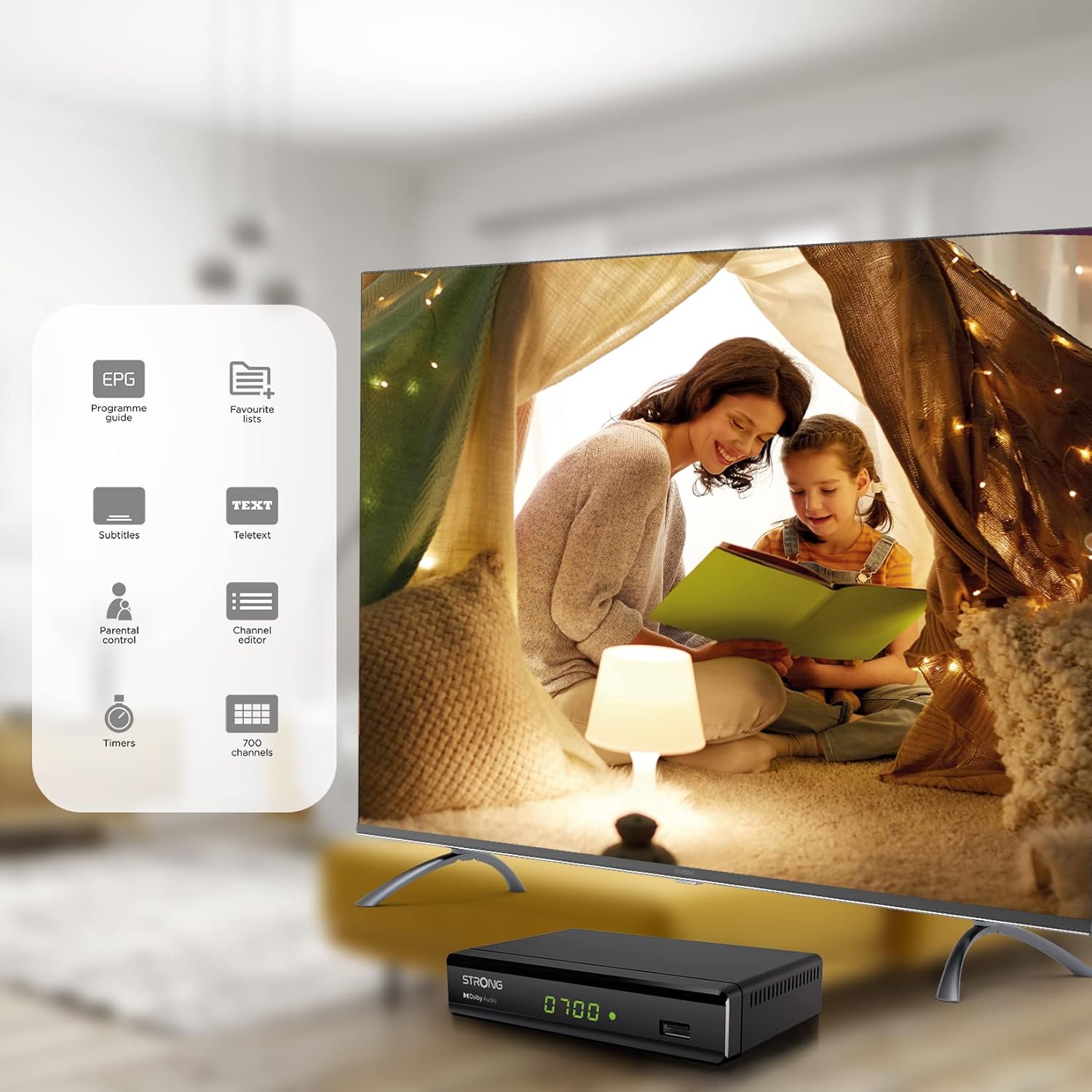
Figure 6.1: Visual representation of the Strong SRT 8119's features, including Electronic Program Guide (EPG), favorite lists, subtitles, teletext, parental control, channel editor, timers, and 700 channel capacity.
6.3. Media Playback and Recording (USB)
The decoder supports media playback from a USB storage device connected to the front USB port. Note: Recording function may not be active in all regions (e.g., Italy).
- Insert a USB flash drive or external hard drive into the front USB port.
- അമർത്തുക മീഡിയ button on the remote control to access the media player.
- ആവശ്യമുള്ളതിലേക്ക് നാവിഗേറ്റ് ചെയ്യുക file (video, audio, image) and press OK കളിക്കാൻ.
- To record a program, press the REC button during live TV. Ensure a USB device with sufficient free space is connected.
- To schedule a recording, use the EPG and select the program, then follow the on-screen prompts to set a timer.

Figure 6.2: The Strong SRT 8119 decoder shown in a living room setting, highlighting its USB playback and recording capabilities. A note indicates that recording is not implemented for Italy.
6.4. ചാനൽ മാനേജ്മെന്റ്
- Channel Editor: Access the channel editor via the മെനു to move, delete, or lock channels.
- പ്രിയപ്പെട്ട ലിസ്റ്റുകൾ: Create up to 4 favorite lists for TV and radio programs for quick access to your preferred channels.
- രക്ഷാകർതൃ നിയന്ത്രണം: Set a password to restrict access to certain channels or programs.
7. പരിപാലനം
- വൃത്തിയാക്കൽ: Use a soft, dry cloth to clean the exterior of the decoder. Do not use liquid or aerosol cleaners.
- സോഫ്റ്റ്വെയർ അപ്ഡേറ്റ്: ഇടയ്ക്കിടെ സ്ട്രോങ്ങ് പരിശോധിക്കുക website for available software updates. Updates can typically be installed via the USB port.
- സംഭരണം: If storing the device for an extended period, disconnect it from power and store in a cool, dry place.
8. പ്രശ്നപരിഹാരം
| പ്രശ്നം | സാധ്യമായ കാരണം | പരിഹാരം |
|---|---|---|
| ശക്തിയില്ല | പവർ കേബിൾ ബന്ധിപ്പിച്ചിട്ടില്ല; പവർ ഔട്ട്ലെറ്റ് തകരാറിലാണ്. | പവർ കണക്ഷനുകൾ പരിശോധിക്കുക; മറ്റൊരു ഔട്ട്ലെറ്റ് പരീക്ഷിക്കുക. |
| No signal / "No Signal" message | Antenna not connected; Antenna faulty; Incorrect input selected on TV. | Check antenna connection; Ensure antenna is working; Select correct HDMI/SCART input on your TV. |
| ചിത്രമില്ല, പക്ഷേ ശബ്ദം ഉണ്ട് | Video cable (HDMI/SCART) loose or faulty. | Check video cable connections; Try a different cable. |
| റിമോട്ട് കൺട്രോൾ പ്രവർത്തിക്കുന്നില്ല | Batteries depleted or inserted incorrectly; Obstruction between remote and decoder. | Replace batteries; Ensure correct polarity; Remove obstructions; Point remote directly at the decoder. |
| പ്രോഗ്രാമുകൾ റെക്കോർഡ് ചെയ്യാൻ കഴിയില്ല | USB device not connected or full; Recording function not available in your region. | Connect a USB device with sufficient space; Check regional limitations for recording. |
9 സ്പെസിഫിക്കേഷനുകൾ
| മോഡൽ നമ്പർ | SRT8119 |
| ഉൽപ്പന്ന അളവുകൾ | 4.41 x 5.98 x 1.5 ഇഞ്ച് |
| ഇനത്തിൻ്റെ ഭാരം | 9.5 ഔൺസ് |
| കണക്റ്റിവിറ്റി ടെക്നോളജി | Antenna (DVB-T2), HDMI, SCART, USB, Coaxial S/PDIF |
| വീഡിയോ എൻകോഡിംഗ് | H.265 |
| ചാനൽ ശേഷി | 700 ചാനലുകൾ |
| ബാറ്ററികൾ | 2 AAA ബാറ്ററികൾ (റിമോട്ടിന് ഉൾപ്പെടുത്തിയിരിക്കുന്നു) |
| ഓഡിയോ put ട്ട്പുട്ട് മോഡ് | ചുറ്റുക |
| സറൗണ്ട് സൗണ്ട് ചാനൽ കോൺഫിഗറേഷൻ | 5.1 |
10. പിന്തുണ
For further assistance, technical support, or to find useful resources, please visit the official Strong website. You can also find information and support on their Facebook profile and LinkedIn page.
Note: Specific contact numbers or direct links are not provided in this manual. Please refer to the official Strong webഏറ്റവും കാലികമായ പിന്തുണാ വിവരങ്ങൾക്കായി സൈറ്റ്.


