1 സുരക്ഷാ വിവരങ്ങൾ
Read and understand all instructions before beginning installation. This product must be installed in accordance with the applicable installation code by a person familiar with the construction and operation of the product and the hazards involved. Failure to follow these instructions may result in electric shock, fire, or serious personal injury.
- ഇൻസ്റ്റാളേഷൻ അല്ലെങ്കിൽ സർവീസ് ചെയ്യുന്നതിന് മുമ്പ് പ്രധാന സർക്യൂട്ട് ബ്രേക്കറിലെ വൈദ്യുതി ബന്ധം എല്ലായ്പ്പോഴും വിച്ഛേദിക്കുക.
- Ensure all electrical connections are in accordance with local codes, ordinances, and the National Electric Code.
- The fan must be mounted with a minimum of 7 feet (2.1 meters) clearance from the floor to the trailing edge of the blades.
- The fan must be mounted to a ceiling outlet box marked "Acceptable for Fan Support of 35 lbs (15.9 kg) or less."
- കേടായ ബ്ലേഡുകൾ ഉപയോഗിച്ച് ഫാൻ പ്രവർത്തിപ്പിക്കരുത്. ഏതെങ്കിലും ഒന്നിന് കേടുപാടുകൾ സംഭവിച്ചാൽ എല്ലാ ബ്ലേഡുകളും മാറ്റിസ്ഥാപിക്കുക.
- ഫാൻ ബ്ലേഡുകളുടെ പാതയിൽ വസ്തുക്കൾ സ്ഥാപിക്കുന്നത് ഒഴിവാക്കുക.
- This fan is ETL Listed for indoor and outdoor use. Ensure proper sealing for outdoor installations to prevent water damage.
2. പാക്കേജ് ഉള്ളടക്കം
ഇൻസ്റ്റാളേഷൻ ആരംഭിക്കുന്നതിന് മുമ്പ് എല്ലാ ഘടകങ്ങളും ഉണ്ടെന്ന് ഉറപ്പാക്കുക.
- മോട്ടോർ അസംബ്ലി
- ഫാൻ ബ്ലേഡുകൾ (3)
- Downrod (5" and 10" included for Downrod Mount)
- മൌണ്ടിംഗ് ബ്രാക്കറ്റ്
- മേലാപ്പ്
- വാൾ മൗണ്ട് ഉപയോഗിച്ച് റിമോട്ട് കൺട്രോൾ
- ലൈറ്റ് കിറ്റ് അസംബ്ലി
- ഹാർഡ്വെയർ പായ്ക്ക് (സ്ക്രൂകൾ, വയർ നട്ടുകൾ, വാഷറുകൾ)
- ഇൻസ്ട്രക്ഷൻ മാനുവൽ

Image: Main components of the OFANTOP 52-Inch Smart Ceiling Fan.
3. ഉൽപ്പന്ന സവിശേഷതകൾ
| ബ്രാൻഡ് | OFANTOP |
| മോഡലിൻ്റെ പേര് | 52YFT-7068 |
| വലിപ്പം | 52 ഇഞ്ച് |
| ബ്ലേഡുകളുടെ എണ്ണം | 3 |
| മോട്ടോർ തരം | ബ്രഷ് ഇല്ലാത്ത ഡിസി മോട്ടോർ |
| എയർ ഫ്ലോ കപ്പാസിറ്റി | മിനിറ്റിന് 6031 ക്യുബിക് അടി (CFM) |
| പവർ ഉറവിടം | എസി/ഡിസി (120 വോൾട്ട് എസി) |
| വാട്ട്tage | 35 വാട്ട്സ് |
| നിയന്ത്രണ രീതി | Remote, App (Smart Life), Voice (Alexa, Google Assistant) |
| ലൈറ്റ് സവിശേഷതകൾ | Dimmable, 3 Color Temperature Options (3000K, 4500K, 6000K), Memory Function |
| ഇൻഡോർ/ഔട്ട്ഡോർ ഉപയോഗം | Yes (ETL Listed, IP44 for outdoor) |
| മൗണ്ടിംഗ് തരം | Downrod Mount (5" and 10" downrods included) |
| ശബ്ദ നില | 35dB (നിശബ്ദ പ്രവർത്തനം) |
| ഊർജ്ജ കാര്യക്ഷമത | 75% Less Energy than AC Fan |

Image: Energy Efficiency label for the ceiling fan.
4. ഇൻസ്റ്റലേഷൻ നിർദ്ദേശങ്ങൾ
4.1 പ്രീ-ഇൻസ്റ്റലേഷൻ ചെക്ക്ലിസ്റ്റ്
- സർക്യൂട്ട് ബ്രേക്കറിൽ വൈദ്യുതി വിച്ഛേദിക്കപ്പെട്ടിട്ടുണ്ടെന്ന് ഉറപ്പാക്കുക.
- Confirm you have all necessary tools (screwdriver, wire strippers, ladder, etc.).
- Verify the mounting location can support the fan's weight (16.42 lbs).
- Choose the appropriate downrod length (5" or 10") for your ceiling height.
4.2 മൗണ്ടിംഗ് ഓപ്ഷനുകൾ
This fan supports both standard downrod mount and angled mount (up to 20 degrees).
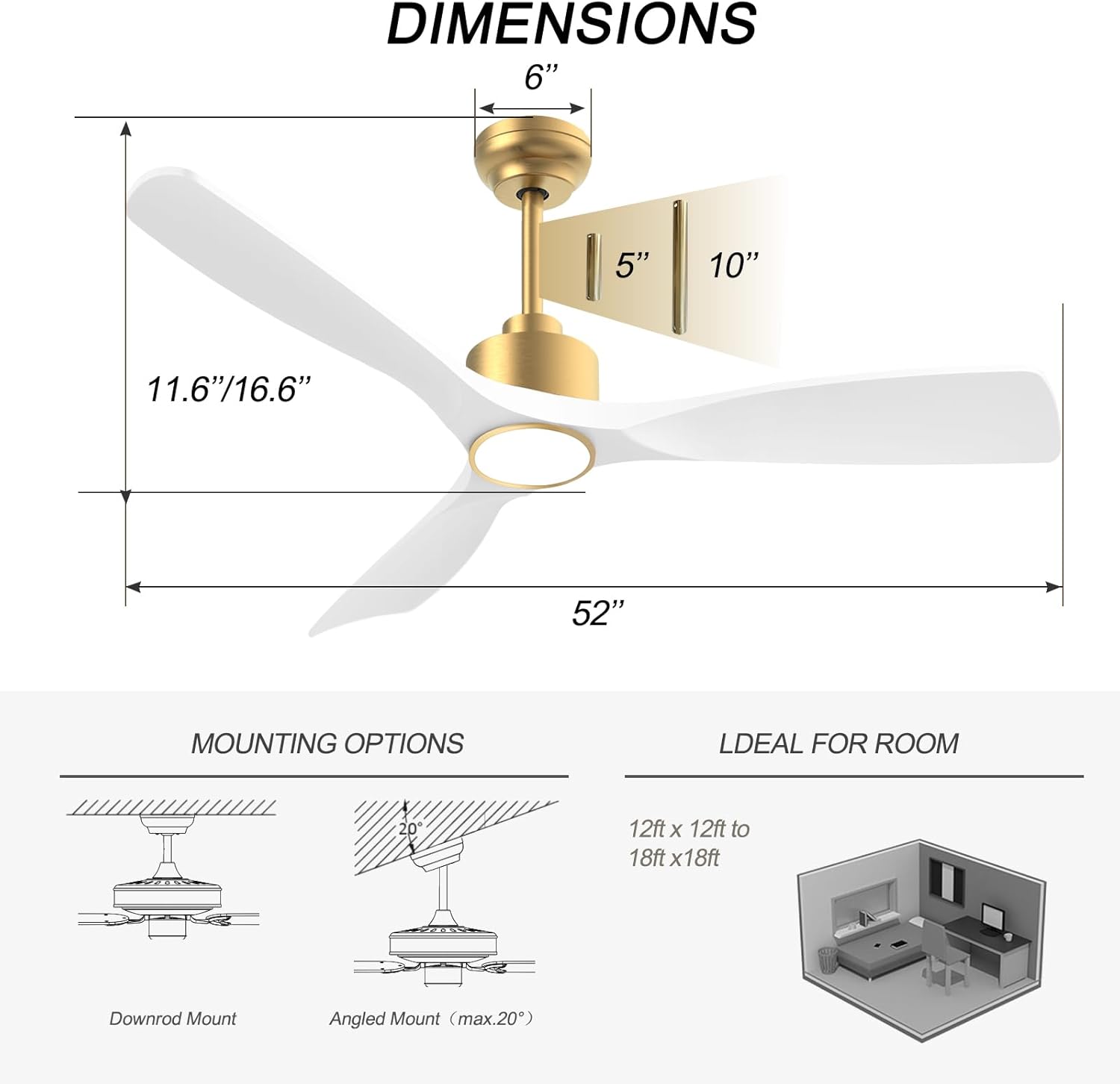
Image: Diagram showing fan dimensions and available downrod and angled mounting options.
- Attach the mounting bracket to the ceiling outlet box using the provided screws.
- Feed the electrical wires from the ceiling through the center hole of the mounting bracket.
- Assemble the downrod to the motor assembly, ensuring all screws are tightened securely.
- ഫാൻ അസംബ്ലി ശ്രദ്ധാപൂർവ്വം ഉയർത്തി മൗണ്ടിംഗ് ബ്രാക്കറ്റിൽ തൂക്കിയിടുക.
4.3 വയറിംഗ്
The fan features quick connectors for simplified wiring.
- Connect the fan's wires to the household wiring according to the color codes (typically black to black, white to white, green/bare copper to ground).
- വയർ നട്ടുകൾ ഉപയോഗിച്ച് എല്ലാ കണക്ഷനുകളും സുരക്ഷിതമാണെന്ന് ഉറപ്പാക്കുക.
- ഔട്ട്ലെറ്റ് ബോക്സിൽ എല്ലാ വയറുകളും വൃത്തിയായി തിരുകുക.
Video: A short demonstration of the fan's appearance and operation. This video is a 7-second preview and shows the fan spinning with its light on.
4.4 ബ്ലേഡ് അറ്റാച്ച്മെന്റ്
- Carefully attach each of the three fan blades to the motor housing using the provided screws.
- Ensure all screws are tightened evenly to prevent wobbling.
വീഡിയോ: ഒരു ഓവർview of the BOOSANT White and Gold Ceiling Fan, demonstrating its features and design. This video provides a general look at the fan's aesthetics and functionality.
4.5 ലൈറ്റ് കിറ്റ് ഇൻസ്റ്റാളേഷൻ
- ഫാൻ മോട്ടോറിൽ നിന്ന് ലൈറ്റ് കിറ്റ് വയറുകൾ അനുബന്ധ വയറുകളുമായി ബന്ധിപ്പിക്കുക.
- ഫാൻ മോട്ടോർ ഹൗസിംഗിന്റെ അടിയിൽ ലൈറ്റ് കിറ്റ് അസംബ്ലി ഉറപ്പിക്കുക.
5. പ്രവർത്തന നിർദ്ദേശങ്ങൾ
5.1 വിദൂര നിയന്ത്രണ പ്രവർത്തനങ്ങൾ
The included remote control allows for convenient operation of all fan and light functions.
- പവർ ഓൺ/ഓഫ്: ഫാനും ലൈറ്റും ഓണാക്കുകയോ ഓഫാക്കുകയോ ചെയ്യുന്നു.
- ഫാൻ വേഗത: Select from 6 different fan speeds.
- ലൈറ്റ് ഓൺ/ഓഫ്: പ്രകാശത്തെ സ്വതന്ത്രമായി നിയന്ത്രിക്കുന്നു.
- വർണ്ണ താപനില: Cycle through 3 color temperature options (3000K Warm White, 4500K Natural White, 6000K Cool White).
- ഡിമ്മർ: പ്രകാശത്തിന്റെ തെളിച്ചം ക്രമീകരിക്കുക.
- റിവേഴ്സിബിൾ മോട്ടോർ: Switch between summer (downward airflow) and winter (upward airflow) modes.
- ടൈമർ: Set the fan to turn off automatically after a set period (e.g., 1H, 2H, 4H, 8H).
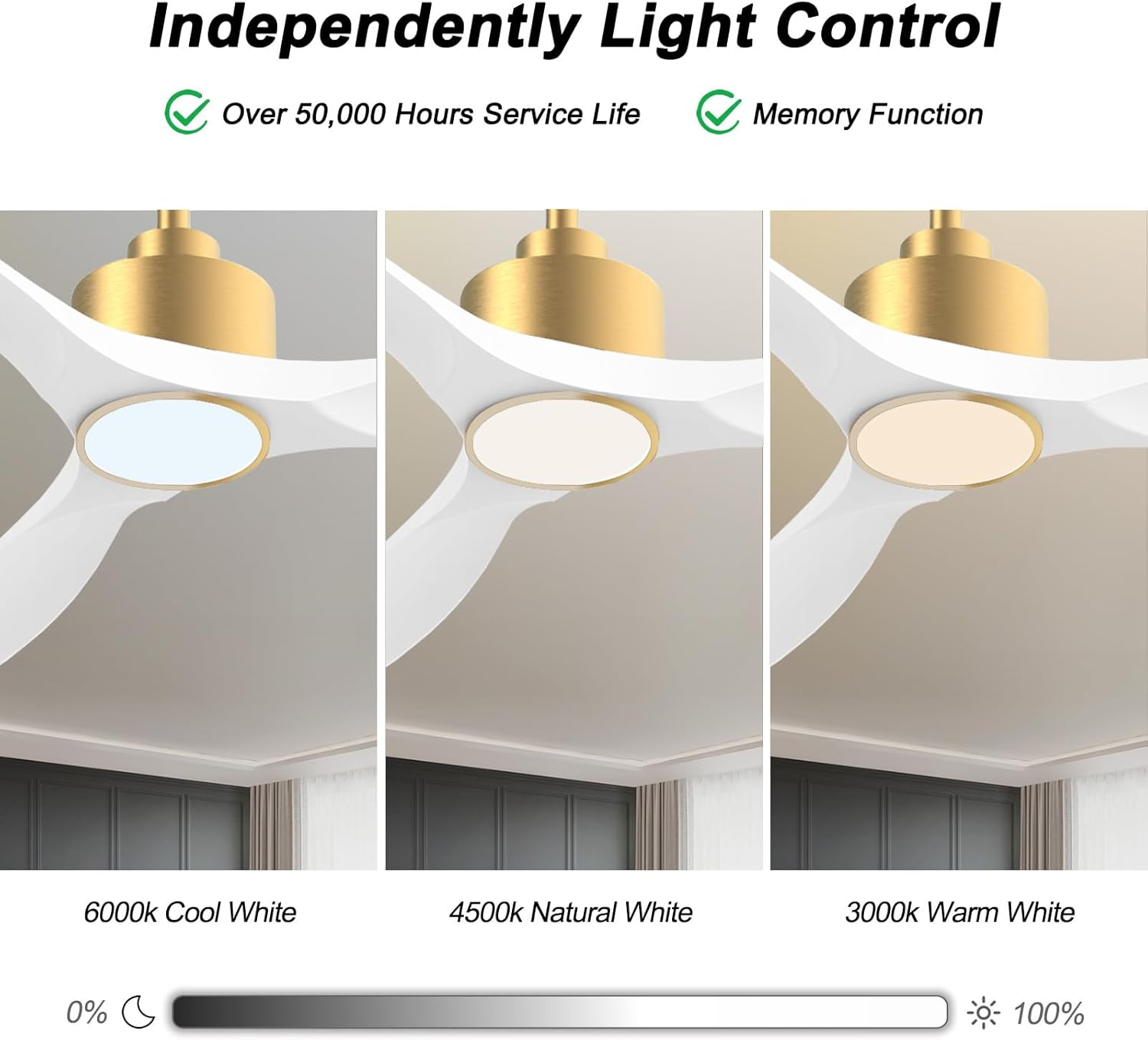
Image: Visual representation of the three adjustable light color temperatures (Warm, Natural, Cool White).

Image: Illustration of the reversible motor function for summer cooling and winter warm air circulation.
5.2 Smart Control (App/Voice)
The OFANTOP Smart Ceiling Fan can be controlled via the Smart Life app or voice assistants like Amazon Alexa and Google Assistant.
- ആപ്പ് ഡൗൺലോഡ്: നിങ്ങളുടെ ഉപകരണത്തിന്റെ ആപ്പ് സ്റ്റോറിൽ നിന്ന് "സ്മാർട്ട് ലൈഫ്" ആപ്പ് ഡൗൺലോഡ് ചെയ്യുക.
- Wi-Fi ജോടിയാക്കൽ:
- നിങ്ങളുടെ വൈഫൈ നെറ്റ്വർക്ക് 2.4GHz ആണെന്ന് ഉറപ്പാക്കുക.
- Turn the fan power off and back on at the switch.
- Within 10 seconds, press the "8H Fan Timer & Wi-Fi Pairing" button on the remote for 3 seconds to enter pairing mode.
- Open the Smart Life app, select "Add Device" or click the "+" in the upper right corner.
- Find the fan device and click "ADD".
- Fill in your 2.4GHz Wi-Fi name and password.
- Wait for the connection to complete. A beep from the fan indicates successful pairing.
- ശബ്ദ നിയന്ത്രണം: Once paired with the Smart Life app, enable the Smart Life skill/action in your Amazon Alexa or Google Assistant app to control the fan with voice commands.

Image: Depiction of smart control features, including compatibility with Google Assistant and Amazon Alexa.
Video: Instructions on how to connect the BOOSANT 102 Series Smart Ceiling Fan to the Smart Life app for mobile control. This video details the Wi-Fi pairing process.
6. പരിപാലനം
- വൃത്തിയാക്കൽ: ഫാൻ വൃത്തിയാക്കാൻ, മൃദുവായ, ഡി തുണി ഉപയോഗിച്ച് തുടയ്ക്കുക.amp തുണി. ഉരച്ചിലുകളുള്ള ക്ലീനറുകളോ ലായകങ്ങളോ ഉപയോഗിക്കരുത്.
- ബ്ലേഡ് കെയർ: Periodically check blade screws for tightness. Loose blades can cause wobbling and noise.
- പ്രകാശ സ്രോതസ്സ്: The integrated LED light source is designed for long life (over 50,000 hours) and is not user-replaceable.
- മോട്ടോർ: ഡിസി മോട്ടോർ അറ്റകുറ്റപ്പണികൾ ഇല്ലാത്തതാണ്, ലൂബ്രിക്കേഷൻ ആവശ്യമില്ല.
7. പ്രശ്നപരിഹാരം
| പ്രശ്നം | സാധ്യമായ കാരണം | പരിഹാരം |
|---|---|---|
| ഫാൻ ആരംഭിക്കുന്നില്ല | ഫാനിലേക്ക് വൈദ്യുതിയില്ല; അയഞ്ഞ വയർ കണക്ഷനുകൾ; റിമോട്ട് കൺട്രോൾ ബാറ്ററി കുറവാണ്. | Check circuit breaker; Verify all wire connections; Replace remote control battery. |
| ഫാൻ കുലുങ്ങുന്നു | Loose blade screws; Improperly balanced blades; Loose mounting bracket. | എല്ലാ ബ്ലേഡ് സ്ക്രൂകളും മുറുക്കുക; ആവശ്യമെങ്കിൽ ഒരു ബാലൻസിംഗ് കിറ്റ് (ഉൾപ്പെടുത്തിയിട്ടില്ല) ഉപയോഗിക്കുക; മൗണ്ടിംഗ് ബ്രാക്കറ്റ് സുരക്ഷിതമായി ഉറപ്പിച്ചിട്ടുണ്ടെന്ന് ഉറപ്പാക്കുക. |
| വെളിച്ചം പ്രവർത്തിക്കുന്നില്ല | Loose wire connection to light kit; LED driver failure; Remote control issue. | Check light kit wiring; Contact customer support if LED driver is suspected; Check remote battery/functionality. |
| റിമോട്ട് കൺട്രോൾ പ്രവർത്തിക്കുന്നില്ല | Battery depleted; Remote not paired with fan; Obstruction between remote and receiver. | Replace battery (23A 12V); Re-pair remote with fan (refer to pairing instructions); Ensure clear line of sight. |
| Wi-Fi കണക്ഷൻ പ്രശ്നങ്ങൾ | Incorrect Wi-Fi password; 5GHz Wi-Fi network; Fan not in pairing mode. | Verify password; Ensure 2.4GHz network is used; Follow app pairing instructions carefully. |
8. വാറൻ്റിയും പിന്തുണയും
OFANTOP products are manufactured to the highest quality standards. For specific warranty details and customer support, please refer to the warranty card included with your purchase or contact OFANTOP customer service directly. Keep your proof of purchase for warranty claims.
ബന്ധപ്പെടാനുള്ള വിവരങ്ങൾ: Refer to your product packaging or the official OFANTOP webഏറ്റവും കാലികമായ ബന്ധപ്പെടാനുള്ള വിശദാംശങ്ങൾക്കായി സൈറ്റ്.


