1. പാക്കേജ് ഉള്ളടക്കം
നിങ്ങളുടെ പാക്കേജിൽ എല്ലാ ഇനങ്ങളും ഉണ്ടെന്ന് ഉറപ്പാക്കുക:
- Spedal 4K Ultra HD Webcam FF931
- റിമോട്ട് കൺട്രോൾ
- മിനി ട്രൈപോഡ്
- USB-A മുതൽ USB-C അഡാപ്റ്റർ വരെ
- ദ്രുത ഗൈഡ്

Image 1.1: The Spedal 4K Webcam FF931 is shown with its included accessories: a remote control, a mini tripod, and a USB-A to USB-C adapter. The webcam features a sleek black design with '4K ULTRA HD' and 'Spedal' branding visible on the front.
2. സജ്ജീകരണം
2.1 ഫിസിക്കൽ ഇൻസ്റ്റലേഷൻ
The Spedal FF931 webcam offers flexible mounting options:
- Monitor/Laptop Mount: Unfold the integrated clip to securely attach the webcam to the top of your computer monitor or laptop screen. Ensure the clip is stable and the webcam is level.
- ട്രൈപോഡ് മൗണ്ട്: For desktop use or alternative positioning, screw the webcam onto the included mini tripod. The tripod provides stability and allows for precise angle adjustments.
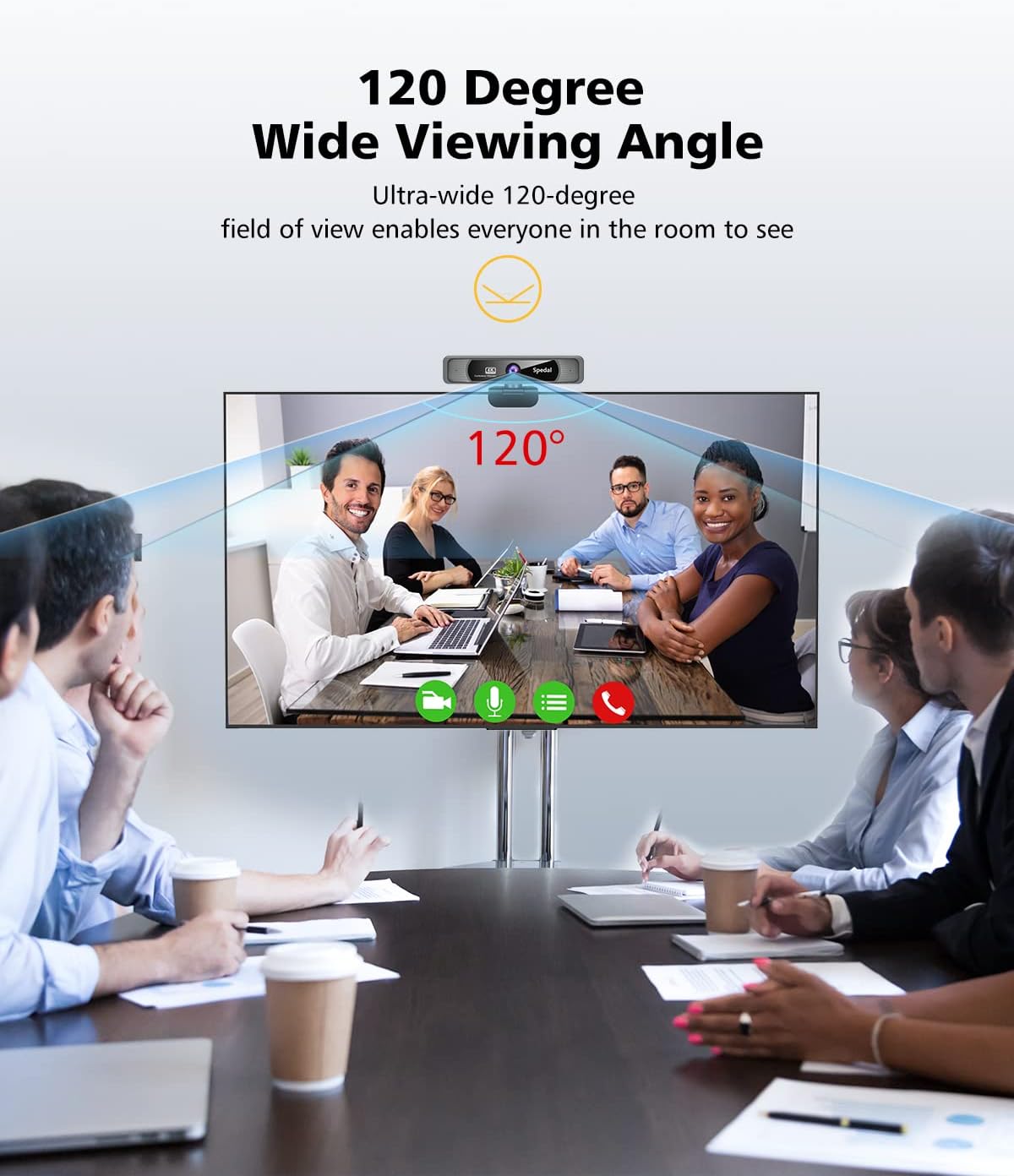
Image 2.1: The Spedal 4K Webcam FF931 is shown mounted on a laptop screen, illustrating its wide 120-degree field of view. The image depicts a group of people in a meeting, highlighting the webcam's ability to capture multiple participants within a single frame.
2.2 കണക്ഷൻ
ദി webcam features a Plug & Play design, requiring no driver installation:
- ബന്ധിപ്പിക്കുക webcam's USB cable directly to an available USB-A port on your computer.
- If your computer only has USB-C ports, use the provided USB-A to USB-C adapter to connect the webക്യാം
- ദി webcam will be automatically recognized by your operating system.

Image 2.2: This image demonstrates the versatility of the Spedal 4K Webcam FF931's connectivity. It shows the included USB Type-C adapter, allowing the webcam to be connected to both traditional USB-A ports and modern USB-C ports on a laptop, ensuring broad compatibility.
2.3 Optional Software
For advanced customization and features, optional Spedal software is available. This software allows you to adjust exposure, contrast, resolution, and colors, and provides features like image filters and a virtual camera.
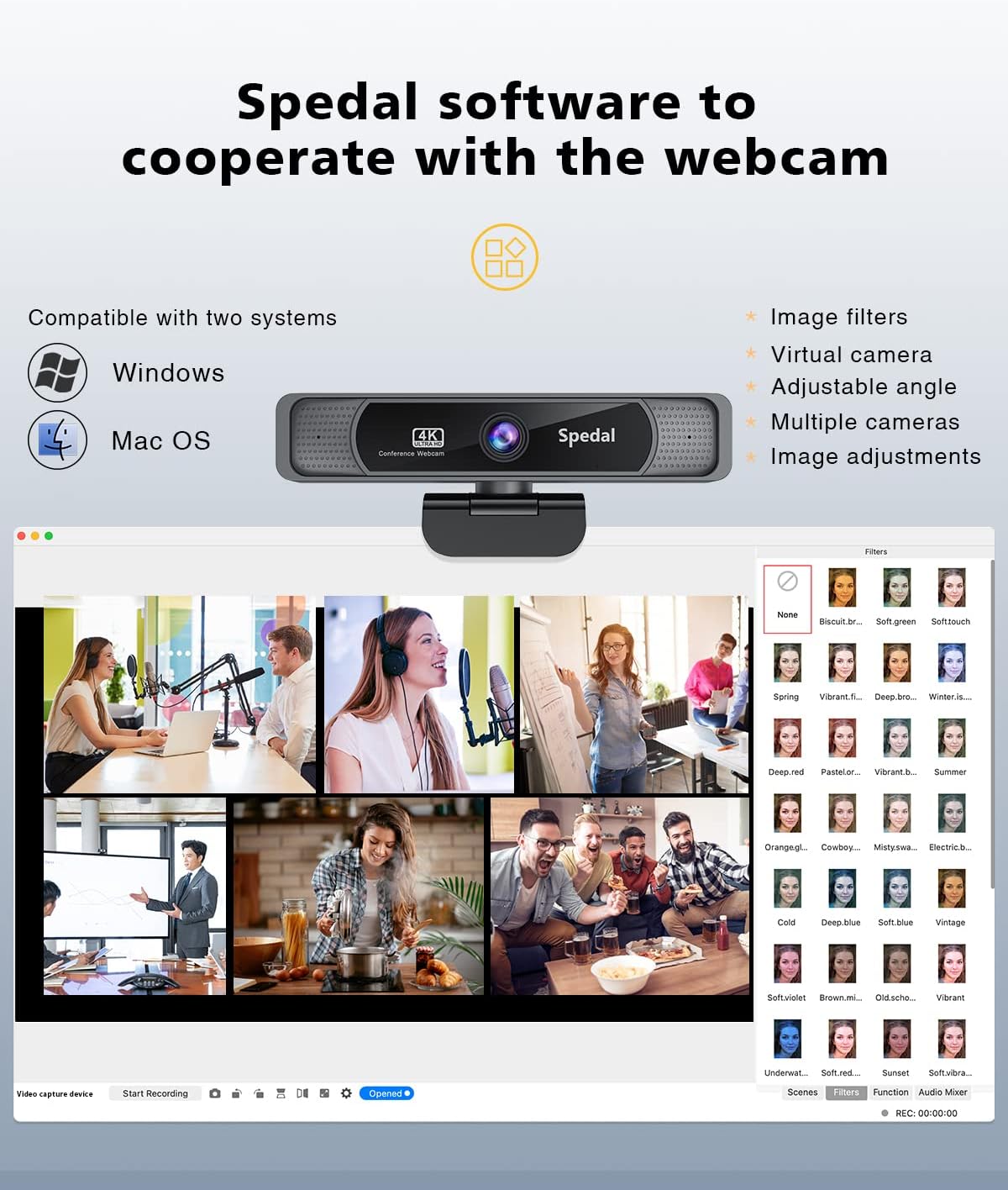
Image 2.3: The Spedal software interface is displayed, compatible with Windows and macOS. It showcases various features such as image filters, virtual camera options, adjustable angles, and multiple camera support, allowing users to fine-tune their webക്യാം അനുഭവം.
3. പ്രവർത്തന നിർദ്ദേശങ്ങൾ
3.1 അടിസ്ഥാന പ്രവർത്തനങ്ങൾ
- 4K അൾട്രാ എച്ച്ഡി വീഡിയോ: ദി webcam delivers sharp and clear video at 3840 x 2160 resolution at 30 frames per second (fps), utilizing an 8MP 1/2.7" CMOS sensor and a 7-lens professional optical lens.
- 120° Wide-Angle: ഒരു വിശാലമായ ക്യാപ്ചർ view, ideal for group meetings or presentations, ensuring everyone is visible.
- AI Noise-Reduction Microphones: Built-in stereo microphones with AI noise reduction technology capture clear audio up to 3 meters, minimizing background distractions.

Image 3.1: This comparison highlights the superior image quality of the Spedal 4K Webcam FF931. It shows a side-by-side view of a subject captured in 4K/8MP resolution versus 1080p, demonstrating the enhanced sharpness and detail provided by the 4K resolution.

Image 3.2: The Spedal 4K Webcam FF931 is depicted in a conference setting, emphasizing its built-in AI noise reduction dual microphones. The image illustrates how the microphones enhance clarity by minimizing background noise, ensuring crystal-clear online voice communication.
3.2 റിമോട്ട് കൺട്രോൾ ഉപയോഗിക്കുന്നു
ഉൾപ്പെടുത്തിയിരിക്കുന്ന റിമോട്ട് കൺട്രോൾ വിവിധ ഉപകരണങ്ങളിലേക്ക് സൗകര്യപ്രദമായ പ്രവേശനം നൽകുന്നു webcam settings:
- സൂം: Adjust the 4x digital zoom (effective at resolutions below 4K).
- തെളിച്ചം: Increase or decrease video brightness.
- സാച്ചുറേഷൻ: Adjust color saturation.
- നിശബ്ദമാക്കുക: മൈക്രോഫോൺ നിശബ്ദമാക്കുക അല്ലെങ്കിൽ അൺമ്യൂട്ട് ചെയ്യുക.
- Mirror & Flip: Change the image orientation.
- പാൻ: Adjust the camera's horizontal position when zoomed in.
- 50Hz/60Hz: Adjust the flicker frequency.
- ഫാക്ടറി പുന et സജ്ജമാക്കുക: സ്ഥിരസ്ഥിതി ക്രമീകരണങ്ങൾ പുനഃസ്ഥാപിക്കുക.
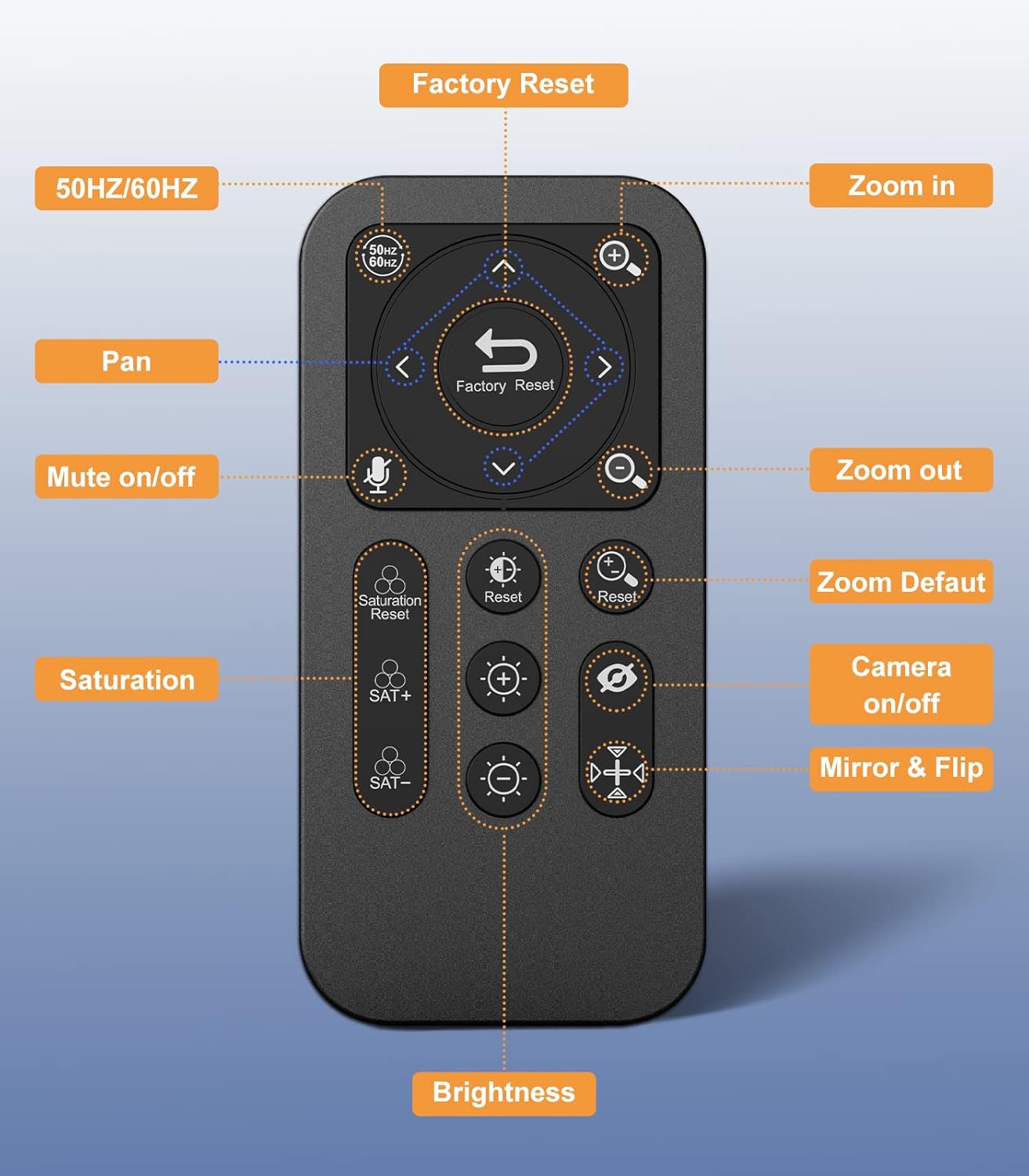
ചിത്രം 3.3: ഈ ചിത്രം വിശദമായ ഒരു view of the Spedal 4K Webcam FF931's remote control, with each button clearly labeled for its function. Key controls include Factory Reset, Zoom In/Out, Pan, Mute On/Off, Saturation adjustment, Brightness adjustment, Camera On/Off, and Mirror & Flip.

Image 3.4: This visual demonstrates the adjustable light correction feature of the Spedal 4K Webcam FF931. It shows three panels: underexposed, perfect, and overexposed, illustrating how users can adjust saturation and brightness via the remote control to achieve optimal image and video quality.

Image 3.5: This image illustrates the 4X digital zoom capability of the Spedal 4K Webcam FF931, controlled by the included remote. It displays a sequence of images from 1X to 4X zoom, along with controls for panning, highlighting the flexibility in framing the subject. Note: Zoom buttons function when resolution is below 4K.
3.3 അനുയോജ്യത
The Spedal FF931 webcam is compatible with a wide range of operating systems and platforms:
- ഓപ്പറേറ്റിംഗ് സിസ്റ്റങ്ങൾ: വിൻഡോസ്, മാകോസ്, ലിനക്സ്.
- പ്ലാറ്റ്ഫോമുകൾ: Zoom, Skype, Teams, OBS, and other major video conferencing and streaming applications.
4. പരിപാലനം
To ensure optimal performance and longevity of your Spedal FF931 webക്യാം:
- വൃത്തിയാക്കൽ: Gently wipe the lens and body of the webcam with a soft, dry, lint-free cloth. Avoid using harsh chemicals or abrasive materials.
- സംഭരണം: ഉപയോഗത്തിലില്ലാത്തപ്പോൾ, സംഭരിക്കുക webനേരിട്ടുള്ള സൂര്യപ്രകാശത്തിൽ നിന്നും ഉയർന്ന താപനിലയിൽ നിന്നും മാറി വൃത്തിയുള്ളതും വരണ്ടതുമായ സ്ഥലത്ത് ക്യാം വയ്ക്കുക.
5. പ്രശ്നപരിഹാരം
If you encounter issues with your Spedal FF931 webcam-ൽ, ഇനിപ്പറയുന്ന പൊതുവായ പരിഹാരങ്ങൾ കാണുക:
- ചിത്രം/വീഡിയോ ഇല്ല:
- യുഎസ്ബി കേബിൾ രണ്ടിലേക്കും സുരക്ഷിതമായി ബന്ധിപ്പിച്ചിട്ടുണ്ടെന്ന് ഉറപ്പാക്കുക webകാമും നിങ്ങളുടെ കമ്പ്യൂട്ടറും.
- മറ്റൊരു USB പോർട്ടിലേക്ക് കണക്റ്റുചെയ്യാൻ ശ്രമിക്കുക.
- നിങ്ങളുടെ കമ്പ്യൂട്ടർ പുനരാരംഭിക്കുക.
- Check your application's settings to ensure the Spedal webcam വീഡിയോ ഇൻപുട്ട് ഉപകരണമായി തിരഞ്ഞെടുത്തിരിക്കുന്നു.
- മോശം വീഡിയോ നിലവാരം:
- നിങ്ങളുടെ പരിസരത്ത് ആവശ്യത്തിന് വെളിച്ചം ഉറപ്പാക്കുക.
- വൃത്തിയാക്കുക webമൃദുവായ തുണി ഉപയോഗിച്ച് ക്യാം ലെൻസ്.
- Check your application's video settings to ensure 4K resolution is selected if supported.
- Use the remote control or optional Spedal software to adjust brightness and saturation.
- ശബ്ദമില്ല/മോശം ഓഡിയോ:
- Ensure the microphone is not muted via the remote control or your computer's settings.
- Check your application's audio settings to ensure the Spedal webcam is selected as the audio input device.
- Ensure you are within 3 meters of the webcam for optimal microphone pickup.
- ഫാക്ടറി പുന et സജ്ജമാക്കുക: If issues persist, use the 'Factory Reset' button on the remote control to restore the webcam to its default settings.
6 സ്പെസിഫിക്കേഷനുകൾ
| ബ്രാൻഡ് | സ്പെഡൽ |
| മോഡൽ | FF931 |
| ഫോട്ടോ സെൻസർ ടെക്നോളജി | സിഎംഒഎസ് (1/2.7") |
| വീഡിയോ റെക്കോർഡിംഗ് റെസല്യൂഷൻ | 4K (3840 x 2160) at 30fps, 1080p |
| പരമാവധി ഫോക്കൽ ദൈർഘ്യം | 1400 മില്ലിമീറ്റർ |
| പരമാവധി അപ്പേർച്ചർ | f/2 |
| വീഡിയോ ക്യാപ്ചർ ഫോർമാറ്റ് | MJPG, YUY2 |
| പിന്തുണയ്ക്കുന്ന ഓഡിയോ ഫോർമാറ്റ് | Multiple audio formats |
| കണക്റ്റിവിറ്റി ടെക്നോളജി | USB (USB-A, USB-C with adapter) |
| ഫീൽഡ് View | 120 ഡിഗ്രി |
| മൈക്രോഫോൺ | Built-in Stereo with AI Noise Reduction (3m pickup) |
| സൂം ചെയ്യുക | 4x Digital Zoom (via remote) |
7. ഉൽപ്പന്ന വീഡിയോകൾ
വീഡിയോ 7.1: ഈ വീഡിയോയിൽ ഒരു ഓവർ നൽകുന്നുview of the Spedal 4K Webcam FF931, demonstrating its unboxing, physical setup on a laptop, and the ease of its plug-and-play functionality. It also highlights the wide 120-degree viewing angle and the clarity of the 4K resolution, showcasing the remote control's basic functions like brightness and mute.
Video 7.2: This video further illustrates the capabilities of the Spedal 4K Webcam FF931, focusing on its 8-megapixel sensor and 120-degree wide-angle view, which allows for capturing more of the surrounding environment. It also demonstrates the effectiveness of the built-in noise reduction feature for clear audio and the convenience of the 4x digital zoom controlled by the remote.
8. വാറൻ്റിയും പിന്തുണയും
For warranty information, technical support, or service inquiries, please refer to the contact details provided in your product packaging or visit the official Spedal webവാറന്റി ക്ലെയിമുകൾക്കുള്ള വാങ്ങലിന്റെ തെളിവായി നിങ്ങളുടെ വാങ്ങൽ രസീത് സൂക്ഷിക്കുക.


