1. ആമുഖം
This manual provides comprehensive instructions for the setup, operation, and maintenance of your Bushnell Prime L20 Low Glow Trail Camera. Designed for wildlife monitoring and scouting, this camera captures high-quality images and videos with minimal disturbance to its environment. Please read this manual thoroughly to ensure optimal performance and longevity of your device.
2. പാക്കേജ് ഉള്ളടക്കം
നിങ്ങളുടെ പാക്കേജിൽ എല്ലാ ഇനങ്ങളും ഉണ്ടെന്ന് ഉറപ്പാക്കുക:
- ബുഷ്നെൽ പ്രൈം L20 ലോ ഗ്ലോ ട്രെയിൽ ക്യാമറ
- Adjustable Mounting Strap
- ഉപയോക്തൃ മാനുവൽ (ഈ പ്രമാണം)
3. ക്യാമറ ഘടകങ്ങൾ
Familiarize yourself with the key components of your trail camera:

ചിത്രം 1: മുൻഭാഗം view of the Bushnell Prime L20 Low Glow Trail Camera, showing the lens, PIR sensor, and IR LEDs.
- ലെൻസ്: ചിത്രങ്ങളും വീഡിയോകളും പകർത്തുന്നു.
- Low Glow IR LEDs: Provide illumination for night vision without a visible flash.
- പിഐആർ മോഷൻ സെൻസർ: റെക്കോർഡിംഗ് പ്രവർത്തനക്ഷമമാക്കുന്നതിനുള്ള ചലനം കണ്ടെത്തുന്നു.
- നിയന്ത്രണ പാനൽ: Located inside the camera, features an LCD display and navigation buttons for settings.
- ബാറ്ററി കമ്പാർട്ട്മെൻ്റ്: Houses 8 AA batteries (not included).
- SD കാർഡ് സ്ലോട്ട്: Accepts standard SD cards for storage (up to 32GB recommended).
- External Power Port: For optional external power sources.
- മൗണ്ടിംഗ് പോയിൻ്റുകൾ: For attaching the camera to a tree or other surfaces using the provided strap or compatible accessories.
4. പ്രാരംഭ സജ്ജീകരണം
4.1 ബാറ്ററി ഇൻസ്റ്റാളേഷൻ
The Bushnell Prime L20 requires 8 AA batteries for operation. For best performance and battery life, use high-quality alkaline or lithium batteries.

ചിത്രം 2: 8 AA ബാറ്ററികളുള്ള ബാറ്ററി കമ്പാർട്ട്മെന്റ്.
- സൈഡ് ക്ലിപ്പുകൾ അഴിച്ചുകൊണ്ട് ക്യാമറയുടെ മുൻ കവർ തുറക്കുക.
- Locate the battery tray at the bottom of the camera.
- കമ്പാർട്ടുമെന്റിനുള്ളിൽ സൂചിപ്പിച്ചിരിക്കുന്നതുപോലെ ശരിയായ പോളാരിറ്റി (+/-) ഉറപ്പാക്കിക്കൊണ്ട് 8 AA ബാറ്ററികൾ ഇടുക.
- Securely close the battery tray and the camera's front cover.
4.2 SD കാർഡ് ഇൻസ്റ്റലേഷൻ
A standard SD card (not included) is required to store photos and videos. The camera supports cards up to 32GB.
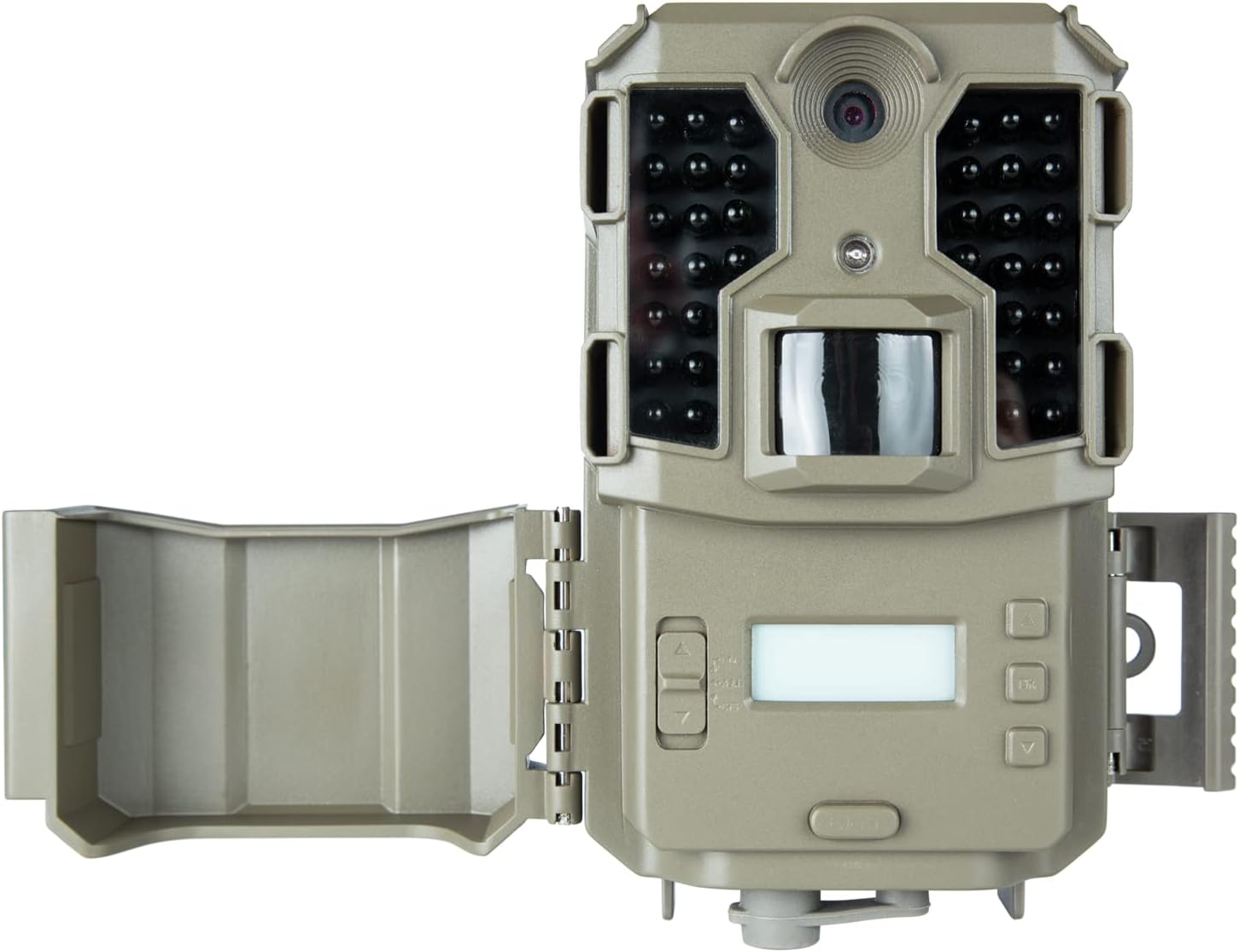
Figure 3: Internal controls and SD card slot.
- With the camera open, locate the SD card slot on the side of the control panel.
- മെറ്റൽ കോൺടാക്റ്റുകൾ താഴേക്ക് അഭിമുഖമായി വരുന്ന വിധത്തിൽ SD കാർഡ് ഇടുക, അങ്ങനെ അത് സ്ഥലത്ത് ക്ലിക്ക് ആകും വരെ.
- It is recommended to format the SD card using the camera's menu before first use to ensure compatibility and optimal performance.
4.3 ക്യാമറ മൗണ്ടിംഗ്
The camera can be mounted using the included strap or a compatible tree bracket.

Figure 4: Mounting the camera on a tree.
- ക്യാമറയുടെ പിൻഭാഗത്തുള്ള സ്ലോട്ടുകളിലൂടെ മൗണ്ടിംഗ് സ്ട്രാപ്പ് ത്രെഡ് ചെയ്യുക.
- Securely fasten the camera to a tree or post at the desired height and angle.
- ക്യാമറ സ്ഥിരതയുള്ളതാണെന്നും നിങ്ങൾ നിരീക്ഷിക്കാൻ ആഗ്രഹിക്കുന്ന ഭാഗത്തേക്ക് ചൂണ്ടിയിട്ടുണ്ടെന്നും ഉറപ്പാക്കുക.
5. പ്രവർത്തന നിർദ്ദേശങ്ങൾ
5.1 പവർ ഓൺ/ഓഫ്
To power on the camera, slide the power switch (located inside the camera) from 'OFF' to 'ON'. The LCD screen will illuminate. To power off, slide the switch back to 'OFF'.
5.2 മെനു നാവിഗേഷൻ
Use the navigation buttons (MENU, OK, Up/Down/Left/Right arrows) on the control panel to access and adjust settings.
- Press the 'MENU' button to enter the settings menu.
- Use the Up/Down arrow buttons to scroll through menu options.
- Press 'OK' to select an option or enter a sub-menu.
- Use the Left/Right arrow buttons to change values or settings.
- Press 'MENU' again to exit the current menu or save changes.
5.3 Photo and Video Settings
Customize your camera's capture preferences:
- ചിത്ര ക്രമീകരണങ്ങൾ: Choose between 3MP, 12MP, and 20MP resolutions for still photos.
- വീഡിയോ മിഴിവ്: Select 1080p at 30 FPS for detailed video recording.
- ട്രിഗർ വേഗത: The camera features a 0.4-second trigger speed with a 1-second recovery rate.
- Date, Time, and Temp Stamps: Enable these options to overlay capture details on every photo.
6. പരിപാലനം
6.1 വൃത്തിയാക്കൽ
Regularly clean the camera lens and PIR sensor window with a soft, lint-free cloth to ensure clear images and proper motion detection. Avoid abrasive cleaners.
6.2 ബാറ്ററി ലൈഫ്
The camera offers an approximate 12-month battery life with optimal usage. Replace batteries when the low battery indicator appears on the display.
6.3 സംഭരണം
When not in use, store the camera in a cool, dry place. Remove batteries if storing for extended periods to prevent leakage.
7. പ്രശ്നപരിഹാരം
നിങ്ങളുടെ ക്യാമറയിൽ പ്രശ്നങ്ങൾ നേരിടുകയാണെങ്കിൽ, പൊതുവായ പ്രശ്നങ്ങളും പരിഹാരങ്ങളും അറിയാൻ താഴെയുള്ള പട്ടിക പരിശോധിക്കുക:
| പ്രശ്നം | സാധ്യമായ പരിഹാരം |
|---|---|
| ക്യാമറ ഓണാക്കുന്നില്ല | Check battery polarity and ensure batteries are fully charged. Verify the power switch is in the 'ON' position. |
| ഫോട്ടോകളോ വീഡിയോകളോ എടുത്തിട്ടില്ല. | Ensure SD card is inserted correctly and formatted. Check PIR sensor sensitivity settings. Verify camera is armed (switch in 'ON' position). |
| മോശം ഇമേജ്/വീഡിയോ നിലവാരം | Clean the camera lens and PIR sensor window. Adjust image/video resolution settings. Ensure adequate lighting for daytime captures. |
| ചെറിയ ബാറ്ററി ലൈഫ് | Use high-quality alkaline or lithium batteries. Reduce the number of photos/videos captured per trigger event. |
8 സാങ്കേതിക സവിശേഷതകൾ
| ഫീച്ചർ | സ്പെസിഫിക്കേഷൻ |
|---|---|
| മോഡൽ നമ്പർ | 119930 മി |
| ചിത്ര മിഴിവ് | 3MP, 12MP, 20MP |
| വീഡിയോ റെസല്യൂഷൻ | 1080p @ 30 FPS |
| ട്രിഗർ വേഗത | 0.4 സെക്കൻഡ് |
| വീണ്ടെടുക്കൽ നിരക്ക് | 1 സെക്കൻഡ് |
| നൈറ്റ് വിഷൻ റേഞ്ച് | 100 feet (36 Low Glow LEDs) |
| വാട്ടർപ്രൂഫിംഗ് | IPX6 |
| പവർ ഉറവിടം | 8 AA ബാറ്ററികൾ (ഉൾപ്പെടുത്തിയിട്ടില്ല) |
| ബാറ്ററി ലൈഫ് | 12 മാസം വരെ |
| അളവുകൾ | 8.66 x 5.91 x 2.76 ഇഞ്ച് |
| ഭാരം | 1.19 പൗണ്ട് |
9. വാറൻ്റിയും പിന്തുണയും
9.1 വാറൻ്റി വിവരങ്ങൾ
Your Bushnell Prime L20 Low Glow Trail Camera is covered by a manufacturer's warranty against defects in materials and workmanship. Please refer to the product packaging or the official Bushnell webനിർദ്ദിഷ്ട വാറന്റി നിബന്ധനകൾക്കും വ്യവസ്ഥകൾക്കും സൈറ്റ്.
9.2 ഉപഭോക്തൃ പിന്തുണ
For technical assistance, troubleshooting, or product inquiries, please visit the official Bushnell Store or contact their customer service department. You can find more information at: ആമസോണിലെ ബുഷ്നെൽ സ്റ്റോർ


