1. ആമുഖം
Thank you for choosing the JUQITECH Backlit Keyboard Case. This product is designed to enhance your Samsung Galaxy Tab A8 10.5 (2022) experience by providing a protective case and a versatile detachable Bluetooth wireless keyboard. This manual provides essential information for setup, operation, and maintenance to ensure optimal performance.
2 അനുയോജ്യത
This keyboard case is specifically designed for the Samsung Galaxy Tab A8 10.5 inch (2022 Release). It is compatible with the following model numbers:
- SM-X200
- SM-X205
- SM-X207
To verify your tablet's model number, navigate to 'Settings' > 'About tablet' > 'Model' on your device. This case is not compatible with any other tablet models. The Samsung Tablet and S Pen are not included with this product.
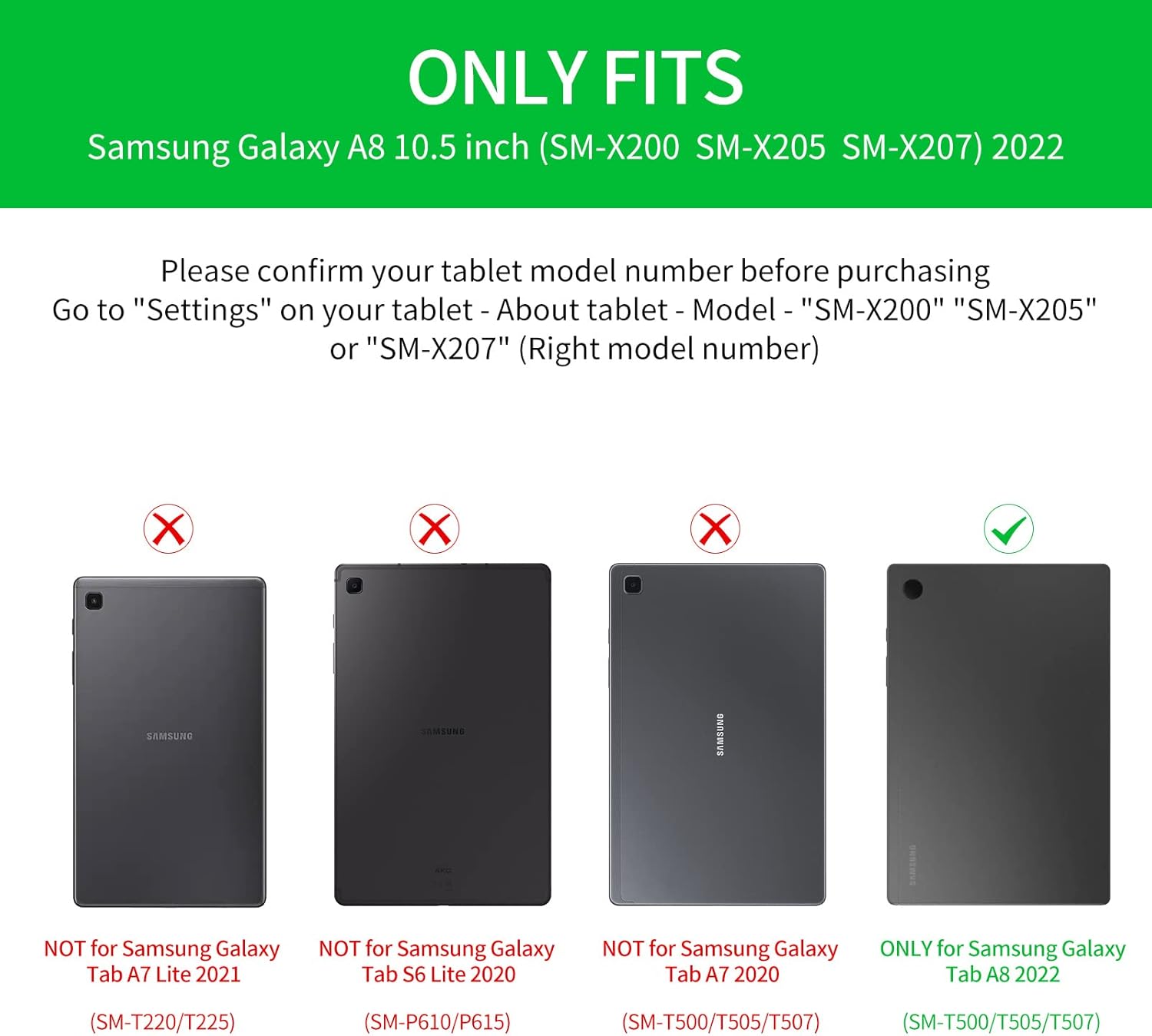
Image: Compatibility chart indicating supported Samsung Galaxy Tab A8 10.5 (2022) models and incompatible models.
3. പാക്കേജ് ഉള്ളടക്കം
പാക്കേജിൽ ഇനിപ്പറയുന്ന ഇനങ്ങൾ ഉണ്ടോ എന്ന് പരിശോധിക്കുക:
- 1 x Smart Case for Galaxy Tab A8 10.5"
- 1 x Wireless Backlit Keyboard
- 2 x USB ചാർജിംഗ് കേബിളുകൾ
- 1 x ഉപയോക്തൃ മാനുവൽ
4. സജ്ജീകരണ നിർദ്ദേശങ്ങൾ
4.1 പ്രാരംഭ ചാർജിംഗ്
Before first use, fully charge the wireless keyboard for 2-3 മണിക്കൂർ using one of the provided USB cables. The keyboard has a built-in Lithium-ion battery.
4.2 ബ്ലൂടൂത്ത് ജോടിയാക്കൽ
- കീബോർഡ് ചാർജ് ചെയ്തിട്ടുണ്ടെന്ന് ഉറപ്പാക്കുക.
- Turn on the keyboard using the power switch (usually located on the side or top edge).
- On your Samsung Galaxy Tab A8, go to 'Settings' > 'Connected devices' > 'Bluetooth'.
- ബ്ലൂടൂത്ത് പ്രവർത്തനക്ഷമമാക്കി ലഭ്യമായ ഉപകരണങ്ങൾക്കായി തിരയുക.
- Select the keyboard (it may appear as 'Bluetooth Keyboard' or a similar name) from the list to pair.
- ജോടിയാക്കൽ പ്രക്രിയ പൂർത്തിയാക്കാൻ ഏതെങ്കിലും ഓൺ-സ്ക്രീൻ നിർദ്ദേശങ്ങൾ പാലിക്കുക.
4.3 സിസ്റ്റം സ്വിച്ചിംഗ്
The keyboard is compatible with iOS, Android, and Windows operating systems. To optimize keyboard functions for your tablet, switch to the appropriate system:
- വേണ്ടി ഐഒഎസ്: അമർത്തുക Fn + Q
- വേണ്ടി ആൻഡ്രോയിഡ്: അമർത്തുക Fn + W
- വേണ്ടി വിൻഡോസ്: അമർത്തുക Fn + E

Image: Keyboard layout illustrating the function keys for switching between different operating systems.
5. പ്രവർത്തന നിർദ്ദേശങ്ങൾ
5.1 കീബോർഡ് ബാക്ക്ലൈറ്റ് നിയന്ത്രണം
കുറഞ്ഞ വെളിച്ചത്തിൽ ടൈപ്പ് ചെയ്യുന്നതിനായി കീബോർഡിൽ 7-കളർ ബാക്ക്ലൈറ്റിംഗ് ഉണ്ട്.
- അമർത്തുക bulb key to cycle through stable backlight mode, breathing backlight mode, or turn off the backlight.
- In stable backlight mode, press the RGB key to change between the 7 available colors: blue, green, red, light blue, purple, yellow, and white.

Image: Close-up of the keyboard demonstrating the backlit keys and color options.
5.2 Detachable Design and Viewing കോണുകൾ
The keyboard is magnetically attached to the case, allowing for easy detachment. This feature enables flexible viewing positions for your tablet.
- ക്രമീകരിക്കുന്നതിന് viewing angle, detach the keyboard and reposition your tablet within the case.
- The case's design supports multiple viewing angles, ideal for watching videos, reading, working, or playing games.

Image: The keyboard case configured to hold the tablet at an optimal viewing angle, simulating a laptop setup.
5.3 മൾട്ടിമീഡിയ കുറുക്കുവഴികൾ
The keyboard includes convenient multimedia shortcut keys for quick access to various functions. Refer to the keyboard layout for specific key assignments such as volume control, playback, and screen lock.

ചിത്രം: വിശദമായത് view of the keyboard's multimedia shortcut keys.
6. പരിപാലനം
To ensure the longevity and performance of your JUQITECH keyboard case, follow these maintenance guidelines:
- വൃത്തിയാക്കൽ: Wipe the case and keyboard with a soft, damp തുണി. കഠിനമായ രാസവസ്തുക്കളോ ഉരച്ചിലുകളുള്ള ക്ലീനറുകളോ ഒഴിവാക്കുക.
- സംരക്ഷണം: The case is designed with oil resistance, dustproof properties, impact resistance, anti-fingerprint coating, and scratch-proof material. However, avoid exposing it to extreme temperatures or direct sunlight for extended periods.
- Keyboard Care: The keyboard features a high-quality waterproof conductive film, offering some protection against minor spills. In case of liquid contact, immediately power off the keyboard and allow it to dry completely before reuse.
- സംഭരണം: When not in use, store the keyboard case in a clean, dry environment.

Image: Visual representation of the case's protective features and material quality.
7. പ്രശ്നപരിഹാരം
If you encounter issues with your keyboard case, please refer to the following common solutions:
- കീബോർഡ് കണക്റ്റുചെയ്യുന്നില്ല:
- കീബോർഡ് പൂർണ്ണമായും ചാർജ് ചെയ്തിട്ടുണ്ടെന്ന് ഉറപ്പാക്കുക.
- Verify Bluetooth is enabled on your tablet and the keyboard is powered on.
- Try unpairing and re-pairing the keyboard in your tablet's Bluetooth settings.
- നിങ്ങളുടെ ടാബ്ലെറ്റും കീബോർഡും പുനരാരംഭിക്കുക.
- ബാക്ക്ലൈറ്റ് പ്രവർത്തിക്കുന്നില്ല:
- കീബോർഡ് ചാർജ് ചെയ്തിട്ടുണ്ടെന്ന് ഉറപ്പാക്കുക.
- Press the bulb key to cycle through backlight modes.
- പ്രതികരിക്കാത്ത കീകൾ:
- കീബോർഡ് ബ്ലൂടൂത്ത് വഴി ശരിയായി ബന്ധിപ്പിച്ചിട്ടുണ്ടോ എന്ന് പരിശോധിക്കുക.
- Ensure the correct operating system mode (Fn+Q/W/E) is selected for your tablet.
- If specific keys are unresponsive, try cleaning around the keys.
- Tablet Sleep/Wake Function Issues:
- For optimal sleep/wake functionality, it is recommended to remove the keyboard and use the case separately.
- Unexpected Keyboard Behavior:
- If the keyboard exhibits unusual behavior (e.g., taking screenshots, resetting pages), ensure your tablet's software is up to date.
- Try resetting the keyboard by turning it off and on. If the issue persists, contact customer support.
8 സ്പെസിഫിക്കേഷനുകൾ
| ഫീച്ചർ | വിശദാംശങ്ങൾ |
|---|---|
| ബ്രാൻഡ് | ജുകിടെക് |
| മോഡൽ നമ്പർ | എസ്ജിടിഎ8 |
| അനുയോജ്യമായ ഉപകരണങ്ങൾ | Samsung Galaxy Tab A8 10.5" SM-X200 SM-X205 SM-X207 (2022) |
| കണക്റ്റിവിറ്റി ടെക്നോളജി | ബ്ലൂടൂത്ത് |
| കീബോർഡ് വിവരണം | Wireless Bluetooth Rechargeable Detachable 7 Colors Backlit Keyboard |
| പ്രത്യേക സവിശേഷതകൾ | Backlit, Multi-Angle Adjustable, Rechargeable, Soft Full Protective Case, Transforms Tablet to Laptop |
| കീബോർഡ് ബാക്ക്ലൈറ്റിംഗ് വർണ്ണ പിന്തുണ | RGB (7 നിറങ്ങൾ) |
| മെറ്റീരിയൽ | Polyurethane (PU), Thermoplastic Polyurethane (TPU) |
| ഇനത്തിൻ്റെ ഭാരം | 1.3 പൗണ്ട് |
| ബാറ്ററികൾ | 1 ലിഥിയം അയോൺ ബാറ്ററി (ഉൾപ്പെടുത്തിയിരിക്കുന്നു) |
| ചാർജിംഗ് സമയം | 2-3 മണിക്കൂർ |
| ജോലി സമയം | Up to 100 hours (without backlight) |
| ബാക്ക്ലിറ്റ് പ്രവർത്തന സമയം | 3-5 മണിക്കൂർ |
9. വാറൻ്റിയും പിന്തുണയും
JUQITECH offers a 24-hour after-sales service guarantee for your purchase. If you encounter any problems or have questions regarding your product, please do not hesitate to contact us. Our support team is available to assist you.
For assistance, please refer to the contact information provided with your product packaging or visit the official JUQITECH webസൈറ്റ്.

