ആമുഖം
This manual provides essential information for the safe operation, maintenance, and troubleshooting of your EVERCROSS 6.5'' App-Enabled Bluetooth Hoverboard. Please read this manual thoroughly before first use to ensure a safe and enjoyable riding experience. Retain this manual for future reference.
സുരക്ഷാ മാർഗ്ഗനിർദ്ദേശങ്ങൾ
Operating a hoverboard carries inherent risks. Adhering to these safety guidelines is crucial to prevent injury or damage.
- ഹെൽമറ്റ്, കാൽമുട്ട് പാഡുകൾ, എൽബോ പാഡുകൾ എന്നിവയുൾപ്പെടെ ഉചിതമായ സുരക്ഷാ ഗിയർ എപ്പോഴും ധരിക്കുക.
- ഓരോ ഉപയോഗത്തിനും മുമ്പ് ഹോവർബോർഡ് പൂർണ്ണമായും ചാർജ് ചെയ്തിട്ടുണ്ടെന്ന് ഉറപ്പാക്കുക.
- മദ്യത്തിന്റെയും മയക്കുമരുന്നിന്റെയും ലഹരിയിൽ വാഹനമോടിക്കരുത്.
- പ്രാദേശിക ഗതാഗത നിയമങ്ങളും ചട്ടങ്ങളും പാലിക്കുക.
- Avoid riding on uneven surfaces, steep slopes exceeding 15 degrees, or near obstacles.
- The maximum weight capacity is 220 lbs. Do not exceed this limit.
- കുട്ടികൾ മുതിർന്നവരുടെ മേൽനോട്ടത്തിൽ മാത്രമേ ഹോവർബോർഡ് പ്രവർത്തിപ്പിക്കാൻ പാടുള്ളൂ.
- Be aware of your surroundings and other people or objects.
- The Gyro Stabilization System assists with balance, but users must still maintain control.
- Pay attention to safety system warnings, such as high-speed reminders and low battery alerts.
പാക്കേജ് ഉള്ളടക്കം
പാക്കേജ് തുറക്കുമ്പോൾ, എല്ലാ ഇനങ്ങളും നിലവിലുണ്ടെന്നും നല്ല നിലയിലാണെന്നും ഉറപ്പാക്കുക:
- EVERCROSS 6.5'' App-Enabled Bluetooth Hoverboard
- ചാർജർ
- ഉപയോക്തൃ മാനുവൽ (ഈ പ്രമാണം)
സജ്ജമാക്കുക
1. Charging the Hoverboard
Before initial use, fully charge the hoverboard. Connect the charger to the charging port on the hoverboard and then plug it into a standard electrical outlet. The indicator light on the charger will change (e.g., from red to green) when charging is complete. Disconnect the charger once fully charged.

Image: The EVERCROSS hoverboard connected to its power adapter for charging.
2 പ്രാരംഭ കാലിബ്രേഷൻ
If the hoverboard does not seem balanced or responsive, it may require calibration:
- Place the hoverboard on a flat, level surface.
- Ensure the hoverboard is powered off.
- Press and hold the power button for approximately 5-10 seconds until the indicator lights flash.
- Release the button and wait for the lights to stop flashing, indicating successful calibration.
3. ആപ്പ് കണക്ഷൻ (ബ്ലൂടൂത്ത്)
The EVERCROSS hoverboard features app connectivity for enhanced control and monitoring:
- Download the official EVERCROSS app from your device's app store.
- നിങ്ങളുടെ സ്മാർട്ട്ഫോണിൽ ബ്ലൂടൂത്ത് പ്രവർത്തനക്ഷമമാക്കിയിട്ടുണ്ടെന്ന് ഉറപ്പാക്കുക.
- Power on the hoverboard.
- Open the EVERCROSS app and follow the on-screen instructions to pair with your hoverboard.
- Once connected, you can customize riding modes, adjust sensitivity, monitor battery and speed, and play music through the built-in Bluetooth speaker.
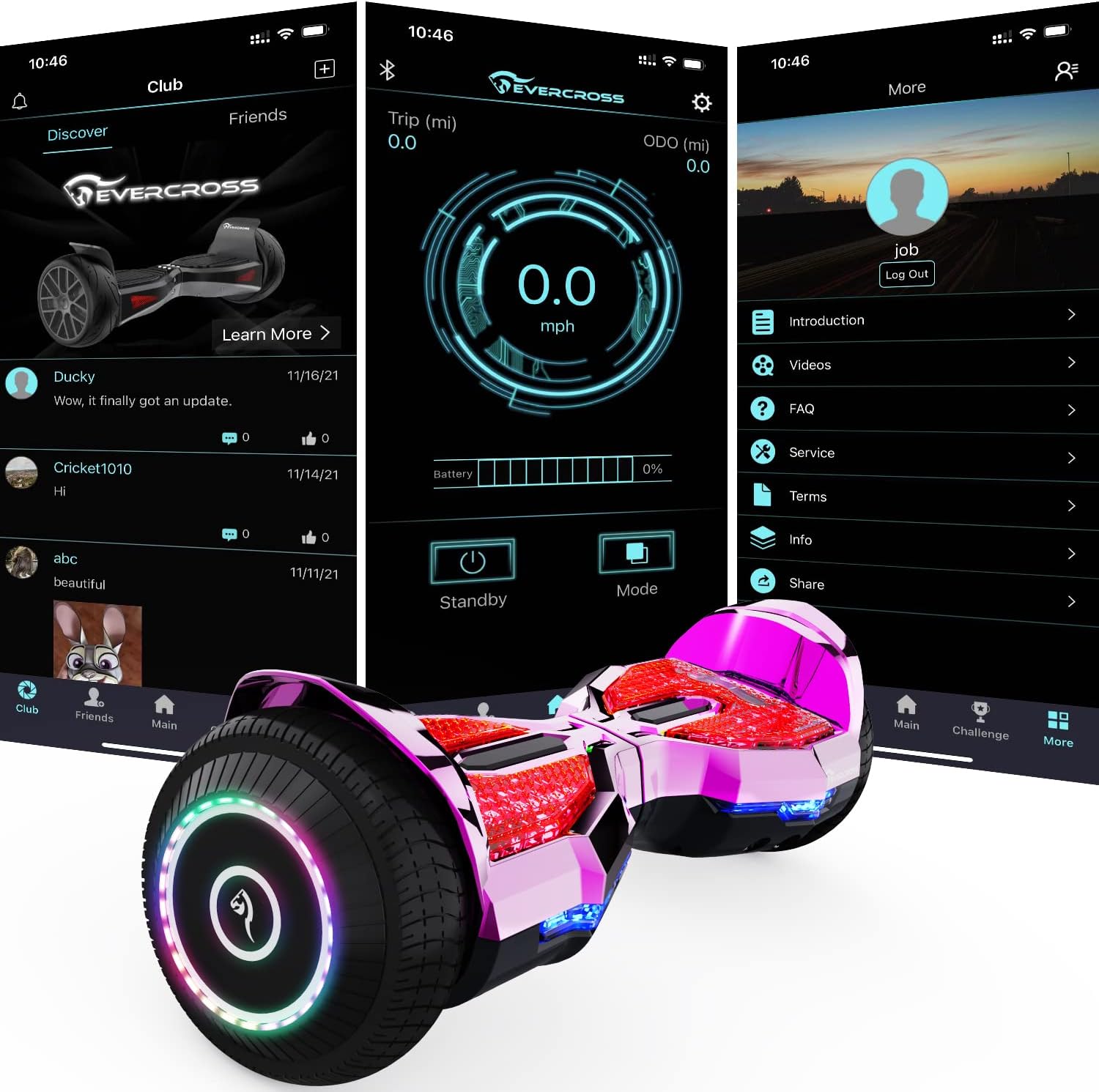
Image: A smartphone displaying the EVERCROSS app interface, showing various control and monitoring options for the hoverboard.
Operating the Hoverboard
റൈഡിംഗ് അടിസ്ഥാനങ്ങൾ
Learning to ride takes practice. Start in a safe, open area with assistance if needed.
- മൗണ്ടിംഗ്: Place one foot firmly on a footpad, then quickly step up with the other foot. Maintain a relaxed posture.
- മുന്നോട്ട്/പിന്നോട്ട്: മുന്നോട്ട് നീങ്ങാൻ അല്പം മുന്നോട്ട് ചായുക, പിന്നിലേക്ക് നീങ്ങാൻ അല്പം പിന്നോട്ട് ചായുക.
- തിരിയുന്നു: To turn left, press your right foot forward. To turn right, press your left foot forward.
- ഡിസ്മൗണ്ട് ചെയ്യുന്നു: Step off one foot at a time, preferably backward.

Image: The EVERCROSS hoverboard in a vibrant pink color, showcasing its glowing pedals and wheels.
App Features and Customization
The EVERCROSS app provides advanced control over your hoverboard's functions:
- Riding Mode Selection: Choose between different riding modes (e.g., beginner, normal, advanced) to adjust acceleration and responsiveness.
- സെൻസിറ്റിവിറ്റി അഡ്ജസ്റ്റ്മെന്റ്: Fine-tune how responsive the hoverboard is to your movements.
- GPS Real-time Positioning: Track your hoverboard's location.
- സംഗീത പ്ലേബാക്ക്: Connect your phone to the hoverboard's Bluetooth speaker to play music during your ride.
- ഇന്റലിജന്റ് മോണിറ്ററിംഗ്: View real-time battery level, speed, and distance traveled.
Lights and Aesthetics
The hoverboard features colorful glowing pedals, super bright LED lights, and flashing wheels for enhanced visibility and a dynamic appearance.

Image: The hoverboard illuminated with colorful lights, highlighting its Bluetooth music capability.

Image: A display of multiple EVERCROSS hoverboards, demonstrating the variety of color changes and the cool glow pedal feature.
മെയിൻ്റനൻസ്
ബാറ്ററി കെയർ
- ബാറ്ററി ആയുസ്സ് വർദ്ധിപ്പിക്കുന്നതിന്, റീചാർജ് ചെയ്യുന്നതിന് മുമ്പ് ബാറ്ററി പൂർണ്ണമായും തീർന്നുപോകുന്നത് ഒഴിവാക്കുക.
- Charge the hoverboard regularly, even if not in use, to maintain battery health.
- Store the hoverboard in a cool, dry place away from direct sunlight and extreme temperatures.
- The built-in Protection Circuits System helps prevent overheating and fire, but proper charging practices are still essential.
വൃത്തിയാക്കലും സംഭരണവും
- പരസ്യം ഉപയോഗിച്ച് ഹോവർബോർഡ് തുടയ്ക്കുകamp അഴുക്കും പൊടിയും നീക്കം ചെയ്യാൻ തുണി ഉപയോഗിക്കുക. കഠിനമായ രാസവസ്തുക്കളോ അഗ്രസീവ് ക്ലീനറുകളോ ഉപയോഗിക്കരുത്.
- Ensure the hoverboard is dry before storing or charging.
- When storing for extended periods, charge the battery to about 50% and recharge every 2-3 months.
ട്രബിൾഷൂട്ടിംഗ്
This section addresses common issues you might encounter with your EVERCROSS hoverboard.
| പ്രശ്നം | സാധ്യമായ കാരണം | പരിഹാരം |
|---|---|---|
| Hoverboard not turning on. | ബാറ്ററി ചാർജ് കുറവാണ്; പവർ ബട്ടൺ ശരിയായി അമർത്തിയിട്ടില്ല. | Charge the hoverboard fully. Press and hold the power button firmly. |
| Hoverboard not balancing correctly. | Needs calibration; Uneven surface. | Perform a calibration as described in the Setup section. Move to a flat, level surface. |
| ബ്ലൂടൂത്ത് കണക്ഷൻ പ്രശ്നങ്ങൾ. | Bluetooth off on device; Hoverboard not in pairing mode; App issue. | Ensure Bluetooth is on. Restart hoverboard and app. Try re-pairing. |
| കുറഞ്ഞ വേഗത അല്ലെങ്കിൽ പരിധി. | Low battery; Overweight rider; Riding conditions (e.g., uphill, rough terrain). | Charge fully. Ensure rider weight is within limits. Ride on smoother, flatter surfaces. |
| അസാധാരണമായ ശബ്ദങ്ങൾ അല്ലെങ്കിൽ വൈബ്രേഷനുകൾ. | Loose components; Internal issue. | Stop using immediately. Contact customer support for assistance. Do not attempt to repair yourself. |
സ്പെസിഫിക്കേഷനുകൾ
Key technical specifications for the EVERCROSS EV2 Hoverboard:
- മോഡൽ: EV2
- അളവുകൾ (L x W x H): 24.29 x 9.17 x 8.58 ഇഞ്ച്
- ഭാരം: 6.95 കിലോഗ്രാം
- മെറ്റീരിയൽ: പ്ലാസ്റ്റിക്
- നിറം: ROSE RED (available in other colors)
- പരമാവധി വേഗത: Up to 9.32 mph (15 Kilometers per Hour)
- പരമാവധി ശ്രേണി: Up to 6.2 miles (varies with conditions)
- പരമാവധി ക്ലൈംബിംഗ് ആംഗിൾ: 15° വരെ
- പരമാവധി ലോഡ് കപ്പാസിറ്റി: 220 പൗണ്ട്
- ടയർ വലിപ്പം: 6.5 inches Solid Tire
- മോട്ടോർ തരം: Dual Brushless Motors
- പ്രത്യേക സവിശേഷതകൾ: App-Enabled Control, Bluetooth Speaker, LED Lights, Flashing Wheels, Gyro Stabilization System
- ഉൾപ്പെടുന്നു: ചാർജർ

Image: A diagram illustrating the hoverboard's dimensions (23.7 inches length, 7 inches height) and key features like 6.5-inch solid tires, 25-degree slope capability, 165 pounds weight capacity, and PC fireproof material.

ചിത്രം: ഒരു ആന്തരികം view highlighting the dual torque brushless motor, emphasizing its strong capacity and battery life.
ഉപഭോക്തൃ പിന്തുണ
For any questions, concerns, or technical assistance regarding your EVERCROSS hoverboard, please contact our customer support team. Refer to the product packaging or the official EVERCROSS webഏറ്റവും പുതിയ ബന്ധപ്പെടാനുള്ള വിവരങ്ങൾക്കായി സൈറ്റ്.
Our team is dedicated to providing responsive and helpful service to ensure your satisfaction.


