1. ആമുഖം
Thank you for choosing the DEKCO 2K HD Outdoor Security Camera. This manual provides detailed instructions for the installation, operation, and maintenance of your new security camera. Please read this manual thoroughly before use to ensure proper functionality and safety. Keep this manual for future reference.
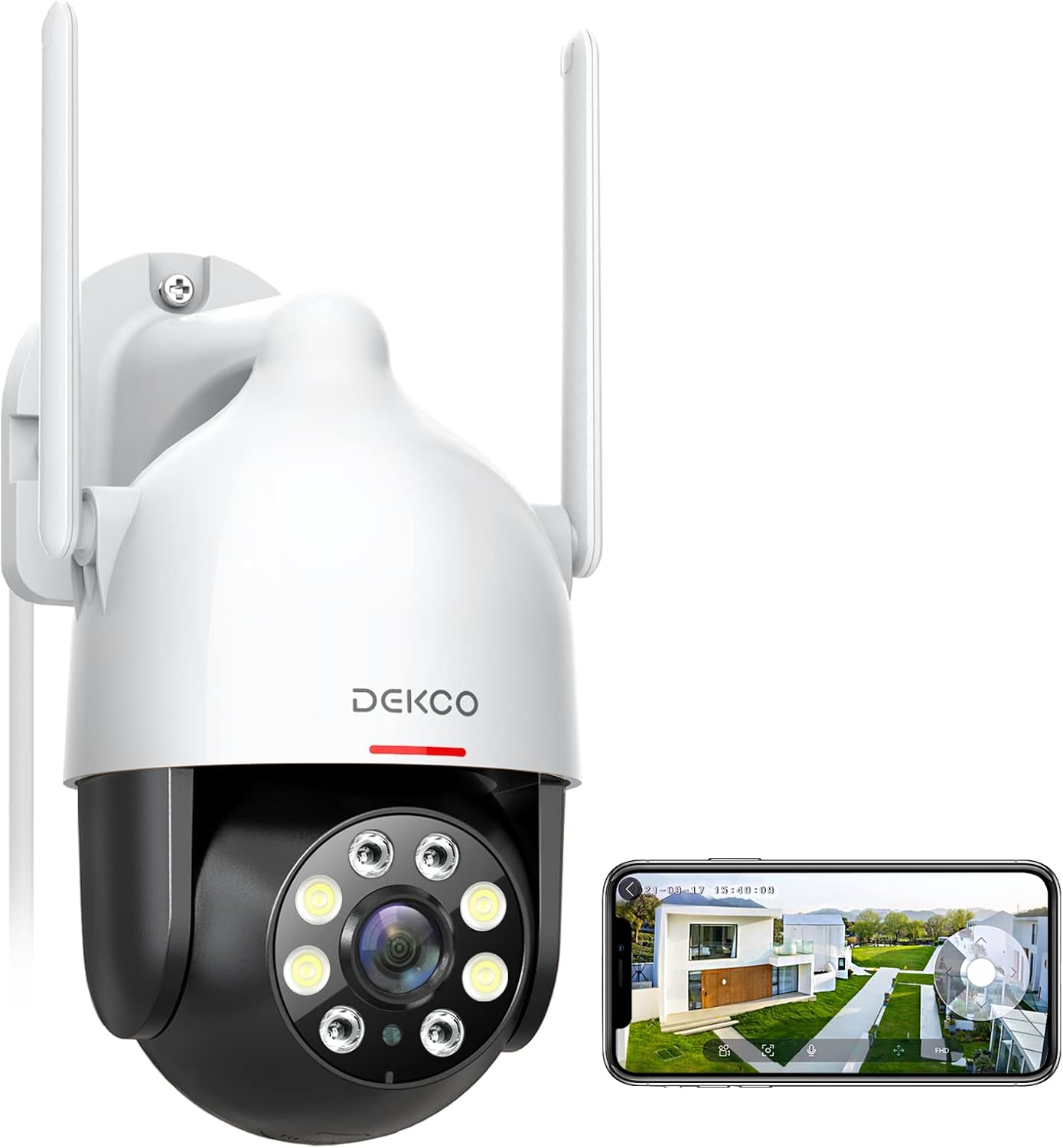
Image 1.1: DEKCO 2K HD Outdoor Security Camera with mobile app view.
2 സുരക്ഷാ വിവരങ്ങൾ
- Ensure the camera is installed in a location where it is protected from direct impact and extreme weather conditions beyond its IP66 rating.
- Use only the provided power adapter. Using unauthorized power sources may damage the device and void the warranty.
- Do not attempt to disassemble or modify the camera. This may cause electric shock or damage the product.
- ക്യാമറയും അനുബന്ധ ഉപകരണങ്ങളും കുട്ടികൾക്ക് ലഭ്യമാകാതെ സൂക്ഷിക്കുക.
- Ensure your Wi-Fi network is secure to prevent unauthorized access to your camera feed.
3. പാക്കേജ് ഉള്ളടക്കം
നിങ്ങളുടെ പാക്കേജിൽ എല്ലാ ഇനങ്ങളും ഉണ്ടെന്ന് ഉറപ്പാക്കുക:
- DEKCO 2K HD Outdoor Security Camera
- പവർ അഡാപ്റ്റർ (ചാർജർ)
- മൗണ്ടിംഗ് സ്ക്രൂകളും വാൾ പ്ലഗുകളും
- മ Template ണ്ടിംഗ് ടെംപ്ലേറ്റ്
- ഉപയോക്തൃ മാനുവൽ (ഈ പ്രമാണം)
4. ഉൽപ്പന്നം കഴിഞ്ഞുview
Familiarize yourself with the main components of your DEKCO security camera.

ചിത്രം 4.1: കഴിഞ്ഞുview of camera placement and 360-degree viewകഴിവ്.
The DEKCO camera features a durable, weather-resistant housing, dual antennas for stable Wi-Fi connection, a high-definition lens, infrared LEDs for night vision, and floodlights for full-color night vision. It also includes a microphone and speaker for two-way audio communication.
5. സജ്ജീകരണം
5.1 ഫിസിക്കൽ ഇൻസ്റ്റലേഷൻ
- ഒരു ലൊക്കേഷൻ തിരഞ്ഞെടുക്കുക: Select an outdoor location with a strong 2.4GHz Wi-Fi signal and a nearby power outlet. The camera is IP66 waterproof, suitable for various weather conditions (rain, sun, snow).
- ഡ്രില്ലിംഗ് പോയിന്റുകൾ അടയാളപ്പെടുത്തുക: ചുമരിലെ സ്ക്രൂ ദ്വാരങ്ങൾ അടയാളപ്പെടുത്താൻ നൽകിയിരിക്കുന്ന മൗണ്ടിംഗ് ടെംപ്ലേറ്റ് ഉപയോഗിക്കുക.
- തുളകൾ: Drill holes at the marked points and insert the wall plugs if mounting on masonry.
- ക്യാമറ ഘടിപ്പിക്കുക: നൽകിയിരിക്കുന്ന സ്ക്രൂകൾ ഉപയോഗിച്ച് ക്യാമറ ബേസ് ഭിത്തിയിൽ ഉറപ്പിക്കുക.

Image 5.1: The camera is designed to withstand rain, sun, and snow.
5.2 പവർ കണക്ഷൻ
Connect the power adapter to the camera's power input port and then plug it into a power outlet. The camera will power on and initiate its startup sequence.
5.3 ആപ്പ് ഡൗൺലോഡും അക്കൗണ്ട് സൃഷ്ടിക്കലും
- ആപ്പ് ഡൗൺലോഡ് ചെയ്യുക: ഇതിനായി തിരയുക "DEKCO" in your mobile app store (App Store for iOS or Google Play Store for Android) and download the official DEKCO app.
- അക്കൗണ്ട് രജിസ്റ്റർ ചെയ്യുക: Open the app and follow the on-screen instructions to register a new account using your email address.
5.4 വൈഫൈ കണക്ഷൻ
The DEKCO camera supports 2.4GHz Wi-Fi networks only. 5GHz Wi-Fi is not supported.
- ഉപകരണം ചേർക്കുക: In the DEKCO app, tap the "+" icon to add a new device.
- ക്യാമറ തരം തിരഞ്ഞെടുക്കുക: Choose the appropriate camera model from the list.
- ഇൻ-ആപ്പ് നിർദ്ദേശങ്ങൾ പാലിക്കുക: The app will guide you through connecting the camera to your 2.4GHz Wi-Fi network. This typically involves scanning a QR code displayed on your phone with the camera lens.

Image 5.2: The camera connects via 2.4GHz Wi-Fi for a faster and more stable connection.
6. പ്രവർത്തന നിർദ്ദേശങ്ങൾ
6.1 തത്സമയം View
Once connected, you can access the live video feed from your camera through the DEKCO app. The 2K QHD resolution provides clear details.

Image 6.1: Experience clear details with 2K QHD resolution.
6.2 പാൻ/ടിൽറ്റ് നിയന്ത്രണം
The camera features 350° horizontal pan and 90° vertical tilt rotation. Use the controls within the DEKCO app to remotely adjust the camera's viewകോണിൽ കൂടുതൽ വീതിയുള്ള പ്രദേശം ഉൾക്കൊള്ളുന്നു.
6.3 ടു-വേ ഓഡിയോ
The built-in microphone and speaker allow for real-time two-way audio communication. Tap the microphone icon in the app to speak through the camera, and listen to audio from the camera's location.

Image 6.2: Two-way audio allows for communication through the camera.
6.4 മോഷൻ ഡിറ്റക്ഷൻ & ട്രാക്കിംഗ്
Enable motion detection in the app to receive instant alerts when movement is detected. The camera can automatically track moving objects (humanoid tracking) within its field of view.

Image 6.3: The camera can track motion in real-time, focusing on key subjects.
6.5 നൈറ്റ് വിഷൻ മോഡുകൾ
ക്യാമറ ഒന്നിലധികം രാത്രി കാഴ്ച മോഡുകൾ വാഗ്ദാനം ചെയ്യുന്നു:
- ഇൻഫ്രാറെഡ് നൈറ്റ് വിഷൻ: Provides clear black and white video in low light conditions.
- പൂർണ്ണ വർണ്ണ രാത്രി ദർശനം: Activates the built-in floodlights to provide full-color video even in complete darkness.
- Auto (Smart) Night Vision: The camera intelligently switches between infrared and full-color modes based on detected motion or light conditions.

Image 6.4: Comparison of Color Mode (Spotlight ON) and Infrared Mode (Spotlight OFF) at night.
6.6 റെക്കോർഡിംഗും പ്ലേബാക്കും
The camera supports local storage via a Micro SD card (up to 128GB, not included) for 24/7 recording, or cloud storage (subscription may be required). You can review രേഖപ്പെടുത്തി footage through the app's timeline.

Image 6.5: The camera supports 24/7 recording to a local SD card for playback anytime.
6.7 അലാറം പ്രവർത്തനങ്ങൾ
When motion is detected, the camera can activate a loud siren and strobe lights to deter intruders. These functions can be customized or turned off in the app settings.

Image 6.6: The camera can scare off intruders with sound-light alarms and quick voice alerts.
6.8 സ്മാർട്ട് ഹോം ഇന്റഗ്രേഷൻ
The DEKCO camera is compatible with popular smart home platforms like Amazon Alexa and Google Assistant, allowing for voice control and integration into your smart home ecosystem.

Image 6.7: The camera works with Amazon Alexa and Google Assistant for convenient voice control.
7. പരിപാലനം
7.1 വൃത്തിയാക്കൽ
To maintain optimal performance, periodically clean the camera lens and housing with a soft, damp തുണി. കഠിനമായ രാസവസ്തുക്കളോ ഉരച്ചിലുകളുള്ള ക്ലീനറുകളോ ഉപയോഗിക്കരുത്.
7.2 ഫേംവെയർ അപ്ഡേറ്റുകൾ
Regularly check the DEKCO app for available firmware updates. Keeping your camera's firmware up-to-date ensures the latest features, security patches, and performance improvements.
8. പ്രശ്നപരിഹാരം
| പ്രശ്നം | സാധ്യമായ കാരണം | പരിഹാരം |
|---|---|---|
| ക്യാമറ ഓഫ്ലൈനിൽ | No power, weak Wi-Fi signal, Wi-Fi password changed. | Check power connection. Ensure camera is within Wi-Fi range. Reconfigure Wi-Fi settings in the app. |
| Wi-Fi-യിലേക്ക് കണക്റ്റുചെയ്യാൻ കഴിയില്ല | Incorrect Wi-Fi password, 5GHz network used, camera too far from router. | Verify password. Ensure you are connecting to a 2.4GHz network. Move camera closer to router or use a Wi-Fi extender. |
| SD കാർഡിലേക്ക് റെക്കോർഡിംഗ് ഇല്ല | SD card full, faulty SD card, incorrect recording settings. | Format or replace SD card. Check recording settings in the app. |
| ചലന മുന്നറിയിപ്പുകൾ ലഭിച്ചില്ല. | Motion detection disabled, app notifications turned off, sensitivity too low. | Enable motion detection and push notifications in the app. Adjust detection sensitivity. |
9 സ്പെസിഫിക്കേഷനുകൾ
| ഫീച്ചർ | വിശദാംശങ്ങൾ |
|---|---|
| മോഡൽ നമ്പർ | DC5E-DE |
| വീഡിയോ റെസല്യൂഷൻ | 2K QHD (2304x1296p) |
| പാൻ/ടിൽറ്റ് ശ്രേണി | തിരശ്ചീനം: 350°, ലംബം: 90° |
| നൈറ്റ് വിഷൻ | Infrared, Full-Color, Auto (Smart) |
| കണക്റ്റിവിറ്റി | 2.4GHz വൈ-ഫൈ (IEEE 802.11b/g/n) |
| സംഭരണം | മൈക്രോ എസ്ഡി കാർഡ് (128 ജിബി വരെ), ക്ലൗഡ് സ്റ്റോറേജ് |
| ഓഡിയോ | ടു-വേ ഓഡിയോ (ബിൽറ്റ്-ഇൻ മൈക്കും സ്പീക്കറും) |
| കാലാവസ്ഥ പ്രതിരോധം | IP66 വാട്ടർപ്രൂഫ് |
| വൈദ്യുതി വിതരണം | 12 വോൾട്ട് (DC) |
| അളവുകൾ | 13 x 19 x 16 സെ.മീ |
| ഭാരം | 600 ഗ്രാം |
| അനുയോജ്യമായ ഉപകരണങ്ങൾ | Smartphone, Tablet (iOS, Android) |
| സ്മാർട്ട് ഹോം ഇൻ്റഗ്രേഷൻ | ആമസോൺ അലക്സ, ഗൂഗിൾ അസിസ്റ്റൻ്റ് |
10. വാറൻ്റിയും പിന്തുണയും
DEKCO products come with a 1-year full machine warranty വാങ്ങിയ തീയതി മുതൽ. സാധാരണ ഉപയോഗത്തിലുള്ള നിർമ്മാണ വൈകല്യങ്ങളും തകരാറുകളും ഈ വാറന്റി ഉൾക്കൊള്ളുന്നു.
For technical support, troubleshooting assistance, or warranty claims, please contact the "DekcoCare" Online Support Team. You can usually find contact information within the DEKCO app or on the official DEKCO webസൈറ്റ്.
Please have your product model number (DC5E-DE) and purchase details ready when contacting support.


