1. ഉൽപ്പന്നം കഴിഞ്ഞുview
The WORKPRO 6.5AMP 850W Corded Electric Jig Saw is a versatile power tool designed for precise cutting of various materials, including wood, metal, and plastic. It features a powerful motor, variable speed control, orbital settings, and a tool-free blade change system for enhanced efficiency and user convenience.

Figure 1: WORKPRO 6.5AMP 850W Corded Electric Jig Saw and included accessories.
2 സുരക്ഷാ വിവരങ്ങൾ
Always prioritize safety when operating power tools. Read and understand all safety warnings, instructions, illustrations, and specifications provided with this power tool. Failure to follow all instructions listed below may result in electric shock, fire, and/or serious injury.
- വർക്ക് ഏരിയ സുരക്ഷ: നിങ്ങളുടെ ജോലിസ്ഥലം വൃത്തിയുള്ളതും നല്ല വെളിച്ചമുള്ളതുമായി സൂക്ഷിക്കുക. അലങ്കോലമായതോ ഇരുണ്ടതോ ആയ പ്രദേശങ്ങൾ അപകടങ്ങൾ ക്ഷണിച്ചുവരുത്തുന്നു.
- ഇലക്ട്രിക്കൽ സുരക്ഷ: പവർ ടൂൾ പ്ലഗുകൾ ഔട്ട്ലെറ്റുമായി പൊരുത്തപ്പെടണം. പ്ലഗിൽ ഒരിക്കലും ഒരു തരത്തിലും മാറ്റം വരുത്തരുത്. മണ്ണിട്ടതോ നിലംപരിശായതോ ആയ പ്രതലങ്ങളുമായുള്ള ശരീര സമ്പർക്കം ഒഴിവാക്കുക.
- വ്യക്തിഗത സുരക്ഷ: Always wear eye protection, dust mask, non-skid safety shoes, hard hat, or hearing protection as appropriate for the conditions.
- ഉപകരണ ഉപയോഗവും പരിചരണവും: പവർ ടൂൾ നിർബന്ധിച്ച് ഉപയോഗിക്കരുത്. നിങ്ങളുടെ ആപ്ലിക്കേഷന് അനുയോജ്യമായ പവർ ടൂൾ ഉപയോഗിക്കുക. എന്തെങ്കിലും ക്രമീകരണങ്ങൾ നടത്തുന്നതിനോ, ആക്സസറികൾ മാറ്റുന്നതിനോ, പവർ ടൂളുകൾ സൂക്ഷിക്കുന്നതിനോ മുമ്പ് പവർ സ്രോതസ്സിൽ നിന്ന് പ്ലഗ് വിച്ഛേദിക്കുക.
- പരിപാലനം: പവർ ടൂളുകളും അനുബന്ധ ഉപകരണങ്ങളും പരിപാലിക്കുക. ചലിക്കുന്ന ഭാഗങ്ങളുടെ തെറ്റായ ക്രമീകരണം അല്ലെങ്കിൽ ബൈൻഡിംഗ്, ഭാഗങ്ങളുടെ പൊട്ടൽ, പവർ ടൂളിൻ്റെ പ്രവർത്തനത്തെ ബാധിച്ചേക്കാവുന്ന മറ്റേതെങ്കിലും അവസ്ഥ എന്നിവ പരിശോധിക്കുക.
For detailed safety guidelines, refer to the complete user manual provided in the product packaging.
3. പാക്കേജ് ഉള്ളടക്കം
Upon opening the package, ensure all items are present and in good condition. The WORKPRO 6.5AMP 850W Corded Electric Jig Saw kit includes:
- 1 × WORKPRO Jigsaw
- 7 × Replaceable T-shank blades (1 for metal, 6 for wood)
- 1 × Scale Ruler
- 1 × Dust Exhaust Pipe
- 1 × ഉപയോക്തൃ മാനുവൽ
- 1 × അലൻ റെഞ്ച്
വീഡിയോ 1: അൺബോക്സിംഗ്, പിന്നെയുംview of the WORKPRO 6.5AMP 850W Corded Electric Jig Saw and its included components.
4. ഉൽപ്പന്ന സവിശേഷതകൾ
4.1 High-Performance Motor
The jigsaw is equipped with a powerful 6.5 amp motor, delivering a top speed of 3000 Strokes Per Minute (SPM). This high power allows for faster cutting and helps prevent material burn. The 4/5-inch stroke length ensures efficient material removal with each cut. It can cut iron plate up to 10mm and wood board up to 100mm.
4.2 Bevel Cutting & Orbital Settings
The adjustable bottom plate allows for bevel cuts up to ±45 degrees, providing flexibility for various cutting angles. Four orbital settings enable adjustment of cut aggressiveness, suitable for different materials and cutting speeds. Higher orbital settings are ideal for softer materials and faster cuts, while lower settings are for harder materials and slower, more precise cuts.

Figure 2: The adjustable base plate allows for precise ±45° bevel cutting.

Figure 3: Four-position orbital action for varied cutting needs across different materials.
4.3 Tool-less Blade Change & LED Light
Blade changes are quick and easy with the tool-less system; simply press the replacement button. The integrated LED light illuminates the cutting area, ensuring improved visibility and precise cuts, especially in dimly lit environments.

Figure 4: Easy and quick saw blade installation without the need for additional tools.

Figure 5: Built-in LED light provides enhanced visibility for precise cutting.
4.4 User-Friendly Design
The jigsaw includes a dust blower function to keep the cut line clear of debris, improving visibility. The blower switch allows for both blowing and vacuuming functions. A lock-on button is also provided to reduce user fatigue during extended cutting tasks.

Figure 6: Labeled components of the WORKPRO Jig Saw for easy identification.
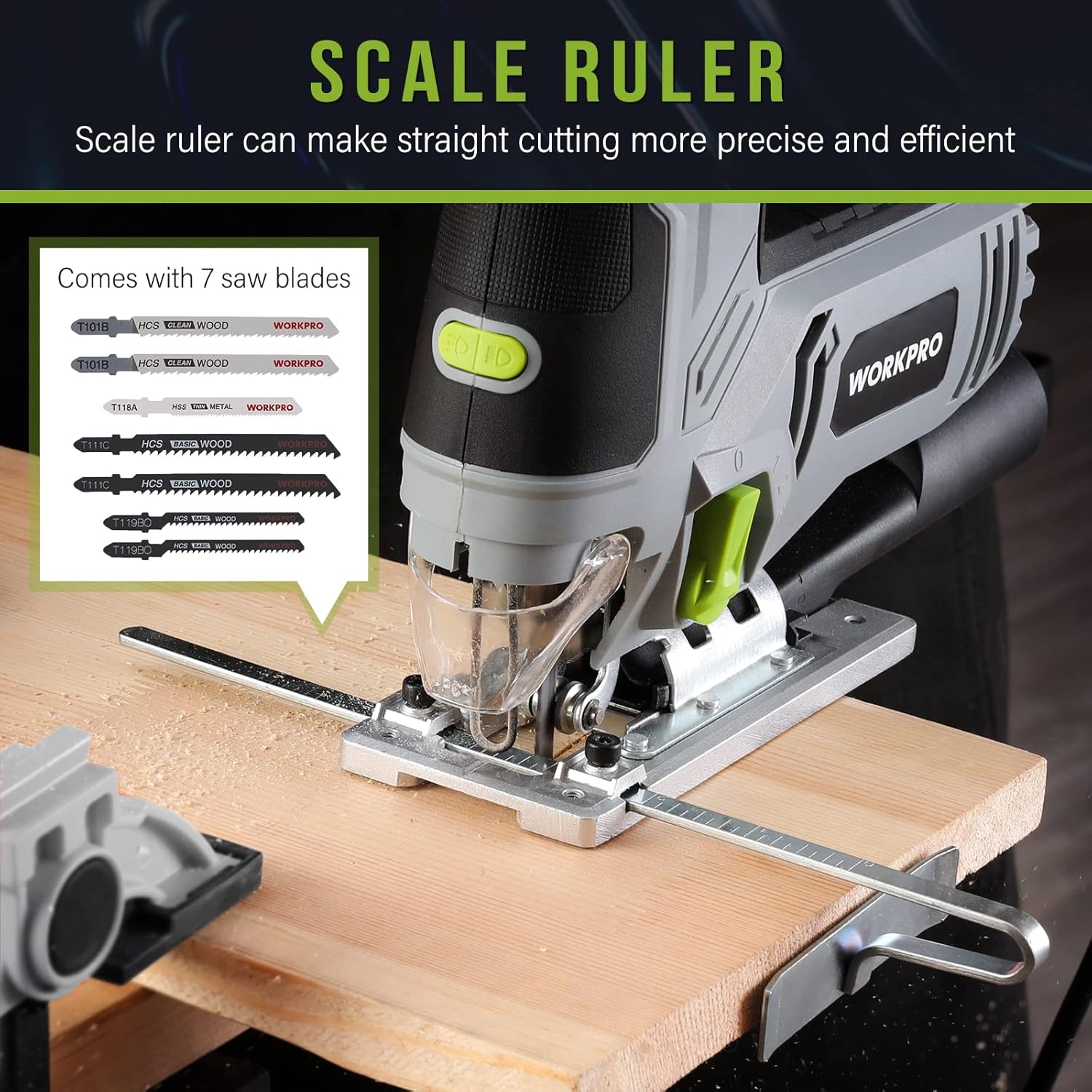
Figure 7: The included scale ruler assists in making straight and precise cuts.
5. സജ്ജീകരണം
5.1 ബ്ലേഡ് ഇൻസ്റ്റലേഷൻ
- ജിഗ് സോ പവർ സ്രോതസ്സിൽ നിന്ന് ഊരിവെച്ചിട്ടുണ്ടെന്ന് ഉറപ്പാക്കുക.
- Locate the tool-less blade change lever on the front of the saw.
- Push the lever to release the blade clamp.
- Insert the T-shank blade into the blade holder until it clicks securely into place.
- Release the lever to lock the blade. Gently pull on the blade to ensure it is firmly seated.
5.2 Attaching Dust Exhaust Pipe
For dust collection, attach the dust exhaust pipe to the designated port at the rear of the saw. This allows connection to a vacuum system to keep your work area clean.
5.3 Adjusting Base for Bevel Cuts
- Using the included Allen wrench, loosen the screws on the base plate.
- Tilt the base plate to the desired angle (up to ±45 degrees). Use the angle markings on the base for accuracy.
- Tighten the screws firmly to secure the base plate in position.
5.4 Using the Scale Ruler (Edge Guide)
The scale ruler can be inserted into the slot on the base plate to guide straight cuts parallel to an edge. Adjust the ruler to the desired distance from the blade and tighten its locking mechanism.
6. പ്രവർത്തന നിർദ്ദേശങ്ങൾ
6.1 പവർ ഓൺ/ഓഫ്
To turn the jig saw on, press the trigger switch. To turn it off, release the trigger. For continuous operation, press the lock-on button while the trigger is depressed. To release the lock, press the trigger again.
6.2 വേരിയബിൾ സ്പീഡ് കൺട്രോൾ
Adjust the variable speed dial located on top of the tool to select the appropriate speed for your material. Speeds range from 1 (lowest) to 6 (highest). Use lower speeds for harder materials or intricate cuts, and higher speeds for softer materials or faster cuts.
6.3 Orbital Action Selection
The orbital action lever allows you to choose from four settings (0-3). Setting 0 provides no orbital action for fine, splinter-free cuts. Higher settings increase the orbital action for faster, more aggressive cuts in softer materials.
6.4 LED ലൈറ്റ് ഉപയോഗിക്കുന്നു
The LED light can be turned on or off using the dedicated switch near the front of the tool. This feature is useful for illuminating the cutting line in low-light conditions.
6.5 പൊടി നിയന്ത്രണം
Utilize the dust blower switch to direct air away from the cutting line, keeping it clear of sawdust. For more comprehensive dust collection, attach the dust exhaust pipe to a vacuum cleaner.
6.6 General Cutting Tips
- Always secure your workpiece with clampമുറിക്കുമ്പോൾ ചലനം തടയാൻ.
- Allow the saw to reach full speed before engaging the material.
- Apply steady, even pressure. Do not force the saw, as this can damage the blade or motor.
- For plunge cuts, tilt the saw forward on its base plate, start the cut, and slowly lower the blade into the material.
7. പരിപാലനം
Regular maintenance ensures the longevity and optimal performance of your WORKPRO Jig Saw.
- ബ്ലേഡ് മാറ്റിസ്ഥാപിക്കൽ: Replace blades when they become dull or damaged to ensure clean and efficient cuts. Always use appropriate T-shank blades for the material being cut.
- വൃത്തിയാക്കൽ: After each use, unplug the tool and clean any sawdust or debris from the ventilation slots and the blade area. Use a soft brush or compressed air.
- ചരട് പരിശോധന: പവർ കോർഡിന് എന്തെങ്കിലും തകരാറുകൾ ഉണ്ടോ എന്ന് പതിവായി പരിശോധിക്കുക. കേടുപാടുകൾ സംഭവിച്ചിട്ടുണ്ടെങ്കിൽ, യോഗ്യതയുള്ള ഒരു പ്രൊഫഷണലിനെക്കൊണ്ട് അത് നന്നാക്കുക.
- സംഭരണം: Store the jig saw in a dry, secure location out of reach of children.
8. പ്രശ്നപരിഹാരം
If you encounter issues with your jig saw, refer to the following common problems and solutions:
| പ്രശ്നം | സാധ്യമായ കാരണം | പരിഹാരം |
|---|---|---|
| സോ ആരംഭിക്കുന്നില്ല | വൈദ്യുതി ഇല്ല; സ്വിച്ച് തകരാറിലാണ്. | Check power outlet and cord. If issue persists, contact service. |
| ബ്ലേഡ് നേരെ മുറിക്കുന്നില്ല | Dull or bent blade; incorrect orbital setting; forcing the tool. | Replace blade. Adjust orbital setting. Apply less pressure. |
| അമിതമായ വൈബ്രേഷൻ | അയഞ്ഞ ബ്ലേഡ്; കേടായ ബ്ലേഡ്; തേഞ്ഞുപോയ ആന്തരിക ഘടകങ്ങൾ. | Ensure blade is securely installed. Replace blade. Contact service if vibration continues. |
| മോട്ടോർ അമിത ചൂടാക്കൽ | അടഞ്ഞ വെന്റിലേഷൻ സ്ലോട്ടുകൾ; തുടർച്ചയായ കനത്ത ഉപയോഗം. | വെന്റിലേഷൻ സ്ലോട്ടുകൾ വൃത്തിയാക്കുക. ഉപകരണം തണുക്കാൻ അനുവദിക്കുക. ലോഡ് കുറയ്ക്കുക. |
ഈ പരിഹാരങ്ങൾ പരീക്ഷിച്ചതിനു ശേഷവും പ്രശ്നം നിലനിൽക്കുകയാണെങ്കിൽ, ദയവായി WORKPRO ഉപഭോക്തൃ പിന്തുണയുമായി ബന്ധപ്പെടുക.
9 സ്പെസിഫിക്കേഷനുകൾ
| ഫീച്ചർ | വിശദാംശങ്ങൾ |
|---|---|
| ബ്രാൻഡ് | വർക്ക്പ്രോ |
| മോഡൽ നമ്പർ | W124748A |
| പവർ ഉറവിടം | കോർഡഡ് ഇലക്ട്രിക് |
| നിലവിലെ റേറ്റിംഗ് | 6.5 Amps |
| വാട്ട്tage | 850 വാട്ട്സ് |
| വാല്യംtage | 120 വോൾട്ട് |
| വേഗത | 3000 SPM (മിനിറ്റിൽ സ്ട്രോക്കുകൾ) |
| ബെവൽ കട്ടിംഗ് ആംഗിൾ | ± 45 ഡിഗ്രി |
| പരിക്രമണ ക്രമീകരണങ്ങൾ | 4 സ്ഥാനങ്ങൾ |
| ബ്ലേഡ് മെറ്റീരിയൽ | ലോഹം |
| ഉപരിതല ശുപാർശ | മരം |
| ഇനത്തിൻ്റെ ഭാരം | 5.44 പൗണ്ട് |
| ഉൽപ്പന്ന അളവുകൾ | 8.86"L x 11.22"W x 3.15"H |
| പ്രത്യേക ഫീച്ചർ | Tool-less Blade Change, LED Light, Dust Blower |
| യു.പി.സി | 820909772569 |
10. വാറൻ്റിയും പിന്തുണയും
The WORKPRO 6.5AMP 850W Corded Electric Jig Saw comes with a limited warranty. For specific warranty terms and conditions, please refer to the warranty card included in your product packaging or visit the official WORKPRO webസൈറ്റ്.
For technical support, replacement parts, or any inquiries regarding your product, please contact WORKPRO customer service. Contact information can typically be found in your user manual or on the WORKPRO brand webസൈറ്റ്.


