ആമുഖം
This manual provides comprehensive instructions for the installation, operation, and maintenance of your Ozone Smart Rim Lock, Model OZ-DRL. This advanced security device offers multiple access methods for enhanced convenience and protection.
പ്രധാന സവിശേഷതകൾ
- Wi-Fi Connectivity for Smart Control
- Multiple Access Modes: Fingerprint, User Password, OzoLife Mobile App, RFID Card, Emergency Key
- High Fingerprint Capacity (100 fingerprints)
- Durable Stainless Steel and Alloy Steel Construction
- എളുപ്പമുള്ള ഇൻസ്റ്റലേഷൻ
ഘടകങ്ങൾ പൂർത്തിയായിview
The Ozone Smart Rim Lock system consists of the main lock unit and the external keypad/reader. Familiarize yourself with the key parts:
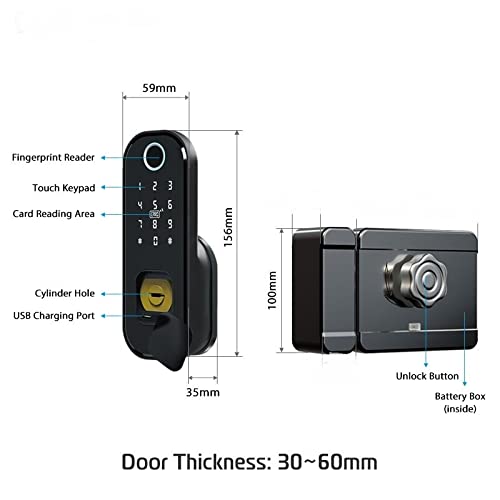
Figure 1: Smart Rim Lock Components and Dimensions
This diagram illustrates the main components of the lock. The external unit features a Fingerprint Reader, Touch Keypad, Card Reading Area, Cylinder Hole for emergency key access, and a USB Charging Port. The internal unit includes an Unlock Button and a Battery Box. The lock is designed for door thicknesses between 30mm and 60mm.
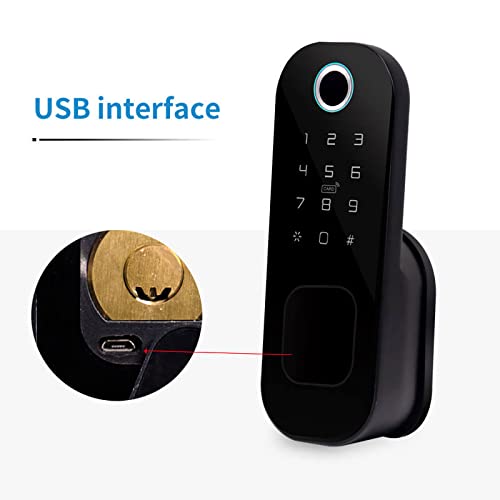
Figure 2: USB Charging Port Detail
എ വിശദമായി view of the USB interface, located near the cylinder hole, used for emergency power or charging.
പാക്കേജ് ഉള്ളടക്കം
- Ozone Smart Rim Lock Unit (External and Internal)
- മൌണ്ടിംഗ് ഹാർഡ്വെയർ
- എമർജൻസി കീകൾ
- RFID കാർഡുകൾ (അളവ് വ്യത്യാസപ്പെടാം)
- ഉപയോക്തൃ മാനുവൽ (ഈ പ്രമാണം)
സാങ്കേതിക സവിശേഷതകൾ

Figure 3: Technical Parameters and Specifications
ഈ ചിത്രം സമഗ്രമായ ഒരു അവലോകനം നൽകുന്നുview of the lock's technical parameters and detailed specifications.
| ഫീച്ചർ | വിശദാംശങ്ങൾ |
|---|---|
| മോഡൽ | OZ-DRL |
| മെറ്റീരിയൽ | സ്റ്റെയിൻലെസ്സ് സ്റ്റീൽ, അലോയ് സ്റ്റീൽ |
| നിറം | കറുപ്പ് |
| അളവുകൾ (L x W x H) | 25.4 x 20.3 x 10.2 സെ.മീ |
| ലോക്ക് തരം | Key Lock (with smart features) |
| കണക്റ്റിവിറ്റി | വൈഫൈ |
| നിയന്ത്രണ രീതി | App, Fingerprint, Keypad, RFID Card, Emergency Key |
| വിരലടയാള ശേഷി | 100 |
| പാസ്വേഡ് ദൈർഘ്യം | 4-8 അക്കങ്ങൾ |
| വെർച്വൽ പാസ്വേഡ് | 32 അക്കങ്ങൾ വരെ |
| വാതിൽ കനം | 30-60 മി.മീ |
| ശക്തി | DC 6V |
| എമർജൻസി പവർ | DC 5V (via Micro USB) |
| പ്രവർത്തന താപനില | -25°C മുതൽ 60°C വരെ |
| പ്രവർത്തന ആപേക്ഷിക ആർദ്രത | 20% -90% RH |
ഇൻസ്റ്റലേഷൻ ഗൈഡ്
The Ozone Smart Rim Lock is designed for easy installation, retrofitting with regular rim locks without additional cutouts.
ഇൻസ്റ്റാളേഷന് മുമ്പ്
- നിങ്ങളുടെ വാതിലിന്റെ കനം 30mm നും 60mm നും ഇടയിലാണെന്ന് ഉറപ്പാക്കുക.
- Verify all components are present as listed in the "Package Contents" section.
- Prepare necessary tools (screwdriver, drill if required for new installations).
ഇൻസ്റ്റലേഷൻ ഘട്ടങ്ങൾ (പൊതുവായത്)
- വാതിൽ തയ്യാറാക്കുക: Remove any existing rim lock. Ensure the door frame and door edge are clean and clear.
- Mount the External Unit: Position the external keypad/reader unit on the outside of the door. Secure it using the provided mounting hardware.
- Install the Internal Unit: Align the internal lock unit with the external unit, ensuring the spindle and wiring (if any) connect properly. Secure the internal unit to the door.
- പവർ ബന്ധിപ്പിക്കുക: Insert the required batteries into the battery box within the internal unit.
- ടെസ്റ്റ് ഓപ്പറേഷൻ: After installation, test the mechanical lock function with the emergency key.
കുറിപ്പ്: For detailed, step-by-step installation instructions, please refer to the specific installation diagram or video provided with your product packaging, or consult a professional installer.
Operating Your Smart Rim Lock
Your Ozone Smart Rim Lock offers multiple convenient ways to unlock your door.
Initial Setup and Administrator
Upon first power-up, you will need to set up an administrator. This is typically the first fingerprint or password registered. Refer to the lock's voice prompts or the OzoLife App for guided setup.
ആക്സസ് മോഡുകൾ

Figure 4: Available Access Modes
This image highlights the five primary methods for unlocking the Ozone Smart Rim Lock.
1. ഫിംഗർപ്രിന്റ് ആക്സസ്
- എൻറോൾമെൻ്റ്: As an administrator, follow the voice prompts or app instructions to enroll new fingerprints. Place the finger firmly on the fingerprint reader until successful registration is confirmed.
- അൺലോക്ക് ചെയ്യുന്നു: Place your registered finger on the fingerprint reader. The lock will unlock if the fingerprint is recognized.
2. User Password Access
- പാസ്വേഡുകൾ സജ്ജമാക്കുന്നു: Administrators can set or modify user passwords (4-8 digits) via the keypad or OzoLife App.
- അൺലോക്ക് ചെയ്യുന്നു: Enter your registered password on the touch keypad, followed by the '#' key.
- വെർച്വൽ പാസ്വേഡ്: To prevent peeping, you can enter random digits before or after your actual password (e.g.,
XXXXപാസ്വേഡ്YYYY).
3. OzoLife Mobile App Control
- ഡൗൺലോഡ് ചെയ്ത് ബന്ധിപ്പിക്കുക: Download the "OzoLife" app from your smartphone's app store. Follow the in-app instructions to connect your lock to your home Wi-Fi network and pair it with the app.
- റിമോട്ട് അൺലോക്കിംഗ്: Once connected, you can remotely unlock the door, manage users, view access logs, and receive notifications through the app.
4. RFID കാർഡ് ആക്സസ്
- എൻറോൾമെൻ്റ്: Register RFID cards through the administrator mode or OzoLife App.
- അൺലോക്ക് ചെയ്യുന്നു: Present a registered RFID card to the card reading area on the external unit. The lock will unlock upon recognition.
5. Emergency Key Access
In case of battery depletion or electronic malfunction, the emergency key provides mechanical access.
- Insert the emergency key into the cylinder hole.
- Turn the key to unlock the door.
ബാറ്ററി മാനേജ്മെൻ്റ്
The lock will provide a low power warning when batteries are running low. Replace batteries promptly to ensure continuous operation. In an emergency, the USB charging port can be used for temporary power.
മെയിൻ്റനൻസ്
- വൃത്തിയാക്കൽ: Wipe the lock's surface with a soft, dry cloth. Avoid abrasive cleaners or solvents.
- ബാറ്ററി മാറ്റിസ്ഥാപിക്കൽ: Replace all batteries with new ones when the low power warning is activated. Use high-quality alkaline batteries.
- ഫിംഗർപ്രിന്റ് സെൻസർ പരിചരണം: മികച്ച പ്രകടനത്തിനായി ഫിംഗർപ്രിന്റ് സെൻസർ വൃത്തിയായും വരണ്ടതുമായി സൂക്ഷിക്കുക.
- സോഫ്റ്റ്വെയർ അപ്ഡേറ്റുകൾ: Regularly check the OzoLife App for firmware updates to ensure your lock has the latest features and security enhancements.
ട്രബിൾഷൂട്ടിംഗ്
If you encounter issues with your Ozone Smart Rim Lock, refer to the following common problems and solutions:
- Lock is not responding.
- ബാറ്ററി ലെവലുകൾ പരിശോധിച്ച് ആവശ്യമെങ്കിൽ മാറ്റിസ്ഥാപിക്കുക.
- Use the emergency key to open the door.
- Try connecting a power bank to the USB charging port for temporary power.
- വിരലടയാളം തിരിച്ചറിഞ്ഞില്ല.
- നിങ്ങളുടെ വിരൽ വൃത്തിയുള്ളതും വരണ്ടതുമാണെന്ന് ഉറപ്പാക്കുക.
- നിങ്ങളുടെ വിരൽ ദൃഢമായും പൂർണ്ണമായും സെൻസറിൽ വയ്ക്കുക.
- Re-enroll your fingerprint if the issue persists.
- ആപ്പ് കണക്ഷൻ പ്രശ്നങ്ങൾ.
- Ensure your Wi-Fi network is stable and the lock is within range.
- Restart your router and the lock.
- Re-pair the lock with the OzoLife App.
- കീപാഡ് പ്രതികരിക്കുന്നില്ല.
- Check for low battery warning.
- Ensure no foreign objects are obstructing the keypad.
വാറൻ്റി വിവരങ്ങൾ
The Ozone Smart Rim Lock (Model OZ-DRL) comes with a 12 മാസ വാറൻ്റി വാങ്ങിയ തീയതി മുതൽ. സാധാരണ ഉപയോഗത്തിലുള്ള നിർമ്മാണ വൈകല്യങ്ങളും തകരാറുകളും ഈ വാറന്റി ഉൾക്കൊള്ളുന്നു.
വാറൻ്റി ഉൾപ്പെടുന്നില്ല:
- അനുചിതമായ ഇൻസ്റ്റാളേഷൻ അല്ലെങ്കിൽ അനധികൃത അറ്റകുറ്റപ്പണികൾ മൂലമുണ്ടാകുന്ന നാശനഷ്ടങ്ങൾ.
- Damage due to misuse, abuse, or neglect.
- സാധാരണ തേയ്മാനം.
- പ്രകൃതി ദുരന്തങ്ങളോ അപകടങ്ങളോ മൂലമുണ്ടാകുന്ന നാശനഷ്ടങ്ങൾ.
വാറന്റി ക്ലെയിമുകൾക്കുള്ള വാങ്ങിയതിന്റെ തെളിവായി നിങ്ങളുടെ വാങ്ങൽ രസീത് സൂക്ഷിക്കുക.
ഉപഭോക്തൃ പിന്തുണ
For further assistance, technical support, or warranty claims, please contact Ozone customer service:
- ഫോൺ: +91-9310012300
- Webസൈറ്റ്: www.ozonesecutech.com
- ഇമെയിൽ: info@ozonesecutech.com
When contacting support, please have your product model (OZ-DRL) and purchase details ready.


