
1. ഉൽപ്പന്നം കഴിഞ്ഞുview
The UROVO RT40 is a high-performance industrial handheld terminal designed for demanding business environments. It combines advanced data capture capabilities with robust construction and comprehensive connectivity options.
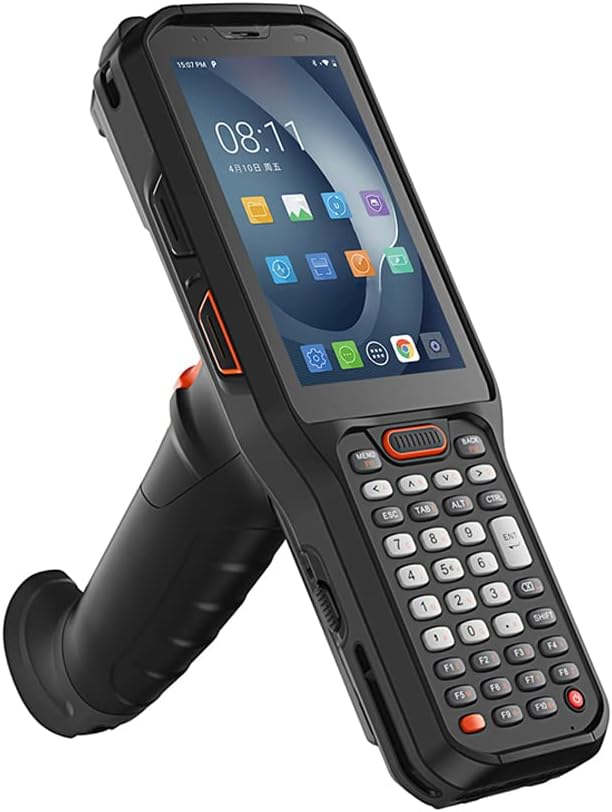
ഫ്രണ്ട് view of the UROVO RT40 handheld terminal, showcasing its ergonomic design with an integrated handle and physical keypad.

Detailed diagram illustrating the various components and buttons of the RT40 terminal, including the system LED, scan LED, volume controls, PTT custom button, scan button, scan key, handle, keypad, POGO PIN, scan engine, and Type-C charging port.

The RT40 is designed as a cold-resistant mobile computer, emphasizing its robustness and durability for challenging environments.
പ്രധാന സവിശേഷതകൾ:
- ഓപ്പറേറ്റിംഗ് സിസ്റ്റം: ആൻഡ്രോയിഡ് 10
- പ്രോസസ്സർ: Octa-core 1.8GHz (Snapdragon 636)
- മെമ്മറി: 4GB RAM + 64GB ROM (expandable)
- ഡിസ്പ്ലേ: 4 ഇഞ്ച് ടച്ച് സ്ക്രീൻ
- സ്കാനിംഗ്: Professional 1D/2D barcode and QR code scanning engine (Zebra SE4750SR or Honeywell N6703/EX30 options)
- കണക്റ്റിവിറ്റി: 4G, WiFi (2.4G/5G), Bluetooth 5.0, GPS, NFC, Vo-LTE
- ബാറ്ററി: 5200mAh hot-swappable battery with quick charge support
- ഈട്: IP68 water and dust resistance, 1.8m drop resistance
2 സുരക്ഷാ വിവരങ്ങൾ
പരിക്കുകളോ കേടുപാടുകളോ തടയാൻ ഉപകരണം ഉപയോഗിക്കുന്നതിന് മുമ്പ് എല്ലാ സുരക്ഷാ നിർദ്ദേശങ്ങളും ശ്രദ്ധാപൂർവ്വം വായിക്കുക.
- Do not expose the device to extreme temperatures, direct sunlight, or corrosive substances.
- Use only UROVO approved chargers and accessories.
- ഉപകരണം സ്വയം വേർപെടുത്താനോ നന്നാക്കാനോ ശ്രമിക്കരുത്. യോഗ്യതയുള്ള സേവന ഉദ്യോഗസ്ഥരെ ബന്ധപ്പെടുക.
- Keep the device away from water and moisture, even though it has an IP68 rating, improper handling can still cause damage.
- പ്രാദേശിക നിയന്ത്രണങ്ങൾ അനുസരിച്ച് ബാറ്ററികളും ഇലക്ട്രോണിക് ഘടകങ്ങളും ഉത്തരവാദിത്തത്തോടെ നിർമാർജനം ചെയ്യുക.
3. സജ്ജീകരണം
3.1 പാക്കേജ് ഉള്ളടക്കം
പാക്കേജിൽ എല്ലാ ഇനങ്ങളും ഉണ്ടെന്ന് ഉറപ്പാക്കുക:

Image showing the UROVO RT40 device, power adapter, USB cable, battery, and an optional charging cradle.
- UROVO RT40 Handheld Terminal
- റീചാർജ് ചെയ്യാവുന്ന ബാറ്ററി (5200mAh)
- പവർ അഡാപ്റ്റർ
- യുഎസ്ബി ടൈപ്പ്-സി കേബിൾ
- ഓപ്ഷണൽ: ചാർജ്ജിംഗ് തൊട്ടിൽ
3.2 ബാറ്ററി ഇൻസ്റ്റാളേഷനും ചാർജിംഗും
- ഉപകരണത്തിന്റെ പിൻഭാഗത്ത് ബാറ്ററി കമ്പാർട്ട്മെന്റ് കണ്ടെത്തുക.
- Insert the 5200mAh battery into the compartment, ensuring the contacts align.
- ബാറ്ററി കവർ സുരക്ഷിതമാക്കുക.
- Connect the USB Type-C cable to the device's charging port and the power adapter.
- Plug the power adapter into a wall outlet. The device will begin charging.
- For quick charging, ensure the device is powered off or in standby mode. A full charge typically takes less than 3 hours.

Illustration of the 5200mAh hot-swappable battery and quick charge capability, indicating charging time under 3 hours.
3.3 പ്രാരംഭ പവർ ഓൺ
Press and hold the power button located on the side of the device until the UROVO logo appears on the screen. The device will boot up to the Android 10 operating system.
4. പ്രവർത്തന നിർദ്ദേശങ്ങൾ
4.1 അടിസ്ഥാന നാവിഗേഷൻ
- ടച്ച് സ്ക്രീൻ: Navigate the Android interface by tapping, swiping, and pinching on the 4-inch touch screen.
- കീപാഡ്: Use the physical keypad for data entry and navigation. Refer to the component diagram for key functions.
- വോളിയം ബട്ടണുകൾ: Adjust audio volume using the dedicated volume up/down buttons.
4.2 Barcode and QR Code Scanning
The RT40 is equipped with a professional scanning engine for efficient data capture.
- Open the scanning application or position the cursor in a field requiring barcode input.
- Point the scanner window at the barcode or QR code.
- Press the scan button (located on the side or handle) to activate the scanner.
- Ensure the entire barcode is within the scanner's aiming pattern for optimal reading.
- A successful scan will typically be indicated by an audible beep and/or a visual confirmation on the screen.

Image demonstrating the RT40's capability to smoothly scan various 1D and 2D barcodes, including QR codes.
4.3 എൻഎഫ്സി പ്രവർത്തനം
The RT40 supports Near Field Communication (NFC) for short-range wireless interactions.
- ഉപകരണ ക്രമീകരണങ്ങളിൽ NFC പ്രവർത്തനക്ഷമമാക്കിയിട്ടുണ്ടെന്ന് ഉറപ്പാക്കുക.
- Hold the NFC-enabled item (e.g., card, tag) near the NFC module area of the RT40 (refer to the component diagram for location).
- The device will automatically detect and interact with the NFC tag.
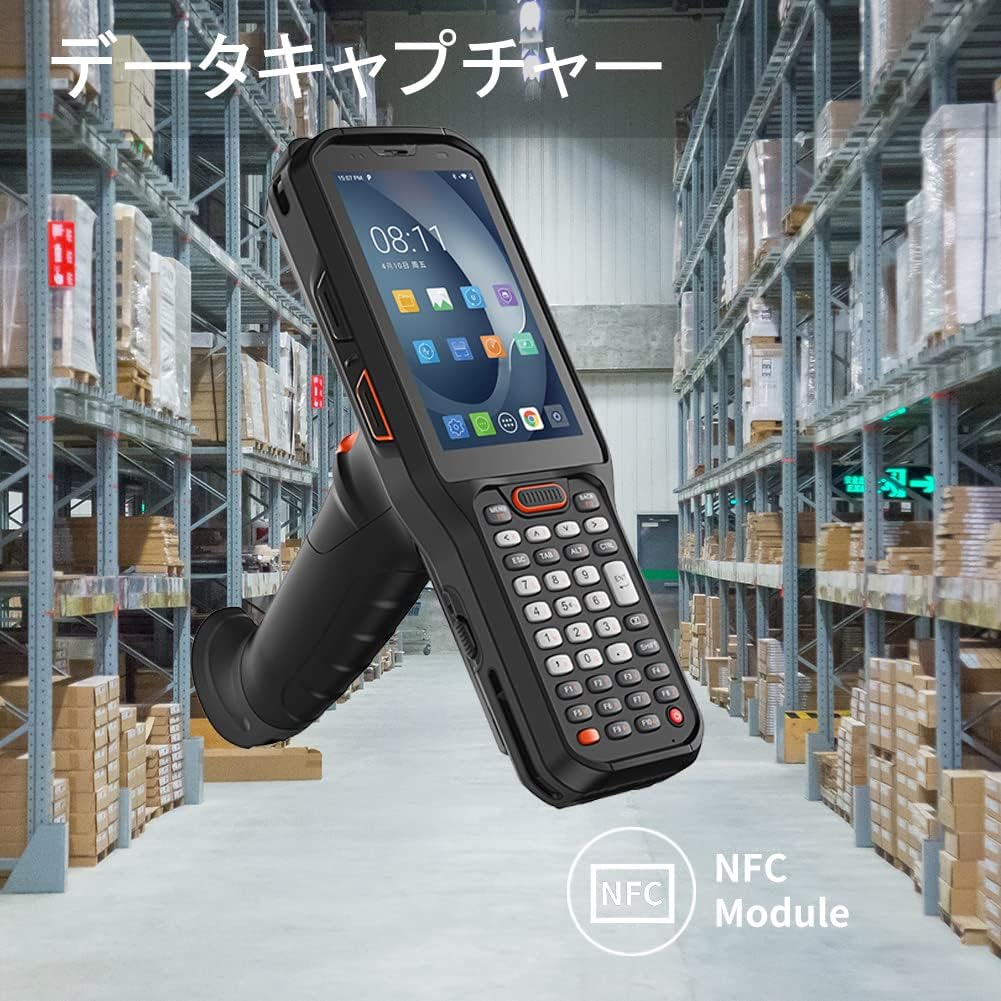
Visual representation of the RT40's NFC module for data capture, indicating its proximity-based functionality.
4.4 Wireless Connectivity (4G, WiFi, Bluetooth, GPS)
The RT40 offers comprehensive wireless communication options.
- വൈഫൈ: Access WiFi settings from the notification panel or Settings app to connect to available networks. Supports 2.4G and 5G bands.
- 4G: Insert a SIM card into the designated slot to enable cellular data and Vo-LTE calls.
- ബ്ലൂടൂത്ത്: Pair with Bluetooth devices (e.g., headsets, printers) via the Bluetooth settings. Supports Bluetooth 5.0.
- ജിപിഎസ്: Location services can be enabled for navigation and location-based applications.

Icons representing the RT40's wireless data and voice communication capabilities, including BT5.0, 4G, WiFi, GPS, and Vo-LTE.
5. പരിപാലനം
5.1 ഉപകരണം വൃത്തിയാക്കുന്നു
- മൃദുവായ, ലിൻ്റ് രഹിത തുണി ഉപയോഗിക്കുകampened with water or a mild cleaning solution to wipe the exterior of the device.
- അബ്രാസീവ് ക്ലീനറുകൾ, ലായകങ്ങൾ, എയറോസോൾ സ്പ്രേകൾ എന്നിവ ഉപയോഗിക്കരുത്.
- For the scanner window, use a lens cleaning cloth to avoid scratches.
5.2 ബാറ്ററി കെയർ
- ബാറ്ററി ഇടയ്ക്കിടെ പൂർണ്ണമായും ഡിസ്ചാർജ് ചെയ്യുന്നത് ഒഴിവാക്കുക.
- ദീർഘനേരം ഉപയോഗിക്കാത്തപ്പോൾ, ഉപകരണവും ബാറ്ററിയും തണുത്തതും വരണ്ടതുമായ സ്ഥലത്ത് സൂക്ഷിക്കുക.
- If the battery is hot-swappable, ensure proper procedure is followed when replacing it to avoid data loss.
5.3 സോഫ്റ്റ്വെയർ അപ്ഡേറ്റുകൾ
Periodically check for software updates to ensure optimal performance and security. Updates can typically be found in the device's Settings menu under "System" or "About phone".
6. പ്രശ്നപരിഹാരം
| പ്രശ്നം | സാധ്യമായ കാരണം | പരിഹാരം |
|---|---|---|
| ഉപകരണം പവർ ഓണാക്കുന്നില്ല. | ബാറ്ററി തീർന്നു അല്ലെങ്കിൽ ശരിയായി ഇൻസ്റ്റാൾ ചെയ്തിട്ടില്ല. | ബാറ്ററി ചാർജ് ചെയ്യുക. ബാറ്ററി ശരിയായി ചേർത്തിട്ടുണ്ടെന്ന് ഉറപ്പാക്കുക. |
| ബാർകോഡുകൾ സ്കാൻ ചെയ്യാൻ കഴിയില്ല. | Scanner not activated, dirty scanner window, or incorrect barcode type. | Press the scan button. Clean the scanner window. Verify barcode type is supported. |
| വൈഫൈ കണക്ഷനില്ല. | WiFi is off, out of range, or incorrect password. | Enable WiFi. Move closer to the access point. Re-enter WiFi password. |
| ഉപകരണം മന്ദഗതിയിലാണ് അല്ലെങ്കിൽ പ്രതികരിക്കുന്നില്ല. | Too many applications running, low memory. | Close unnecessary applications. Restart the device. |
If the problem persists, please contact UROVO customer support.
7 സ്പെസിഫിക്കേഷനുകൾ
| ഫീച്ചർ | വിശദാംശങ്ങൾ |
|---|---|
| മോഡൽ | RT40 |
| ഓപ്പറേറ്റിംഗ് സിസ്റ്റം | ആൻഡ്രോയിഡ് 10 |
| പ്രോസസ്സർ | Octa-core 1.8GHz (Snapdragon 636) |
| മെമ്മറി | 4GB RAM + 64GB ROM (expandable via microSD) |
| പ്രദർശിപ്പിക്കുക | 4 ഇഞ്ച് ടച്ച് സ്ക്രീൻ |
| ബാർകോഡ് സ്കാനർ | 1D/2D Imager (Zebra SE4750SR or Honeywell N6703/EX30) |
| എൻഎഫ്സി | പിന്തുണച്ചു |
| വയർലെസ് കമ്മ്യൂണിക്കേഷൻ | 4G LTE, WiFi (802.11a/b/g/n/ac, 2.4G/5G), Bluetooth 5.0, GPS (GNSS: GPS, Glonass, BeiDou, Galileo), Vo-LTE |
| ബാറ്ററി | 5200mAh, Hot-swappable, Quick Charge |
| ഈട് | IP68 Water & Dust Resistant, 1.8m Drop Resistance |
| അളവുകൾ | 7.9 x 2.8 x 6.5 inches (approximate, from image) |
| ഭാരം | 520 ഗ്രാം |

Visual summary of the RT40's industrial performance specifications: Android 10, Octa-core 1.8GHz CPU, Snapdragon 636, and 4+64GB memory.

Icons indicating the RT40's reliability and durability, including IP68 waterproof rating and 1.8m drop resistance.
8. വാറൻ്റിയും പിന്തുണയും
UROVO products come with a standard manufacturer's warranty. Please refer to the warranty card included in your package for specific terms and conditions.
For technical support, service, or warranty claims, please contact UROVO customer service through their official webനിങ്ങളുടെ വാങ്ങലിനൊപ്പം നൽകിയിരിക്കുന്ന സൈറ്റ് അല്ലെങ്കിൽ ബന്ധപ്പെടാനുള്ള വിവരങ്ങൾ.
പിന്തുണയുമായി ബന്ധപ്പെടുമ്പോൾ നിങ്ങളുടെ വാങ്ങൽ രസീതും ഉൽപ്പന്ന സീരിയൽ നമ്പറും കൈവശം വയ്ക്കുക.


