FANTECH MAXFIT67 മെക്കാനിക്കൽ ഗെയിമിംഗ് കീബോർഡ് ഉപയോക്തൃ മാനുവൽ
മോഡൽ: MK858
ബ്രാൻഡ്: ഫാൻടെക്
ആമുഖം
The FANTECH MAXFIT67 is a versatile 65% (67-key) mechanical gaming keyboard designed for an enhanced typing and gaming experience. It features 3-mode connectivity (wired, 2.4GHz wireless, Bluetooth), hot-swappable sockets, RGB backlighting, and a programmable macro knob. This manual provides detailed instructions for setting up, operating, maintaining, and troubleshooting your MAXFIT67 keyboard.

Image: FANTECH MAXFIT67 keyboard in off-white with RGB backlighting and included extra keycaps.
ബോക്സിൽ എന്താണുള്ളത്
Upon unboxing your FANTECH MAXFIT67 keyboard, please ensure all the following items are present:
- FANTECH MAXFIT67 Keyboard
- കീക്യാപ് പുള്ളർ
- Extra DYE-SUB PBT Keycaps (gift)
- യുഎസ്ബി വയർലെസ് ഡോംഗിൾ
- യുഎസ്ബി ടൈപ്പ്-സി കേബിൾ
- സ്വിച്ച് പുള്ളർ

Image: The FANTECH MAXFIT67 keyboard and its accessories, including the USB cable, wireless dongle, keycap puller, and extra keycaps, laid out on a surface.
സജ്ജമാക്കുക
പ്രാരംഭ സജ്ജീകരണം
- ബോക്സിൽ നിന്ന് കീബോർഡും എല്ലാ അനുബന്ധ ഉപകരണങ്ങളും അൺപാക്ക് ചെയ്യുക.
- Choose your preferred connection method: Wired, 2.4GHz Wireless, or Bluetooth.
- Ensure the keyboard is fully charged for optimal wireless performance. Connect the USB Type-C cable to the keyboard and a USB port on your computer.
കണക്ഷൻ മോഡുകൾ
The MAXFIT67 keyboard supports three distinct connection modes for maximum flexibility:
- വയർഡ് മോഡ്: Connect the keyboard directly to your computer using the provided USB Type-C cable. This mode offers the most stable connection and charges the keyboard's battery.
- 2.4GHz വയർലെസ് മോഡ്: Insert the USB Wireless Dongle into an available USB port on your computer. The keyboard will automatically connect. This mode provides a low-latency wireless experience ideal for gaming.
- ബ്ലൂടൂത്ത് മോഡ്: The keyboard can connect to up to 5 devices via Bluetooth 5.0. To pair, switch the keyboard to Bluetooth mode and follow your device's Bluetooth pairing instructions. The keyboard will appear as 'MAXFIT67'.

Image: The FANTECH MAXFIT67 keyboard connected to a laptop, tablet, and smartphone, illustrating its 3-mode connectivity (wired, 2.4GHz, Bluetooth).
Key Features & Components
Hot-Swappable Sockets
The MAXFIT67 features high-quality Gateron hot-swappable sockets, allowing you to easily change switches without soldering. It supports both 3-pin and 5-pin mechanical switches from various brands, enabling full customization of your typing feel.

Image: A hand using a switch puller to remove a mechanical switch from the FANTECH MAXFIT67 keyboard, highlighting its hot-swappable design.
Programmable Rotary Encoder Knob
The aluminum macro knob on the MAXFIT67 is fully programmable. Beyond standard volume control, you can customize it to assign macros, control media playback, adjust productivity settings, or even function as a weapon wheel in games.

ചിത്രം: വിശദമായ ഒരു ചിത്രം view of the programmable rotary encoder knob on the FANTECH MAXFIT67 keyboard, emphasizing its metallic finish and functionality.
DYE-SUB PBT Keycaps and South-Facing RGB
The keyboard comes equipped with high-quality DYE-SUB PBT keycaps, known for their durability and resistance to wear and shine. The south-facing RGB LED lights provide vibrant illumination and are compatible with a wider range of aftermarket keycaps and switches.

ചിത്രം: ഒരു ഓവർഹെഡ് view of the FANTECH MAXFIT67 keyboard, showcasing its DYE-SUB PBT keycaps, 65% form factor, and south-facing RGB lighting.
Adjustable 3-Step Height
Customize your typing angle with the keyboard's adjustable 3-step height feet, providing ergonomic comfort for extended use.
Double Sound Absorbing Foam
The MAXFIT67 incorporates a 2-piece sound dampening foam design, significantly reducing unwanted acoustic resonance and providing a more solid and pleasant typing sound profile.
Image: An exploded diagram of the FANTECH MAXFIT67 keyboard's internal structure, illustrating the placement of the double sound-absorbing foam layers and adjustable feet.
പ്രവർത്തന നിർദ്ദേശങ്ങൾ
അടിസ്ഥാന പ്രവർത്തനങ്ങൾ
- Function Key (Fn): The Fn key is used in combination with other keys to access secondary functions, such as media controls, lighting adjustments, and connection mode switching.
- RGB ലൈറ്റിംഗ് നിയന്ത്രണം: Use Fn key combinations to cycle through various RGB lighting modes, adjust brightness, and change speed. Refer to the quick start guide for specific key combinations.
- വോളിയം നിയന്ത്രണം: Rotate the programmable knob to adjust the system volume. Press the knob to mute/unmute.
- Switching Devices (Bluetooth): If multiple Bluetooth devices are paired, use the designated Fn key combinations to switch between them quickly.
സോഫ്റ്റ്വെയർ കസ്റ്റമൈസേഷൻ
The FANTECH MAXFIT67 offers extensive personalization options through its dedicated software. This software allows you to:
- Adjust RGB spectrum modes.
- Reassign button functions.
- Create and edit macro scripts.
The MAXFIT67 software is available for download from the official FANTECH webസൈറ്റ്. Note: The software is not compatible with Mac operating systems.
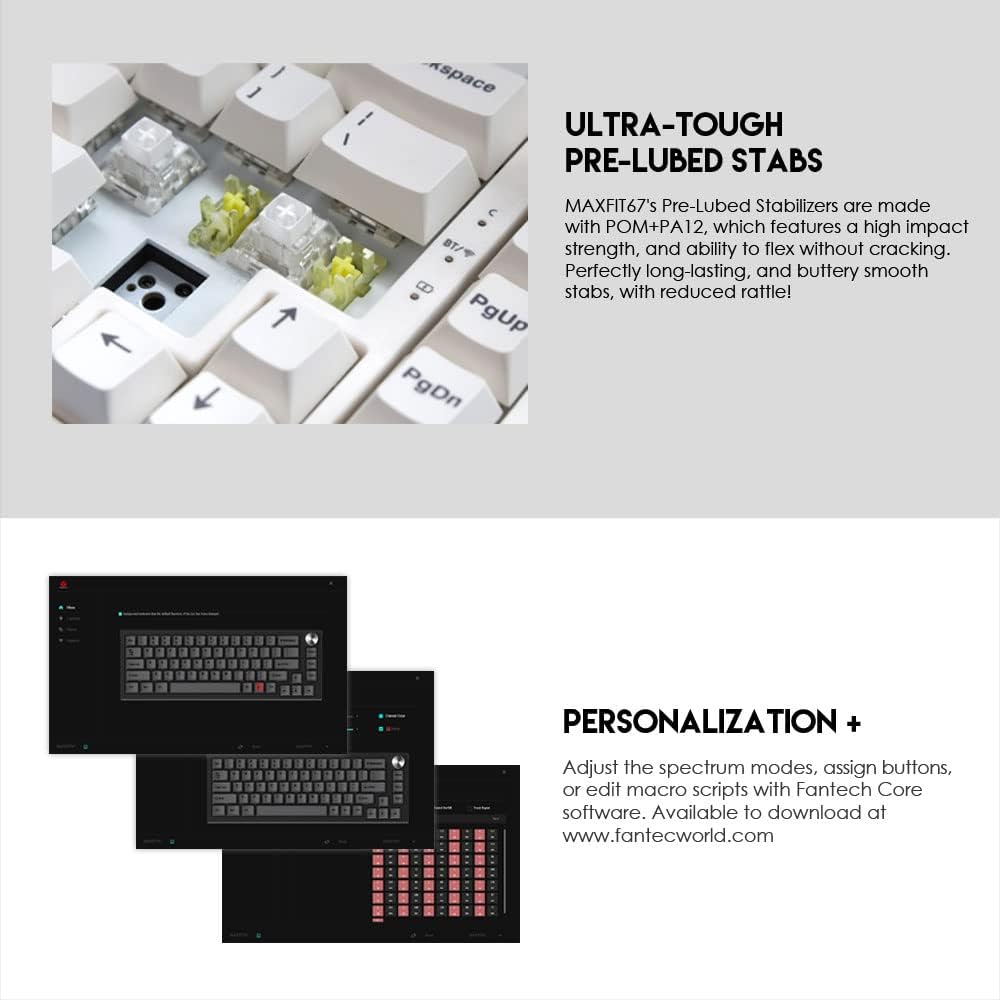
Image: Screenshots of the FANTECH MAXFIT67 software interface, demonstrating options for RGB lighting control, key remapping, and macro programming.
വീഡിയോ: ഒരു ഔദ്യോഗിക ഉൽപ്പന്ന വീഡിയോ പ്രദർശനംasing the FANTECH MAXFIT67 RGB Mechanical Hotswap Keyboard's features, including its design, customizable elements, and connectivity options.
മെയിൻ്റനൻസ്
വൃത്തിയാക്കൽ
- പൊടിയും അവശിഷ്ടങ്ങളും അടിഞ്ഞുകൂടുന്നത് തടയാൻ നിങ്ങളുടെ കീബോർഡ് പതിവായി വൃത്തിയാക്കുക.
- വൃത്തിയാക്കുന്നതിനുമുമ്പ് നിങ്ങളുടെ കമ്പ്യൂട്ടറിൽ നിന്ന് കീബോർഡ് വിച്ഛേദിക്കുക.
- Use a soft brush or compressed air to remove dust from between keycaps.
- For stubborn dirt, gently wipe keycaps with a damp cloth and mild cleaning solution. Ensure the keycaps are completely dry before reattaching or using the keyboard.
സ്വിച്ചും കീക്യാപ്പ് മാറ്റിസ്ഥാപിക്കലും
ഹോട്ട്-സ്വാപ്പ് ചെയ്യാവുന്ന രൂപകൽപ്പനയ്ക്ക് നന്ദി, സ്വിച്ചുകളും കീക്യാപ്പുകളും മാറ്റിസ്ഥാപിക്കുന്നത് എളുപ്പമാണ്:
- ആവശ്യമുള്ള കീക്യാപ്പ് ശ്രദ്ധാപൂർവ്വം നീക്കം ചെയ്യാൻ നൽകിയിരിക്കുന്ന കീക്യാപ്പ് പുള്ളർ ഉപയോഗിക്കുക.
- Use the provided switch puller to gently extract the switch from its socket.
- പുതിയ സ്വിച്ചിന്റെ പിന്നുകൾ പിസിബിയിലെ ദ്വാരങ്ങളുമായി വിന്യസിക്കുക, അത് സ്ഥലത്ത് ക്ലിക്ക് ആകുന്നതുവരെ ദൃഢമായി അമർത്തുക.
- പുതിയ കീക്യാപ്പ് സ്വിച്ച് സ്റ്റെമിൽ വയ്ക്കുക, സുരക്ഷിതമാകുന്നതുവരെ അമർത്തുക.
ട്രബിൾഷൂട്ടിംഗ്
പൊതുവായ പ്രശ്നങ്ങളും പരിഹാരങ്ങളും
- കീബോർഡ് പ്രതികരിക്കുന്നില്ല: Ensure the USB cable is securely connected (wired mode) or the wireless dongle is properly inserted and the keyboard is powered on (wireless modes). Check battery level if in wireless mode.
- ബ്ലൂടൂത്ത് കണക്റ്റിവിറ്റി പ്രശ്നങ്ങൾ: Ensure Bluetooth is enabled on your device and the keyboard is in pairing mode. Remove previous pairings and try re-pairing. Keep the keyboard within the effective range (up to 10m).
- RGB ലൈറ്റിംഗ് പ്രവർത്തിക്കുന്നില്ല: Check if RGB is enabled via Fn key combinations. Ensure the keyboard is not in a low-power mode if battery is low.
- രജിസ്റ്റർ ചെയ്യാത്തതോ ഇരട്ട ടൈപ്പ് ചെയ്യാത്തതോ ആയ കീകൾ: ഇത് തകരാറുള്ള സ്വിച്ചിനെ സൂചിപ്പിക്കാം. പ്രശ്നമുള്ള സ്വിച്ച് മാറ്റിസ്ഥാപിക്കാൻ ഹോട്ട്-സ്വാപ്പ് ചെയ്യാവുന്ന സവിശേഷത ഉപയോഗിക്കുക. സ്വിച്ചുകൾ പൂർണ്ണമായും ഇരിപ്പുണ്ടെന്ന് ഉറപ്പാക്കുക.
- കീബോർഡ് കണ്ടെത്താത്ത സോഫ്റ്റ്വെയർ: Ensure the keyboard is connected via wired mode when attempting to use the software. Restart the software and/or your computer.
സ്പെസിഫിക്കേഷനുകൾ
| ഫീച്ചർ | വിശദാംശങ്ങൾ |
|---|---|
| ഉൽപ്പന്നത്തിൻ്റെ പേര് | MAXFIT67 MK858 |
| കീകളുടെ എണ്ണം | 67 കീകൾ |
| സ്വിച്ച് തരം | Mechanical (Kailh Box White) |
| ആൻ്റി-ഗോസ്റ്റിംഗ് | എല്ലാ കീകളും |
| കണക്ഷൻ | Wired, 2.4GHz, BT 5.0 (Up to 5 devices) |
| ബാറ്ററി ശേഷി | 4000mAh |
| വയർലെസ് ദൂരം | 10 മീറ്റർ വരെ |
| വലിപ്പം (L x W x H) | 330(L) x 115(W) x 37(H)mm (13 x 4.53 x 1.46 inches) |
| ഭാരം | 764 ഗ്രാം (2.4 പൗണ്ട്) |
| ബാറ്ററി ലൈഫ് | 240hr with RGB off, 70hr with RGB on |
| അനുയോജ്യമായ ഉപകരണങ്ങൾ | മാക്, പിസി |
വാറൻ്റിയും പിന്തുണയും
FANTECH products are designed for durability and performance. For detailed warranty information and support, please visit the official FANTECH webസൈറ്റ് അല്ലെങ്കിൽ അവരുടെ ഉപഭോക്തൃ സേവനവുമായി നേരിട്ട് ബന്ധപ്പെടുക.
നിങ്ങൾക്ക് സന്ദർശിക്കാനും കഴിയും FANTECH Store on Amazon കൂടുതൽ ഉൽപ്പന്ന വിവരങ്ങൾക്കും പിന്തുണാ ഉറവിടങ്ങൾക്കും.


